
Spanning Backup for Microsoft 365 Review

Tested March–April 2026. Updated October 2026.
Bottom Line
Spanning Backup for Microsoft 365 (now part of Kaseya) is a reliable backup solution aimed at SMBs rather than MSPs or large enterprises. It is missing some customization options and performance for search and backup/restore jobs is slower than alternative solutions. But, if you want an easy-to-manage platform with good visibility into what’s being protected, Spanning delivers.
Overall Rating Summary
Read our M365 testing methodology to learn more.
Pros
- Very quick and easy to set up — around 10 minutes from account creation to connected tenant
- Standout backup health monitoring with dedicated problem codes and fix suggestions
- Auto-protect feature automatically assigns licenses to newly discovered users
- End-user self-service restore capabilities
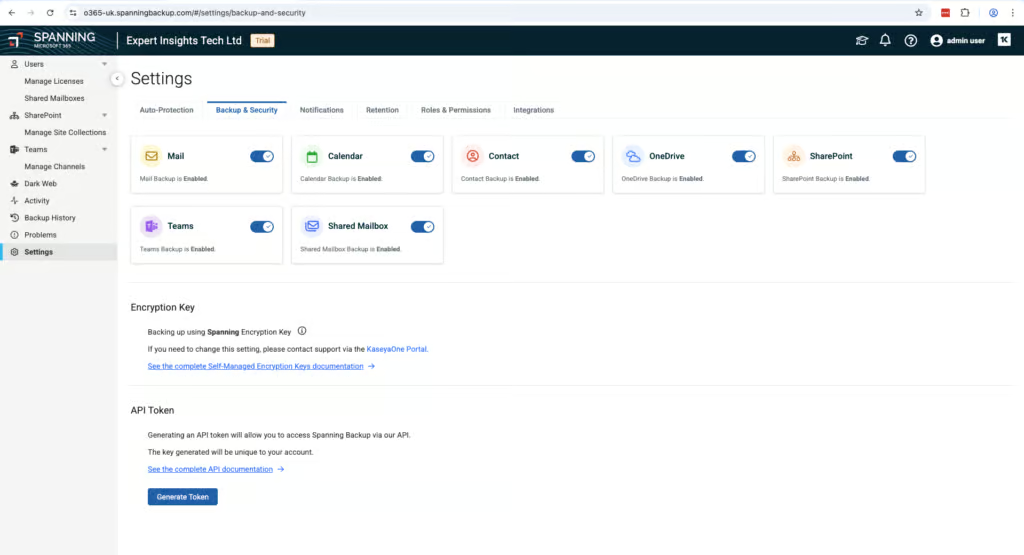
- BYOK encryption supported
- Backup data stored on AWS, independent of Microsoft Azure
Cons
- No bulk restore capability — each mailbox must be restored individually
- No ransomware or malware scanning
- Retention customization requires contacting support — cannot be configured in the UI
- Backup frequency limited to once per day with no option to increase
- Search limited to subject, sender, recipient, and date — no keyword or body text search
In our testing, Spanning proved to be a reliable solution that was very easy to use. The initial setup was straightforward, the backup health monitoring is genuinely impressive with its problem code system, and recovery works as expected.
The overall impression is a product that does solid backup for M365. For SMBs that want a straightforward backup solution without complexity, Spanning fits the bill.
How We Tested Spanning

We began by setting up backups from scratch, recording the time and steps required to reach a first successful backup. We verified which M365 workloads were protected by default and tested the auto-discovery and auto-protect features.
For recovery testing, we ran full mailbox restores and granular single-item recoveries, including cross-user restores. We tested the search functionality and evaluated the calendar-based restore point selection.
Finally, we tested governance controls including admin permissions and audit logging, verified the backup health monitoring system including the Problems page, and evaluated the licensing model.
One thing to note: Spanning was a harder product to trial than most of the services we have looked at. You have to go through the sales process and have a call to set up a trial account. If you like to negotiate a deal, Spanning is one where there’s room to negotiate.
Deployment
Ranked #4 out of 12 M365 Backup Solutions for Deployment
Deployment Options
| SaaS | ✓ |
| On-premises (for Microsoft services like Exchange, Active Directory, etc.) | ✗ |
| Hybrid cloud | ✗ |
Setup was very quick and simple, taking around 10 minutes from account creation to connected tenant.
In our setup, we had to assign admin permissions twice, then we got access to the application. Mailboxes, SharePoint, and other workloads all auto-synced across without requiring external documentation. This was all very easy.
One thing to consider: backups are not started immediately after setup. You have to toggle the mailboxes, SharePoint sites, and Teams you want protected. Mailboxes also require a Spanning user license before they can be protected.
The initial backup was quite slow, which we have found to often be the case for the first backup. Backups are incremental, so subsequent backups are faster.
Backups run automatically once per day, and we couldn’t find any option to change the schedule. You can perform ad-hoc backups, but there doesn’t seem to be a way to do this in bulk.
A useful feature is the ability to start recovering items as soon as they appear during backup — you don’t have to wait for the entire process to complete.
Coverage
Ranked #8 out of 12 M365 Backup Solutions for Coverage
Supported Platforms
 Exchange (Outlook) Exchange (Outlook) |
✓ |
 SharePoint SharePoint |
✓ |
 OneDrive OneDrive |
✓ |
 Teams Teams |
✓ |
 Azure VMs Azure VMs |
✗ |
 Entra ID Entra ID |
✗ |
 Dynamics Dynamics |
✗ |
 Power Platform Power Platform |
✗ |
Spanning covers licensed mailboxes, shared mailboxes, OneDrive, Contacts, Calendar, SharePoint, and Teams.
Unlicensed user mailboxes are not backed up. Public Folders are also not supported. Backup for other platforms like Entra ID, Azure, and Salesforce is available through other Kaseya products, such as Datto SaaS Protection, but not through Spanning directly. This falls short of other backup solutions with more comprehensive coverage.
There is an auto-protect feature which is genuinely useful. It means users that are auto-discovered can be assigned the correct license depending on their group, so they’re automatically protected with a standard or archiver license.
Accounts deleted in Microsoft are auto-assigned archiver licenses. For every standard license purchased, you get a shared mailbox license for free, which is a nice touch for cost management.
Retention
Ranked #9 out of 12 M365 Backup Solutions for Retention
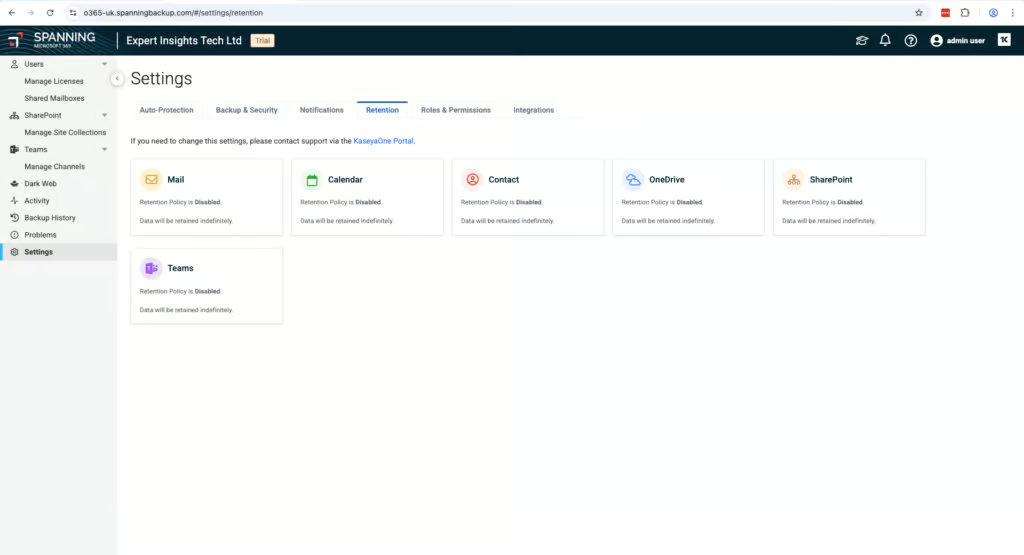
Retention is unlimited by default, but customization requires contacting support.
In our test account, the retention policy configuration was completely disabled. We’re not certain if this was a limitation of our trial account or if this is just the default standard setting. There is a link to contact support if you want the retention period changed.
It appears you can potentially have different retention periods for Mailboxes, OneDrive, Teams, etc., but nothing more granular than that. Kaseya can only edit retention policies per data type. Backup frequency is once per day — the same as CloudAlly (by default) and Veeam’s standard plans — but lags behind Hornetsecurity (multiple times/day), Acronis (up to 6x/day), and NinjaOne (12x/day for Exchange). For organizations with tight recovery point objectives, this is worth factoring into your evaluation.
The leaver scenario handling is important to understand. If a deleted user isn’t auto-archived and the license is removed, backup data will be permanently deleted after 60 days. We removed licensing from a mailbox and were still able to recover data from backups taken prior to removal.
If you want to retain data indefinitely for a mailbox that has become unlicensed, you’ll have to assign an archiver license — otherwise all data will be deleted after 60 days. The 60-day grace period is quite generous, and the license management system makes it easy to see who is and isn’t being protected.
Spanning’s 60-day window is reasonable but sits between competitors’ approaches: CloudAlly retains data from previously licensed accounts at no extra cost, while SpinOne permanently deletes data after just 7 days without allowing recovery.
Only admins can perform cross-user restores.
Recovery
Ranked #6 out of 12 M365 Backup Solutions for Recovery
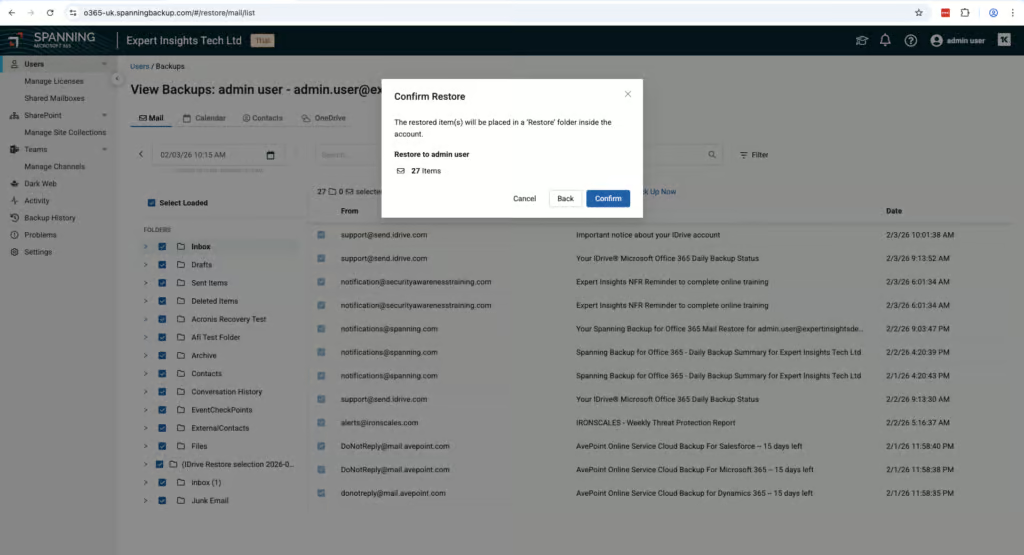
Recovery is reliable, though the interface could be more intuitive. Our main issue with restoring data with Spanning is that there isn’t a dedicated tab in the navigation — you have to drill into each user to access backups and restore from there. Other than that, the process is fairly straightforward and quick.
Once logged in, no additional permissions are required to initiate a restore. You can start viewing items in the mailbox mid-restore without waiting for the entire process to complete. A small mailbox took under 10 minutes.
Self-service restore capabilities allow end users to initiate recovery operations independently without requiring administrator intervention.
Locating an email was simple enough using the calendar view to pick between restore points. The search bar is functional, matching string values in subject, sender, and recipient. However, filtering doesn’t go into much depth — you can only filter by subject, sender, and date.
This is a common limitation across most M365 backup products we tested — Veeam, Acronis, and Hornetsecurity all have the same constraint. CloudAlly goes further by indexing email body content and attachments, and NinjaOne supports AND/OR conditions with attachment content search. For organizations where e-discovery or compliance-driven restores are a priority, this gap is worth considering.
In our test restore, we restored an email to a different mailbox on the tenant and it was very quickly viewable in seconds.
The main limitation is that you can’t search across multiple mailboxes. You can only restore individual mailboxes at a time. This could be quite labour-intensive if you need to search multiple mailboxes for a specific email. Search performance was also a little slow — it definitely isn’t the snappiest system.
Resilience
Ranked #8 out of 12 M365 Backup Solutions for Resilience
Point-in-time recovery is easy, but there’s no bulk restore capability — a limitation shared with SpinOne and iDrive. By contrast, Hornetsecurity, AvePoint, and Veeam all offer bulk restore capabilities that allow multiple mailboxes to be recovered simultaneously.
With Spanning, it’s not possible to do a bulk restore — you can only access an individual user at one time. This isn’t ideal in a situation where multiple mailboxes might have been compromised. It means each one will have to be actioned individually.
However, selecting restore points is easy. The calendar view is a great way to display backup points and makes it intuitive to identify a known-good restore point.
There is no ransomware or malware scanning capability. This is common among SMB-focused backup tools — CloudAlly, Hornetsecurity, and NinjaOne also lack malware scanning. Among the products we tested, Acronis (as a paid add-on), AvePoint (behavior-based detection), Redstor (scanning 14 attachment types), SpinOne (continuous scanning) and Veeam (on its Advanced and Premium plans) offer varying degrees of ransomware protection within backups.
Spanning stores all backup data on Amazon Web Services (AWS), completely separate from Microsoft’s Azure infrastructure. This means that in the event of a significant Azure outage — which would take Microsoft 365 offline — your backups remain fully accessible. This is an advantage over Veeam, which stores backups within Azure and therefore shares the same underlying infrastructure as the production M365 environment. CloudAlly, NinjaOne, and Hornetsecurity also store backups independently of Azure.
Backup Health
Ranked #1 out of 12 M365 Backup Solutions for Backup Health
Any issues with backups are reported on a dedicated “Problems” page. Every error has a dedicated problem code, and Spanning provides detailed information on what each problem code refers to, whether it’s actionable, not actionable, or unknown. This is a standout feature and there’s even a suggestion on how to fix the issue or a link to a support page. It’s very clear and is the only product we’ve tested with this level of problem documentation.
Alerting is functional, with a top-level view of what’s currently being protected. Reports are sent daily and must be assigned to users. There’s also an error-only email option (not toggled on by default) that reports in real time when an error occurs.
The daily summary report shows how many backups succeeded or failed as well as licensing information. The reporting is functional, but it’s not very customisable.
Governance and Security
Ranked #9 out of 12 M365 Backup Solutions for Governance and Security
Auditing is functional and well-implemented. When we assigned admin permissions to a user, this correctly appeared in the audit logs with details of who performed the action.
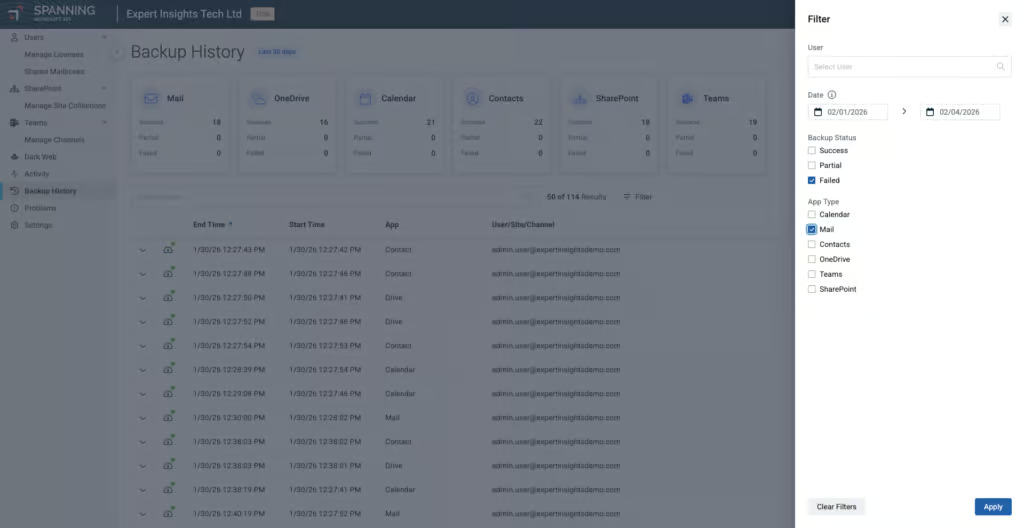
You can filter audit logs to a granular level, and export logs entirely or just filtered results as CSV. This is very easy to do. Spanning separates system-level and user-level logs into Backup History and Activity tabs respectively, which makes the system easier to use.
Governance Capabilities
| Public API available | Limited functionality |
| Multi-Tenancy | ✓ |
| Reporting / Alerts | ✓ |
| Automatic mailbox / site / etc onboarding | ✓ |
| Bulk enable / disable backups | ✓ |
| Self-service recovery (for end users) | ✓ |
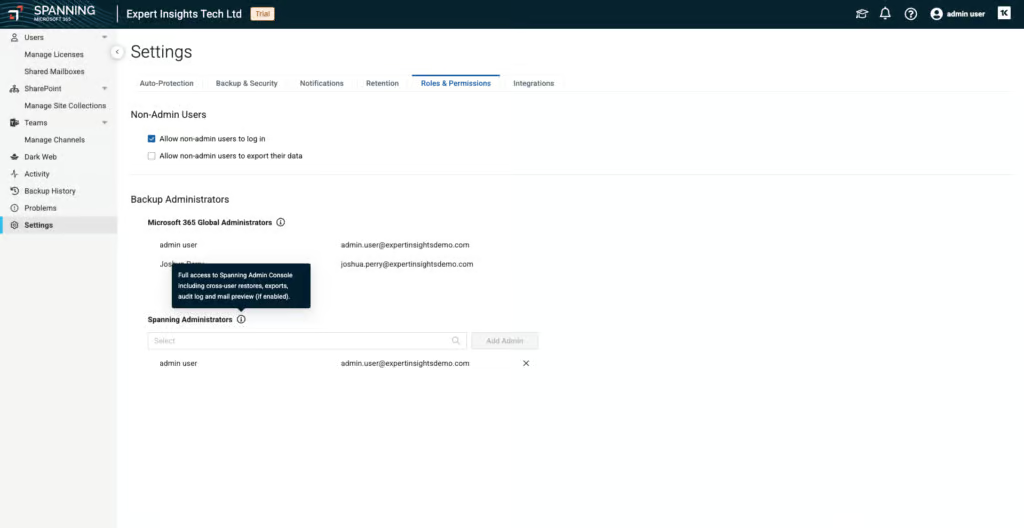
The roles and permissions are very limited — you’re either an admin or an end user. Admins can do everything with no requirement for other admins to sign off on actions. End users can only restore data to their own account (no cross-mailbox restore), and admins can disable end-user data export.
There’s also a quirk to be aware of — M365 Global Admin accounts are automatically granted admin access to Spanning, and this cannot be turned off. For companies wanting tight RBAC, Spanning falls short. Hornetsecurity is also limited, with a full admin role and a restricted Service Desk role, but most other products we tested offer meaningfully more granularity: NinjaOne provides six or ten predefined roles, Veeam offers fully custom role creation at an extremely granular level, and Acronis supports sub-roles and scoped access.
For organizations that need to demonstrate separation of duties or restrict helpdesk staff from performing destructive actions, Spanning’s current model will be a limitation.
Compliance
| Audit Logs | ✓ |
| Data Center Regions | US, Canada, EU, UK, APAC, South Africa |
| Data Center Infrastructure | AWS |
| Maximum retention period | Unlimited |
| Role-based access controls | Limited - admin and end-user roles only |
| Data encrypted at rest and in transit | ✓ |
| Supports bring-your-own storage | No |
| E-discovery / legal hold | No |
Spanning is SOC 2 Type II certified and compliant with GDPR and POPIA. Data centres are available in US, Canada, EU, UK, APAC, and South Africa. BYOK encryption is supported. OAuth 2.0 is used for authentication, and you can generate an API token unique to the account.
Commercials
Ranked #10 out of 12 M365 Backup Solutions for Commercials
Pricing
| Free plan available | ✗ |
| Trial available | ✓ |
| Seat-based pricing option | ✓ |
| Storage-based pricing option | Per-license pricing with pooled 60 GB per license |
| Starting Price (user / month unless otherwise noted) | $4.00 (via sales) |
| Higher Tier Pricing | Not public |
Spanning uses a license-based model that can be confusing, with a storage limit to be aware of.
Spanning uses four different license types (Active user, Active shared mailbox, Archived user, Archived shared mailbox), which can become confusing. Simply put: if data is not licensed, it’s not protected by Spanning.
There’s a pooled storage limit of 60GB per mailbox, which is worth factoring into cost planning for users with large mailboxes. By comparison, CloudAlly, Hornetsecurity, NinjaOne, and Veeam all offer unlimited storage (Veeam under a pooled 100GB-per-user fair-use policy). SpinOne offers 30GB or 50GB pooled per license depending on tier — making Spanning’s 60GB limit typical among storage-capped vendors, but a disadvantage against the unlimited-storage competitors.
Spanning advertises 24/7 support worldwide. The website only mentions email support, but additional support options may be available via Kaseya.
Spanning provides pricing through its sales team; in our trial it was about $48/year ($4.00/user/month), which is more expensive than most alternatives at a similar capability level.
OpenText CloudAlly is $30 per licensed mailbox per year and NinjaOne $3.00/user/month, both with unlimited storage; Hornetsecurity’s list price is $2.75/user/month with unlimited storage; and Veeam starts at $2.63/user/month for M365-only coverage.
Combined with the 60GB pooled storage limit, Spanning’s total cost of ownership is noticeably higher. That said, Spanning has a very active sales team, so discounts may be available — particularly if you push for a better rate during the trial or procurement process.
Support
| Support Locations | Global (via Kaseya) |
| Email support | Yes |
| Phone support | Yes |
| Chat support | Yes |
| Web support portal | Yes |
| Support hours (normal priority) | 24 hours |
| First response SLA (normal priority) | 24 hours |
Editor's Score
Ranked #5 out of 12 M365 Backup Solutions for Editor's Score
Spanning is a solid, reliable backup solution aimed at SMBs rather than MSPs or larger organizations. It’s quick and easy to set up — it’s definitely possible for a non-technical person to configure the service. You can trust the product to back up your data and recover it when needed.
However, Spanning lacks customization. If you want custom retention periods for groups, you’d need to contact support. Performance for search and backup/restore jobs is slower than alternatives like CloudAlly and NinjaOne, and there’s no bulk restore capability — though this is a limitation shared with SpinOne and iDrive but not with Hornetsecurity, AvePoint, or Veeam.
At $4.00/user/month with a 60GB storage cap, Spanning is also more expensive than most comparable solutions, which offer unlimited storage at a lower per-seat price. If you want good visibility on what’s being protected and ease of use for managing licenses and backups, Spanning delivers.
Who This Is For: SMBs wanting a reliable, backup solution that’s easy to set up and manage, as well as teams already in the Kaseya ecosystem.
Who Should Look Elsewhere: MSPs and large enterprises needing bulk restore for disaster recovery or granular RBAC beyond admin/end-user.
Read the full review
Enter your work email to unlock the full review.
Check your email
We sent a 6-digit code to . Enter it below to continue.