
AvePoint Cloud Backup Review

Tested March–April 2026. Updated October 2026.
Bottom Line
AvePoint offers an M365 backup solution designed for large, regulated enterprises, available for teams of 500 users or more. In our review, we were impressed by the strong customization around policies and controls, bulk recovery features, and the reporting capabilities on offer. It provides serious control over backups and if you need this level of granularity, AvePoint is one of the best solutions we’ve seen.
Overall Rating Summary
Read our M365 testing methodology to learn more.
Pros
- Very broad coverage of M365 services, including Dynamics, PowerBI, Azure and Power Platform (Dynamics and Azure are licensed separately)
- Supports large scale bulk recovery of multiple mailboxes
- Granular system audits with 3-year retention policies
- Full control over data residency with bring-your-own-encryption and bring-your-own-storage
- Automated weekly offboarding detection for employees that leave
- Behavior-based ransomware protection
Cons
- 500 user minimum – not designed for SMBs
- Monthly pricing is higher than some competitors
- Certain features such as container configuration can require additional training to understand
- Cloud Backup Express requires a separate license
AvePoint is best suited for organizations with dedicated IT teams and tough compliance requirements to meet. It’s not a simple backup and recovery service, but goes much further than basic requirements, with features like data control and auditing. SMB backup and recovery tools don’t offer this level of granularity.
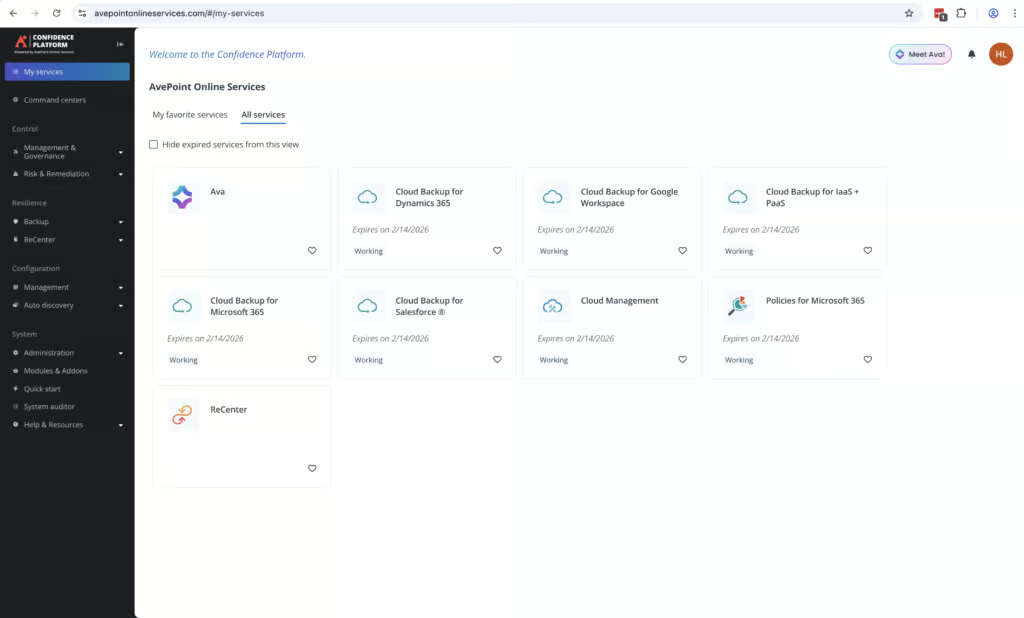
AvePoint offers two different backup options, Cloud Backup (Standard) and Cloud Backup Express. Standard backups use AvePoint’s API to pull data, while Express integrates directly with M365 and offers a 10-minute recovery point objective (RPO). You can use both options at once, giving a lot of flexibility and extremely fast large-scale recovery, if you need it. Cloud Backup Express does require a separate license.
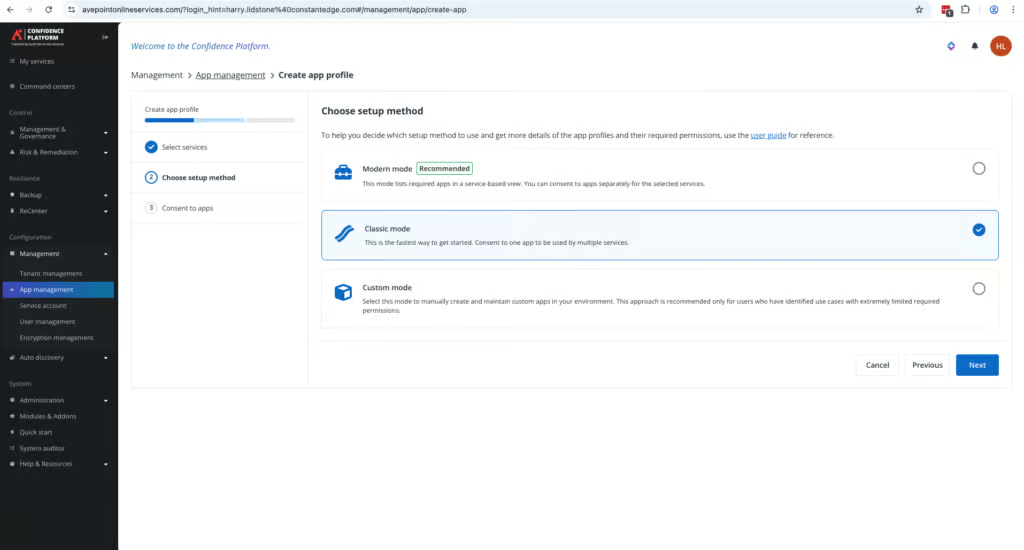
As you’d expect from a more enterprise-focused solution, deployment is a lot more involved than with simpler tools. There are multiple permissions and scoping processes during setup. You will need to have a good level of familiarity with the settings menus of M365 and Entra ID. There is a 90-minute onboarding session available which will help you when first getting started.
There are a lot of strengths with this solution. You have full control over data residency, and you can bring your own storage or encryption keys. There are also strong security features, like behavior-based ransomware detection.
One limitation of AvePoint is the search functionality. The base license has no keyword search of the tenant or even within an individual mailbox; you can only search by subject, sender, recipient or date. Searching email body content and attachments requires the paid eDiscovery add-on. In a large environment, this could make it difficult to find individual emails, especially if you don’t know the exact subject line. This is also an enterprise solution, and the pricing reflects that.
Overall, we’d describe AvePoint as an enterprise data management and resilience platform. It’s not a standard M365 backup and recovery service. But if you need bulk recovery, strong governance controls, including full control over data residency and deep auditing, it’s a very strong solution to consider.
How We Tested AvePoint
We conducted an independent review of the AvePoint service. We set up AvePoint on our M365 tenant and recorded the time taken to reach a successful backup. We granted permissions for all of the relevant apps and set up the additional configuration required in Entra ID to assign Exchange Admin permissions.
We ran full timed mailbox restores and recovered single items. We measured the time it took to find the data to restore, and the time taken before the restored content appeared back in M365. We also tested how data recovery works with departed employees, and restored data from a deleted user to an active mailbox.
We then tested bulk recovery, restore point selection and tested how alerts and backup health monitoring work within the platform. We performed privileged admin tasks and checked the audit log entries and the System Auditor.
This review was conducted fully independently by BackupVerdict. We have no commercial relationship with AvePoint. A draft of this review was sent to the AvePoint team in advance of publication.
Deployment
Ranked #10 out of 12 M365 Backup Solutions for Deployment
Deployment Options
| SaaS | ✓ |
| On-premises (for Microsoft services like Exchange, Active Directory, etc.) | Limited (on-prem SharePoint only) |
| Hybrid cloud | Limited - on-prem SharePoint only |
Initially getting started with AvePoint took more time than other backup solutions we tested due to the additional controls and features that need to be configured.
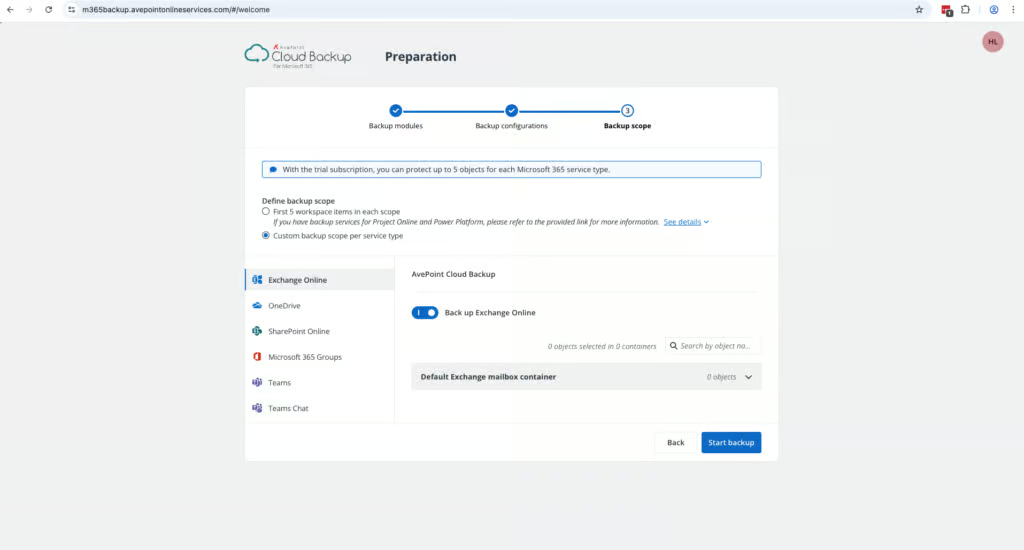
It took around an hour to deploy the service and start running backups. As part of the process, we needed to assign multiple permissions for M365 apps like SharePoint and Teams. When setting up Exchange, we had to go into Entra ID and assign Exchange Admin permissions to AvePoint – which took a few minutes to understand.
Enterprise teams will be used to this level of effort when deploying new tools, and an hour may not seem like a long time. But it is worth mentioning that other backup tools we’ve tested, such as OpenText CloudAlly, normally can be up and running in about 10-minutes.
This isn’t a criticism of AvePoint’s deployment process, but more a reflection of the additional admin permissions and controls available.
AvePoint also offers a complimentary 90-minute onboarding session to help new customers get started with the platform. It’s also very easy for MSPs to get up and running with AvePoint. We were able to create an MSP account in about 5 minutes.
Coverage
Ranked #1 out of 12 M365 Backup Solutions for Coverage
We were very impressed with AvePoint’s coverage. It protects Dynamics, Azure, PowerBI, Azure resources, Entra ID, as well as the core services of Exchange Online, SharePoint, OneDrive and Teams. Within these apps it supports Public Folders, Teams channels, group chats and 1:1 conversations. Entra ID does require additional licensing. Dynamics and Azure backup also require separate licenses. Public Folder backup depends on Microsoft’s Exchange Web Services (EWS), which Microsoft is planning to retire in April 2027.
Supported Platforms
 Exchange (Outlook) Exchange (Outlook) |
✓ |
 SharePoint SharePoint |
✓ |
 OneDrive OneDrive |
✓ |
 Teams Teams |
✓ |
 Azure VMs Azure VMs |
Yes - separate AvePoint license |
 Entra ID Entra ID |
Yes - additional license |
 Dynamics Dynamics |
Yes - separate license |
 Power Platform Power Platform |
✓ |
Microsoft now includes a basic Entra ID backup with Entra ID P1 and P2 licenses, but it keeps only seven days of daily backups inside your own tenant. AvePoint’s Entra ID backup adds longer retention and a copy held outside Microsoft.
Mailboxes and objects are automatically discovered, and there’s a high level of granularity to choose which of the above services get backed up. If you need coverage across all of your Microsoft workloads, this is a very strong option to consider.
AvePoint continues to expand coverage. In July 2026 it added backup for Copilot Studio agents and Entra External ID, and in April 2026 it launched a Rapid Recovery System, which prioritizes restoring the most business-critical data first.
AvePoint cannot backup unlicensed user mailboxes.
Retention
Ranked #1 out of 12 M365 Backup Solutions for Retention
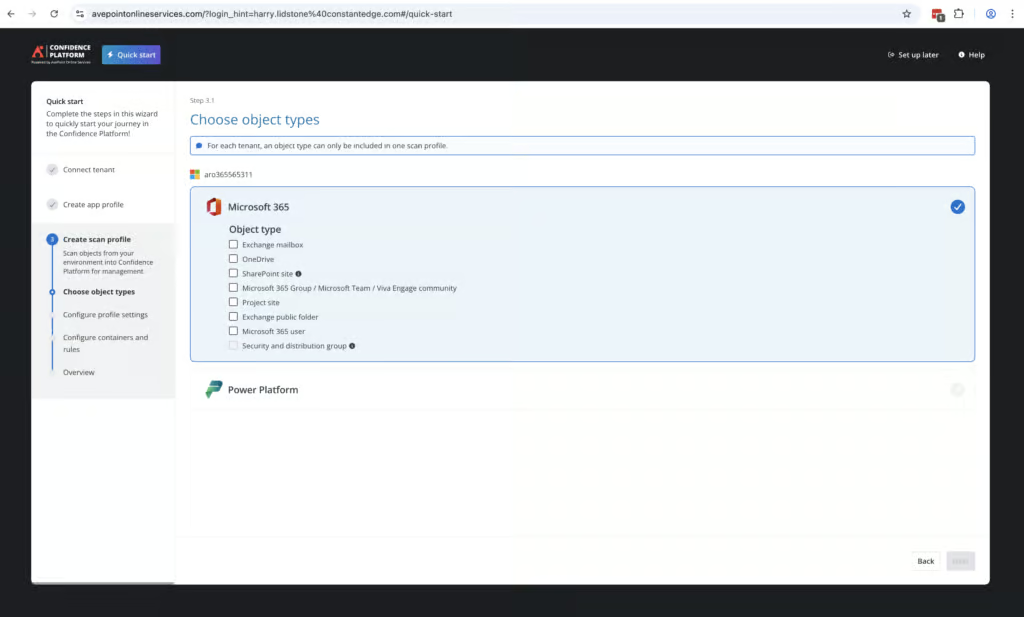
AvePoint offers strong retention controls as well as user lifecycle management. When testing, we found it easy to restore data to another mailbox on the tenant.
You can build retention policies and apply them to different resources as required. In our trial of the service we could only select 1-year retention, but full customers can choose to keep data from 1 day to up to 30 years, or even unlimited.
Every week there is a scan of all M365. If a user has been removed, they are placed in an ‘off-boarding’ tab. Their data is saved according to your retention policies. We think this is a really well-done implementation which will really benefit larger teams with strict compliance requirements. There is no extra cost for storing this data.
We found the biggest challenge was learning how the system works. For example, creating groups of users, mailboxes or resources in order to apply retention policies took some time to understand. But once you learn the system, there is a lot of granular control on offer. For example, you can create separate containers for different departments or regions, each with their own retention period and admin access. This is very impressive and few tools we’ve tested offer this level of control.
Recovery
Ranked #6 out of 12 M365 Backup Solutions for Recovery
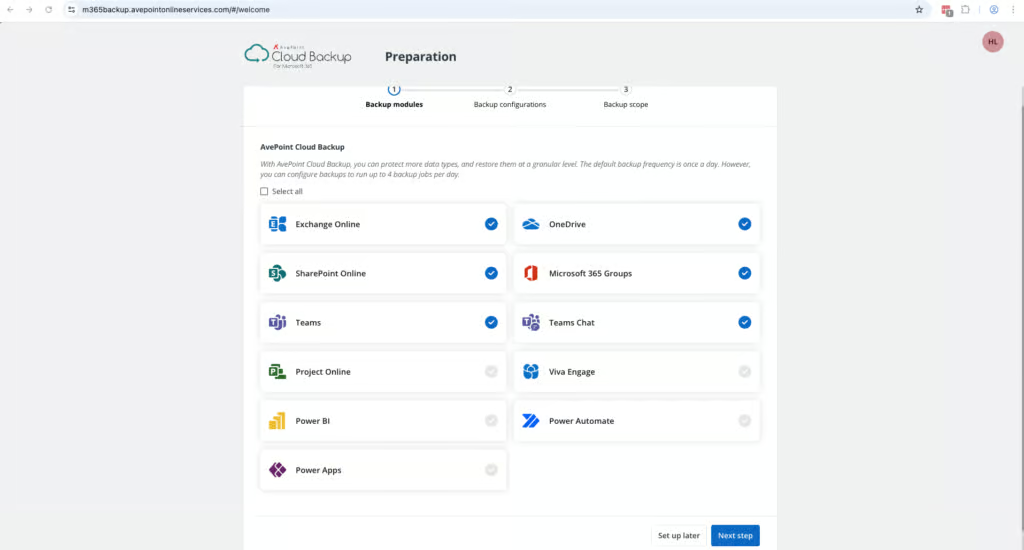
It’s relatively simple to find and restore resources like mailboxes using AvePoint. We were able to find a mailbox, select a specific version and restore it to its original location in about five clicks. When restoring a file, there’s a calendar-based view that makes it easy to see all of the available recovery points.
There are multiple options available for recovering files. You can Skip, Merge, Append or Overwrite – so be sure to choose the option you actually need. This will require close reading of the documentation, so be prepared to invest some time into learning this platform.
The full mailbox restores took just over 2 hours for a 5GB mailbox. This was similar to other enterprise platforms we tested — Veeam, for example, took nearly four hours for a similar restore. CloudAlly was faster (under an hour for a 3.8GB mailbox), but CloudAlly is a lighter-weight solution.
If you need faster large scale recovery of data, AvePoint offers Cloud Backup Express, which integrates directly with Microsoft 365’s native storage, which allows restore speeds of 1–3TB per hour for SharePoint, OneDrive, Exchange, Teams and Microsoft 365 Groups. This does require an extra license, and is designed for large scale recovery, rather than finding a specific item to recover.
One of the few negatives with AvePoint is the lack of granular search functionality. When looking for an item to restore, you can only search by subject, sender, recipient, or date, with an option to filter for emails with attachments. Keyword searching of email body content and attachments isn’t included in the base license and requires the paid eDiscovery add-on.
AvePoint is much better suited to bulk recovery scenarios or when you know exactly what you’re looking for rather than looking for a specific item or file.
Resilience
Ranked #1 out of 12 M365 Backup Solutions for Resilience
AvePoint stands out for its resilience capabilities, with strong bulk recovery, granular restore points and a behavior-based ransomware monitoring system. Backups are always fully immutable, and your AvePoint credentials are separated from your M365 admin account which provides an extra level of security if your M365 account were to be breached.
AvePoint has a very impressive ransomware protection component that monitors for suspicious behaviors rather than traditional signature-based malware scanning. It looks for things like mass file encryption, bulk deletion of files, or suspicious admin activity that usually indicates an attack is taking place. This feature needs at least 12-days of successful backups to establish a baseline.
There are detailed reports available as well that also help admins to monitor the security of the system. The Unusual Activities Analysis Report for example shows a detailed report of suspicious behavior. During recovery, snapshots are color-coded: green indicates safe restore points, yellow flags unusual activity, and red marks potential ransomware-affected backups.
Backup Health
Ranked #1 out of 12 M365 Backup Solutions for Backup Health
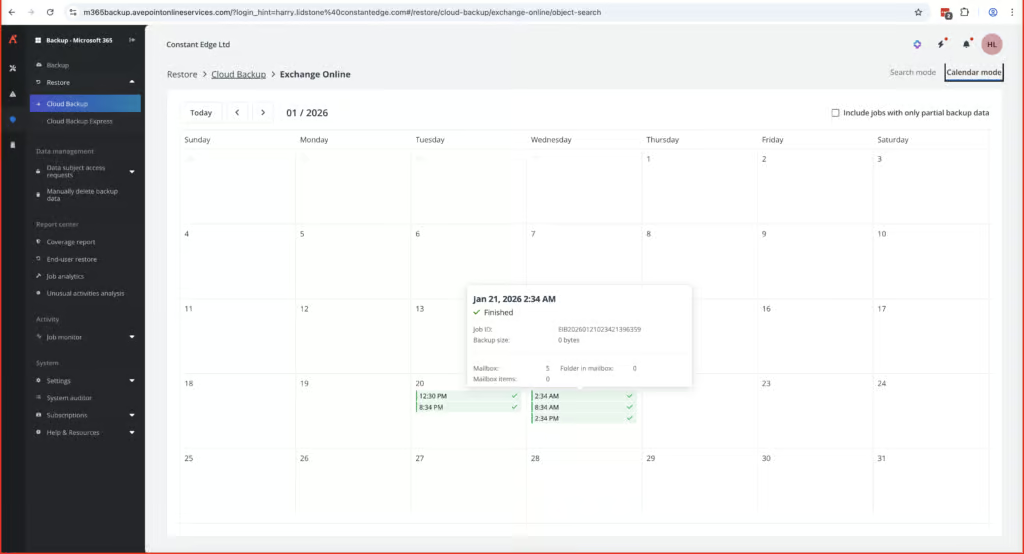
As you’d expect from an enterprise tool AvePoint provides strong visibility into the health of backups.
The Job Monitor feature provides a comprehensive log of all system activity, which can be easily searched, filtered, and exported. It’s one of the easiest features we’ve used across all of the backup solutions we’ve tested.
Every Job ID, including backups, restores, and deleted items, can be viewed individually. You can filter for failures or in-progress jobs, and drill down into each task to generate a report. You can also set up alerts for backups, restores, exports, and other events. Alerts are very detailed, with customization available on the frequency of alerts. When our test account closed, we were notified that no more backups would take place via email notification and in the application itself.
We weren’t able to test what happens if there was a backup failure specifically. This meant we couldn’t confirm how much detail a backup failure report would provide and how easy it would be to identify the root cause.
Governance and Security
Ranked #1 out of 12 M365 Backup Solutions for Governance and Security
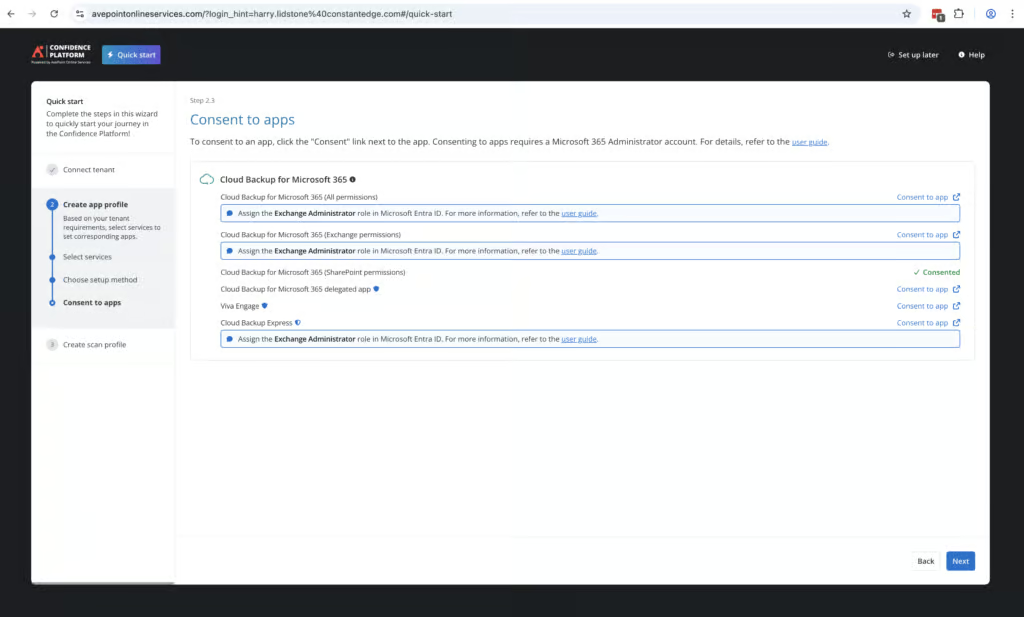
AvePoint provides a System Auditor feature which provides detailed information on all admin actions within the portal and which user performed it. These are kept for three years. They are easy to search and can be exported as required.
Logs show the full list of backups performed and are also easy to search and filter. We were able to easily build a report with 12-months of backup history. We also built a bi-weekly report that shows overall system health which was very helpful.
Governance Capabilities
| Public API available | ✓ |
| Multi-Tenancy | ✓ |
| Reporting / Alerts | ✓ |
| Automatic mailbox / site / etc onboarding | ✓ |
| Bulk enable / disable backups | ✓ |
| Self-service recovery (for end users) | ✓ |
AvePoint enables granular role-based access controls, with customizable security policies for different groups. You can set multiple permissions for different users, including read-only access, the ability to restore files, and controls just over certain M365 apps. You can also provision access location for different services, which is ideal for large enterprises with multiple teams spread out in different regions.
Security controls are enterprise level. AvePoint is SOC 2 and ISO 27001 certified, with clear GDPR documentation and well-implemented right-to-erasure workflows. There are 21 different locations for data residency, and you can also direct backups to your own cloud storage account, giving you full ownership of both the data and where it physically resides.
Compliance
| Audit Logs | ✓ |
| Data Center Regions | US, UK, EU, Japan, Korea, Singapore, UAE, Qatar, South Africa |
| Data Center Infrastructure | Azure, Google Cloud Platform |
| Maximum retention period | Unlimited |
| Role-based access controls | ✓ |
| Data encrypted at rest and in transit | ✓ |
| Supports bring-your-own storage | Yes |
| E-discovery / legal hold | Limited (paid eDiscovery add-on) |
AvePoint also supports bring your own key encryption, where AvePoint holds your backup data but doesn’t hold the keys needed to decrypt it. This is increasingly important in regulated industries such as financial services, healthcare, and government agencies.
Commercials
Ranked #5 out of 12 M365 Backup Solutions for Commercials
Pricing
| Free plan available | ✗ |
| Trial available | ✓ |
| Seat-based pricing option | ✓ |
| Storage-based pricing option | ✗ |
| Starting Price (user / month unless otherwise noted) | $4.00 (500-user minimum) |
| Higher Tier Pricing | Not public |
AvePoint is an enterprise solution and the pricing does reflect that. Pricing is $4.00 per user per month with a minimum of 500 users, which makes the service more expensive than Acronis, CloudAlly, and Veeam.
Pricing is based on the number of licensed Microsoft 365 accounts and the specific services you enable. Storage is unlimited. This is good to see as this can really drive the cost especially for larger teams.
Support
| Support Locations | US, UK, EU, AU, Singapore |
| Email support | Yes |
| Phone support | Yes |
| Chat support | Limited - chatbot |
| Web support portal | Yes |
| Support hours (normal priority) | 24 hours |
| First response SLA (normal priority) | Medium severity—24 hours; Low severity—48 hours |
Support is available globally via phone and email, which would be expected for potential enterprise clients. The knowledge base is extensive and we found it helpful when we were onboarding the solution.
Editor's Score
Ranked #5 out of 12 M365 Backup Solutions for Editor's Score
We were impressed with AvePoint. It’s not the easiest or the fastest backup product to use and deploy. There are complexities when setting up groups and alerts. Policies can take a long time to understand, and deployment took longer than some other solutions.
But if you want serious control over your data, including where it is stored, who can access it, and what happens when you need to recover it, few solutions offer as much control as AvePoint.
For enterprise organizations who need features like bulk mailbox restore, BYOK encryption, policies that can be fine-tuned across locations and teams, and coverage across the M365 eco-system, AvePoint is well worth the investment of time and cost needed to operate the solution.
Put simply, AvePoint offers a depth that very few M365 services we’ve reviewed come close to matching.
Who AvePoint is For: Large enterprises, teams with strict compliance and government requirements, teams with teams split across geographic regions, teams looking for granular data residency controls.
Who should look elsewhere: Teams with less than 500 employees, teams looking for a straightforward, simple backup solution, teams that need keyword search of email content without paying for an add-on.
Read the full review
Enter your work email to unlock the full review.
Check your email
We sent a 6-digit code to . Enter it below to continue.