
OpenText CloudAlly Backup for Google Workspace Review

The Bottom Line
CloudAlly is one of the simplest Google Workspace backup solutions we tested. Deployment took less than five minutes, and the interface is clean and very easy to use. The pricing model is transparent: $3 per user per month with unlimited storage. CloudAlly is best suited for SMBs and MSPs that prioritize simplicity, transparent pricing, and ease of use over restore speed and advanced features.
Overall Rating Summary
Read our Google Workspace testing methodology to learn more.
Pros
- Deployment completed in under five minutes
- Transparent pricing at $3 per user per month
- 24/7 live chat support with responsive, knowledgeable agents
- Modern, easy-to-use admin console
- Admin role separated from Google Workspace admin role, reducing blast radius
- Unlimited retention by default with customization available via support
- Single-item restores complete in under a minute
Cons
- Large backup and restore jobs are slow
- Backups run once per day unless you purchase the 3x per day add-on
- No support for Google Sites, Forms, or Chats
- No preview option when restoring Gmail items
- Error messages can be vague
- Google Workspace and Shared Drive backups must be set up separately
- No bulk restore without going though support
- Any administrator can delete the entire CloudAlly account
CloudAlly backs up the essential Google Workspace workloads — Gmail, Drive, Shared Drives, Contacts, Calendar, and Tasks — with all users and Shared Drives discovered automatically on setup. Google Sites, Forms, and Chats are not supported. The product's biggest strength is simplicity: the interface is clean, deployment is fast, and the pricing model is among the most transparent in this comparison. A non-technical administrator could comfortably manage it without dedicated training.
The most significant weakness is performance. Both backup and restore operations are slow compared to competitors, particularly for larger data sets. If your organization has mailboxes exceeding 1 GB, expect initial backups and full restores to take significantly longer than alternative products.
If your priorities are reliable backups, transparent pricing, and low management overhead, CloudAlly is one of the strongest options on the market — provided restore speed isn't your primary concern.
How We Tested CloudAlly
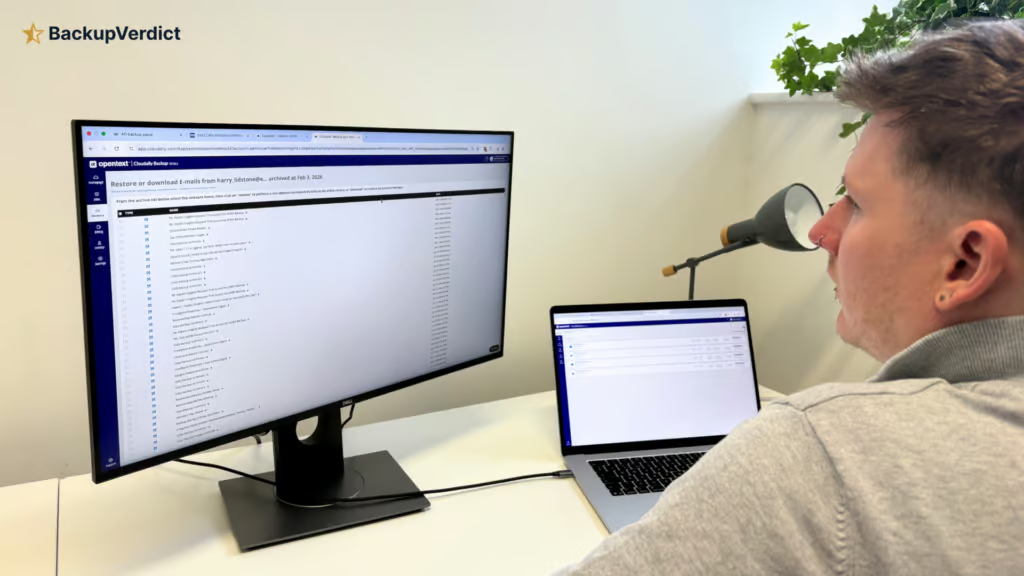
We applied a standard testing methodology across all vendors. We looked at deployment, data coverage, retention policies, recovery capabilities, resilience, backup health monitoring, governance and security controls, commercial considerations, and an overall editorial score.
We timed deployment, time taken to backup, and full mailbox snapshot restores (cross-user and same-user). We also ran single-item restores and tested search functionality.
All testing was conducted in a dedicated Google Workspace environment with the following configuration:
- Domain: recoveryzap.com
- Licensed users: 6 (5 active, 1 suspended)
- Approximate data volume: ~10 GB across Gmail, Drive, and Shared Drives
- Workloads tested: Gmail, Google Drive, Shared Drives, Calendar, Contacts, Tasks
- Platform tested: CloudAlly
The same environment and data set was used for all 11 vendors to ensure a fair, like-for-like comparison. You can read our full testing methodology here.
Deployment
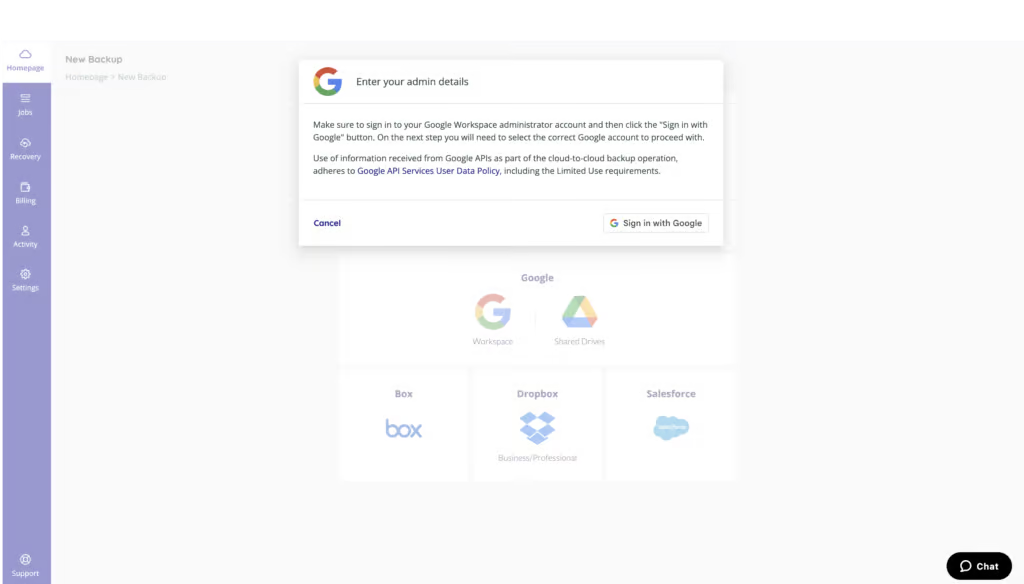
CloudAlly is very easy to deploy — setup takes less than five minutes. The product uses standard OAuth: sign in with a super admin account, install the Google Marketplace app, and accept permissions. No documentation was needed; the process was self-explanatory. Google Workspace and Shared Drives have to be set up separately, but both follow the same process.
Once permissions are approved, workloads are discovered automatically and backups start immediately. We found no hidden exclusions or surprises during our review. Backups run once per day by default unless you purchase the add-on for three times per day. Backups can also be run on demand.
Once deployed, the portal shows how long until the next scheduled backup, and you can queue backups on demand. Currently running backups appear under the Jobs tab — clicking into a running task displays current progress clearly.
We found backup speeds did vary significantly by data volume. A small Shared Drive with only 1 folder took about 30 minutes to back up. A Gmail backup with 1.2 GB of data (mostly thousands of emails) took 18 hours. This is slower than most competitors for a data set of this size.
We found backup speeds did vary significantly by data volume. A small Shared Drive with only 1 folder took about 30 minutes to back up. A Gmail backup with 1.2 GB of data (mostly thousands of emails) took 18 hours. This is slower than most competitors in our comparison.
Coverage
Workloads Covered
| Gmail | ✓ |
| Drive | ✓ |
| Calendar | ✓ |
| Contacts | ✓ |
| Shared Drives | ✓ |
| Sites | ✗ |
| Chats / Hangouts | ✗ |
| Classroom | ✗ |
CloudAlly covers the essential Google Workspace services, with a focus on core workloads: Gmail, Google Drive, Shared Drives, Contacts, Calendar, and Tasks are all included. Google Sites, Forms, Chats, and Photos are not supported, which is worth weighing if you rely on those applications.
All users and Shared Drives are discovered automatically on setup. Despite the gaps, the coverage will be enough for the majority of teams looking for a Google Workspace backup solution.
Retention
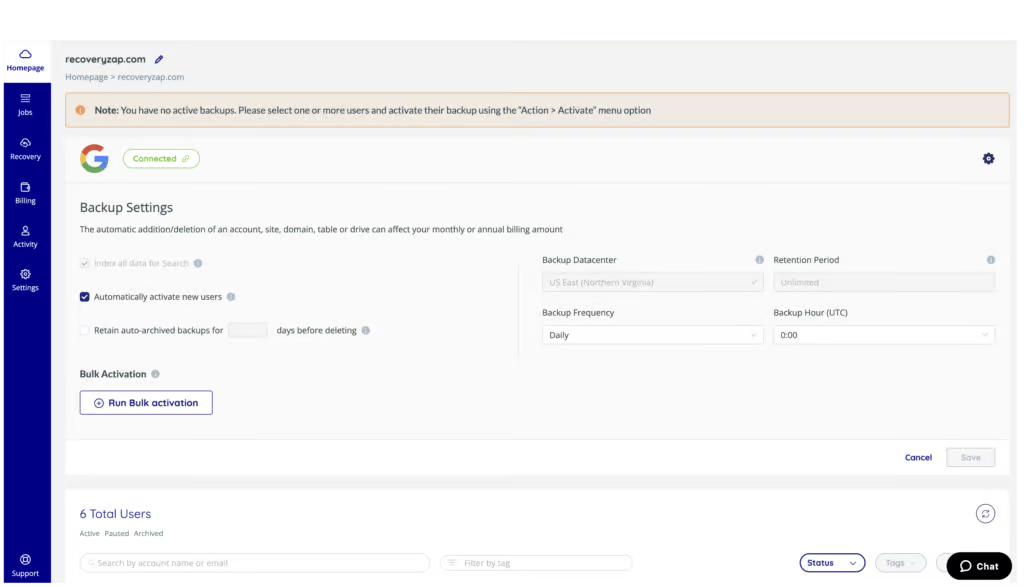
CloudAlly provides strong retention capabilities with unlimited retention by default and sensible handling of user lifecycle events. Retention can be customized if needed by contacting support, and different retention policies can be set for separate backup tasks.
Backups run once per day, or you can purchase the add-on for three times per day. On-demand backups are available.
If a mailbox or user is deleted or has their license removed, existing backup data is automatically archived. Archived data can be either retained indefinitely or deleted after a specified period. Users that are suspended in Google Workspace are marked as Archived in CloudAlly automatically. Cross-user restore is supported.
The retention model is well-suited to most SMBs and MSPs, though the need to contact support for customization is less convenient than products like AvePoint or Druva that offer granular retention configuration directly in the portal. It would also be good to see more flexibility for the number of backups available per day.
Recovery
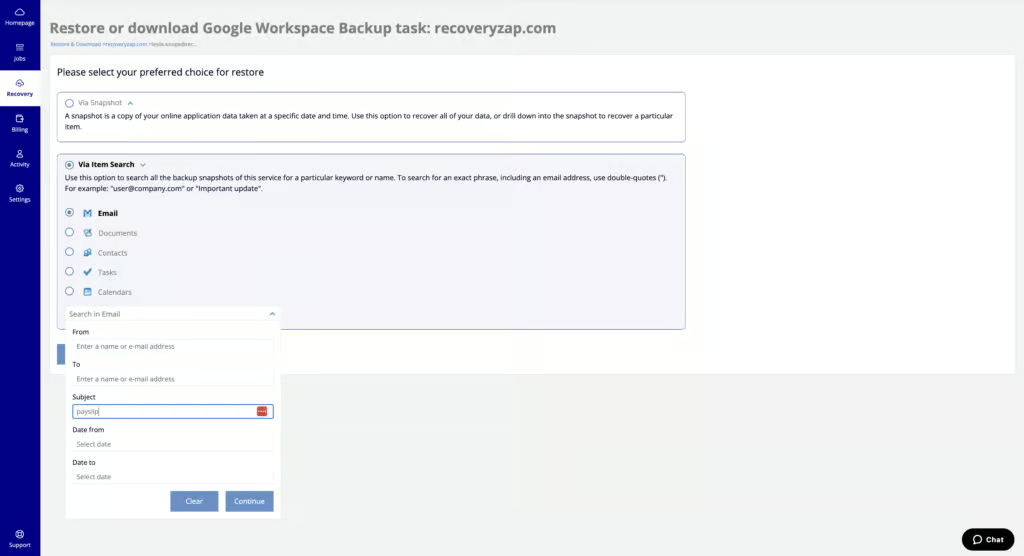
CloudAlly provides an intuitive, dependable recovery process. The platform performs consistently and makes it easy to recover specific files or entire mailboxes.
Google mailboxes can be restored from time-based snapshots. Data can be restored to the same or a different user account or Shared Drive, which is helpful. There is no preview option when restoring Gmail items.
In our testing, restoring a mailbox with 728 MB of email to another account took under three hours. Restoring a single item was much faster: we restored a single email in less than a minute.
End User Recovery can be enabled in settings, allowing users to recover files they have accidentally deleted without needing an admin.
Resilience
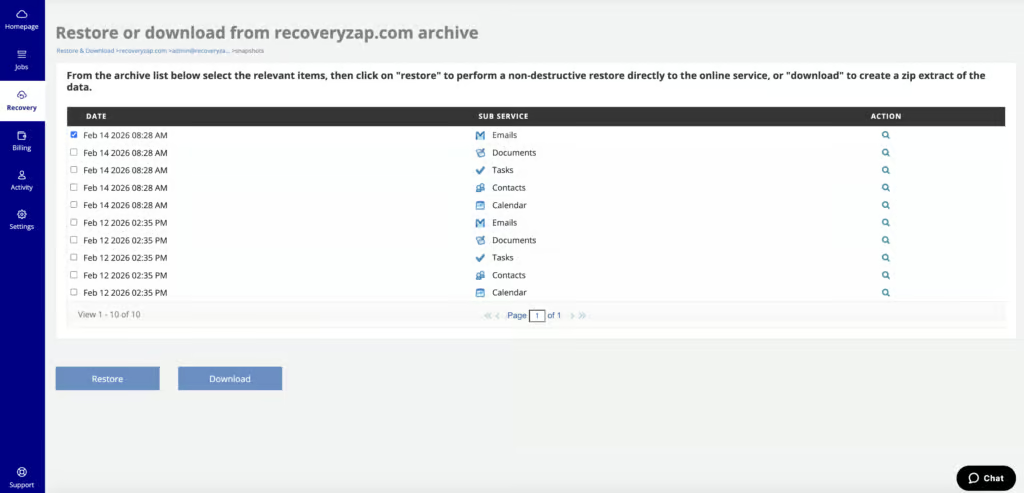
CloudAlly's resilience capabilities are solid for protecting backups from tampering and enabling recovery, but there are no threat detection capabilities to help identify a point of compromise. You can choose a specific date and time snapshot to restore data from, which is the primary mechanism for selecting a known-good recovery point.
Backups are immutable by default, which prevents them from being altered or deleted after creation. CloudAlly also stores all backup data on Amazon Web Services (AWS), completely separate from Google's infrastructure. In the event of a significant Google outage, your backups remain accessible. CloudAlly also supports bring-your-own-storage, allowing you to direct backups to your own Amazon S3 bucket.
CloudAlly admins are separated from the Google Workspace admin role, which reduces blast radius if Google Workspace credentials are compromised.
If a bulk restore is needed, CloudAlly recommends contacting their support team for assistance. This is a limitation for organizations that need to independently manage large-scale recovery scenarios. The 24/7 live chat availability does mitigate this to some extent, as you would not be waiting until business hours to get help.
Backup Health
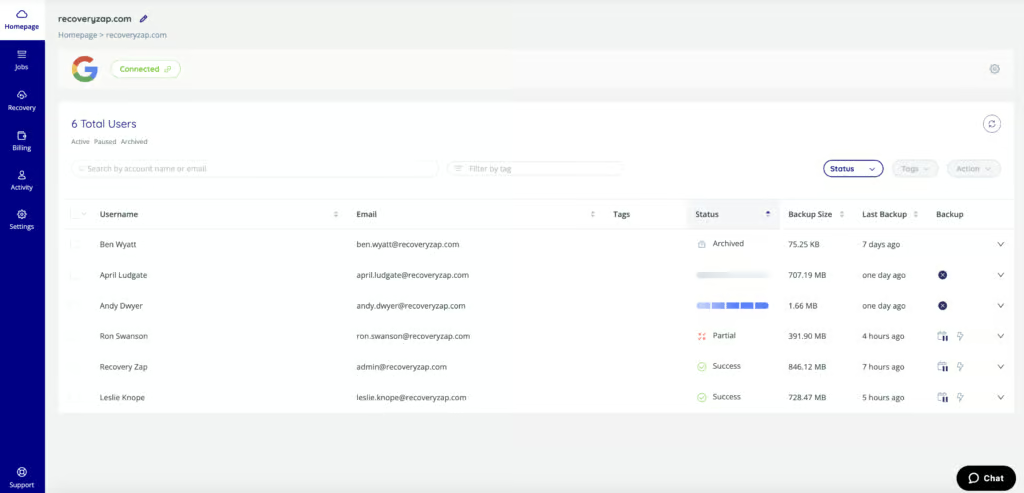
CloudAlly provides the visibility you need to confirm backups are running, and recent improvements have brought the monitoring experience closer to the mid-range of this comparison.
Admins can receive email notifications if a backup fails. There is no dashboard or graph displaying overall backup health, but backup failures are noted in the activity logs and are searchable.
During testing, we had one Gmail backup task partially fail, and the only error message was the word “Mail,” which isn’t particularly helpful. The CloudAlly live chat was responsive and able to help diagnose the issue, but ideally the error messages themselves would provide more actionable detail.
Admins can choose to receive emailed reports either daily, weekly, or only upon failure. The backup health monitoring is functional and adequate for SMBs, though it lacks the depth and real-time alerting capabilities of products like AvePoint, SpinOne, or Druva.
Governance and Security
| Public API available | ✓ |
| Multi-Tenancy | ✓ |
| Reporting / Alerts | Limited - email on backup failure and daily/weekly reports; no real-time alerting |
| Automatic mailbox / site / etc onboarding | ✓ |
| Bulk enable / disable backups | ✓ |
| Self-service recovery | ✓ |
| Audit Logs | ✓ |
| Role-based access controls | ✓ |
| Data encrypted at rest and in transit | ✓ |
| Supports bring-your-own storage | ✓ |
| E-discovery / legal hold | ✗ |
| Data Center Regions | US, UK, EU, AU, Canada, India, Japan, South Africa |
| Data Center Infrastructure | AWS |
| Maximum retention period | Unlimited |
CloudAlly provides solid governance controls and security features suitable for most SMB and mid-market environments.
Logs are retained indefinitely for both system and user activity, and are exportable as CSV. Logs can be filtered by date, activity type, and success or failure status.
Any administrator with access to the CloudAlly portal can delete the organization’s entire account. This is a governance risk that should be managed through strict access controls and limiting the number of users with full admin privileges.
MFA via authenticator app and SSO via Microsoft or Google are available. Admins can set granular permissions for which backup services users can access and which actions they are allowed to take.
CloudAlly is ISO 27001 certified, and all backup data is encrypted in transit and at rest using AES-256. The platform is GDPR and HIPAA compliant. However, CloudAlly does not support SOC 2, FedRAMP, or BYOK encryption.
Data residency options include the US, UK, Ireland, multiple European regions, Japan, and Australia, all built on AWS infrastructure.
Commercials
Pricing
| Free plan available | ✗ |
| Trial available | ✓ |
| Seat-based pricing option | ✓ |
| Storage-based pricing option | ✓ |
| Starting Price (user / month unless otherwise noted) | $3.00/user/month or $30/user/year |
| Higher Tier Pricing | Not public |
CloudAlly operates a simple, clear and transparent pricing model. Pricing is $3 / user / month or $30 / user / year.
The billing tab in the portal clearly shows which items customers are being billed for and the associated costs. There are no hidden fees or storage caps to manage.
Storage is unlimited as long as you’re backing up all users. This removes one of the biggest sources of uncertainty in SaaS backup pricing and eliminates the need to monitor storage growth over time.
Support
| Email support | ✓ |
| Phone support | ✓ |
| Chat support | ✓ |
| Web support portal | ✓ |
| Support hours (normal priority) | 24 hours |
| First response SLA (normal priority) | 30 minutes |
Support is available 24/7 via live chat, with email, web, and phone support also available. During testing, the live chat team was responsive and helpful. This is the most transparent and straightforward commercial model in the comparison.
Editor's Score
CloudAlly is a reliable, easy-to-use Google Workspace backup solution with the most transparent pricing model in this comparison. Deployment is very simple, the interface is clean, and 24/7 live chat support is responsive. For organizations that need a straightforward backup product without complexity, CloudAlly is a strong choice.
CloudAlly is owned by OpenText, a publicly traded, multi-billion-dollar enterprise software vendor, which provides confidence in long-term platform stability.
The main issue we ran into was performance. Both backup and restore operations are significantly slower than competitors for larger data sets. The lack of a preview option for Gmail items, once-daily default backup frequency, and vague error messages are additional areas where the product falls short of more feature-rich alternatives.
The lack of ransomware scanning and advanced compliance certifications means CloudAlly isn’t the right fit for highly regulated environments, but for most SMB and mid-market tenants, it delivers exactly what’s needed.
Who this is for: SMBs and MSPs that want a simple, affordable, and reliable backup solution with unlimited storage and transparent pricing. Best suited for environments where restore speed is not a critical requirement and simplicity is valued over feature depth.
Who should look elsewhere: Organizations with large mailboxes that need real-time alerting, or ransomware detection should consider AvePoint, SpinOne, or Druva instead.
Read the full review
Enter your work email to unlock the full review.
Check your email
We sent a 6-digit code to . Enter it below to continue.