
Acronis Cyber Protect Cloud for Google Workspace Review

Tested March–April 2026. Updated October 2026.
The Bottom Line
Acronis is one of the top Google Workspace backup solutions we’ve tested. It covers the core GWS apps, granular search and recovery, complete role-based access controls and enterprise level retention policies. We think it’s a strong fit for medium-sized companies to enterprises.
Overall Rating Summary
Read our Google Workspace testing methodology to learn more.
Pros
- Covers the core GWS workloads
- Granular email content search
- Customizable retention policies at user and group level
- Role-based access controls
- Detailed reporting and audit logs with export
- Over 50 data center locations
- Global support infrastructure
Cons
- Complex deployment took 1+ hour
- Slow full mailbox restore speed
- No bulk restore capability
- UI could be easier to navigate
Acronis is a top choice for medium-sized companies to enterprises and MSPs, particularly multi-national teams. Coverage includes the core workloads: Gmail, Drive, Shared Drives, Contacts and Calendar.
Acronis started out in traditional enterprise backup, with an on-premises solution. You can still feel the legacy of this in the interface, which is a bit less easy-to-navigate than some of the simpler cloud-first solutions on the market, like CloudAlly.
But, retention policies are granular, and we were impressed with the search interface. You can search across all mailbox content, with support for nine languages. If your teams operate globally and speak multiple languages, or if your organization needs deep email content search for e-discovery and litigation purposes, Acronis is the best solution to consider.
We did find deployment to be challenging. It took around one hour to configure, which would be an ongoing workload for MSPs. Getting set up does require some technical expertise and patience learning the solution.
Overall, Acronis delivers robust, enterprise-grade protection.
How we tested Acronis
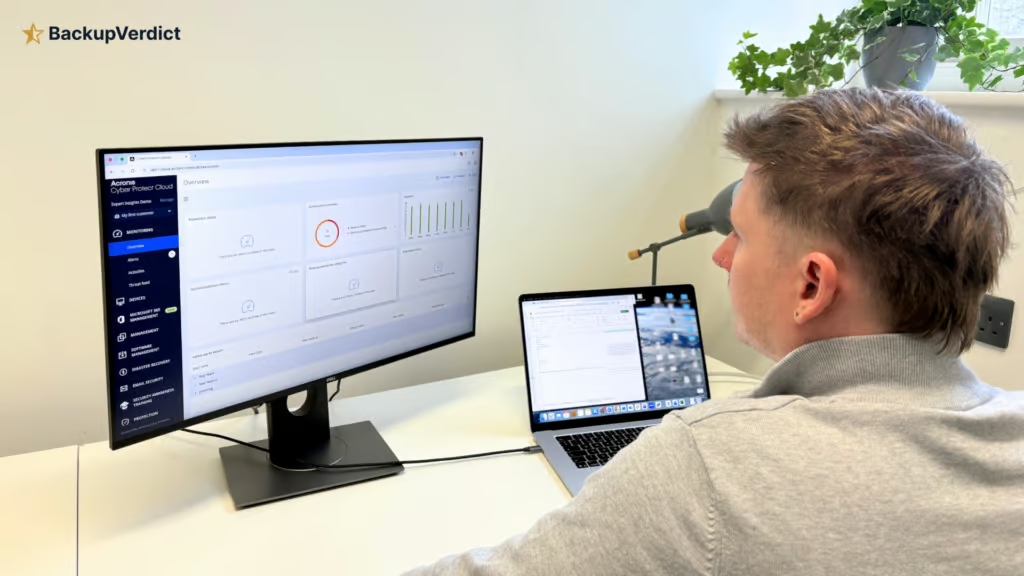
We set up Acronis on a clean Google Workspace account and ran through our full testing methodology. We timed deployment across initial setup, user import and assignment, retention policy creation with password protection, and backup plan scheduling.
Our testing followed a standardized protocol applied consistently across all vendors, covering deployment, data coverage, retention policies, recovery capabilities, resilience, backup health monitoring, governance and security controls, commercial considerations, and an overall editorial verdict.
We then tested recovery scenarios: single-email search and preview with admin access, multi-user Drive restore, and cross-language email search (testing Chinese, Japanese, and Portuguese content).
All testing was conducted in a dedicated Google Workspace environment with the following configuration:
- Domain: recoveryzap.com
- Licensed users: 6 (5 active, 1 suspended)
- Approximate data volume: ~10 GB across Gmail, Drive, and Shared Drives
- Workloads tested: Gmail, Google Drive, Shared Drives, Calendar, and Contacts
- Platform tested: Acronis Cyber Protect Cloud (end-user product)
The same environment and data set was used for all 11 vendors to ensure a fair, like-for-like comparison. You can read our full testing methodology here.
Deployment
Acronis doesn’t have the most straightforward deployment process. It took around one hour from initial login to getting the first backup up and running. By comparison, CloudAlly and SpinOne were up and running in under five minutes. Spanning took 15, and AvePoint took 30 minutes.
The experience can be a bit confusing, mostly because of the user interface, and we had to refer to the documentation a few times.
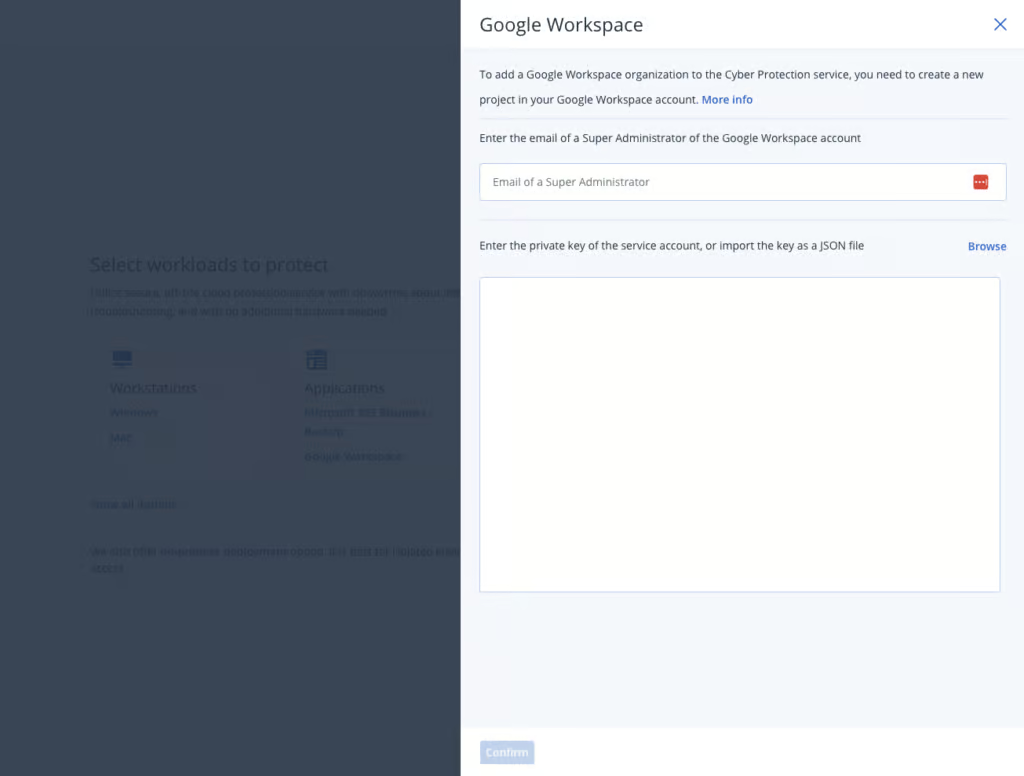
Connecting the Google Workspace tenant required creating a Google Cloud project, setting up a service account, assigning permissions, and pasting in a JSON key. The initial tenant onboarding took approximately 50 minutes, with external documentation required to complete the process. This is longer than average deployment time.
Workloads are also not auto protected after tenant connection. Backup plans must be created and mailboxes assigned manually. However, if a backup plan is set to cover "all" users, new users are automatically included going forward.
With all of the above said, customization available in backup plan creation is among the best tested. It was comparable only to AvePoint, but significantly easier to configure.
Coverage
Workloads Covered
| Gmail | ✓ |
| Drive | ✓ |
| Calendar | ✓ |
| Contacts | ✓ |
| Shared Drives | ✓ |
| Sites | ✗ |
| Chats / Hangouts | ✗ |
| Classroom | ✗ |
Acronis protects Gmail, Drive, Shared Drives, Contacts and Calendar. Chat and Forms were not backed up in our testing, and Acronis's documentation doesn't list them. Google Sites files stored in Drive are recovered as text files rather than as working sites. The platform also can include VM backup, providing a unified backup solution that extends beyond SaaS data.
In the admin console coverage is split into two backup tasks: one handles Gmail and Calendar, the other handles Drive, Shared Drives and Contacts. This does mean you can apply different retention policies and scheduling rules across these different applications.
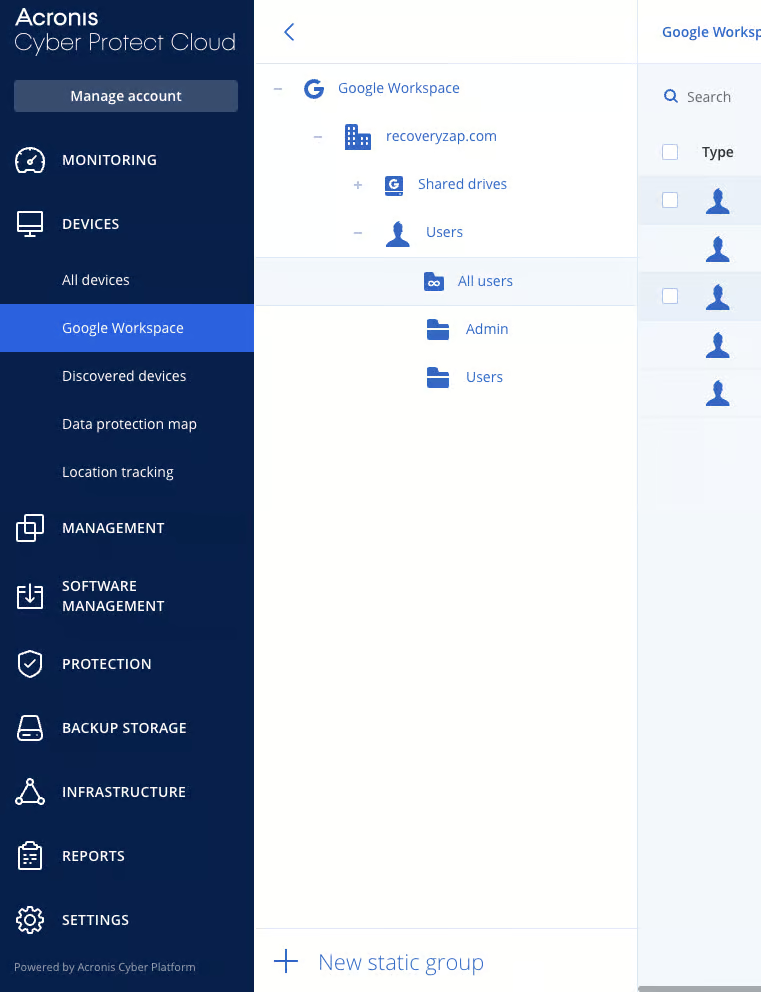
This could be seen as a positive or a negative, depending on if you need the flexibility to assign these policies, or if you’d prefer the simplicity of only needing to manage one set of policies.
Meet recordings stored in Drive are backed up, but Google Meet as a standalone workload is not a dedicated backup target. Google Classroom is also not covered. Most teams won’t rely on these apps, but if you are in education, Google Classroom would be an important workload to cover.
Retention
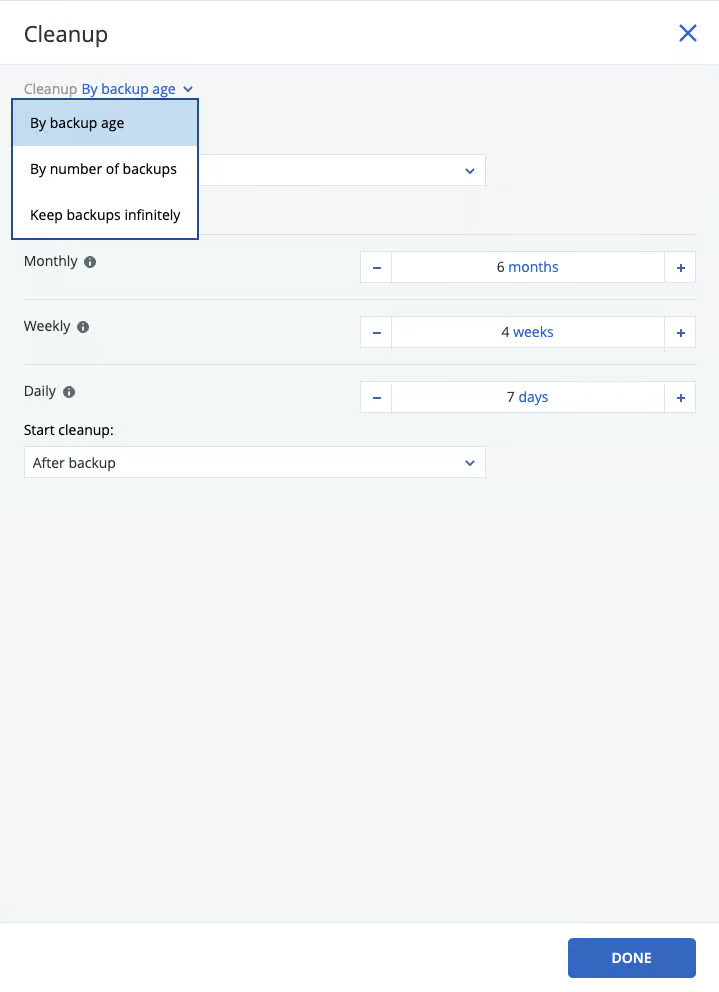
Acronis offers granular retention policies. You can configure up to 6 backups per day, which is the highest frequency we saw across all 11 products tested.
Creating customizable backup plans is one of the most in-depth and straightforward we’ve used. Google Workspace backups are stored in Acronis-hosted cloud storage, or in partner-hosted storage if you buy through an MSP.
Creating user groups with differentiated retention policies was the easiest of all products tested. Groups can be created for different user tiers (e.g., administrators vs. standard users) with separate retention and storage settings. We were impressed that Acronis has managed to provide this amount of customization and still keeping the admin console relatively simple.
Something to be aware of is that Acronis also offers optional ‘roll-up’ backups. This feature was popular for on-premises backups where storage was a serious consideration. It means that older backups are rolled-up over time, meaning that you lose some granularity in terms of recovery points. This feature is optional and you can switch-it off if you want to keep granular daily recovery points.
Policies can be applied to users, groups or across the whole tenant. You can also protect backups with an encryption password.
When a mailbox was removed from backups to simulate an off-boarded employee, previous backup data could still be recovered. The mailbox displayed a "Not protected" status and could easily be re-added to a backup plan if needed. In our testing, suspended Google Workspace accounts were not detected. Acronis documents that existing plans keep running for 72 hours after a user is suspended or archived, then stop; earlier backups remain available. Billing continues for storage consumed by off-boarded users until the retention policy expires.
Recovery
Acronis offers strong search and metadata capabilities for granular recovery, though full mailbox restores were slow. A full 1.4GB cross-user mailbox restore reached 81% completion after 8.5 hours.
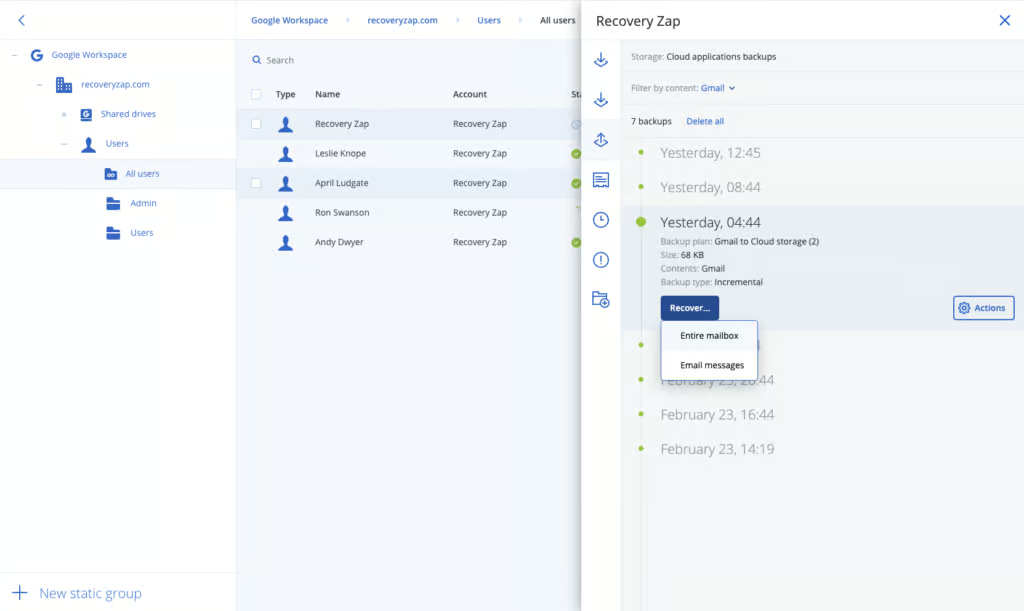
Keyword search functionality within individual mailboxes is excellent. Acronis supports keyword search that includes the email body. Data was fetched very quickly during testing. You can search email by metadata (sender, subject, date, recipient, folder) or by full body content.
The restore point selection interface has an unusual layout compared to competitors but was well-implemented and provided clear visibility into available recovery points.
Acronis is one of the only solutions we’ve tested that provide full search of email body content. The search functionality even supports multiple languages, including Chinese and Japanese.
However, there is no search capability across the entire tenant. Search can only be performed within individual mailboxes, which limits efficiency when the location of a specific item is unknown. There is no bulk restore capability. You can run up to 10 recovery operations at once, but there is no multi-user bulk restore.
Something to be aware of is that admins are able to read the full email content in the search console. This could potentially mean admins could view HIPAA-protected health records, FERPA-protected student information, or attorney-client communications. Other solutions we’ve tested, like AvePoint, keeps the actual body content of the email hidden in the search console. Acronis shows a privacy warning before admins view email content, and these actions are recorded in the audit log.
Resilience
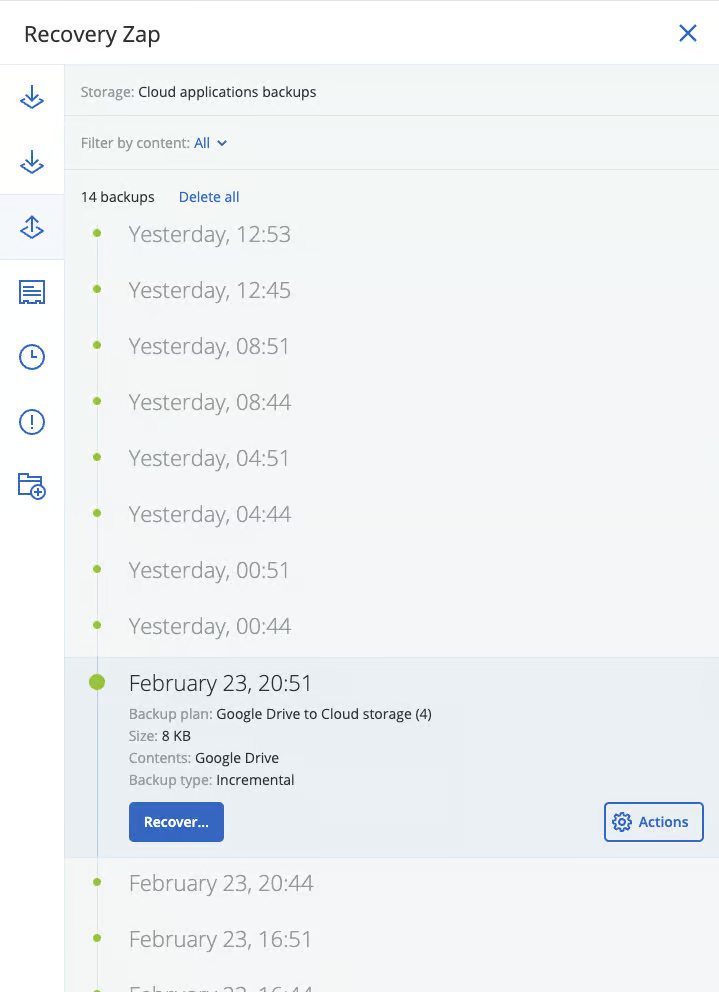
Acronis performed very well in resilience testing, with highly customizable reporting and strong restore point management.
Reporting capabilities are among the best tested. Reports can be scheduled hourly, daily, weekly, or monthly and delivered as PDF or Excel files. This level of granularity in report scheduling was not matched by any other solution in the comparison.
Acronis's antimalware scanning of backups isn't available for Google Workspace cloud-to-cloud backups.
Acronis offers two immutable storage options: Governance and Compliance. You can decide which security controls are applied to backups.
Admin alerts are a strength of the platform. You can set up alerts for the usual scenarios, like backup failures, as well as infrastructure health, like CPU temperature, hardware changes and network usage anomalies. This is a really helpful feature for enterprises who want to monitor their underlying backup infrastructure.
As noted in Recovery, there is no bulk restore capability. For large-scale incident recovery, restores would need to be performed individually, which could significantly extend recovery time.
Backup Health
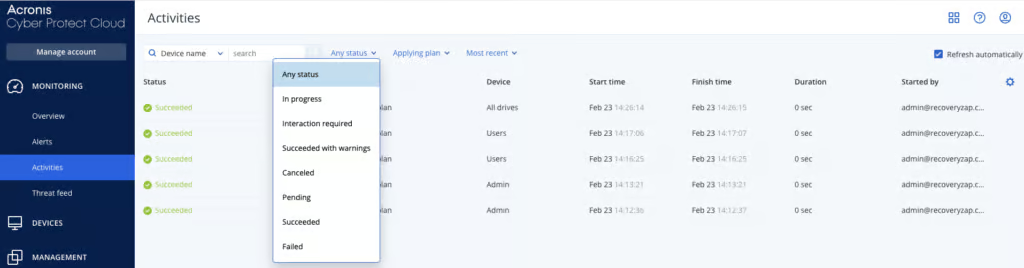
Acronis provides a high level of visibility into backup health. The depth of reporting, clear status indicators, and proactive alerting ensure that backup failures or degradation are quickly identified and never ambiguous.
Acronis provides detailed reporting, although it will take time to learn how to set up everything that is possible. You can create your own reports that can be scheduled to be sent by hour/day/week/month.
You can build your own customizable dashboards and filter views by device, workload, user or time period. You can then schedule these reports to be sent daily or monthly, or export and download them directly.
Reports and email notification policies must be manually created, though default placeholder reports are available for customization. Once configured, alerts can be scheduled with granularity down to hourly delivery.
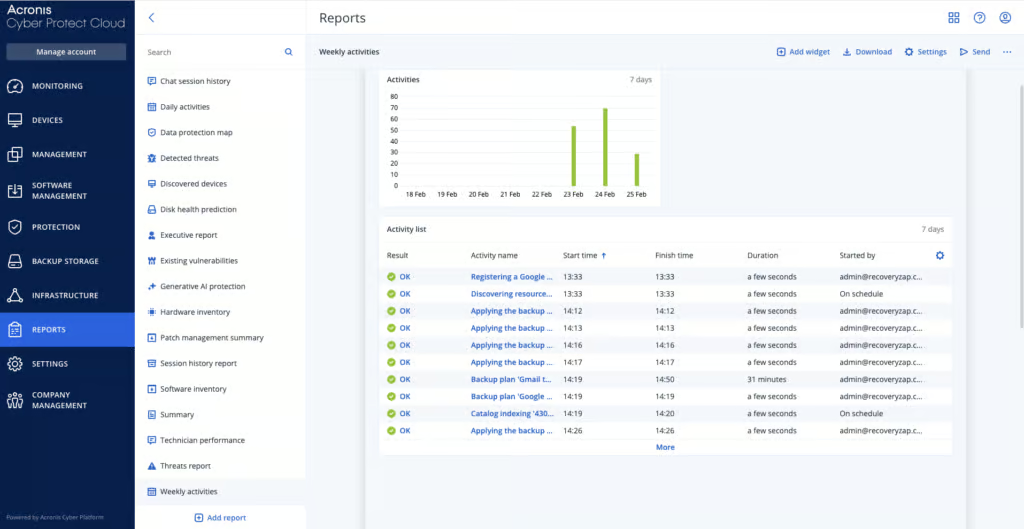
Weekly activity logs capture all backup runs with details including start time, completion time, any warnings, any failures. You can export reports documenting that backups succeeded on a specific date. You can also export the whole dashboard as a PDF.
Activity logs are detailed and can be exported. Reports include retention policies, recovery attempts, blocked recoveries and deleted items, with timestamps, user actions and outcomes.
The extensive reporting and alerting capabilities come with a learning curve. Navigation requires multiple clicks to access specific features, and becoming proficient with the full reporting toolkit takes time.
Governance and Security
| Public API available | ✓ |
| Multi-Tenancy | ✓ |
| Reporting / Alerts | ✓ |
| Automatic mailbox / site / etc onboarding | New users are auto-included only when a backup plan protects all users |
| Bulk enable / disable backups | ✓ |
| Self-service recovery | ✗ |
| Audit Logs | ✓ |
| Role-based access controls | ✓ |
| Data encrypted at rest and in transit | ✓ |
| Supports bring-your-own storage | ✗ |
| E-discovery / legal hold | ✗ |
| Data Center Regions | US, UK, EU, South Africa, Middle East, AU, NZ, APAC |
| Data Center Infrastructure | Independent data centers |
| Maximum retention period | Unlimited |
Acronis is designed for MSPs and enterprises with complex GWS environments. It supports this setup with role-based access controls, permissions management and a complete governance dashboard.
Acronis offers a range of built-in roles, including a Restore operator role that can see file names and email subjects but not content, as well as custom roles. Only a company administrator can set up Google Workspace backup and recovery.
The user interface for managing roles isn’t always the most intuitive, but there are granular permission management policies you can configure. For example, you can restrict recovery to specific mailboxes, and you can allow access to reporting without allowing recovery.
The audit log is extremely detailed with the ability to filter across a wide range of task types. Each entry can be expanded to view granular information including timestamps, user identity, and action details. Logs can be drilled down to near code-level detail when needed. Activity logs can be exported to Excel or PDF.
Acronis is compliant with SOC 2 and ISO 27001, clear documentation for GDPR compliance. Backup data is encrypted both in transit and at rest and MFA is supported.
Data is encrypted in transit and at rest, and you can add your own encryption password to backups. Acronis doesn't offer customer-managed encryption keys (BYOK).
Acronis supports more than 50 global data center locations across North America, South America, Europe, the Middle East, and Asia-Pacific, so there is a lot of flexibility for data residency.
You need a separate admin account to manage Acronis, rather than just using your Google Workspace credentials – which we think is a good thing. It means if your Google Workspace account is compromised, your backups are still secure. Multi-factor authentication is supported, but it is switched off by default, so we recommend enabling it.
Acronis is not FedRAMP authorized, and the team confirmed to us that there are no current plans to pursue this due to insufficient customer/partner demand.
Commercials
Pricing
| Free plan available | ✗ |
| Trial available | ✓ |
| Seat-based pricing option | ✓ |
| Storage-based pricing option | ✓ |
| Starting Price (user / month unless otherwise noted) | Not public |
| Higher Tier Pricing | Not public |
Acronis can be billed per solution, per workload, or per GB. This flexibility is beneficial, but the range of options does add complexity to cost modelling. Storage consumed by off boarded or inactive users continues to be billed until retention policies expire, which should be factored into long-term cost projections.
Licensing can be hard to get to grips with. Acronis offers different products for direct customers, SMBs, and service providers, some of which are similarly named but are quite different. This can make it difficult to quickly understand exactly which product you need when you’re first getting setup with the solution.
Support
| Email support | ✓ |
| Phone support | ✓ |
| Chat support | ✓ |
| Web support portal | ✓ |
| Support hours (normal priority) | 24 hours |
| First response SLA (normal priority) | 8 hours |
Support is global and includes access to a support portal, documentation library, and trained support engineers. SLA-backed response times available.
Editor's Score
Acronis Cyber Protect Cloud for Google Workspace is an impressive solution that offers excellent data control, highly customizable backup and retention policies, and strong governance capabilities.
The main challenge we had was the initial onboarding process, but once deployed, the platform is very capable. The lack of bulk restore capability is a gap, and the UI could be easier to manage. But the market-leading retention customization, solid core workload coverage, a wide choice of data center locations, strong audit logging, and responsive support make up for these shortfalls.
We’d recommend Acronis to MSPs and enterprise organizations that value granular control over backup policies, storage locations, and data governance.
Read the full review
Enter your work email to unlock the full review.
Check your email
We sent a 6-digit code to . Enter it below to continue.