
AvePoint Cloud Backup for Google Workspace Review

Tested March–April 2026. Updated October 2026.
The Bottom Line
AvePoint is the most in-depth Google Workspace backup solution we tested. It scored top in our comparison across coverage, retention, resilience, backup health, and governance. AvePoint is designed for enterprises, and it can be complex to manage. But if you are looking for enterprise-grade control over data protection, storage locations, retention policies, and RBAC, AvePoint is a strong product to consider.
Overall Rating Summary
Read our Google Workspace testing methodology to learn more.
Pros
- Broadest workload coverage we tested
- Granular retention with per-container, per-workload, and per-user customization
- Detailed backup health monitoring with exportable reports and real-time alerts
- Strong governance – 3-year retention, granular filtering, exportable logs
- Supports BYOS (bring your own storage) and BYOK (bring your own key)
- Bulk restore capability with different recovery points per workload
- In-house deletion of individual backup records
Cons
- Complex deployment process
- Granular search interface can be clunky
- Does not back up suspended Google Workspace accounts
- No email body search or preview
AvePoint is an enterprise backup and data protection platform. For Google Workspace, it offers the broadest workload coverage of any product we tested, including Gmail, Drive, Shared Drives, Contacts, Calendar and Chat, with Classroom, Directory and Vault available as separate modules or add-ons.
The platform’s strengths are retention, governance, and backup health. Retention policies are the most customizable we tested. You can assign different retention periods and storage locations at the container, workload, and user level.
The audit logging is the strongest across all platforms tested, with 3-year log retention, granular filtering, and full export capability. Backup health monitoring is excellent: failures are immediately visible in the dashboard with detailed drill-down and exportable reports.
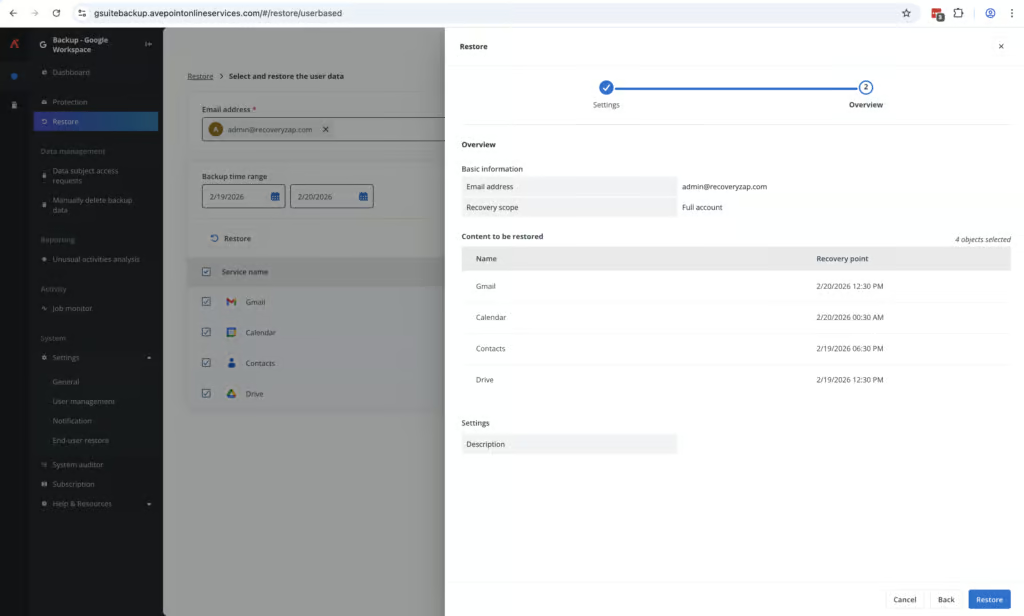
Recovery is also strong, with the ability to select different recovery points for different workloads during a full account restore. We didn’t see this feature in any other products. We were able to complete a full mailbox restore in under an hour. However, the search interface could be more straightforward to manage when looking for a single item to recover.
Overall, the application is impressive. The granular search isn’t the cleanest and feels a little clunky, but the fetching of data is very fast. The main caveat is the set-up: it's not the easiest and would require some technical ability or experience. AvePoint is clearly focused on enterprise companies that require a solution that has deep integration capability.
How We Tested AvePoint
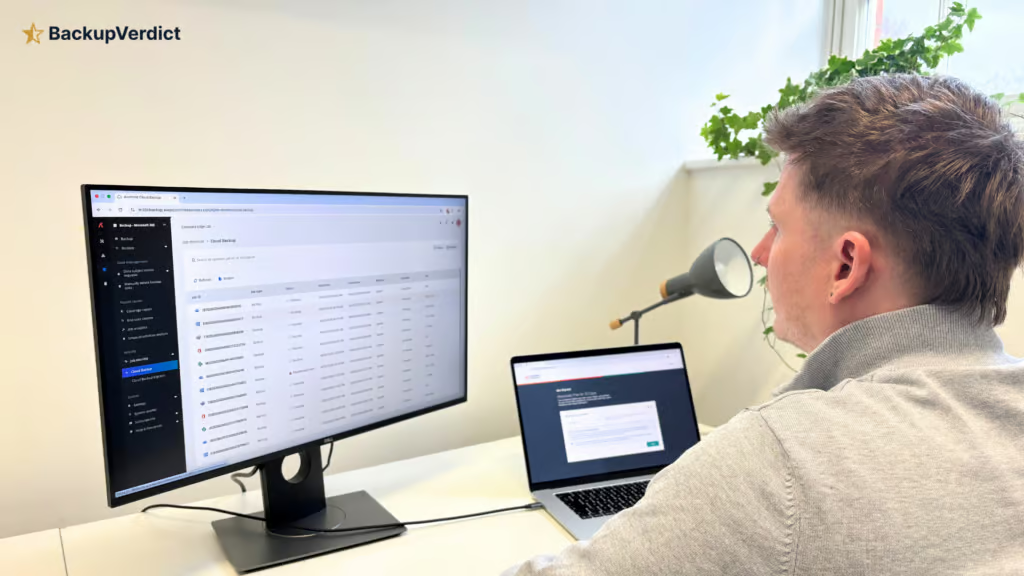
We deployed AvePoint on a clean Google Workspace account. We configured containers and backup policies, timed the deployment process, and tested both Express and Advanced onboarding modes.
We then tested recovery scenarios: full account restores with per-workload recovery point selection, single-item search and restore, cross-user restore, and backup from a suspended account. We also tested backup health reporting, audit logging, RBAC, and notification configuration.
All testing was conducted in a dedicated Google Workspace environment with the following configuration:
- Domain: recoveryzap.com
- Licensed users: 6 (5 active, 1 suspended)
- Approximate data volume: ~10 GB across Gmail, Drive, and Shared Drives
- Workloads tested: Gmail, Google Drive, Shared Drives, Chat, Calendar, Contacts, and Classroom
- Platform tested: AvePoint Cloud Backup for Google Workspace
The same environment and data set was used for all 11 vendors to ensure a fair, like-for-like comparison. You can read our full testing methodology here.
Deployment
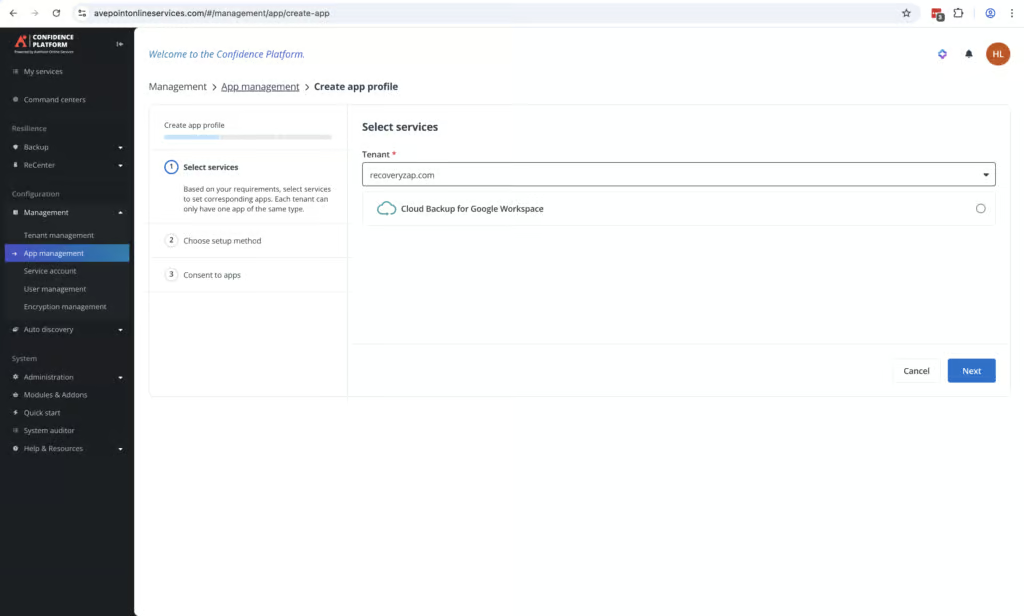
AvePoint was confusing to get up and running even after we’d followed the process before when testing the product for M365. We would recommend working with an AvePoint engineer rather than attempting the setup independently.
The setup involves multiple steps: assigning AvePoint app permissions, assigning Super Admin permissions multiple times, and then configuring containers before any Google Workspace items can be protected. Setting up Google Groups for backup requires separate permissions, which took approximately 30 minutes of knowledge base research to locate.
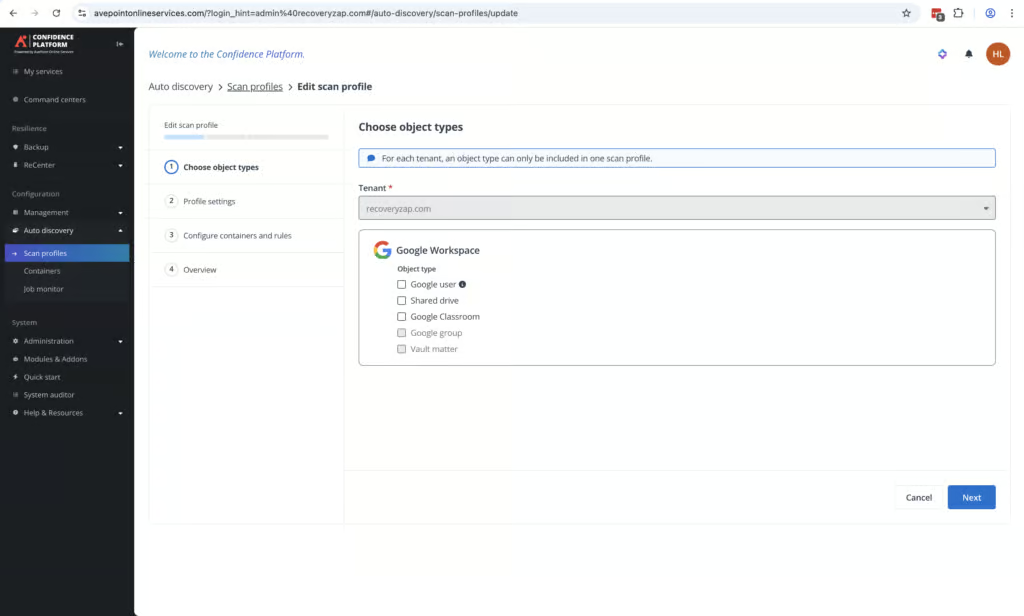
The added complexity is tied to the product’s granularity. AvePoint uses containers that workloads are placed into, and each container can have its own custom retention and storage location settings. There are two onboarding modes: Express mode scans objects into default containers for a simpler start, and Advanced mode scans objects dynamically to containers defined by custom business rules.
Once the initial configuration was complete, the first backup ran very quickly, and the dashboard clearly showed backup progress. The visibility during backup was excellent – a contrast to the complexity of getting there. Without prior product knowledge, there is a steep learning curve. This is not a product a non-technical user could deploy independently.
AvePoint also offers a complimentary 90-minute onboarding session to help new customers get started with the platform.
Coverage
AvePoint covers all of the workloads you would expect it to, with the option to expand coverage into Google Classroom and Google Directory. It backs up Gmail, Drive, Shared Drives, Contacts, Calendar and Chat. Classroom and Directory are separately subscribed modules, and Vault backup is a paid add-on. Forms backup was also added in June 2026.
Workloads Covered
| Gmail | ✓ |
| Drive | ✓ |
| Calendar | ✓ |
| Contacts | ✓ |
| Shared Drives | ✓ |
| Sites | ✗ |
| Chats / Hangouts | ✓ |
| Classroom | ✓ |
Classroom and Directory support extend AvePoint’s relevance to education-sector organizations and those needing comprehensive Google Workspace data protection. AvePoint is one of a few products we tested that supports Google Classroom.
Workloads are not auto-discovered after adding the tenant. The application needs permissions assigned so items can be discovered and placed into containers. New mailboxes and workloads can be auto-discovered once the initial configuration is in place. Our reviewer noted that “items like Trash, Spam, Shared items in Drive are not backed up by default, have to be toggled.”
AvePoint does not back up suspended Google Workspace accounts. However, if a user was backed up before being suspended, their existing backup data can be exported or restored.
Retention
AvePoint has the most in-depth retention capabilities of any product we tested.
The platform uses containers that workloads are placed into, and each container can have its own custom retention period and storage location. During the trial, we only had the option for one year, but in a full account, there is the option to pick between days (minimum 30), months, years, or unlimited, as well as unlimited storage.
There is also an Express mode for organizations that need less customization, where all mailboxes are stored in one container with a single retention policy. For multinational organizations that need to comply with different data residency and retention laws across regions, the container-based model is exceptionally well suited.
When we removed a user from protection to simulate an off-boarded employee, their existing backup data was still recoverable. AvePoint supports BYOS (bring your own storage) and BYOK (bring your own key), with multiple geographic storage locations available across Azure, AWS and Google Cloud.
Every week there is a scan that checks for users that have been removed from Google Workspace. If a user has been removed, they are placed in an 'off-boarding' tab within the AvePoint portal. Their data is retained for the full retention period. There is no extra cost for storing this data.
Cross-user restore is supported. This is the most customizable retention offering of all the products we tested, comparable only to Acronis and Druva at the top end.
Recovery
AvePoint takes a unique approach when it comes to recovery: there are multiple ways to restore and search for data, which can lead to some confusion. The search is functional, maybe a little clunky, but it is very easy to pick recovery points for individual mailbox items. Data was fetched quickly on searches, and we didn't notice any loading times. The backups we performed were also completed very quickly.
Full account restore was relatively simple once we found it, but the UI is not always the simplest to navigate. AvePoint uses a calendar view for individual service restores (Gmail, Calendar, Contacts) and a separate search mode for more granular recovery. A full mailbox restore was completed in under an hour.
A standout feature is the ability to select different recovery points for different workloads when performing a full account restore. You can pick different restore points, for Gmail, Calendar, Contacts and Drive when doing a full mailbox restore. We did not see this capability in any other product tested.
Bulk restores of Gmail, Contacts, and Calendar are supported, though each service must be restored individually rather than all at once. Data was fetched quickly during searches, with no noticeable loading times.
There are multiple options available for recovering files. You can Skip, Merge, Append or Overwrite. AvePoint is much better suited to bulk recovery scenarios or when you know exactly what you are looking for, rather than browsing for a specific item or file.
The granular search has two modes: calendar mode (which only lets you search individual backup tasks at once) and search mode (which only allows single-user search). This approach adds some complexity, and this area could be easier to manage.
AvePoint is privacy-focused and does not allow searching or previewing the body of emails, which is beneficial for organizations subject to FERPA, HIPAA, or similar regulations. Restore can be performed to the same mailbox or another on the tenant. No additional security checks are required beyond MFA at login, which can be enforced tenant wide.
Resilience
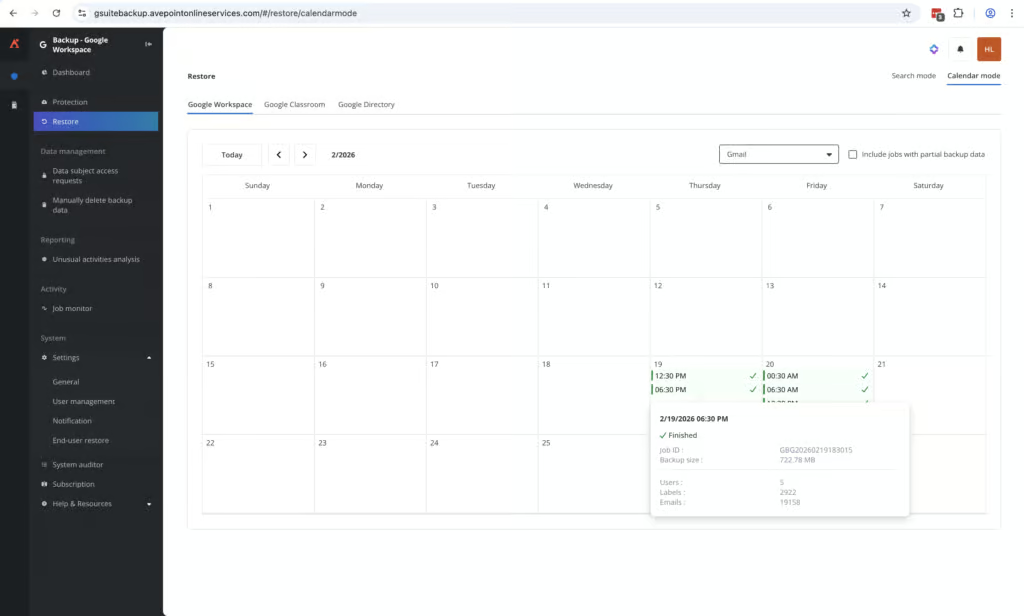
Resilience is a major strength. The Job Monitor section is one of the easiest we used, with the most customization. You can view individual tasks and filter for failures, in-progress tasks, and completed jobs, then drill down into each and generate an exportable report.
Customizable alerts can be configured for backups, restores, exports, and other activities. Alerts correctly notified us when actions were completed. When Google Chat backups failed during testing, this was immediately visible in the dashboard and via email notification. We were able to generate a detailed report on the failure explaining why Chat backups were not completing.
AvePoint also offers detailed activity reporting for Shared Drives and Drives, which can help identify suspicious changes that may indicate a compromise. Backup exclusion rules can be configured to exclude up to 100 labels or folders, reducing the risk of backing up unwanted or potentially harmful content.
You can trust AvePoint in a high-stress incident: there is a bulk restore capability, easy selection of restore points, customizable alerts, and an excellent UI for monitoring recovery progress.
Backups are immutable by default. Authorized admins can request deletion of backup data, and customer-owned WORM storage is available.
AvePoint monitors for suspicious behaviors rather than traditional signature-based malware scanning. It looks for patterns such as mass file encryption, bulk deletion of files, or suspicious admin activity. The system needs at least 12 days of successful backups to establish a baseline. Snapshots are color-coded: green indicates safe restore points, yellow flags unusual activity, and red marks potential ransomware-affected backups.
Backup Health
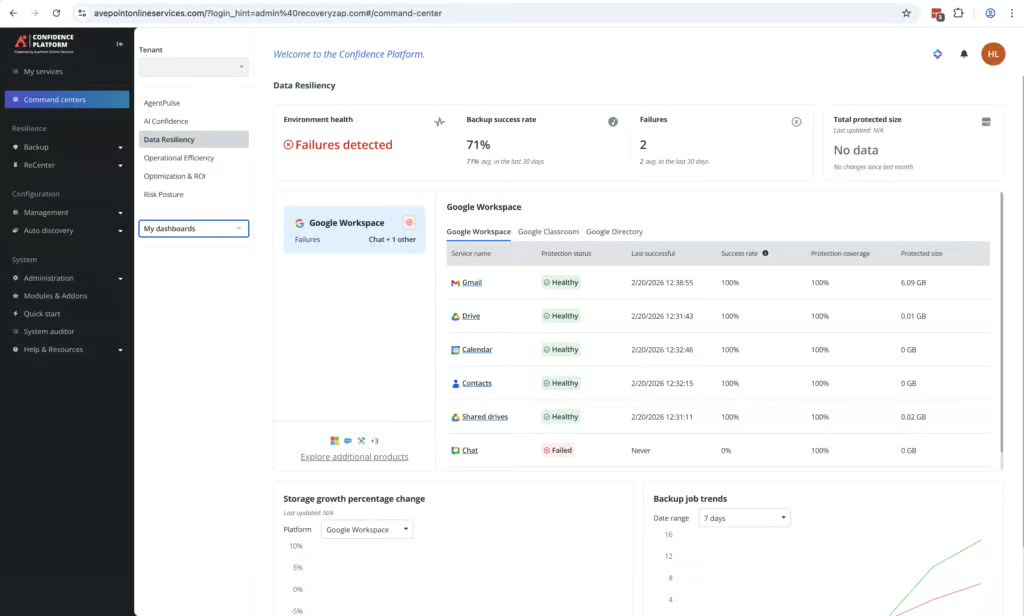
Backup health monitoring is exceptional and the best of any product we tested.
When Google Chat failed to back up during testing, this was clearly visible in the dashboard. It was impossible to miss, as it had a large red X over the Google Chat status. We also received a failed status email notification. Drilling down further revealed how long backups had been failing, and we could generate an exportable .xlsx report on the failure with a direct link to the relevant knowledge base article.
Every Job ID (backups, restores, deletes, and other operations) can be viewed individually. Reports can be generated and downloaded locally for each job. Real-time and scheduled alerts are customizable, so the correct administrators receive the information required to stay on top of any issues.
This level of detail in backup health reporting was not matched by any other product in the comparison.
Governance and Security
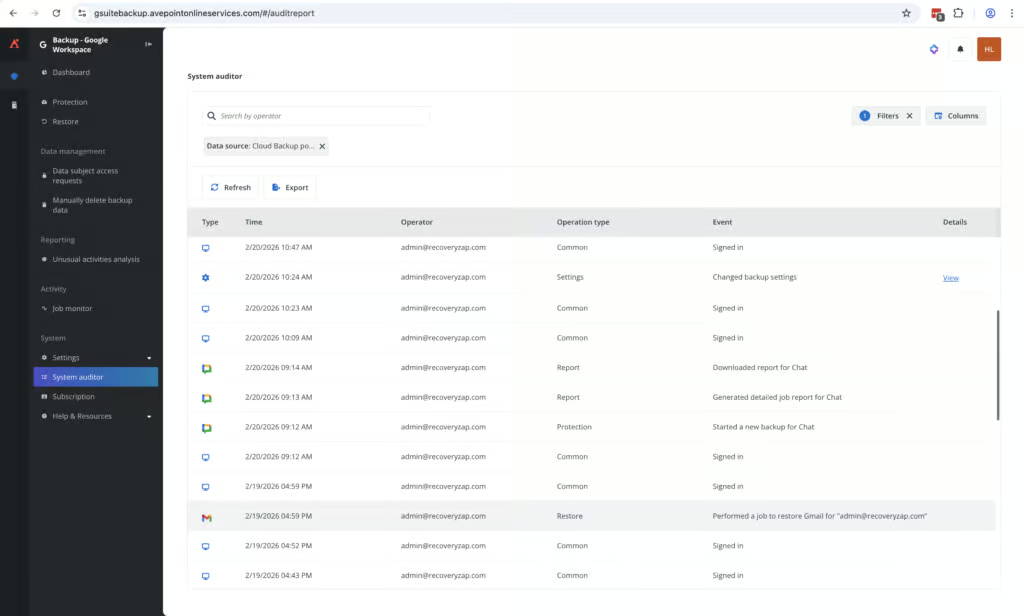
Governance again is the strongest of all platforms tested, offering a high level of granularity around logging, auditing, and exporting.
| Public API available | ✓ |
| Multi-Tenancy | ✓ |
| Reporting / Alerts | ✓ |
| Automatic mailbox / site / etc onboarding | ✓ |
| Bulk enable / disable backups | ✓ |
| Self-service recovery | ✓ |
| Audit Logs | ✓ |
| Role-based access controls | ✓ |
| Data encrypted at rest and in transit | ✓ |
| Supports bring-your-own storage | ✓ |
| E-discovery / legal hold | ✗ |
| Data Center Regions | US, UK, EU, Japan, Korea, Singapore, UAE, Qatar, South Africa |
| Data Center Infrastructure | Azure, AWS, Google Cloud Platform |
| Maximum retention period | Unlimited |
The System Auditor provides clear visibility into all actions performed within the portal, including what action was taken, where it occurred, and which user performed it. Audit logs are retained for three years, have granular filters, and can be bulk exported with up to 12 months of history at one time. You can schedule bi-weekly reports that show overall system health, including backup status, restores, and retention.
When it comes to role and permissions management, you can limit administrators to individual workloads or containers. AvePoint is one of the few products we tested that allows in-house deletion of individual backup records; typically, this requires contacting vendor support. Afi added a similar approval-based feature in July 2026.
As a test, we changed the backup coverage so that mailbox trash items were no longer backed up. This change was correctly recorded in the Auditor tab with timestamp, user identity, and action detail, and could be exported.
MFA can be enforced tenant wide. Password change policies can be configured. Access to the application is tightly controlled. AvePoint supports BYOK and BYOS, and data is stored on Azure, AWS or Google Cloud with multiple geographic location options.
AvePoint is SOC 2 and ISO 27001 certified, with clear GDPR documentation and well-implemented right-to-erasure workflows. There are 21 different locations for data residency.
Commercials
Pricing isn't listed on AvePoint’s website, but its UK G-Cloud listing shows Cloud Backup for Google at £2.65 per user per month, with a 500-user minimum and a 12-month term. Classroom costs an extra £0.85 per user.
Pricing
| Free plan available | ✗ |
| Trial available | ✓ |
| Seat-based pricing option | ✓ |
| Storage-based pricing option | Not Public |
| Starting Price (user / month unless otherwise noted) | £2.65/user/month (UK G-Cloud listing; 500-user minimum, 12-month term) |
| Higher Tier Pricing | Not public |
Support was first-class. During the trial, a dedicated technical manager reached out and answered questions in great depth. The knowledge base is very text-heavy but detailed and up to date. The AI chatbot in the portal answered the majority of questions accurately and pointed to the right knowledge base articles when it could not.
AvePoint offers a unique support feature: you can invite a support team member by creating a temporary support account that gives them direct access to your environment, which we had not seen in any other product.
Support
| Email support | ✓ |
| Phone support | ✓ |
| Chat support | Limited - chatbot |
| Web support portal | ✓ |
| Support hours (normal priority) | 24 hours |
| First response SLA (normal priority) | 24 hours |
World phone support coverage is available, along with a highly detailed set of support options.
Editor's Score
AvePoint is the most in-depth and complete backup solution we tested. We liked the UI, the speed of initial backups was very quick, and a full mailbox restore was good. The control you have over RBAC is extremely impressive, limiting administrators to individual workloads/containers is a level of control that is unmatched.
Access to the application itself can be highly regulated with enforced MFA, password changes, etc. It's one of the few products that allow in-house deletion of single files; this is usually something admins have to contact support about.
Overall, the application is incredibly impressive. The granular search isn’t the cleanest and feels a little clunky, but the fetching of data is very fast. The main caveat for us is the set-up: it's not the easiest and would require some technical ability or experience. As for who this product is aimed at, its focus is clearly enterprise companies that require a solution that has deep integration capability.
The level of detail you can get into with this solution is at the very top level of what is on offer. If you're a large company wanting total control of your data (where it’s stored, who has access, etc.), this is the product for you.
Who this is for: Enterprise organizations that need deep control over backup policies, storage locations, retention, and data governance. Well suited for multinational organizations with complex compliance requirements. Education-sector organizations will benefit from Classroom and Forms support combined with privacy-focused recovery.
Who should look elsewhere: SMBs, MSPs, or any organization that needs a quick, simple backup solution. If deployment speed and ease of use are priorities, consider CloudAlly, SpinOne, or Spanning instead.
Read the full review
Enter your work email to unlock the full review.
Check your email
We sent a 6-digit code to . Enter it below to continue.