
Datto SaaS Protection Review

Tested March–April 2026. Updated October 2026.
The Bottom Line
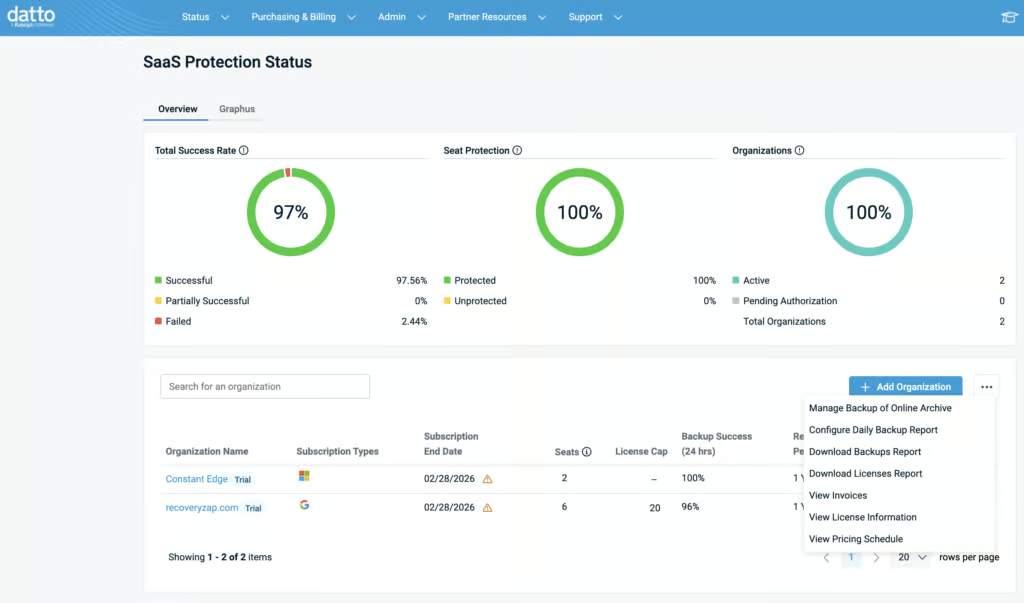
Datto SaaS Protection is a purpose-built MSP backup solution for Google Workspace. The portal is designed around managing multiple client tenants, with licensing, billing, and support ticket management all accessible from a single interface. Backups run three times per day, coverage is solid for the core workloads, and actual backup and restore operations are fast. Datto needs to be viewed at a higher level as part of Kaseya – it is not just a backup solution but a tool for MSPs to manage their clients’ broader security environment. Datto is best suited for MSPs who want a reliable, trustworthy product to manage their clients’ Google Workspace backups alongside the broader Kaseya ecosystem.
Overall Rating Summary
Read our Google Workspace testing methodology to learn more.
Pros
- Simple five-step onboarding process
- Three daily backups with easy snapshot selection
- Fast actual backup and restore speeds
- MSP-focused portal with multi-tenant management for licensing, billing, and support
- Tenant-wide search capability
- Two-factor authentication enforced on account creation
- Activity logs are fully exportable as CSV
Cons
- No real-time alerting – daily report only, set at the partner level
- No Google Chat, Forms, or Classroom backup
- Retention is tenant-wide only with no per-user or per-group customization
- Limited granular search filtering for specific emails
- Cannot preview selected emails
- No bulk mailbox restore
- Dashboard is minimal and errors require digging in activity logs to find
Datto is designed first and foremost for one audience: MSPs. The portal is designed for managing multiple client environments, with capabilities for licensing, payment methods, invoices, and support tickets across all tenants. This sets Datto apart from most products we tested and is a genuine strength for MSP operations.
For teams purchasing directly, the experience is more limited. The dashboard is minimal, errors are not immediately visible without digging into the activity log, and there is no real-time alerting.
Retention can only be set at the tenant level (day, month, year, or unlimited), with no per-user or per-group customization. The UI works well but is not simple to use, and the portal can feel slow when navigating between sections.
Datto SaaS Protection backs up all core Google Workspace workloads outside of Google Chats. There is no expansion of coverage to Forms or Classroom, though it does back up the resulting response spreadsheets from Google Forms, which is standard practice. All workloads were auto discovered and protected after the initial onboarding. Backups run three times per day.
How We Tested Datto SaaS Protection
We applied a standard testing methodology across all vendors. We looked at deployment, data coverage, retention policies, recovery capabilities, resilience, backup health monitoring, governance and security controls, commercial considerations, and an overall editorial verdict.
We timed deployment, time taken to backup, and full mailbox snapshot restores (cross-user and same-user). We also ran single-item restores and tested search functionality.
All testing was conducted in a dedicated Google Workspace environment with the following configuration:
- Domain: recoveryzap.com
- Licensed users: 6 (5 active, 1 suspended)
- Approximate data volume: ~10 GB across Gmail, Drive, and Shared Drives
- Workloads tested: Gmail, Google Drive, Shared Drives, Calendar, Contacts
- Platform tested: Datto SaaS Protection
The same environment and data set was used for all 11 vendors to ensure a fair, like-for-like comparison. You can read our full testing methodology here.
Deployment
Onboarding is a simple five-step process, and everything is clearly labelled. It’s easy to follow and easy to onboard new customers.
Backups start automatically after onboarding, and new users can be auto-discovered and auto-protected. The retention period is set during onboarding at the tenant level. Once the initial backup completes, the product is functional and reliable.
The main challenge we had is that there’s not much visibility during the initial backup. There is no progress bar, so you are left in limbo – it is unclear whether the initial backups are still running or if there has been an error.
MSPs can choose to give access at either the organization or partner level. Admin permissions are required twice: once when connecting the tenant and again when downloading the application from the Google Store. Overall, the setup itself was straightforward and pain-free.
Coverage
Workloads Covered
| Gmail | ✓ |
| Drive | ✓ |
| Calendar | ✓ |
| Contacts | ✓ |
| Shared Drives | ✓ |
| Sites | ✗ |
| Chats / Hangouts | ✗ |
| Classroom | ✗ |
Once deployed, coverage is similarly solid for the core workloads. Datto provides good coverage with support for Gmail, Google Drive, Shared Drives, Calendar and Contacts. There is no coverage for Google Chat, Google Forms or Classroom, though the resulting response spreadsheets from Google Forms are backed up.
Users who are already suspended aren't supported for backup, but previously protected users who are later suspended keep their backup history, although scheduled backups stop. Backups run three times per day, which provides good recovery point granularity. All workloads were automatically discovered and backed up after we deployed the platform.
Retention
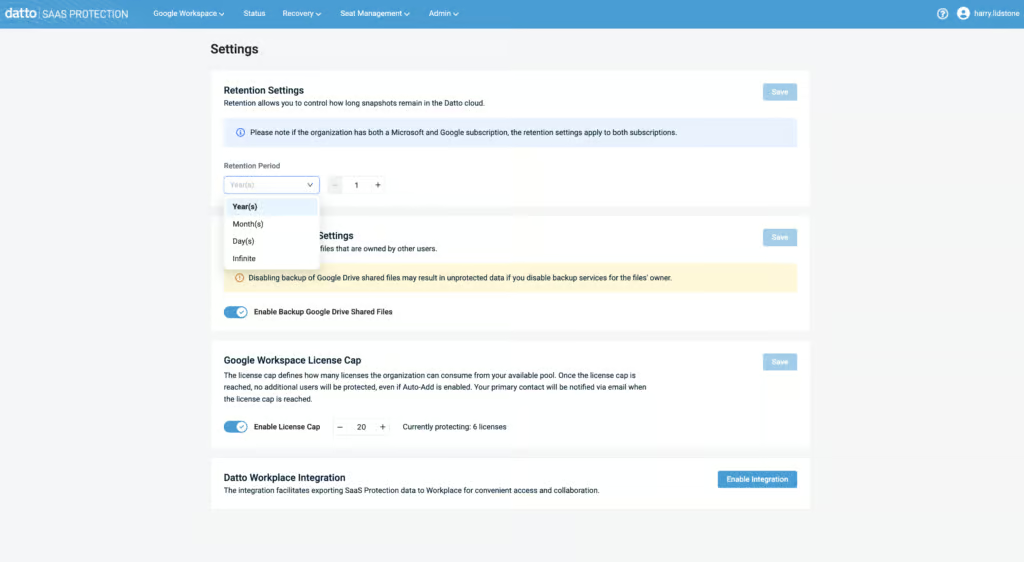
Once those workloads are being backed up, the question becomes how long they’re kept — and here Datto’s MSP focus shows again. Datto offers solid retention controls that will fit the needs of most MSPs. It is easy to manage across different customers, as the UI and solution are MSP-focused.
However, Datto does lack the granular customization that other solutions offer. For example, you cannot specify retention periods for individual workloads or users – retention can only be set tenant-wide from days, months, years, or unlimited.
On the positive side, if a user leaves and their mailbox is suspended or deleted in Google, the mailbox in Datto SaaS Protection is converted to an archived mailbox. No future backups are taken, but existing data is kept and recoverable, subject to the retention policy and licensing. Older recovery points are thinned over time: up to three daily backups are kept for 30 days, then daily, weekly and monthly points.
We tested recovering mail from a suspended mailbox, and it worked as expected — though it’s worth noting that everything other than Shared Drives is billable, including archived mailboxes.
For MSPs, the simplicity of tenant-wide retention is very beneficial.
Recovery
Datto offers strong recovery controls, but there are some limitations, particularly around granular search capabilities.
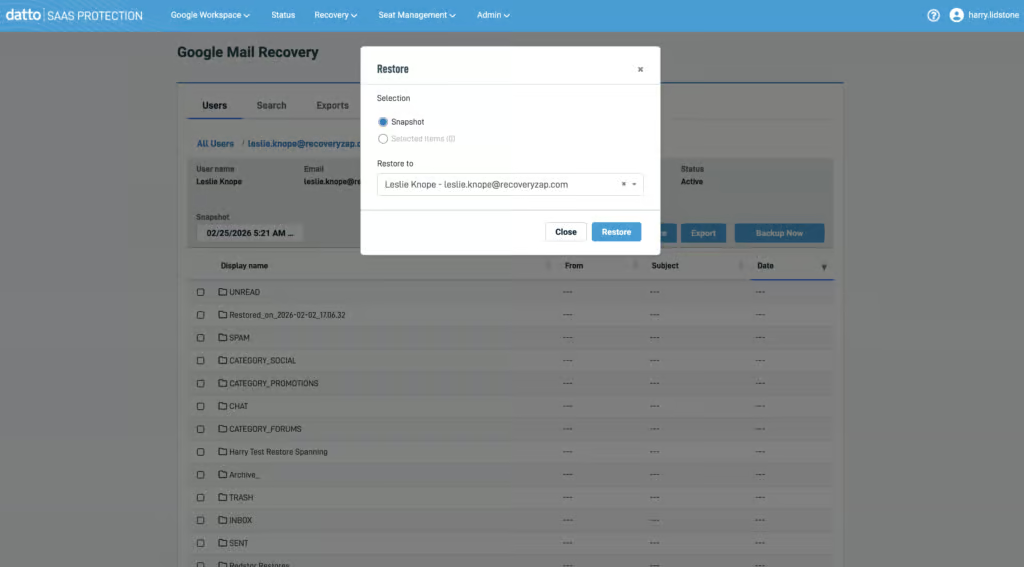
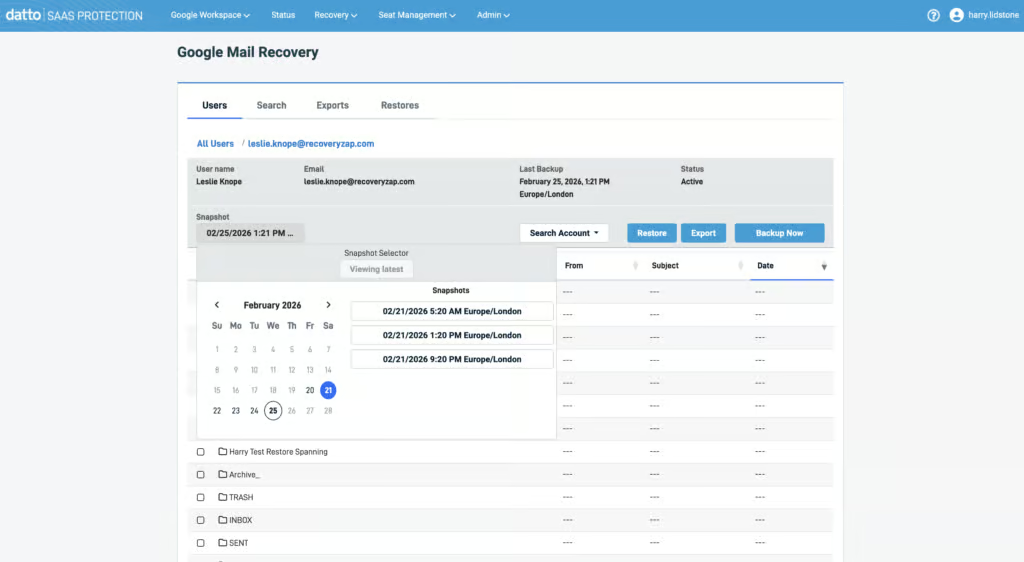
Locating a mailbox to restore was extremely simple. The UI isn’t cluttered, and you can initiate a mailbox restore in just four clicks. Snapshots are easy to select from, and three daily backups provide good granularity for picking a recovery point.
The solution seems to prioritize full mailbox restores over granular search. There is tenant-wide search capability, but the filtering is very limited for pinpointing a specific email. You cannot preview a selected email. But when we did find and restore a single item, the recovery of mailboxes and single items were fast.
There are some quirks that take some time to learn. For example, when you restore a mailbox, it appears in a new dedicated folder. The platform does not tell you this – you only discover it by checking the destination mailbox.
There were failures in a mailbox restoration that were only visible when we exported the activity log; the errors were not visible in the admin console itself. Cross-user restore is supported within the same tenant, but there is no cross-tenant restore capability.
Resilience
Recovery covers the everyday restore experience; resilience is about what happens when something goes badly wrong.
Datto is a safe and secure platform with flexibility for recovering data. Three backups are taken every day which provides good coverage in case there is a serious incident, like ransomware. It’s very easy to restore from a specific snapshot.
Restoring everything after an incident has to be done manually, one user or Shared Drive at a time. In our testing, we were also unable to bulk restore multiple items within a single mailbox, or restore multiple items across multiple mailboxes.
There are no additional security controls for admins to perform restores once they are logged into the admin console. Some solutions we’ve tested require multiple admins to approve restore actions.
The lack of individual mailbox bulk recovery could be painful during large-scale incidents, but Datto offers a Business Continuity and Disaster Recovery system that can also be used alongside this platform.
Backup Health
Datto provides a good level of backup health monitoring, though we’d like to see more detail presented at a glance in the admin console.
There is a status page within the dashboard, but there’s not a huge amount of detail provided on specific backups. To get more detail, you have to navigate to the reporting tab, which would be better described as an Activity Log. Reports are exportable as CSV.
During testing, we found an error in a backup item, but the backup health indicator didn’t show any issues. That said, the error message provided useful information about why the failure may have occurred and suggested contacting support if it persisted.
You can set up a daily report, which is emailed once per day, but this can only be set at the partner level, not to individual customers. There is no real-time alerting, and you cannot configure custom alerts. Kaseya says admins are notified when a job fails, but we didn't see this in testing.
Overall, we’d describe the backup health monitoring as a good high-level overview for MSPs to check each client is being protected as intended.
Governance and Security
That high-level view extends into Datto’s governance and reporting capabilities, which are similarly MSP-oriented. Datto provides solid governance capabilities for MSPs. When it comes to reporting, you can generate a summary report with data displayed in bubble and bar charts.
| Public API available | ✓ |
| Multi-Tenancy | ✓ |
| Reporting / Alerts | Daily report only (set at partner level); no real-time alerts |
| Automatic mailbox / site / etc onboarding | ✓ |
| Bulk enable / disable backups | Limited - only via CSV import |
| Self-service recovery | ✗ |
| Audit Logs | ✓ |
| Role-based access controls | Limited - roles mainly for portal access and MSP staff; read-only for end users |
| Data encrypted at rest and in transit | ✓ |
| Supports bring-your-own storage | ✗ |
| E-discovery / legal hold | ✗ |
| Data Center Regions | US, EMEA, AU, Canada, Singapore, UK |
| Data Center Infrastructure | Independent data centers |
| Maximum retention period | Unlimited |
Reports can be filtered by date, event, status, and user in a granular way. It correctly showed the admin actions we took when performing a restore, with all the correct metadata. The log is fully exportable.
Roles within the backup tabs are limited and mostly focused around MSP capabilities. The assignable roles are primarily for portal access and managing MSP employees’ access. Read-only access can be enabled for end users, but there is nothing more granular.
Two-factor authentication is enforced on account creation.
Commercials
Pricing
| Free plan available | ✗ |
| Trial available | ✓ |
| Seat-based pricing option | ✓ |
| Storage-based pricing option | User licenses include 60GB average storage; excess storage is billed |
| Starting Price (user / month unless otherwise noted) | Not public |
| Higher Tier Pricing | Not public |
Datto’s pricing structure is built around MSPs. Each licence includes an average of 60GB of storage, with excess storage billed, and standalone subscriptions use a committed minimum quantity model. You can manage licenses, payment methods and invoices for all tenants directly from the admin console, which is helpful.
Support
| Email support | ✗ |
| Phone support | ✓ |
| Chat support | ✓ |
| Web support portal | ✓ |
| Support hours (normal priority) | 24 hours |
| First response SLA (normal priority) | 24 hours |
There is plenty of support capability available, including phone numbers for North America, Europe, and Asia, as well as individual numbers for each Kaseya product.
However, we could not find an obvious option to submit a support ticket within the UI, which may be a limitation of the trial. We did eventually find the ticket submission page, but it appeared to be for another product, and our ticket was redirected. If the matter is urgent, there is a 24/7 support line. There is also a virtual assistant chatbot.
One thing we haven’t touched upon much is that Datto is part of Kaseya’s wider MSP platform, it’s not just a standalone backup solution. The commercials tie into this, as the platform is designed to be used alongside other tools. For example, some support features will require KaseyaOne, which ties support access into the broader Kaseya ecosystem.
Editor's Score
Pulling all of this together: Datto SaaS Protection is a reliable, trustworthy product that does the job well for its intended audience: MSPs. The multi-tenant management capabilities for licensing, billing, and support set it apart from most products we tested and represent a genuine advantage for MSP operations.
Backup and restore speeds are fast, three daily backups provide good recovery point granularity, and the product is backed by Kaseya’s infrastructure.
There are some limitations. Backup health reporting in the dashboard is minimal, errors are hidden in activity logs, and there is no real-time alerting. The portal can feel slow, and the granular search is limited. But for MSPs who want a trustworthy, integrated product for managing their clients’ Google Workspace backups, Datto delivers.
Who this is for: MSPs who want a trustworthy, integrated product for managing their clients’ Google Workspace backups. The multi-tenant management capabilities make Datto uniquely suited to MSP operations within the broader Kaseya ecosystem.
Who should look elsewhere: Teams purchasing directly who need real-time alerting, granular search, or per-user retention.
Read the full review
Enter your work email to unlock the full review.
Check your email
We sent a 6-digit code to . Enter it below to continue.