
SpinOne for Google Workspace Review

Tested March–April 2026. Updated October 2026.
The Bottom Line
SpinOne is a security platform for Google Workspace, protecting Gmail, Drive, Shared Drives, Calendar, Contacts, and Chats. As well as backup, SpinOne provides auditing, policy enforcement, and ransomware detection. The security and governance controls are among the strongest of any products we tested. It is best suited to security-conscious SMBs and smaller enterprises that want backup and Google Workspace visibility in a single platform.
Overall Rating Summary
Read our Google Workspace testing methodology to learn more.
Pros
- Deploys in under five minutes
- Real-time alerting for backups, restores, downloads, and deletions
- Ransomware detection with automatic restore to a safe backup (SpinOne and SpinBackup Enterprise tiers)
- Customizable security policies for unusual activity detection
- Storage location and retention configurable per organizational unit
- Full mailbox restore possible in under five clicks
- Supports Google Chat and Spaces backup
Cons
- No bulk restore capability for multiple mailboxes
- Granular search - but no per-mailbox search, only cross-tenant
- Unlicensed mailbox data is deleted after just seven days
- Suspended Google Workspace mailboxes are not auto-discovered
- MFA cannot be enforced by the admin – users must enable it themselves
- Relatively expensive pricing for the backup component
SpinOne is more than a backup product. It combines Google Workspace backup with auditing, security policy enforcement, and ransomware detection. The backup component covers all the main workloads: Gmail, Drive, Shared Drives, Contacts, Calendar, and Chat.
The product’s security capabilities are a genuine differentiator. Customizable policies can detect unusual activity, enforce password changes, and suspend users. Ransomware detection can automatically restore affected files to a previously safe backup. These are capabilities that go well beyond what most backup-only products offer.
Where SpinOne stands out is the combination of solid Google Workspace backup with all major workloads covered, immutable storage, comprehensive real-time alerting, customizable security policies, and ransomware detection. For security-conscious organizations or teams with strong compliance requirements that want backup and visibility in one platform, this is a very strong product to consider.
How We Tested SpinOne
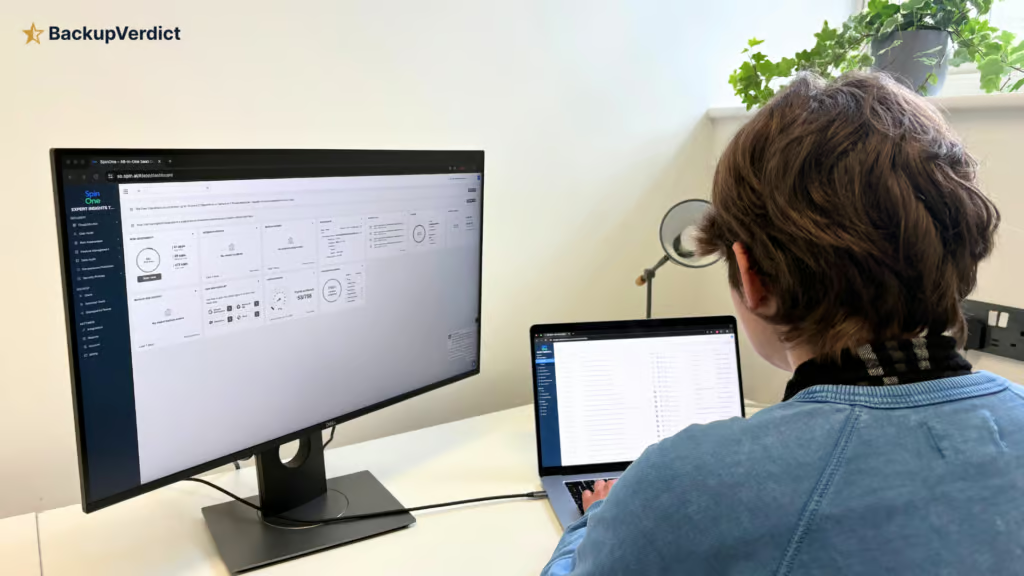
We applied a standard testing methodology across all 11 GWS backup providers, including SpinOne. We looked at deployment, data coverage, retention policies, recovery capabilities, resilience, backup health monitoring, governance and security controls, commercial considerations, and an overall editorial verdict.
We timed deployment, time taken to backup, and full mailbox snapshot restores (cross-user and same-user). We also ran single-item restores and tested search functionality.
All testing was conducted in a dedicated Google Workspace environment with the following configuration:
- Domain: recoveryzap.com
- Licensed users: 6 (5 active, 1 suspended)
- Approximate data volume: ~10 GB across Gmail, Drive, and Shared Drives
- Workloads tested: Gmail, Google Drive, Shared Drives, Calendar, Contacts, Chat
- Platform tested: SpinOne
The same environment and data set was used for all 11 vendors to ensure a fair, like-for-like comparison. You can read our full testing methodology here.
Deployment
Deploying SpinOne to a Google Workspace tenant was painless and caused no confusion. The process followed Google OAuth and Marketplace setup, which is typical for many backup platforms.
After finishing OAuth, we were prompted to choose a data storage location and which Google services to back up. No external documentation was needed. The entire setup from account creation to first backups took less than five minutes.
Once connected, the only additional step was to enable backups for the users. This was completed quickly without needing to consult a guide. The portal is intuitive, and it is easy to see which workloads are currently protected and to assign or deactivate licenses.
Coverage
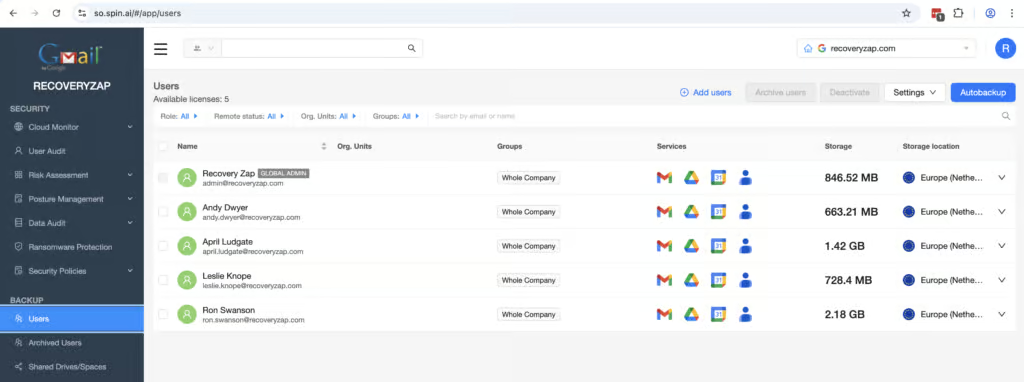
SpinOne covers all of the main GWS services, including Gmail, Google Drive, Google Spaces, Google Calendar, and Contacts. Shared Drives and Chats can also be enabled with a simple toggle. Chat and Spaces backup are rare to see; in our testing we only saw AvePoint and Afi also back up Chat.
Workloads Covered
| Gmail | ✓ |
| Drive | ✓ |
| Calendar | ✓ |
| Contacts | ✓ |
| Shared Drives | ✓ |
| Sites | ✗ |
| Chats / Hangouts | ✓ |
| Classroom | ✗ |
Archived users were not available in our trial, but they are supported. An archived license is required for offboarded or deleted users; otherwise, data is removed after seven days.
Auto discovery isn’t on by default, but policies can be created within the application for this to take place. These customizable policies can be assigned to groups, so different groups can have different storage locations and can be automatically backed up. The metadata captured is comprehensive.
Shared drives had to be set up separately. Spam and trash are also not backed up automatically; they have to be toggled on. These extra configuration steps are minor friction rather than major coverage gaps.
Retention
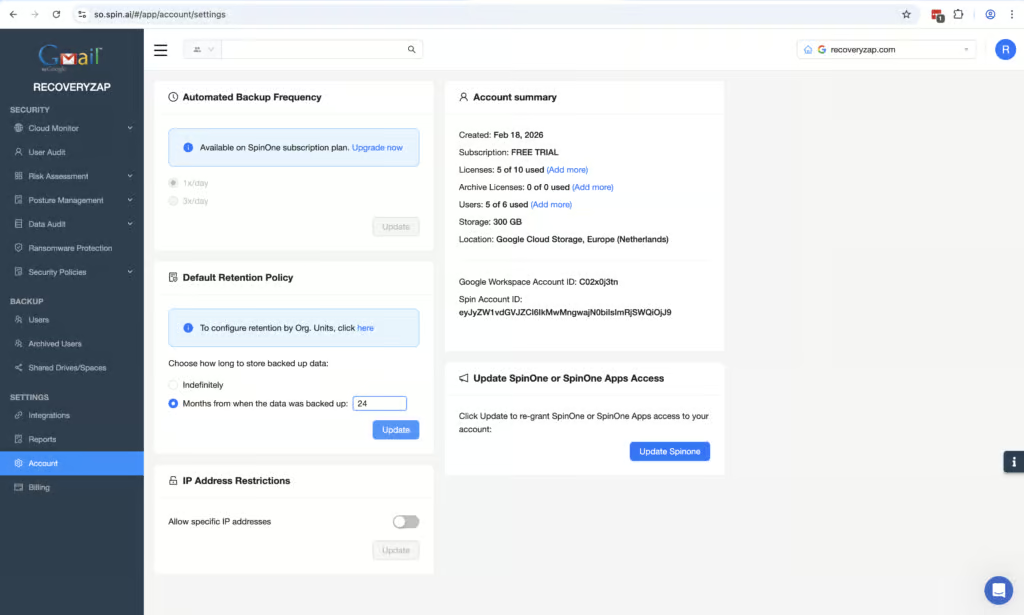
SpinOne offers excellent retention policies and controls. You can customize the data residency location and retention lengths for different groups and different users. Retention periods are customizable from a minimum of six months up to forever. Storage locations can be configured per group across AWS, GCP, and Azure, and bring-your-own-storage is supported.
The main weakness is the handling of unlicensed accounts. If a backed-up user has their license removed in SpinOne, previous backups become inaccessible. The mailbox must be assigned either an archived or standard license to access the data.
Unlicensed mailboxes are deleted after just seven days, which is significantly more aggressive than most competitors. Active license management during offboarding is essential. Suspended mailboxes in Google Workspace are not discovered during tenant onboarding. If a user is already suspended before you deploy SpinOne, their data will not be captured.
You can create granular security policies for retention but be aware this will require you to study the documentation just because of the sheer level of customization available.
Recovery
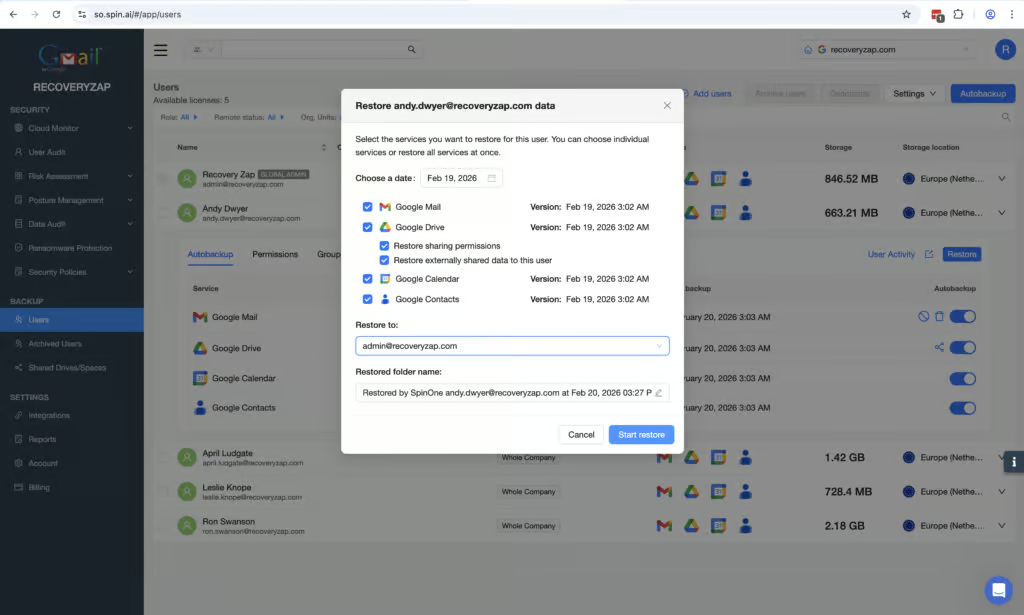
Restoring a complete mailbox is very easy and possible in under five clicks. The UI is clearly labeled, and the calendar view makes selecting a restore point straightforward. The full mailbox restore (17,000 items, 660 MB including contacts and calendar) completed with no problems. Data can be restored to the same mailbox or another on the tenant, which is helpful.
The granular search is functional but feels clunky. You can’t perform a granular search inside a selected mailbox, it only allows for a cross-tenant search. Results can be filtered to show mail sent to or from designated users within a customizable timeframe. Search filters include subject, sender, and recipient. You cannot search the email body, which is something to be aware of. We found the search results to be fast, and selecting a mailbox to restore to and a data version is simple.
There is no bulk restore capability, which is a limitation. While the speed of individual full mailbox restores partially mitigates this, it means that recovering multiple mailboxes during a large-scale incident is more time consuming than a bulk tool.
Self-service access is well implemented. You can allow end users to download or restore their own data without giving them broader administrative rights.
A full mailbox restore in under five clicks is impressive, but the absence of bulk restore is what keeps this section at 8/10.
Resilience
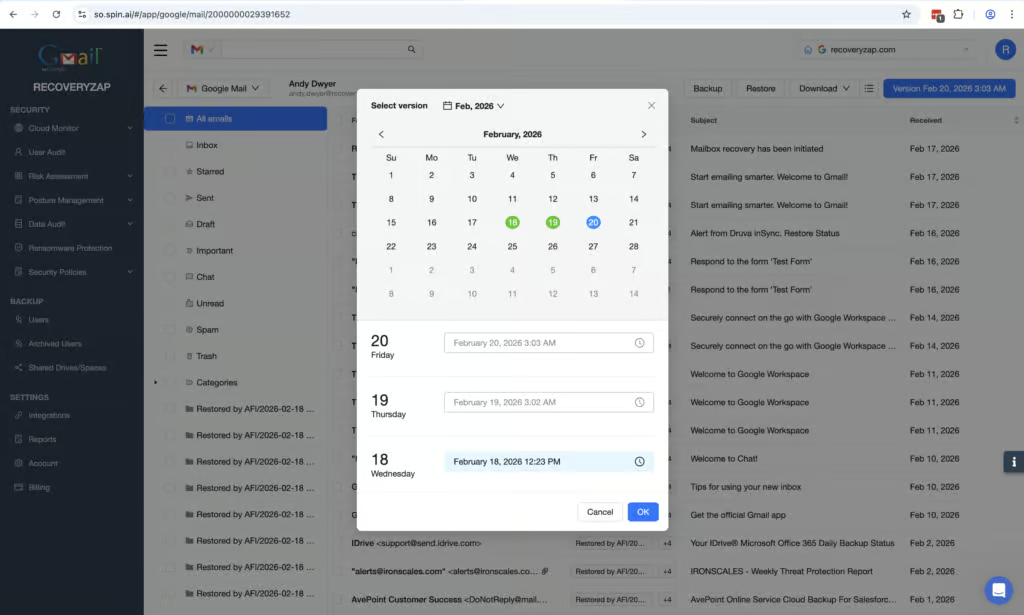
Locating restore points is easy using the calendar view. Customizable policies can be created for suspicious activity on the application, including the ability to enforce password changes and suspend users. Ransomware detection, included in the SpinOne and SpinBackup Enterprise tiers, can automatically restore affected files to a previously safe backup, which is a meaningful capability for incident response scenarios.
Ransomware auto-restore to a known-good backup is a genuine resilience capability, but with no bulk recovery and no additional checks once an account has restore permissions, the overall posture earns a 7/10 rather than higher.
Security policies can be configured to control who can restore and download data. Once an account has the appropriate permissions, there are no additional security checks when initiating a restore, export, or download.
Backup Health
SpinOne has excellent reporting capabilities. Alerts can be sent in real time when actions take place, when restores, downloads and deletions start and finish. A wide range of security policies can also be customized to report suspicious activity.
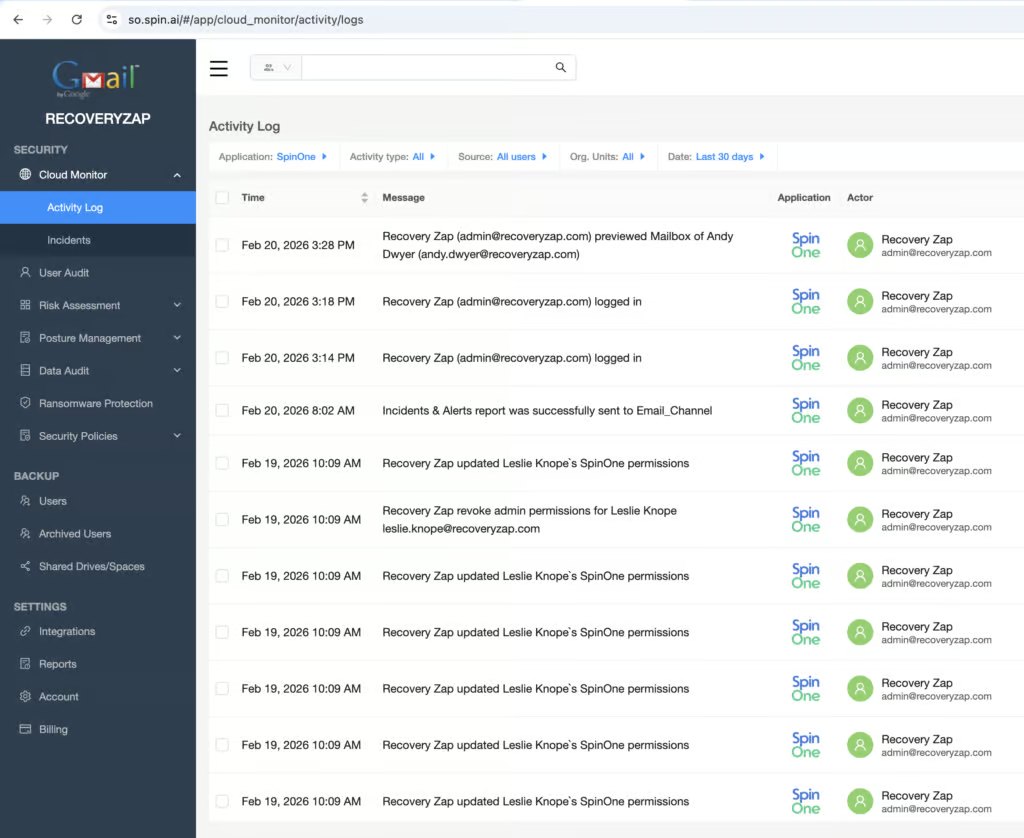
The dashboard displays data well, though the amount of information on display can be overwhelming. The activity log contains actions from both Google Workspace and SpinOne, so filtering is required to show only SpinOne backup activity. Logs can be exported to Excel or CSV.
Real-time alerts on every restore, download, and deletion are among the strongest implementations in this comparison. The missing point reflects the noise from combined auditing and backup logs — errors could get lost without filters applied.
Governance and Security
| Public API available | ✓ |
| Multi-Tenancy | ✓ |
| Reporting / Alerts | ✓ |
| Automatic mailbox / site / etc onboarding | Limited - can enable automatic onboarding via a security policy. Not turned on by default. |
| Bulk enable / disable backups | ✓ |
| Self-service recovery | ✓ |
| Audit Logs | ✓ |
| Role-based access controls | ✓ |
| Data encrypted at rest and in transit | ✓ |
| Supports bring-your-own storage | ✓ |
| E-discovery / legal hold | eDiscovery and legal holds are available with the Enterprise offering |
| Data Center Regions | US, AU, Singapore, EU, UK |
| Data Center Infrastructure | AWS, Azure, Google Cloud Platform |
| Maximum retention period | Unlimited |
SpinOne is strong when it comes to governance and security. The platform supports both MFA and IP address restrictions, along with custom security policies that monitor for unusual activity. You can even apply automatic actions when suspicious activity is detected, from email notifications to enforcing password changes.
The main limitation is that MFA cannot be enforced by the admin across all accounts; each user must enable it themselves. The activity log retention is maintained until the account is deactivated. The combined nature of the audit and backup logs means filtering is necessary to isolate backup-specific governance data.
Data is encrypted both in transit and at rest. The platform supports GDPR compliance, including the right to erasure. SpinOne is not ISO 27001 certified, does not support BYOK encryption, and is not FedRAMP compliant.
Assigning permissions is simple – you can grant a user access to log in and restore in just three clicks, and similarly for assigning admin permissions with granular control over what they can access. The activity log accurately displays actions that have taken place and can be downloaded as CSV or XLSX.
Commercials
Pricing
| Free plan available | ✗ |
| Trial available | ✓ |
| Seat-based pricing option | ✓ |
| Storage-based pricing option | Per-user plans with extra-storage add-ons |
| Starting Price (user / month unless otherwise noted) | SpinBackup costs $36/mailbox/year, with a $5,000 annual minimum |
| Higher Tier Pricing | Not public |
SpinOne offers multiple licensing plans: SpinOne, SpinSPM, and SpinBackup, with additional add-ons for archived licenses and extra storage.
The SpinBackup plan provides 30 GB per mailbox at $36 per mailbox per year ($3 per user per month), with a $5,000 minimum annual subscription, which effectively rules out very small teams.
For organizations that only need backup functionality, the pricing is on the higher side; OpenText CloudAlly, for example, costs $30 per licensed mailbox per year.
Support
| Email support | ✓ |
| Phone support | Phone support during regional business hours |
| Chat support | ✓ |
| Web support portal | ✓ |
| Support hours (normal priority) | 24 hours |
| First response SLA (normal priority) | 24 hours |
Support was responsive during testing. The live chat answered questions within a minute, and when a question needed to be escalated to the technical team, a detailed response was received via email within a couple of hours. The knowledge base is comprehensive.
Editor's Score
We were impressed while using Spin AI, it’s an unusual product, offering auditing capability alongside backup. The combination of Google Workspace auditing, security policy enforcement, and ransomware detection alongside solid backup capabilities makes it a very strong option for security-conscious organizations. Deployment is very easy, real-time alerting is excellent, and there are strong governance controls.
The product is missing some features, like bulk restore capability. The granular security policies feature may also add complexity that some SMBs may not want. Pricing is relatively expensive for a backup-only use case.
Overall, SpinOne occupies a specific niche: a backup product for organizations that also want auditing and security policy enforcement built in. As a combined backup-plus-security platform it is very strong, with ransomware auto-restore, real-time alerting, and customizable security policies.
Who this is for: Security-conscious SMBs and smaller enterprises that want deeper visibility into their Google Workspace environment alongside backup. Ideal for organizations that value ransomware detection, unusual activity detection, and configurable security policies. Also suitable for multinational organizations needing storage and retention differentiation by region.
Who should look elsewhere: Organizations that only need a backup solution and want simplicity. Teams needing bulk restore capability should consider AvePoint. Those on a tighter budget should consider CloudAlly.
Read the full review
Enter your work email to unlock the full review.
Check your email
We sent a 6-digit code to . Enter it below to continue.