
Acronis Cyber Protect Cloud for Microsoft 365 Review

Tested March–April 2026. Updated October 2026.
Bottom Line
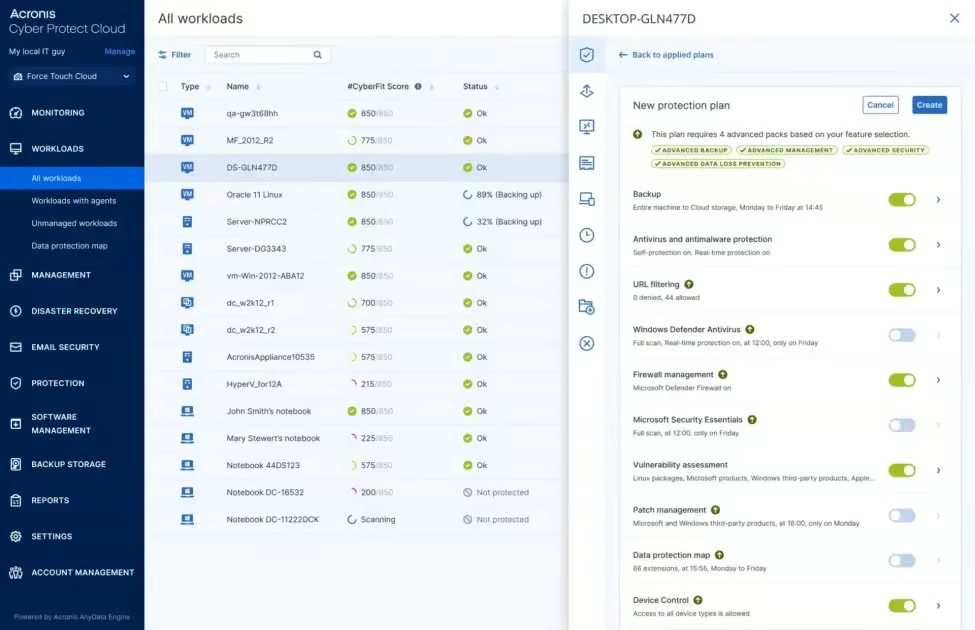
Acronis Cyber Protect Cloud is one of the best Microsoft 365 solutions we’ve tested, particularly when it comes to retention controls, resilience and coverage for M365 services. If your priorities for a backup solution are ransomware protection, granular policies and support for hybrid environments, Acronis is well worth considering.
There are trade-offs. We found the user interface takes some time to fully get to grips with. And in general, the solution is better suited to mid-to-large sized organizations and MSPs than small businesses.
We were impressed by the retention policies on offer, the resilience features to protect your backups, and the strong security controls Acronis offers. These include security features like malware scanning, and immutable storage options. Retention controls are a stand-out: you can set up to six backups per day with Acronis’ Advanced Backup and Acronis supports over 50 global data center locations across North America, South America, Europe, the Middle East, and Asia-Pacific.
Overall Rating Summary
Read our M365 testing methodology to learn more.
Pros
- Best-in-market retention policies, with up to 6 backups per day (with Advanced Backup)
- Unlimited storage for M365 backups
- Built-in malware scanning of mailbox backups (requires Advanced Security +XDR tier)
- Over 50 global data center locations — the widest data residency range of any vendor we tested
- Covers Microsoft 365 apps, on-prem endpoints, servers, Azure VMs, and more
- Support for Entra ID Backup
Cons
- Interface will take time to learn and can be complicated
- No keyword search across all mailboxes when recovering emails or files – limited to single mailbox
- No bulk restore of multiple mailboxes
- Licensing can get confusing – and the pricing here is higher than some competitors
Acronis started out in traditional enterprise backup, with an on-premises solution. You can still feel the legacy of this in the interface, which is a bit less easy-to-navigate than some of the simpler cloud-first solutions on the market, like OpenText CloudAlly.
But Acronis makes up for this with very strong coverage for Microsoft 365, covering all key applications as well as endpoints, servers, and virtual machines, making it a strong choice for organizations transitioning from on-prem to cloud or managing hybrid environments.
As we’ve mentioned, the depth of features here does add some complexity. For example, backups don’t start automatically, and granular recovery for specific items could be easier. If you’re a small team, looking for a very simple backup solution, Acronis may be more advanced than you need.
But for mid-market and enterprise organizations that are looking for ransomware resilience, granular retention control, global data residency, and long-term vendor stability, Acronis is a strong option to consider.
How We Tested Acronis
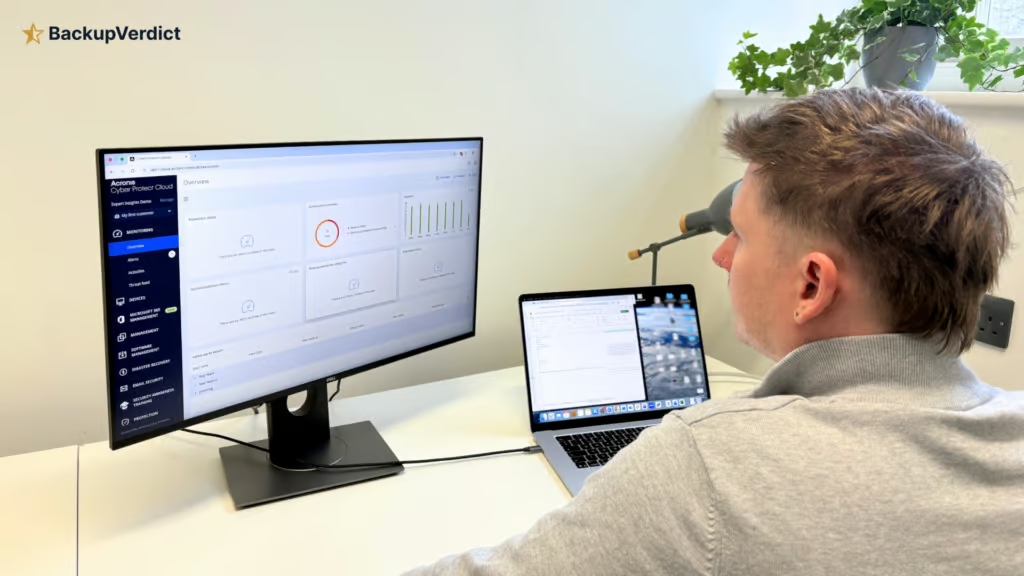
BackupVerdict conducted a fully independent granular test of Acronis. We set up the service on a clean Microsoft 365 tenant and set up a new customer account from scratch.
We measured how long it took to set up the service and detailed the steps it took to reach a successful backup. We created backups of all supported M365 applications and tested retention policies across different user groups and workloads. This even included simulating an employee departure scenario.
For testing recovery, we timed full mailbox restores and granular recoveries. We measured the time it took until this recovered content appeared back in our M365 environment. We assessed resilience by evaluating the malware scanning capabilities and security controls. We also built reports and audits to see how these work for admins.
This review was written with no commercial relationship with Acronis and is fully independent. It’s our own opinion, freely given to help you make the right backup decision.
Deployment
Ranked #2 out of 12 M365 Backup Solutions for Deployment
Deployment Options
| SaaS | ✓ |
| On-premises (for Microsoft services like Exchange, Active Directory, etc.) | ✓ |
| Hybrid cloud | ✓ |
Acronis gets a high score for deployment. It's an enterprise product with a lot to configure, but getting Microsoft 365 protected is now quick and mostly automatic.
Connecting the tenant is a single admin consent, and a backup wizard opens straight away. You choose the scope at the start: the whole organization, which covers Exchange, OneDrive, SharePoint and Teams in one plan, or individual services such as Exchange only. You then confirm the schedule, retention and an encryption password, and you're done. Setup took roughly five minutes and required no documentation.
There are two things to be aware of. Backups don't start immediately: the first run for each mailbox is scheduled at a staggered time over the following 24 hours, and the console only shows "Backup scheduled". In our test they ran between 7:22pm and 6:12am the next morning. If you need same-day protection, run Back up now. New users and changes also sync to the console once a day unless you refresh manually.
Acronis is still one of the few solutions we've tested with a separate deployment workflow for MSPs. Adding a customer in the partner portal is a four-minute wizard. The MSP can then open the customer's console and connect Microsoft 365 directly, or send the customer an activation link to do it themselves.
Deployment only needs doing once. We didn't encounter any failures, and it's easy to check everything is working once you're up and running.
Coverage
Ranked #2 out of 12 M365 Backup Solutions for Coverage
Acronis covers Exchange Online, SharePoint Online, OneDrive and Teams, including 1:1 Teams chats, channel conversations and files. Acronis also covers OneNote and supports mailboxes on litigation hold. Acronis no longer supports backup or recovery of Public Folders: when we checked in October 2026, the console flagged them as “no longer supported”.
Supported Platforms
 Exchange (Outlook) Exchange (Outlook) |
✓ |
 SharePoint SharePoint |
✓ |
 OneDrive OneDrive |
✓ |
 Teams Teams |
✓ |
 Azure VMs Azure VMs |
✓ |
 Entra ID Entra ID |
✓ |
 Dynamics Dynamics |
✗ |
 Power Platform Power Platform |
✗ |
This coverage is really strong; most backup vendors don’t support 1:1 Teams chats at the moment. We found the backups for these apps to be reliable and consistent. Entra ID backup became generally available in June 2026 and was expanded in September 2026 to cover more object types, at no extra cost. Entra ID backup plans can now include audit and sign-in logs.
Microsoft also includes a basic Entra ID backup with Entra ID P1 and P2 licenses, but it keeps only seven days of daily backups inside your own tenant. Acronis’ Entra ID backup adds longer retention and a copy held outside Microsoft.
There aren’t many gaps in coverage, although Acronis does not cover Dynamics, PowerBI, Power Platform, or Copilot. Unlicensed user mailboxes cannot be backed up.
Where Acronis really stands out though is coverage outside of Microsoft 365. Acronis supports Windows, MacOS, and Linux devices, Azure VMs, and other infrastructure workloads. This means if you’re looking for a backup provider that covers M365 alongside on-prem apps, or if you want to migrate from on-prem architecture to M365, Acronis is a really strong solution to consider.
With that said, if you just want a simple M365 backup tool for emails, files and Teams, you may find Acronis’ coverage to be more than you need.
Retention
Ranked #1 out of 12 M365 Backup Solutions for Retention
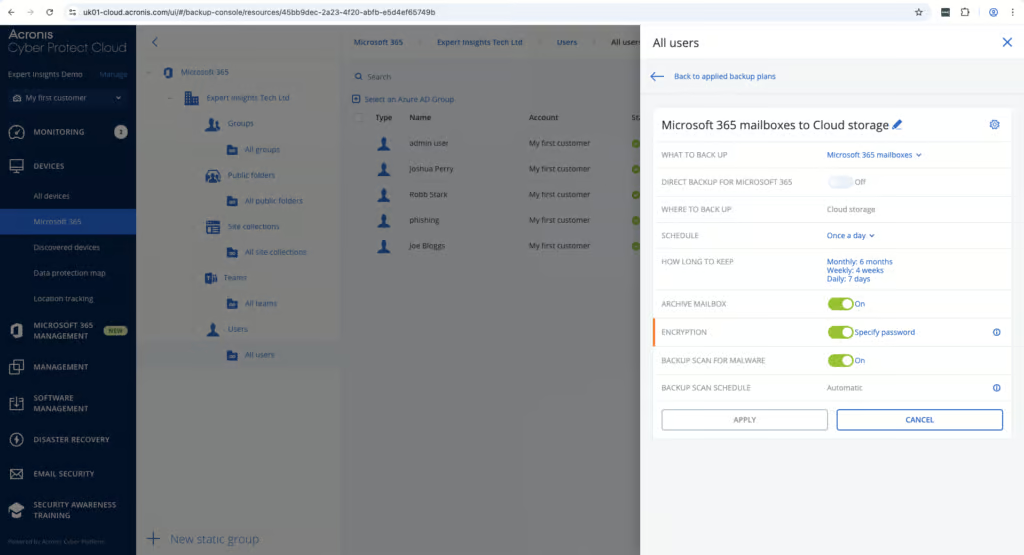
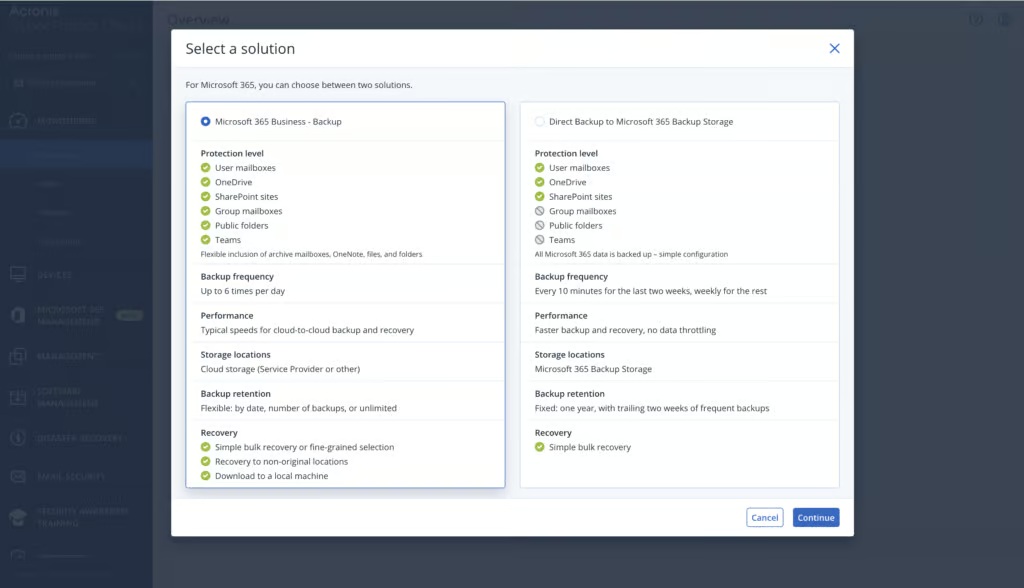
Acronis really stands out when it comes to retention policies. For example, there are highly granular frequency options available. You can choose one, two, four or six backups per 24 hours, although more than one backup a day needs Acronis’ Advanced Backup plan. The standard Microsoft 365 package backs up daily. You can also set up backups on demand.
You can easily configure how long backups are kept – whether daily, weekly, monthly or yearly, which is important for compliance requirements. As part of our testing, we created multiple different backup plans for different user groups and workloads with no issues at all.
When an employee leaves, it’s easy to restore data from an archived account over to an active user. If a user is removed from M365, their data is still available, which makes a process that can be a headache very simple.
Acronis also offers Direct Backup to Microsoft 365 Backup Storage, which uses Microsoft’s own storage. This provides a very fast option with no rate-limits when pulling data from M365. It’s a good alternative if you want a very fast backup solution, or if you need specific data residency options. There are trade-offs: there’s no granular recovery or restore to another user, retention is fixed at one year, and it covers Exchange, OneDrive and SharePoint only, not Teams.
The user interface does take a bit of time to learn, but once you’ve got the hang of things, the granularity of controls exceeds most of the other solutions we have tested on the market.
Something to be aware of is that Acronis also offers optional ‘roll-up’ backups. This feature was popular for on-premises backups where storage was a serious consideration. It means that older backups are rolled-up over time, meaning that you lose some granularity in terms of recovery points. This feature is optional and you can switch-it off if you want to keep granular daily recovery points.
Recovery
Ranked #6 out of 12 M365 Backup Solutions for Recovery
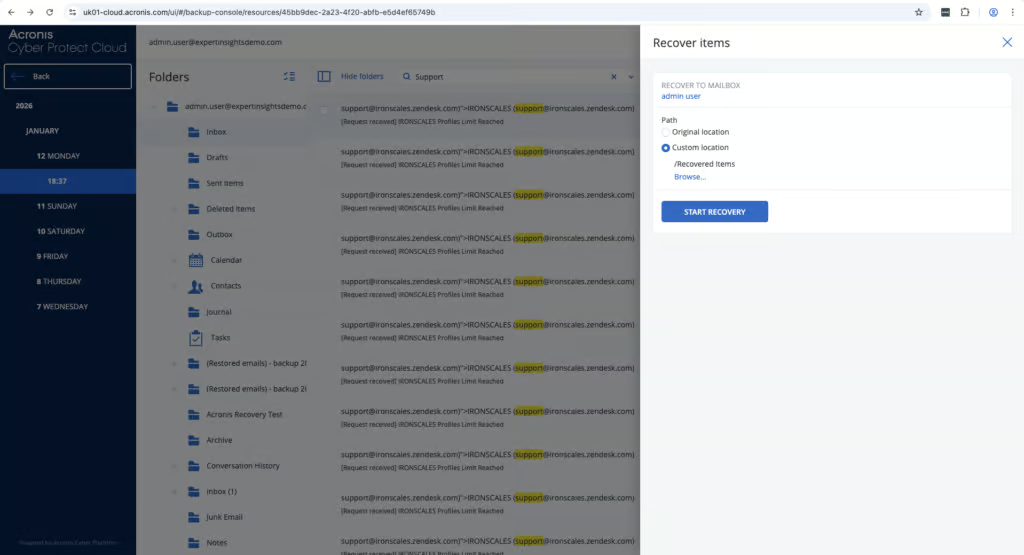
When testing Acronis, we were able to complete a full mailbox restore in under one minute. We found it to be easy to find the right backup snapshot by date, and it’s very easy to recover mailboxes to their original location, or to another mailbox. It’s easy to choose which version you want, and we didn’t have any issues with restores failing.
There is no granular keyword search feature for Exchange recovery across all mailboxes. If you wanted to find a specific email for example, you’d have to manually select an individual mailbox first and then search within that. There are some filters you can apply (Like From, To, Attachment, and Date).
There is also no bulk restore available for M365 mailboxes. You’d need to restore each mailbox one at a time in the event of a major data loss incident in Exchange. However, you can restore to the original location, a custom folder, or another mailbox on the tenant, and non-destructive restores are also supported. You can also recover individual email messages or export a mailbox as PST files.
SharePoint recovery is more flexible. You can browse or search a site for individual files and folders, choose a specific version, download items, or restore them to the original site or another site, with or without permissions.
Resilience
Ranked #4 out of 12 M365 Backup Solutions for Resilience
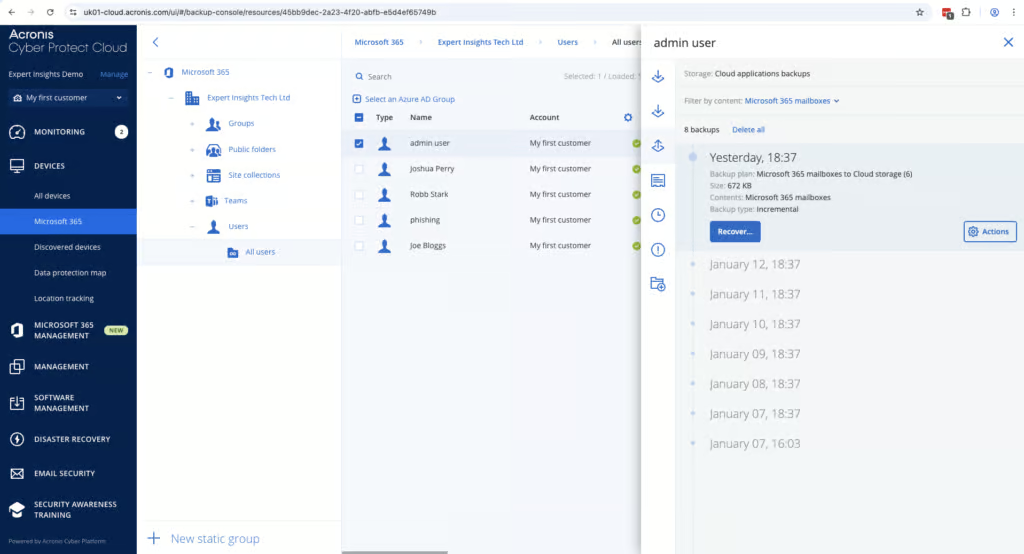
Resilience is one of Acronis’ strongest areas. Acronis includes built-in malware scanning for Microsoft 365 mailbox backups. It scans mailbox backups for known threats. It also flags if any backups you’re trying to restore contain any suspicious links. Flagged backups are highlighted rather than blocked, so they can still be restored. OneDrive and SharePoint backups aren’t scanned.
This is only available in the “Advanced Security +XDR” tier which does add cost – but in our testing the feature works well and will be highly valuable for teams who want the best protection against ransomware.
One thing to be aware of however is that malware scanning does not support RAR, 7z, or ISO file types, which are commonly used in phishing and malware delivery. We have raised this with Acronis’ Senior Product Manager so it may be addressed in the future.
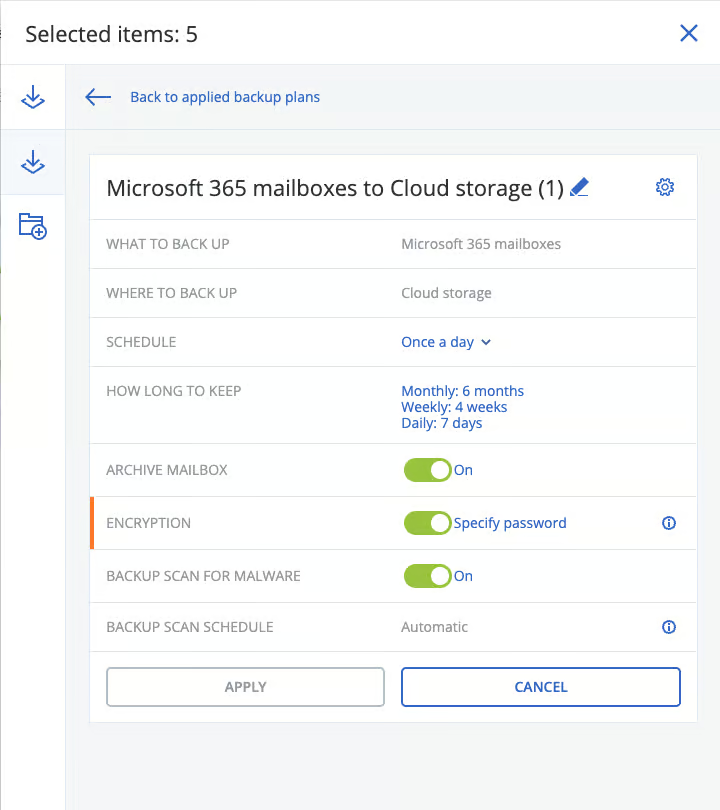
Acronis offers two immutable storage options: Governance and Compliance. You can decide which security controls are applied to backups. Immutable storage isn’t switched on by default; once enabled, the default retention period is 14 days. You need a separate admin account to manage Acronis, rather than just using your M365 credentials – which we think is a good thing. It means if your M365 account is compromised, your backups are still secure. Multi-factor authentication is supported, but it is switched off by default, so we recommend enabling it.
MSPs are able to choose where backups are stored, including on-premises or in the public cloud. But this is not currently available for end-users.
Backup Health
Ranked #1 out of 12 M365 Backup Solutions for Backup Health
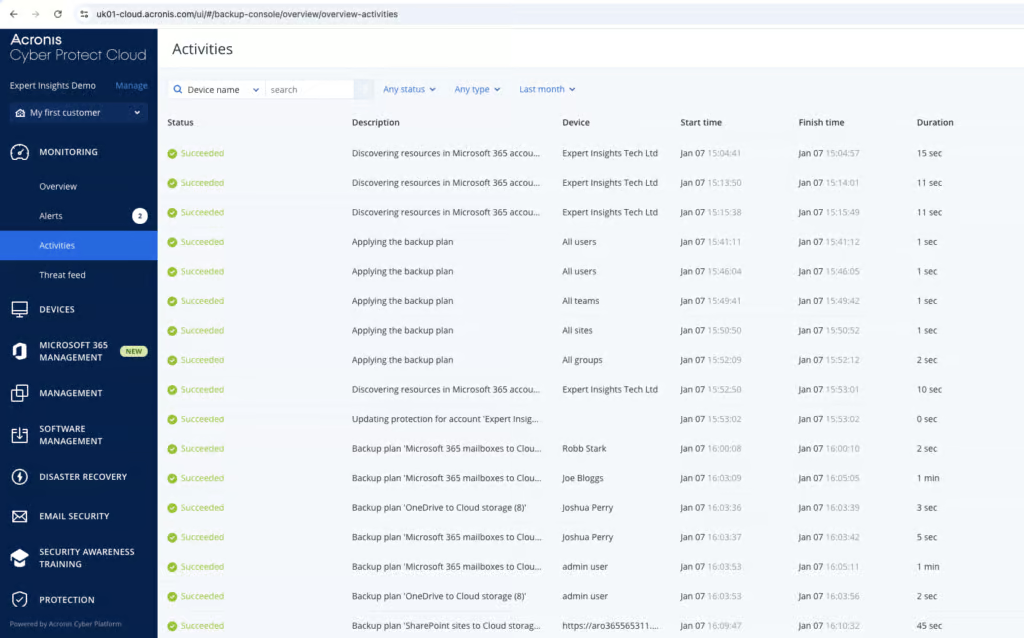
Acronis provides clear visibility into backup health, with email alerts if anything goes wrong.
We didn’t have any issues with backup failures in our testing, but we were able to test the reporting and alerting features.
Any backups with warnings are clearly displayed on the monitoring page, with a summary of the issue and link to support if you need it. Status indicators are very clear and it’s easy to log in and check at a glance that your backups are running smoothly.
We really liked the reporting and dashboards on offer. You can build your own customizable dashboards and filter views by device, workload, user or time period. You can then schedule these reports to be sent daily or monthly, or export and download them directly.
You could spend hours getting these reports built, and the depth can make it a bit overwhelming at first, but we were very impressed by the granularity.
You can setup alerts for failed backups, partial jobs, missed schedules, storage issues or threats if you are on the higher plans. We found the alerts to be clear and helpful.
Governance and Security
Ranked #2 out of 12 M365 Backup Solutions for Governance and Security
Admins can view detailed activity logs and there are audit trails for activity in the admin console. Logs include timestamps, user details and specific action breakdowns. They are very detailed and it’s easy to filter different logs and export them to Excel or PDF.
We did find this function hard to find at first, but once you get to grips with the admin console, exporting logs is straightforward. Audit logs by default are saved for 180-days if you don’t manually export them. MSPs can also integrate with SIEM tools if they want to keep logs for longer.
Governance Capabilities
| Public API available | ✓ |
| Multi-Tenancy | ✓ |
| Reporting / Alerts | ✓ |
| Automatic mailbox / site / etc onboarding | New users/changes synchronize daily; protection plans must be configured |
| Bulk enable / disable backups | ✓ |
| Self-service recovery (for end users) | ✗ |
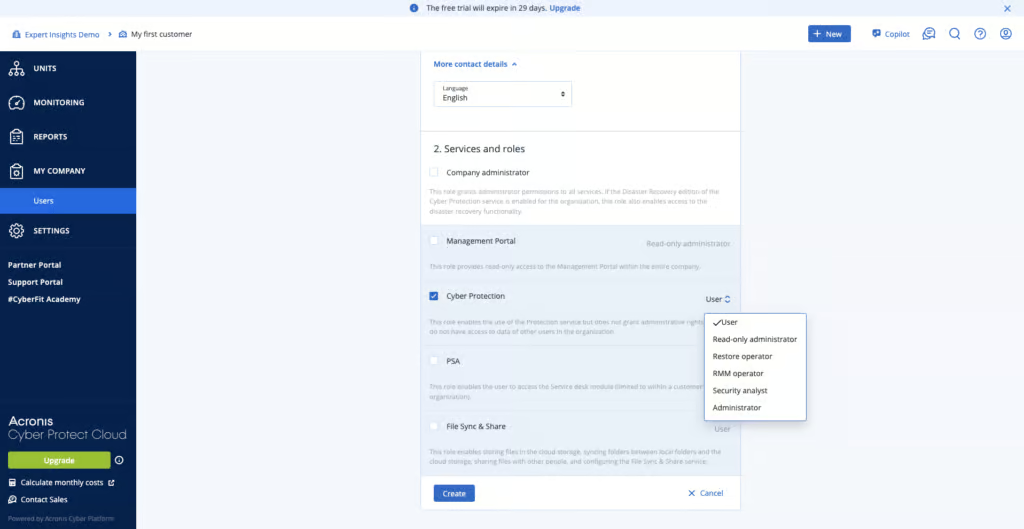
Acronis provides strong role-based admin control. There are pre-defined roles for standard admins, full privilege admins, end-users, and read-only users. There are also more granular sub-roles if you need them.
Acronis is compliant with SOC 2 and ISO 27001, clear documentation for GDPR compliance. Backup data is encrypted both in transit and at rest and MFA is supported. By default, Acronis also enables “Support access”, which lets your service provider’s administrators access your tenant and its backups; you can switch this off in the security settings. Opening the contents of a backed-up mailbox triggers a privacy warning, and the access is logged, which is good for accountability.
Acronis supports more than 50 global data center locations across North America, South America, Europe, the Middle East, and Asia-Pacific, so there is a lot of flexibility for data residency.
Compliance
| Audit Logs | ✓ |
| Data Center Regions | US, UK, EU, South Africa, Middle East, AU / NZ, APAC, Canada, Brazil |
| Data Center Infrastructure | Acronis-hosted standard backup; Microsoft storage for Direct Backup |
| Maximum retention period | Flexible/unlimited standard retention; one year for Direct Backup to Microsoft storage |
| Role-based access controls | ✓ |
| Data encrypted at rest and in transit | ✓ |
| Supports bring-your-own storage | Standard cloud/partner-hosted storage; local/network storage with Exchange-only agent; native Microsoft storage |
| E-discovery / legal hold | No |
Something to consider is that Acronis does not support full Bring Your Own Key (BYOK) encryption when data is stored in Acronis-managed infrastructure. There is a partial workaround available: you can add password-based encryption at the backup plan level. Acronis confirmed to us that they do not have access to the customer’s password. However, this is not the same as proper BYOK with private/public key infrastructure.
Acronis’ position is that customers requiring that level of encryption control would host on premises via an MSP partner. Acronis is not FedRAMP authorized, and the team confirmed to us that there are no current plans to pursue this due to insufficient customer/partner demand.
Commercials
Ranked #5 out of 12 M365 Backup Solutions for Commercials
Pricing
| Free plan available | ✗ |
| Trial available | ✓ |
| Seat-based pricing option | ✓ |
| Storage-based pricing option | Per-GB consumption pricing for native Microsoft 365 Backup Storage; standard plans per seat |
| Starting Price (user / month unless otherwise noted) | $41.80/user/year, based on 50 users |
| Higher Tier Pricing | $4.00 |
Acronis sits firmly in the enterprise and MSP space. Pricing, licensing and support are all designed around the needs of mid-sized to large organizations, rather than SMBs.
Acronis is priced at $41.80/user per year for 50 users. This is more expensive than other M365 backup solutions, for example CloudAlly is $30 per licensed mailbox per year. But, Acronis does offer unlimited storage, and for MSPs there are strong integrations with RMM tools, for example.
Licensing can be hard to get to grips with. Acronis offers different products for direct customers, SMBs, and service providers, some of which are similarly named but are quite different. This can make it difficult to quickly understand exactly which product you need when you’re first getting setup with the solution.
Support
| Support Locations | US / UK, Germany, France, Italy, Spain, Japan |
| Email support | Yes |
| Phone support | Yes |
| Chat support | Yes |
| Web support portal | Yes |
| Support hours (normal priority) | 24 hours |
| First response SLA (normal priority) | 8 hours |
Acronis offers a strong support network. Global assistance is available via web portal, email, and phone. The knowledge base is detailed and helped us with a lot of questions during our onboarding.
Editor's Score
Ranked #3 out of 12 M365 Backup Solutions for Editor's Score
We think Acronis Cyber Protect Cloud is a very capable, enterprise-grade backup platform. We scored the solution highly for retention, backup health and security. We would recommend Acronis for MSPs, mid-market organizations and anyone looking for strong security controls, ransomware protection, and coverage for on-prem or hybrid environments, as well as M365.
It’s not the easiest solution on the market to use, and there is a learning curve with the user interface. But Acronis offers a level of control, and security, that few M365 backup solutions can match.
We were particularly impressed with how fast the solution is to deploy, and the capabilities on offer – like its Entra ID backup. The data residency options are also impressive, with the choice of over 50 countries across the world.
Acronis is also a trusted name brand, with a mature, trusted platform, which really cannot be underestimated when you are choosing a backup solution.
Who Acronis is for: MSPs managing multiple customers, mid-to-large sized organizations, teams with hybrid infrastructures, teams with strict compliance requirements, teams prioritizing ransomware resilience.
Who should look elsewhere: Teams that want simple, low-cost M365 backup, teams that don’t want advanced features or data residency options.
Read the full review
Enter your work email to unlock the full review.
Check your email
We sent a 6-digit code to . Enter it below to continue.