
Druva inSync Review

Tested March–April 2026. Updated October 2026.
The Bottom Line
Druva inSync is an enterprise-grade Google Workspace backup platform. It scored 9/10 in three categories, with standout features including configurable retention windows of up to 1,000 daily snapshots and add-on ransomware recovery that can quarantine infected Drive and Shared Drive snapshots. Druva is best suited for mature organizations with dedicated IT teams that need granular control over backup policies, retention, and compliance — not for teams wanting a quick, simple deployment.
Overall Rating Summary
Read our Google Workspace testing methodology to learn more.
Pros
- Highly configurable retention policies
- Advanced ransomware recovery
- Real-time progress tracking for backup and restore jobs
- Strong governance controls
- End-user self-service restore
- Customizable pre-built reports
- Suspended users are preserved, keeping their backup history
Cons
- Deployment took approximately 45 minutes with manual configuration required
- Search we tested is per mailbox; cross-user search needs Federated Search
- No support for Google Chat, Forms, or Sites
- Storage quotas are enforced based on your plan
Druva inSync is a broad enterprise backup platform that protects Microsoft 365, endpoints, and servers alongside Google Workspace, rather than a Google-only product. That heritage shows in both directions: the governance, retention, and resilience features are built for enterprise scale, but the setup and interface are not tailored specifically to Google Workspace administrators.
Druva covers Gmail, Drive, Shared Drives, Calendar, and Contacts. Google Chat, Forms, and Sites are not supported. Backups run once per day by default, and Druva Support can enable two, three or five backups a day.
The main weakness is accessibility. Deployment requires considerably more effort than most competitors, and the search we tested is limited to individual mailboxes; Druva's Federated Search, which works across users, is available separately.
Where Druva differentiates itself is in the depth of its retention, resilience, and governance capabilities. Retention policies are highly configurable, with the ability to set different retention periods for Gmail and Drive independently.
Backup snapshots are rolled into daily, weekly, and monthly intervals, and the rollup schedule is fully customizable. Druva's ransomware recovery add-on can quarantine infected snapshots for Drive and Shared Drives, so you can restore from a known clean point, which is a meaningful capability for organizations planning for ransomware scenarios.
For organizations with the technical maturity to take advantage of it, Druva is a genuinely strong platform — few competitors will let you keep daily snapshots for 1,000 days the way Druva does. Read on for our full thoughts and a category-by-category breakdown of the product’s strengths and weaknesses.
How We Tested Druva inSync
We applied a standard testing methodology across all vendors. We looked at deployment, data coverage, retention policies, recovery capabilities, resilience, backup health monitoring, governance and security controls, commercial considerations, and an overall editorial verdict.
We timed deployment, time taken to backup, and full mailbox snapshot restores (cross-user and same-user). We also ran single-item restores and tested search functionality.
All testing was conducted in a dedicated Google Workspace environment with the following configuration:
- Domain: recoveryzap.com
- Licensed users: 6 (5 active, 1 suspended)
- Approximate data volume: ~10 GB across Gmail, Drive, and Shared Drives
- Workloads tested: Gmail, Google Drive, Shared Drives, Calendar, Contacts
- Platform tested: Druva inSync
The same environment and data set was used for all 11 vendors to ensure a fair, like-for-like comparison. You can read our full testing methodology here.
Deployment
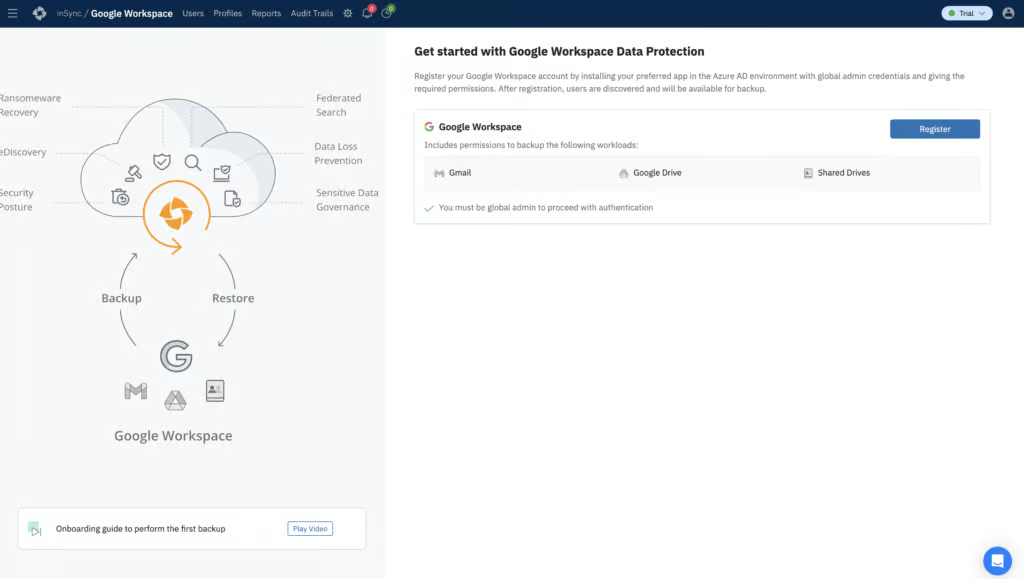
Deploying Druva took approximately 45 minutes and was a relatively tricky deployment process. Connecting Google Workspace to Druva initially was relatively straightforward, but the more challenging part came from configuring backups and provisioning users within the Druva portal. Many parts of this process were not automatic.
Druva did not immediately recognize that we had completed the registration and installed the required Marketplace application. We needed to click an additional button within the Marketplace portal to proceed.
Druva does provide a video tutorial directly from the setup screen, which was helpful and likely necessary for most users. We probably would have struggled to get this set up without the video and setup documentation being readily available.
Before backups would run for the first time, we had to manually set the default Profile to enable SaaS backups and configure retention settings. This is not something most competing products require.
Once backups were running, the Live Activities page provided clear progress tracking for Gmail and Drive tasks, showing both data size and percentage completion.
The page refreshes automatically, which removed the need to constantly reload. A 45-minute setup with manual configuration at multiple stages is what keeps Deployment at 6/10.
Coverage
Workloads Covered
| Gmail | ✓ |
| Drive | ✓ |
| Calendar | ✓ |
| Contacts | ✓ |
| Shared Drives | ✓ |
| Sites | ✗ |
| Chats / Hangouts | ✗ |
| Classroom | ✗ |
Druva inSync covers Gmail, Drive, Shared Drives, Calendar, and Contacts. Calendar and Contacts data are retrievable underneath the Gmail section in the portal. Google Chat, Forms, and Sites are not supported.
Backups run once per day by default, and Druva Support can enable two, three or five backups a day. Shared Drives were discovered immediately but needed to be manually configured for backup.
We provisioned users manually in our test, which adds overhead during initial setup but gives more control over which accounts are included. Druva also supports automatic provisioning through Google Directory mapping.
Covering Gmail, Drive, Shared Drives, Calendar, and Contacts hits the workloads that matter most — the absence of Chat, Forms, and Sites is what keeps this from a higher score.
Retention
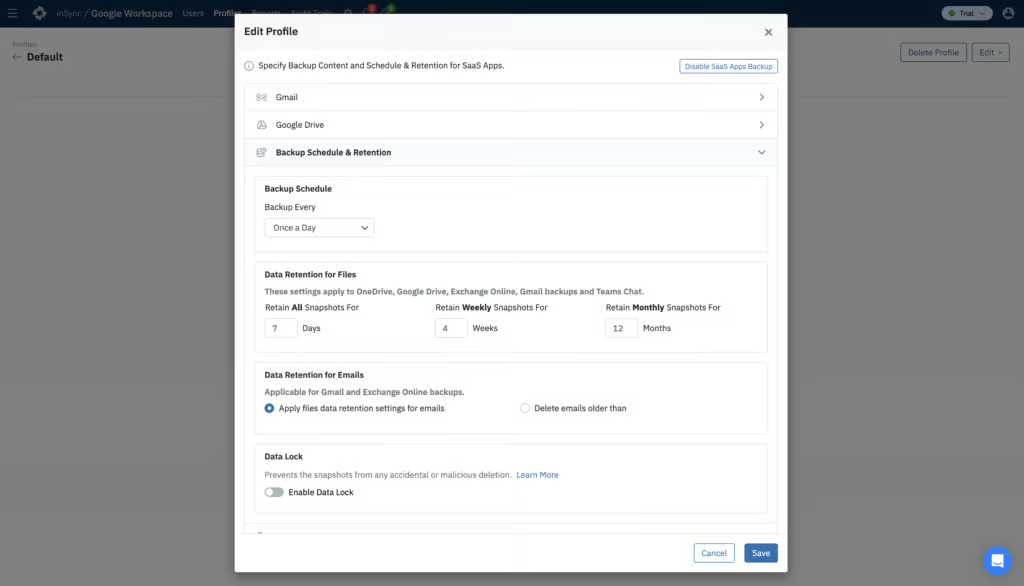
Retention is one of Druva’s strongest areas. Retention policies are highly configurable. The default policy keeps daily snapshots for seven days, weekly snapshots for four weeks, and monthly snapshots for 12 months.
These settings can all be extended significantly, with daily snapshots configurable up to 1,000 days, weekly up to 100 weeks, and monthly up to 360 months. Gmail and Drive can be assigned different retention periods, and exclusions from backups can be set based on path, folder, or file type.
Users that are suspended in Google Workspace are marked as Preserved in Druva: their existing backups are kept, but new backups stop. Druva includes preserve licenses for 10% of your active licenses, with more available to buy, and users who are already suspended or archived can't be imported. Cross-user restore from an inactive account is supported.
Different retention policies can be enforced for specific users by creating separate Profiles. This level of granularity is comparable to AvePoint and places Druva among the strongest options for retention management. Unlimited retention is available on any plan, while legal hold requires the Elite plan.
Recovery
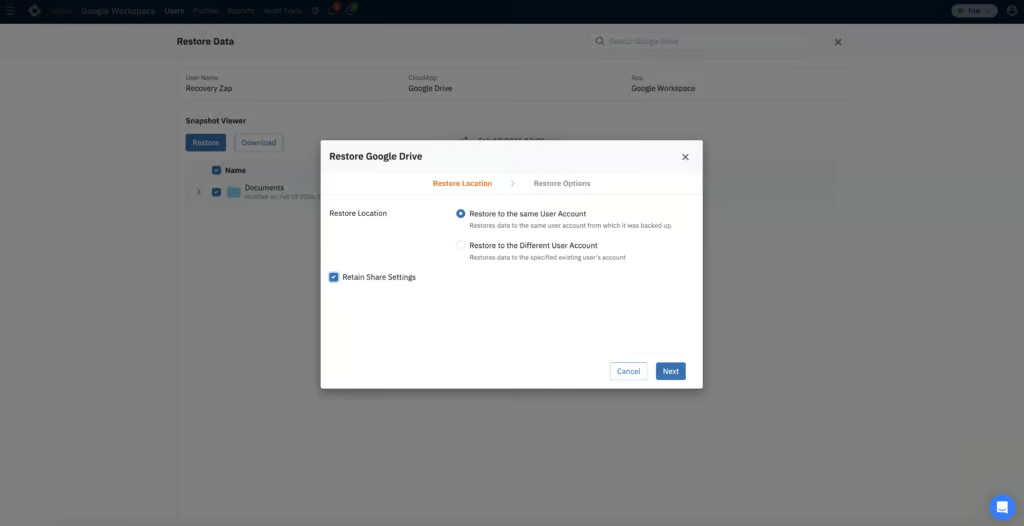
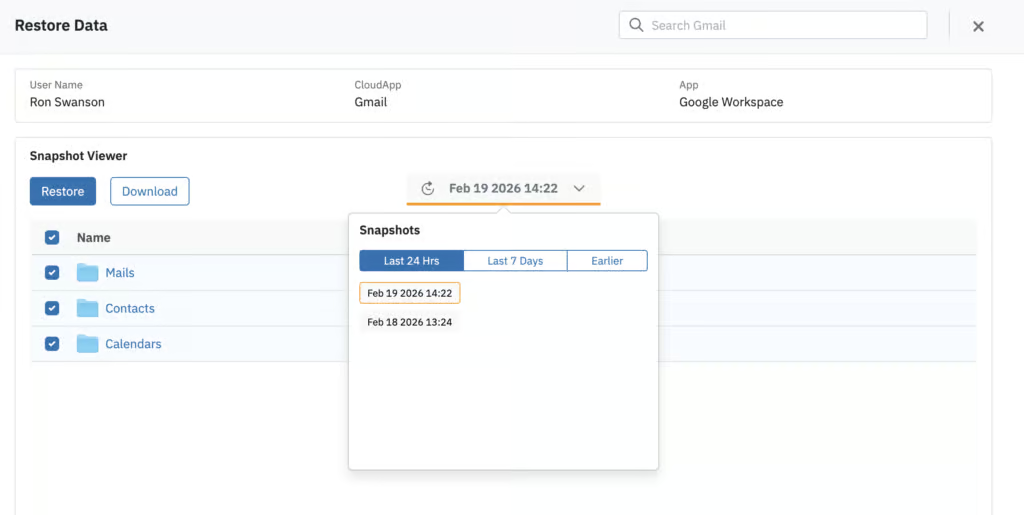
There is no dedicated Restore section in the Druva portal, so finding the option to restore requires some exploration. Restores can be started from either the user list or the list of Gmail and Drive workloads. Once you find the right area, the process is intuitive and uses a nested folder structure that makes navigation straightforward.
Restoring 695 MB of Gmail data (approximately 19,000 items) to another user as a new folder took two hours and 24 minutes. Data began populating in Google Workspace immediately as the restore job progressed, which provides confidence that the process is working. Single-item restores completed in seconds.
Mailbox data can be downloaded in Archive, MBOX, or PST format, and restores can target the same account or a different one. There is also an option to only restore deleted items, which is helpful for targeted recovery scenarios.
The main limitation in our testing was search. In the restore interface, searching can only be done on a per-mailbox basis. Druva's Federated Search can search across users, but we haven’t tested this. You can search Gmail by sender, recipient, date, subject, attachment presence, and attachment name. Results populated quickly and were accurate. There is no option to preview messages, but this could be for privacy / compliance reasons. End-user self-service restore is supported, which is a useful capability that several competitors lack.
Restoring 695 MB of Gmail in two hours and 24 minutes is solid; the per-mailbox-only search is what keeps Recovery at 8/10 rather than higher.
Resilience
Druva offers ransomware recovery as a paid add-on. For Google Workspace, it can quarantine infected snapshots for Drive and Shared Drives so you can restore from a known clean point; Druva's Curated Snapshots feature isn't available for Google Workspace.
Admins can also use the Data Lock add-on (Enterprise and Elite) to block manual deletion of snapshots and lock retention settings, an action that is irreversible once applied.
A managed data detection and response (MDDR) service is now included in both the Enterprise and Elite plans, providing an additional layer of incident response support.
The combination of quarantine, clean snapshot restoration, and data lock places Druva among the strongest options for organizations prioritizing resilience against ransomware and destructive attacks. These are paid add-ons rather than included features, but the capabilities themselves are enterprise-grade and well-implemented.
Backup Health
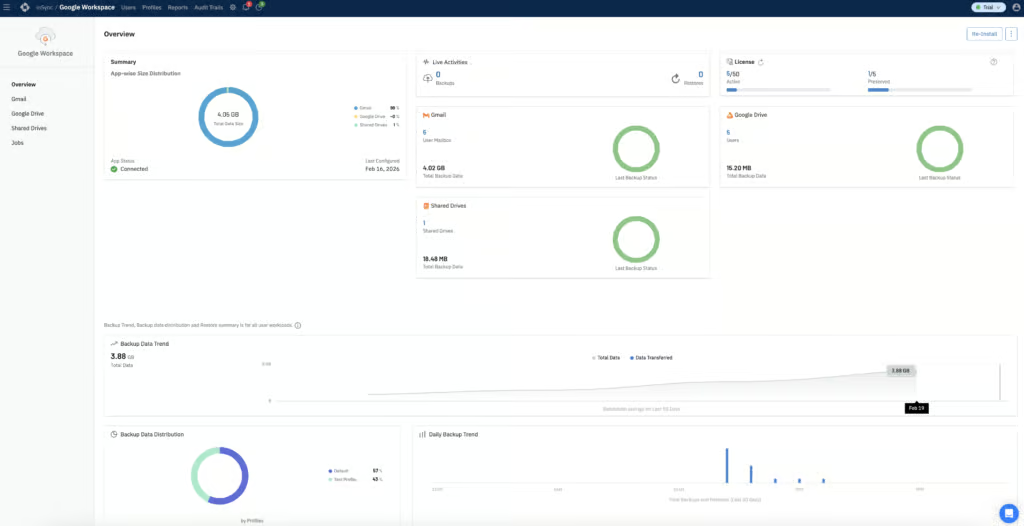
No backup failures occurred during our testing, but Druva documents what failures would look like in practice, including situations where a backup has been throttled by Google. If a failure does occur, it is displayed within the overview dashboard. By default, admins are notified via email immediately when something goes wrong.
The dashboard on the front page is transparent about recent backup activity, storage consumption, and licensing. Several pre-built report types can be scheduled to run daily, weekly, or monthly at specific times. Reports can be downloaded locally as CSV or HTML, or emailed as CSV or PDF, depending on where in the portal you generate them.
Admins can also be notified if a user has not been backed up within a specified number of days, which acts as a safety net for identifying missed backups. The reporting depth and frequency of notifications make it difficult for critical issues to go unnoticed.
Governance and Security
| Public API available | ✓ |
| Multi-Tenancy | ✓ |
| Reporting / Alerts | ✓ |
| Automatic mailbox / site / etc onboarding | Yes, via Google Directory mapping (not set up by default) |
| Bulk enable / disable backups | ✓ |
| Self-service recovery | ✓ |
| Audit Logs | ✓ |
| Role-based access controls | ✓ |
| Data encrypted at rest and in transit | ✓ |
| Supports bring-your-own storage | ✗ |
| E-discovery / legal hold | Limited - Elite plan only |
| Data Center Regions | US, UK, EU, UAE, AU, APAC |
| Data Center Infrastructure | AWS |
| Maximum retention period | Unlimited |
Both system activity and user or admin activity can be managed within the Druva portal. The Audit Trails tab is split into user audits and admin audits, with timestamped entries that are easy to read.
Logs can be filtered by activity type, which user or admin completed an action, and duration. Audit log retention defaults to 30 days but can be extended up to one year or set to indefinite. User and admin audit logs can have different retention periods.
Druva stores backup data in AWS data centers. Eight admin roles are available with differing levels of access. RBAC, MFA, SSO, and geofencing are all supported. By default, inactive administrators are deactivated after 180 days, and idle sessions are terminated after 30 minutes. Druva also issues a critical alert notification if your account only has one administrator.
Audit logs can be exported in CSV or HTML format. While they are not directly searchable within the portal, the filtering options are sufficient for most investigative scenarios. It is worth noting that Druva has a higher-level interface and a separate interface for Google data protection, but you can switch between them.
Governance is one of Druva’s strongest categories. The combination of granular RBAC, exportable audit logs, and configurable log retention covers what most compliance and security teams will be asked to demonstrate.
Commercials
Pricing
| Free plan available | ✗ |
| Trial available | ✓ |
| Seat-based pricing option | ✓ |
| Storage-based pricing option | Per-user licensing with purchased storage quotas |
| Starting Price (user / month unless otherwise noted) | Not public |
| Higher Tier Pricing | Not public |
Druva does not publicly disclose per-user pricing or the cost of storage. These need to be discussed directly with Druva’s sales team, which is common for platforms built with enterprises and large teams in mind.
Google Workspace backup is sold in Enterprise and Elite plans, and Druva also lists a SaaS Universal License and an Essentials Pack for smaller businesses. The Elite package includes eDiscovery, legal holds, federated search, and defensible deletion. Several add-ons such as quarantine functionality and SIEM integration can be purchased separately. Storage quotas are enforced depending on how much storage you have paid for.
Support
| Email support | ✗ |
| Phone support | ✓ |
| Chat support | Limited - Premium or Enterprise support only |
| Web support portal | ✓ |
| Support hours (normal priority) | 24 hours |
| First response SLA (normal priority) | 4 hours for standard support, 2 hours for Premium / Enterprise support |
Extensive documentation and an AI chatbot are available as self-help options. The chatbot was actually very useful during onboarding troubleshooting, providing relevant screenshots from documentation.
However, getting a human response for more complex issues was slow. We submitted a support ticket via the chatbot asking about bulk recovery capabilities during a disaster scenario. Druva’s estimated response time was one day.
Editor's Score
Druva inSync is a mature, enterprise-grade Google Workspace backup platform that excels exactly where large organizations need it to: configurable retention per workload, add-on ransomware quarantine for Drive and Shared Drives, eight-role RBAC with full audit log export (9/10), and reporting depth that makes it difficult for issues to go unnoticed.
There were some challenges in the review. Deployment took 45 minutes and required manual configuration at multiple stages. The search we tested is restricted to a single mailbox at a time, which is the main constraint on day-to-day recovery. The unclear commercials, including enforced storage quotas, were also a negative.
None of those weaknesses change the underlying picture. Druva inSync trades ease of use for depth, and for the buyer it is built for, that trade is well worth making. Few Google Workspace backup tools we tested can match the combination of 1,000-day retention, quarantine-and-clean-snapshot ransomware recovery, and auditor-grade governance.
Who it’s for: Druva inSync is built for mature organizations with a dedicated IT team and strict compliance requirements. The clearest example of that fit is the ability to keep daily snapshots for up to 1,000 days while running a quarantine-and-clean-restore workflow on top of them.
Who should look elsewhere: SMBs without deep technical knowledge that are looking to buy a low-cost solution they can deploy in an afternoon, or admins who expect to run a tenant-wide search across every mailbox at once without adding Federated Search.
Read the full review
Enter your work email to unlock the full review.
Check your email
We sent a 6-digit code to . Enter it below to continue.