
Afi Backup for Microsoft 365 Review

Tested March–April 2026. Updated October 2026.
Bottom Line
Afi.ai is an advanced backup solution for M365 which provides deep control and strong capabilities. This does mean it can be complex to manage, but for teams that value flexibility and security controls, we think it’s a strong solution to consider.
Overall Rating Summary
Read our M365 testing methodology to learn more.
Pros
- Strong coverage with support for Copilot, Entra ID, and Power platform
- Supports BYOK encryption
- Heuristics-based ransomware detection
- Very fast and simple to deploy
- Granular role-based access controls
- Unlimited default retention with customizable policies
Cons
- No bulk recovery of multiple users
- UI can be unintuitive
- 50GB pooled storage per licensed user — backups stop after 30-days if this is exceeded
- Smaller vendor with only 20 employees listed on LinkedIn
Afi.ai is designed for SMBs, but we found it offers a lot of features that you’d typically find in enterprise backup tools. For example, it offers very broad M365 coverage, including support for Copilot backup. Afi.ai provides granular admin controls, support for ransomware monitoring, and even Bring Your Own Key (BYOK) encryption. Afi.ai also has a very good keyword search capability, which is something we think is very helpful.
We did find that the admin console could be at times unintuitive. It wasn’t always immediately obvious how to access certain features. There are some more enterprise-focused features that aren’t included, such as bulk recovery for multiple users.
With that said, one of the standout features of Afi.ai is around its customization. You can build highly granular admin permissions for accessing data and build your own custom backup policies. This stood out in our review of the service.
Afi.ai claims to support 20,000+ organizations and over 50 Petabytes of storage under management. It’s important to note that Afi.ai is a relatively small vendor in the market 20 employees listed on LinkedIn.
Overall, Afi.ai is a strong solution for teams that want a highly customizable solution with features like ransomware monitoring and Copilot backup. If you want a tool you can fine-tune, Afi.ai provides that level of flexibility, and makes it worth learning the solution in-depth.
How We Tested Afi.ai
As with all of our backup reviews we completed a fully independent test of Afi.ai. We installed the service on a clean M365 tenant, and our review covered deployment of all M365 services, setting up retention policies and security controls, and monitoring backup health.
We set up backups from scratch, and recorded the time required to reach a successful backup. We tested retention policies across user groups, including employee departure scenarios. We ran timed mailbox restores and completed single-item recoveries. In all cases we measured the time to find data, and how long it took for restored content to appear in M365. We also measured how backup failures are handled.
As part of our test, we made support requests and we spoke directly to the Afi.ai team to share our thoughts and feedback. We have no commercial relationship with the Afi.ai team and this review is our own opinion of the service.
Deployment
Ranked #4 out of 12 M365 Backup Solutions for Deployment
Deployment Options
| SaaS | ✓ |
| On-premises (for Microsoft services like Exchange, Active Directory, etc.) | ✗ |
| Hybrid cloud | ✗ |
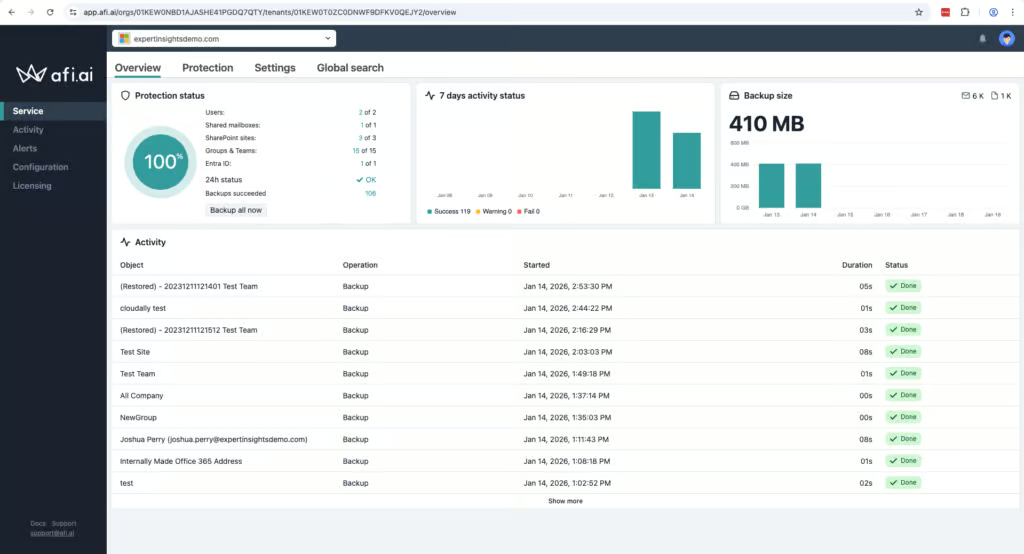
Afi.ai is very fast and straightforward to deploy. The processes use a standard OAuth setup to grant Microsoft permissions, which is very easy.
Once setup, we were able to start backing up data very quickly. All mailboxes and objects are automatically discovered once permissions are granted.
You need to manually create or assign backup policies before you can start protecting data. Afi calls these ‘SLAs’ and they can be very granular. For example, you can assign different SLAs to different users, sites or resources.
Backups can be configured up to 3 times per day, which we think is sufficient for the needs of most organizations.
In the admin console you can quickly check on the progress of backups, and we didn’t have any problems with failures. Overall, deployment was straightforward.
Coverage
Ranked #2 out of 12 M365 Backup Solutions for Coverage
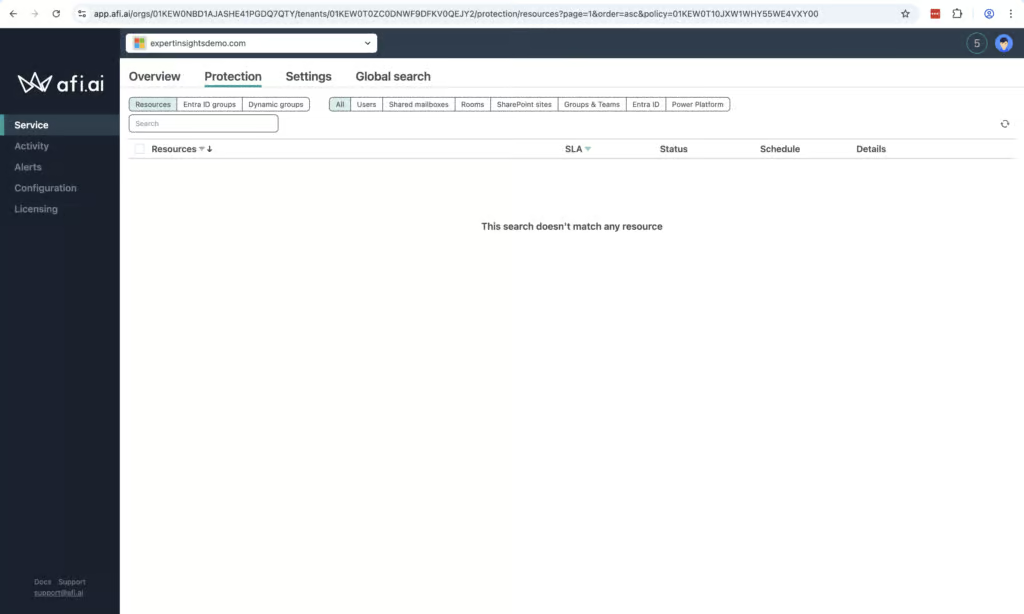
We were impressed with Afi.ai’s coverage of M365 workloads. Afi supports Exchange Online, SharePoint Online, OneDrive for Business, Microsoft Teams, Entra ID, Copilot, and Power Platform services. This range puts Afi.ai comfortably ahead of many other M365 backup tools, particularly those in the SMB-tier.
Supported Platforms
 Exchange (Outlook) Exchange (Outlook) |
✓ |
 SharePoint SharePoint |
✓ |
 OneDrive OneDrive |
✓ |
 Teams Teams |
Limited - chats can be exported as HTML but not restored |
 Azure VMs Azure VMs |
Azure VMs require the separate Afi Data Platform offering |
 Entra ID Entra ID |
✓ |
 Dynamics Dynamics |
✗ |
 Power Platform Power Platform |
✓ |
Microsoft now includes a basic Entra ID backup with Entra ID P1 and P2 licenses, but it keeps only seven days of daily backups inside your own tenant. Afi’s Entra ID backup adds longer retention and a copy held outside Microsoft.
For Teams in particular, Afi protects 1:1 chats, group conversations, channels, and all files, which is very rare to see. Teams chats and Copilot interactions can be exported as HTML, but not restored back into Microsoft 365. If you need Copilot backup, Afi is well ahead of the curve and is one of the few options currently available. AvePoint now backs up Copilot Studio agents, and Druva offers Copilot Chat protection in limited availability, but neither covers Copilot interactions as broadly as Afi.
There is a lot of customization available for which resources are backed up, and mailboxes and objects are automatically discovered which means it’s easy to get up and running.
Unlicensed mailboxes are not supported. However, they do appear in Afi’s admin console and are difficult to hide. We queried this with Afi’s team, and they let us know that filtering for unlicensed mailboxes will be added in an upcoming update. Shared mailboxes are covered.
Public folders are not supported either. Public folder backup across the industry relies on Microsoft’s Exchange Web Services (EWS), which Microsoft is retiring, with full shutdown in April 2027.
Retention
Ranked #3 out of 12 M365 Backup Solutions for Retention
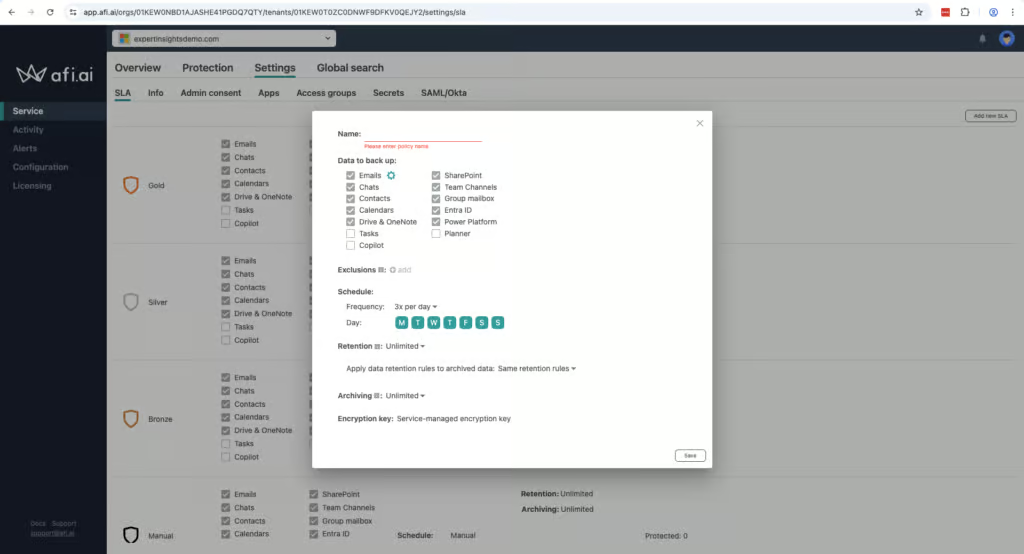
Retention controls are another standout feature of Afi.ai. They are very granular and can be customized at a per-resource level and are fully customizable. Retention is also unlimited by default.
When a user is deleted from M365, their data is still fully archived and accessible, which is a positive. You can then restore this data directly into another user mailbox if you want to, which we think is a very helpful feature.
The trade off with Afi’s granularity is that it can be complex to manage, particularly when building policies for larger environments. There are not many default options or guardrails, so you do need to build up your policies yourself.
Recovery
Ranked #2 out of 12 M365 Backup Solutions for Recovery
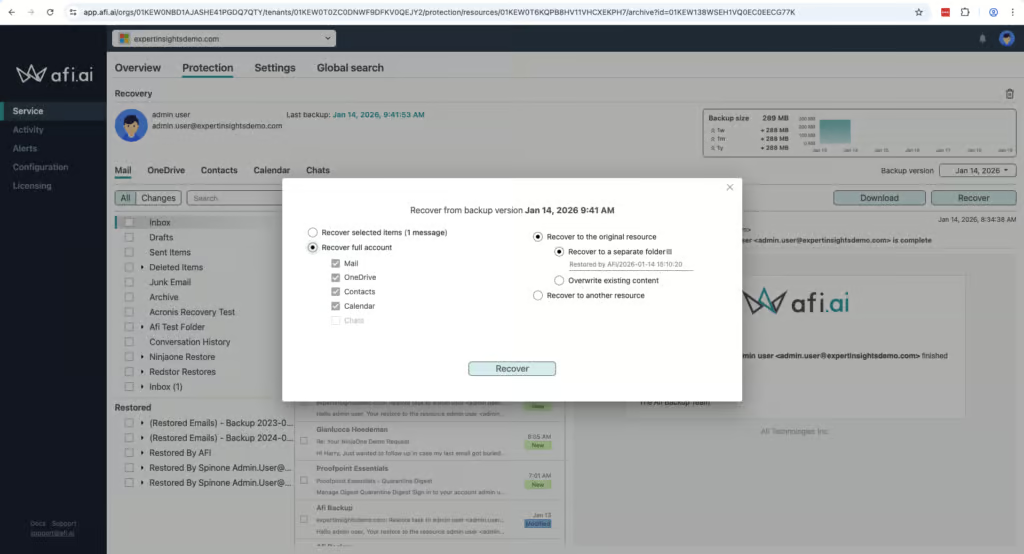
Afi.ai supports full mailbox and site restores, granular item-level recovery, cross-user restores, point-in-time recovery, and non-destructive restores. You can restore data in place or to an alternate location, preserve folder structures, and download recovered data locally.
There are some limitations when exporting data. You can download emails as PSTs, EMLs or MBOX files, but there are no broader export options other than local downloads. There is also no bulk restore option – which we’ll cover more in the next section.
We did find that the user interface could be challenging at times. There isn’t a dedicated Restore dashboard, which is unusual in the tests we’ve conducted. It’s not complicated to restore data at all, but the layout could be easier to navigate.
Afi does provide a very strong search component, which we always find very helpful. You can search for specific files or emails by keyword, date, metadata or content filters. This places Afi.ai alongside OpenText CloudAlly and NinjaOne at the stronger end of search capabilities among the products we tested, ahead of Veeam and Acronis which only enable search within individual mailboxes.
Resilience
Ranked #8 out of 12 M365 Backup Solutions for Resilience
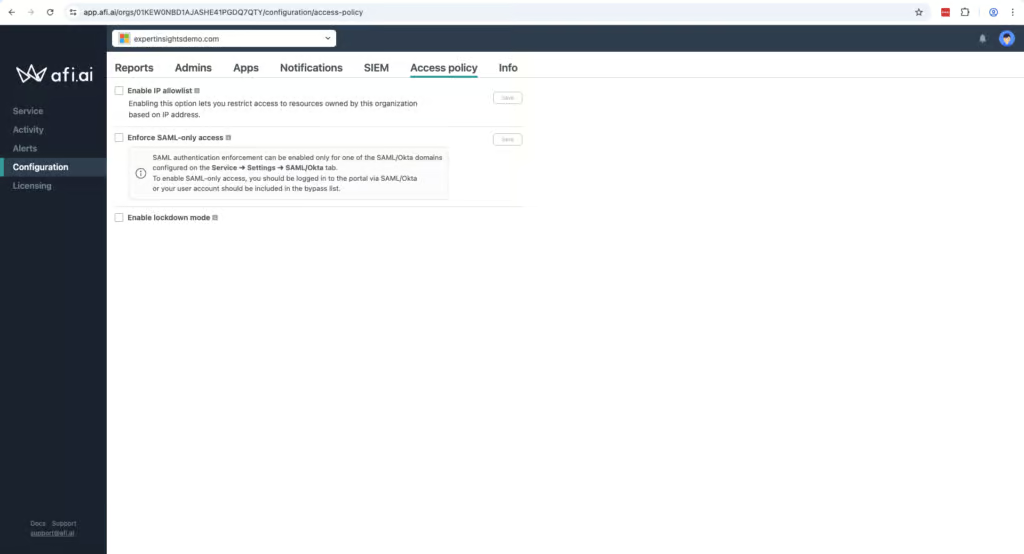
Afi.ai offers heuristics-based ransomware detection, which that can alert you if a ransomware incident is taking place. We couldn’t test this directly as part of our review, but it’s a good feature to see included.
Afi also supports immutable backups, with a lockdown mode that can restrict destructive actions. These are two important security features which are included.
The main challenge we ran into in the resilience category is the lack of bulk recovery. If you are hit by a ransomware attack there is no way to restore dozens or hundreds of mailboxes, instead you’d need to do it one at a time.
Afi is not the only vendor with this problem - Spanning, SpinOne, and iDrive also don’t support bulk recovery. But, Hornetsecurity, AvePoint, and Veeam do support bulk restore of multiple mailboxes, and we think it’s an important feature.
Afi supports Okta and SAML SSO. Afi’s documentation confirms that SSO sign-in doesn’t rely on Microsoft 365, so you can still reach your backups if Microsoft’s services are down.
Backup Health
Ranked #7 out of 12 M365 Backup Solutions for Backup Health
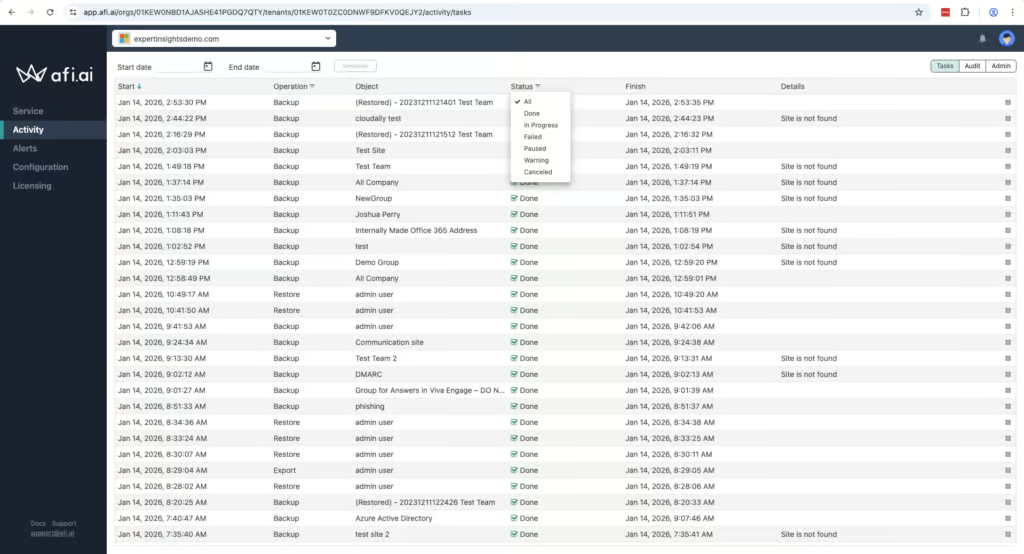
In the Afi admin console you can quickly see which backups are successful, if there are any warnings, or if any backups failed. The user interface could be clearer however, and some metrics are hidden rather than presented in a clear dashboard. You can filter the Tasks logs by Status:Failed to quickly identify problems, which is helpful.
We think Afi could improve on reporting capabilities. Reports are limited when it comes to customization and exporting and are not always detailed. The platform does have all of the data you need included, it’s just not always easy to build a report that pulls everything into one place.
Governance and Security
Ranked #5 out of 12 M365 Backup Solutions for Governance and Security
Afi.ai offers detailed audit logs which cover privileged admin actions. This information is stored for three years and can be exported as a CSV, which is helpful. The user interface for auditing could be more polished, but the information is all there.
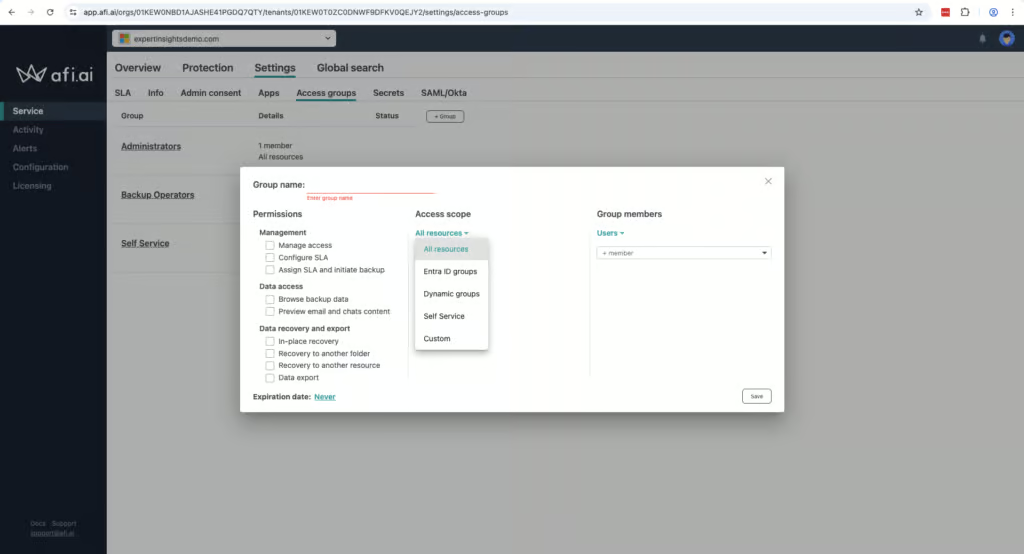
You can build granular role-based access controls for different groups, and these are fully customizable. You can set time restrictions and manage who can view, restore or manage data – it’s very flexible.
Governance Capabilities
| Public API available | ✓ |
| Multi-Tenancy | ✓ |
| Reporting / Alerts | ✓ |
| Automatic mailbox / site / etc onboarding | ✓ |
| Bulk enable / disable backups | ✓ |
| Self-service recovery (for end users) | ✓ |
As we mentioned previously, the granularity does mean there are some challenges around ease-of-use. Some of Afi’s terminology can be confusing as well, for example policies are described as SLAs, which normally would mean ‘Service Level Agreement’.
Afi offers strong security controls. It’s SOC 2 Type II certified (its Google Cloud hosting holds ISO 27001), GDPR compliant, and uses AES-256 encryption for data at rest and in transit. Afi also supports BYOK encryption which is another unusual feature that is great to have the option for.
Compliance
| Audit Logs | ✓ |
| Data Center Regions | US, UK, EU, Germany, Switzerland, Canada, AU |
| Data Center Infrastructure | Google Cloud Platform |
| Maximum retention period | Unlimited |
| Role-based access controls | ✓ |
| Data encrypted at rest and in transit | ✓ |
| Supports bring-your-own storage | No |
| E-discovery / legal hold | No |
Data residency options include the US, UK, EU, Germany, Switzerland, Canada, and Australia, with all backup data stored in Google Cloud data centers, which is a good range that will suit most organizations, especially in the SMB bracket.
Commercials
Ranked #10 out of 12 M365 Backup Solutions for Commercials
Pricing
| Free plan available | ✗ |
| Trial available | ✓ |
| Seat-based pricing option | ✓ |
| Storage-based pricing option | Per-seat pricing with pooled storage quota; additional storage terms depend on the order |
| Starting Price (user / month unless otherwise noted) | $3.00/user/month |
| Higher Tier Pricing | Custom quote - discounts for volume, education, and nonprofits |
Pricing for Afi.ai starts at $3.00 USD per user per month, with a five user minimum. This is a straightforward pricing model and Afi.ai does not charge for archived mailboxes which is a positive.
A drawback is that Afi confirmed to us it applies a pooled storage limit of 50GB per licensed user. This is aggregated at the account level so your total storage pool is calculated across all licensed users rather than applied per mailbox. One user with 80GB of data can be offset by another using 20GB, for example.
For comparison, CloudAlly, Hornetsecurity, NinjaOne, and Veeam all offer unlimited storage (Veeam under a pooled 100GB-per-user fair-use policy). Spanning offers a 60GB pooled limit per license, and SpinOne offers 30GB or 50GB depending on tier.
Afi itself is managed by a relatively small team compared with the other backup solutions we have reviewed. During our vendor feedback call, we raised questions about ownership structure, funding history ($700K seed funding in 2015), team size, but we didn’t feel these were 100% answered – we will update if more information is provided to us.
We feel for buyers evaluating any backup tool, understanding the company’s scale and backing is important given that backup vendors have access to an organization’s entire Microsoft 365 environment.
Support
| Support Locations | US, EU |
| Email support | Yes |
| Phone support | Limited - only for customers spending $60,000+ per year |
| Chat support | No |
| Web support portal | Yes |
| Support hours (normal priority) | Business hours |
| First response SLA (normal priority) | 4 hours |
Afi also has some support limitations. Afi told us that phone support is only available for customers spending $60,000 or more per year. Standard customers are limited to online channels during business hours, with no clear escalation path for out-of-hours incidents.
Editor's Score
Ranked #11 out of 12 M365 Backup Solutions for Editor's Score
From a technical perspective, Afi is impressive. We are impressed at the coverage on offer for Copilot, Entra ID and Teams that is rarely matched by other vendors.
We did find the user interface could be confusing at times, which makes customization, while very granular, complex. We’d also like to see bulk recovery added to the platform as well, which would be a good feature for larger teams. Support options could also be expanded.
But we have highly rated the platform for governance and security controls, and the recovery processes.
However, the company’s unclear ownership structure, and small team size make it difficult for us to recommend Afi.ai with the same confidence as more established vendors.
Until we have greater clarity on the company’s corporate governance and funding trajectory, we cannot score Afi.ai higher editorially, regardless of the product’s technical merits.
Who Afi is for: Teams looking for highly granular policy controls, teams that need BYOK encryption, or coverage for Copilot or Entra ID, and teams with technically proficient admin teams.
Who should look elsewhere: Teams that need bulk recovery, or a simple backup experience without a lot of upfront configuration.
Read the full review
Enter your work email to unlock the full review.
Check your email
We sent a 6-digit code to . Enter it below to continue.