
NinjaOne SaaS Backup for Microsoft 365 Review

Tested March–April 2026. Updated October 2026.
Bottom Line
NinjaOne SaaS Backup is a mature, MSP-friendly Microsoft 365 backup and archiving platform that stands out for recoverability and end-user access. If you want high-frequency backups, strong governance, and the ability for users to self-serve historical data without IT involvement, NinjaOne is one of the strongest options available. The platform is purpose-built for MSPs rather than standalone organizations, and delivers strong value as part of the broader NinjaOne ecosystem.
Overall Rating Summary
Read our M365 testing methodology to learn more.
Pros
- High-frequency backups (Exchange 12x/day, SharePoint 3x/day)
- Strong end-user self-service access to historical data
- Comprehensive search with AND/OR conditions and attachment content search
- SOC 2 Type II and ISO 27001 certified
- Strong governance controls with up to 10 predefined roles
Cons
- Purpose-built for MSPs — less natural fit for standalone organizations
- No built-in ransomware or malware scanning
- Archiver add-on required for granular account-level retention
- No BYOK encryption support
NinjaOne SaaS Backup is a strong, MSP-orientated backup and recovery solution that we thought stood out for its end-user access model. NinjaOne allows end users to view and recover their own historical emails and files, which can significantly reduce operational overhead in MSP and mid-market environments.
The product is built on technology acquired from Dropsuite, an Australian backup specialist with over a decade of experience in SaaS data protection.
From a coverage perspective, NinjaOne handles all of the most common Microsoft 365 workloads. Exchange, SharePoint, OneDrive, Teams (including 1:1 chats), and Public Folders are all protected. NinjaOne Entra Backup is also available, covering users, groups, roles, Conditional Access policies, devices, BitLocker keys and app registrations.
We found the recovery process to be dependable. NinjaOne supports point-in-time restores, granular recovery options, and non-destructive workflows that behave predictably.
Search functionality is particularly strong, supporting AND/OR conditions, attachment name and content search, and keyword filtering. In our testing, searches took around 10 seconds to run, making it ideal for restoring specific items.
On the governance and security side, NinjaOne takes an enterprise-aligned approach. Compliance coverage is strong, with SOC 2, ISO 27001 and GDPR readiness in place. The platform creates a dedicated service account for backups during setup, and you can enforce SSO and 2FA on login.
Overall, NinjaOne positions itself as a practical, operationally efficient backup and archiving platform. The main trade-off is that it’s purpose-built for MSPs, so direct customers looking for a backup solution may wish to look elsewhere.
How We Tested NinjaOne

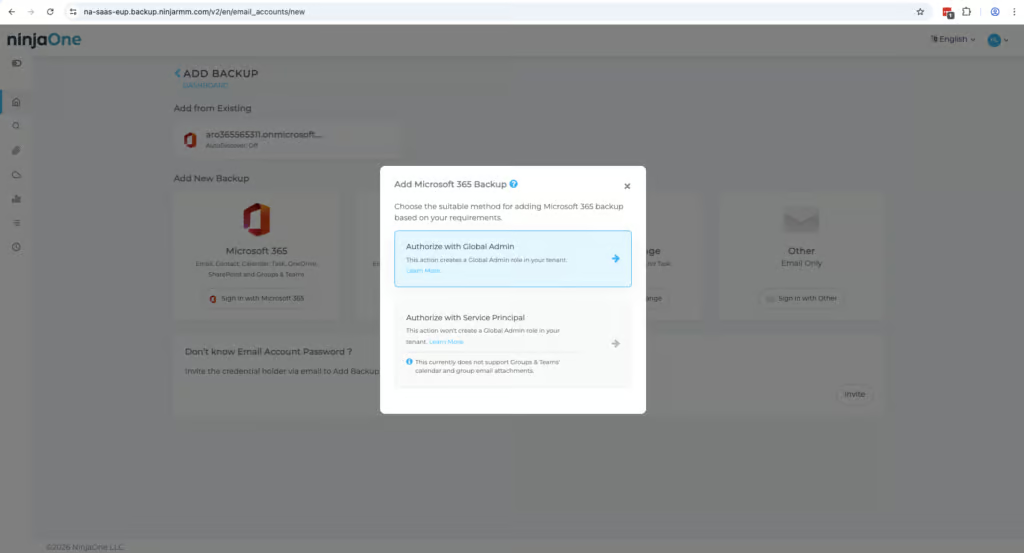
We began by setting up backups from scratch, recording the time and steps required to reach a first successful backup. This included authenticating with Microsoft three times to create a dedicated service account and grant permissions.
We verified which M365 workloads were protected by default and tested retention policies, including the employee departure scenario where we restored data from a deactivated mailbox to an active user.
For recovery testing, we ran full mailbox restores and granular single-item recoveries, testing the search functionality with AND/OR conditions and attachment content filters. We assessed resilience by evaluating point-in-time recovery options and bulk restore capabilities.
Finally, we tested governance controls by performing privileged admin actions and locating the corresponding audit log entries, verified MFA and SSO enforcement, and evaluated the commercial model including pricing structure and support responsiveness.
Deployment
Ranked #4 out of 12 M365 Backup Solutions for Deployment
Deployment Options
| SaaS | ✓ |
| On-premises (for Microsoft services like Exchange, Active Directory, etc.) | ✗ |
| Hybrid cloud | ✗ |
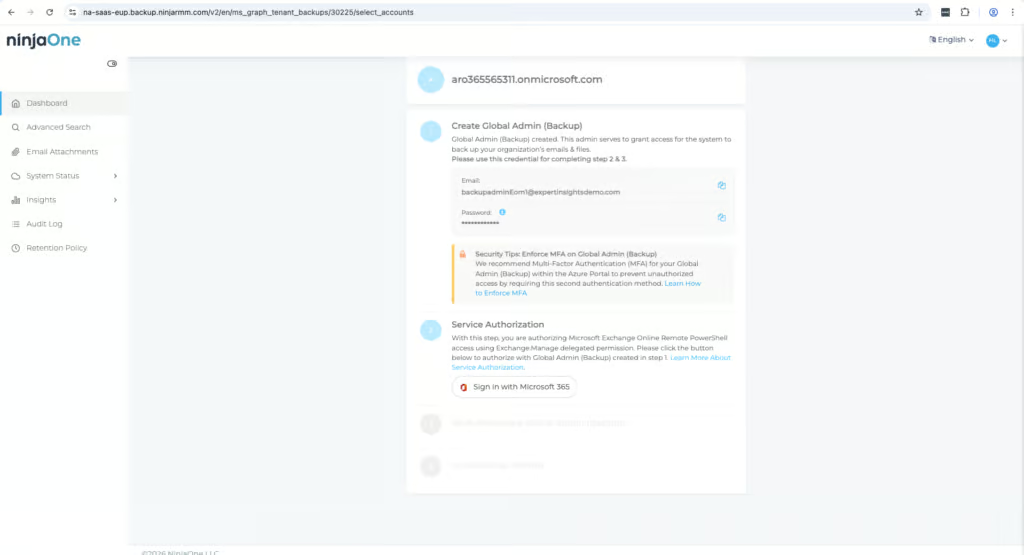
When deploying NinjaOne you’ll need to authenticate with Microsoft three times to create a dedicated service account and grant permissions for backups. This is less convenient than just using the normal Global Administrator’s account, but it’s more secure and aligns with least-privilege principles.
NinjaOne’s backup frequency is one of the strongest in its class. Exchange is backed up 12 times per day, SharePoint 3 times per day, and other services once daily. When compared with other MSP-focused backup providers, this approach stands out. Hornetsecurity only backs up four times per day across all workloads, and CloudAlly offers once per day by default with a paid add-on to reach three times per day.
For MSPs with clients that have tight recovery point objectives, NinjaOne’s frequency is a genuine advantage and one of the best reasons to choose it over alternatives in this space.
The first backup can take a while to complete, but once setup is finished, backups run consistently without further intervention. The slightly clunky onboarding process is the main reason for the score, but in day-to-day operation, the platform is reliable.
Coverage
Ranked #2 out of 12 M365 Backup Solutions for Coverage
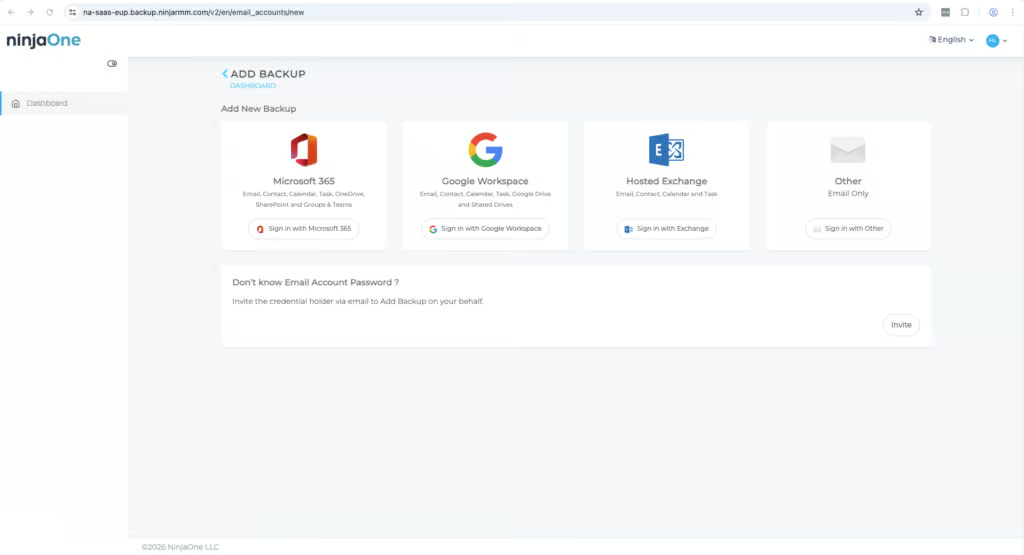
NinjaOne covers Exchange Online, SharePoint Online, OneDrive for Business, Microsoft Teams (including 1:1 chats, group conversations, and channels), and Public Folders. Public Folder support remains a differentiator to many competitors that either exclude them or treat them as an afterthought compared. Public Folder backup depends on Microsoft’s Exchange Web Services (EWS), which Microsoft is planning to retire in April 2027.
Supported Platforms
 Exchange (Outlook) Exchange (Outlook) |
✓ |
 SharePoint SharePoint |
✓ |
 OneDrive OneDrive |
✓ |
 Teams Teams |
✓ |
 Azure VMs Azure VMs |
✗ |
 Entra ID Entra ID |
✓ |
 Dynamics Dynamics |
✗ |
 Power Platform Power Platform |
✗ |
NinjaOne Entra Backup covers users, groups, roles, Conditional Access policies, devices, BitLocker keys and app registrations, for MSPs and internal IT teams. That’s broader than Hornetsecurity (users and groups) and OpenText CloudAlly (users, groups and roles, in beta).
Microsoft does now offer a basic Entra ID backup with Entra ID P1 and P2 licenses, but it keeps only seven days of daily backups inside your own tenant.
Retention
Ranked #3 out of 12 M365 Backup Solutions for Retention
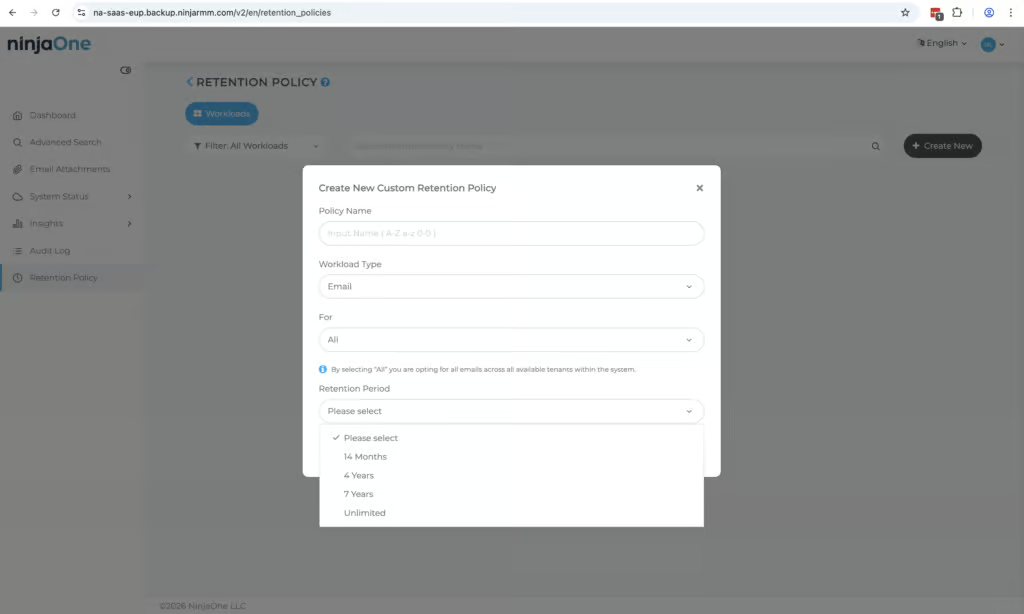
Retention is unlimited by default, or you can limit stored backed up data for 14 months, 4 years, or 7 years. Retention policies can be set for individual accounts if you have purchased the Archiver add-on; they are fairly rigid otherwise.
NinjaOne keeps data from deactivated mailboxes but they no longer consume a NinjaOne license. Data from deactivated accounts is only deleted if you manually remove it. Cross-user restore (restoring backed up data from one user to another) is supported, but permissions for this are restricted to the highest-level admins only.
NinjaOne also backs up unlicensed mailboxes and deleted users, clearly distinguishing between billable and non-billable accounts. Versioning is fully supported, so you know that historical restore points remain available when needed.
The main limitation is that truly granular, account-level retention requires the Archiver add-on. Without it, retention options are more limited.
Recovery
Ranked #2 out of 12 M365 Backup Solutions for Recovery
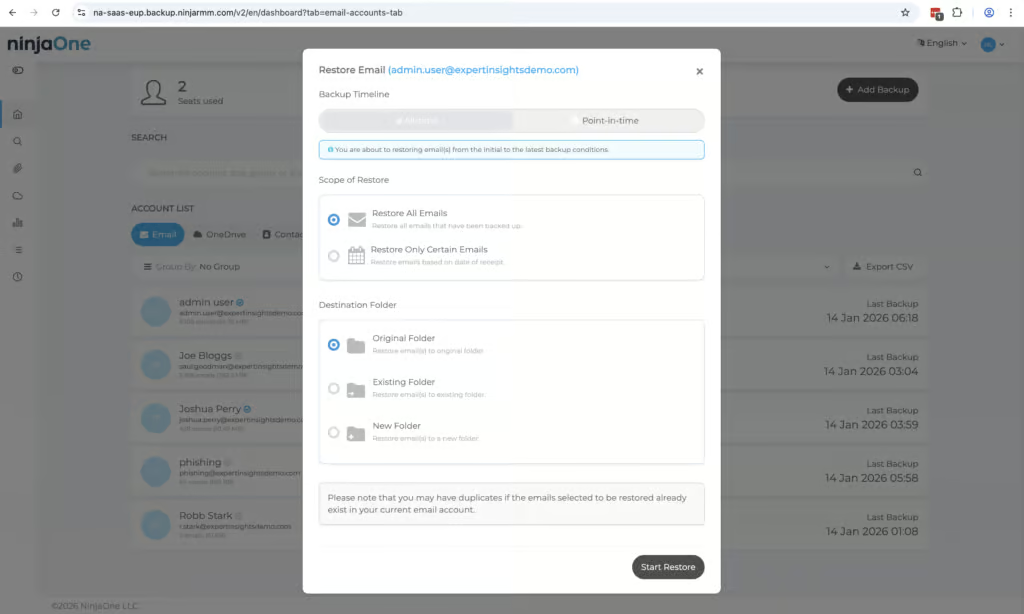
In our testing, standard recovery options performed reliably. Full and granular restores are supported across Exchange, SharePoint, OneDrive, and Teams. Point-in-time recovery and non-destructive restores are available to prevent accidental overwrites.
Search functionality is one of NinjaOne’s clearest strengths among MSP-focused backup products. The platform supports AND/OR search conditions, attachment name and content search, and keyword filtering. These are features that most competitors in this category don’t match. Hornetsecurity allows search only within individual mailboxes with no keyword search. Redstor’s filtering is limited and in practice often requires restoring a broader dataset and manually searching through it. CloudAlly indexes email body content and attachments, but doesn’t support AND/OR logic.
For MSPs handling granular restore requests on behalf of clients, particularly for compliance, legal, or e-discovery scenarios, NinjaOne’s search capability reduces time spent on individual restore jobs considerably.
The main area for improvement we found is that cross-user recovery is only available to partner-level admins. Standard recovery options work well for typical restore scenarios, but this restriction can slow response in certain situations. Downloads are available in PST or EML format, though direct export to cloud storage is not supported.
Resilience
Ranked #8 out of 12 M365 Backup Solutions for Resilience
With NinjaOne you can choose a specific point in time to restore from, which is essential for rolling back to a known-good state after an incident. Backups are immutable, and the platform can be configured to run under a dedicated service account separate from Microsoft 365 Global Admin credentials.
However, NinjaOne does not currently offer ransomware or malware scanning within backups. Administrators must rely on upstream security tooling to ensure backed-up data is clean before restoring. To be fair, this is a common limitation across MSP-focused backup products. Hornetsecurity and CloudAlly also have no malware scanning capability.
Among the MSP-focused alternatives reviewed, Redstor (scanning 14 attachment types) and Acronis (with its Advanced Security + XDR pack) are the exceptions. For MSPs where ransomware resilience is a client requirement, Redstor or a product like Acronis — which offers malware scanning as an add-on — are worth evaluating alongside NinjaOne.
Another slight limitation is the lack of true bulk restore capability. You cannot restore multiple mailboxes, sites, or accounts in a single operation, which would slow recovery in a widespread incident.
Backup Health
Ranked #1 out of 12 M365 Backup Solutions for Backup Health
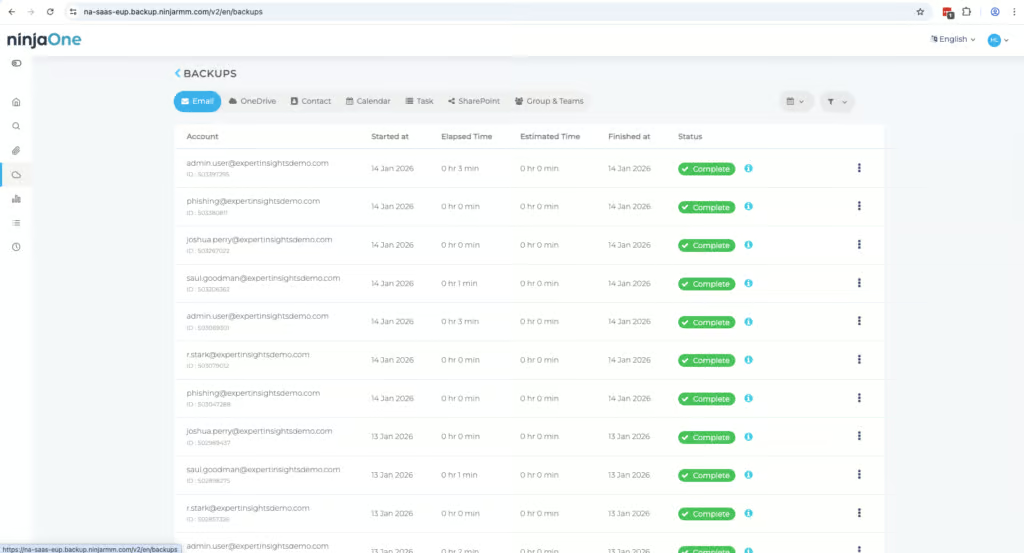
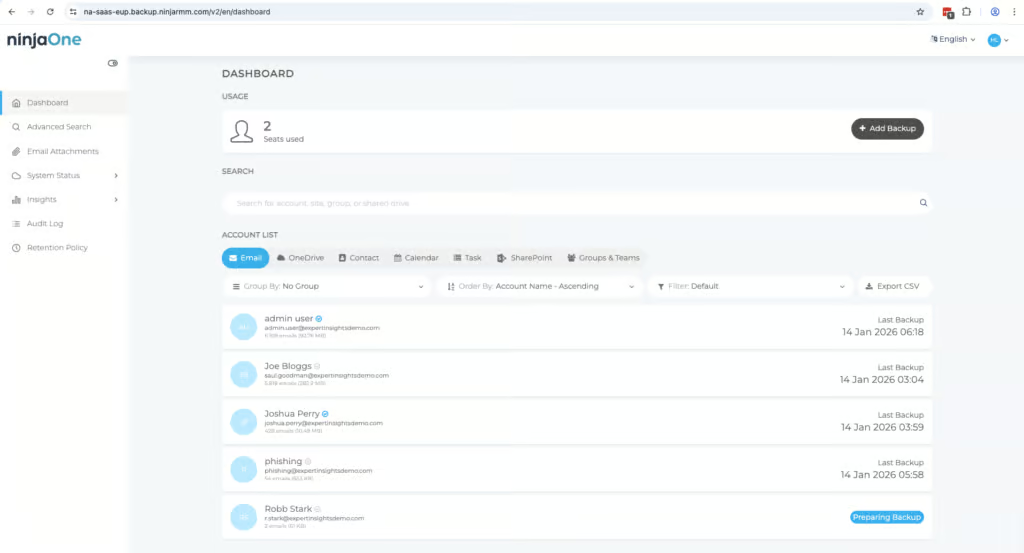
Backup health monitoring is one of NinjaOne’s strongest areas. There’s a good dashboard, detailed documentation and an automatic retry feature if a backup fails.
This automatic retry behavior is uncommon among the solutions we tested; SpinOne is the only other platform we saw retry failed jobs automatically. When we tested the service, we found that if a backup fails, NinjaOne keeps retrying instead of giving up. Admins are notified via email when this happens, so you can quickly jump in and start troubleshooting if there are any problems.
The troubleshooting documentation in NinjaOne Dojo is thorough and we found it broadly to be very helpful.
We found NinjaOne’s dashboard to be well designed and easy to navigate. You can filter backup history by workload and date, and quickly confirm the most recent successful snapshots without digging through logs.
The NinjaOne portal shows how many backup jobs were successful, currently running, or retrying after encountering a problem. Admins get real-time alerts for some use cases, including backup errors, retries, and auto-discovered items. Scheduled reports can be sent to administrators for ongoing visibility without needing to log into the portal daily.
Governance and Security
Ranked #2 out of 12 M365 Backup Solutions for Governance and Security
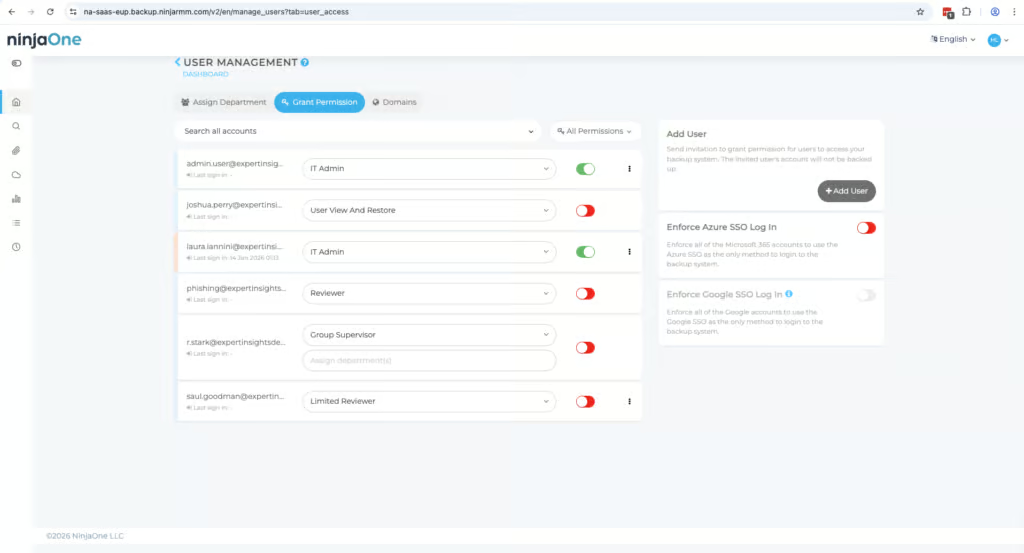
Governance and security are standout areas for NinjaOne, with strong compliance coverage and flexible access controls.
The last 24 hours of logs are displayed by default, but the date range can be expanded. Admin logs are exportable, which is important for compliance, audit, and MSP reporting workflows.
Governance Capabilities
| Public API available | Limited (partners and distributors only) |
| Multi-Tenancy | ✓ |
| Reporting / Alerts | ✓ |
| Automatic mailbox / site / etc onboarding | Optional auto-discovery/auto-licensing; AD-group filtering available |
| Bulk enable / disable backups | ✓ |
| Self-service recovery (for end users) | ✓ |
NinjaOne’s role-based access controls are the strongest across the MSP-focused backup products we’ve tested. Depending on your plan, you can assign six or ten predefined roles, which helps with separation between operational, administrative, and audit-level access. This level of granularity is notably absent in several direct competitors. Hornetsecurity offers only a full admin role and a restricted Service Desk role, with no custom roles. Redstor’s governance controls are present but its audit logs have minimal detail and cannot be exported, significantly limiting their usefulness for formal compliance reporting.
For MSPs that need to demonstrate clear separation of duties to their clients or pass external audits, NinjaOne’s governance model is a meaningful differentiator.
When you set up NinjaOne you’ll create a dedicated service account for backups, and enabling MFA on it is recommended. You can also enforce SSO and 2FA on login. The platform is compliant with SOC 2, ISO 27001 and GDPR. NinjaOne’s endpoint management platform holds FedRAMP Moderate authorization, but SaaS Backup isn’t included in that scope.
Compliance
| Audit Logs | ✓ |
| Data Center Regions | US, Canada, UK, EU, AU, Singapore, Japan |
| Data Center Infrastructure | AWS |
| Maximum retention period | Unlimited |
| Role-based access controls | ✓ |
| Data encrypted at rest and in transit | ✓ |
| Supports bring-your-own storage | No |
| E-discovery / legal hold | Legal hold/eDiscovery with the Archiver plan |
The platform does not support Bring Your Own Key (BYOK) encryption, which is common across SaaS backup platforms but worth noting for organizations that require direct control over encryption keys.
Commercials
Ranked #3 out of 12 M365 Backup Solutions for Commercials
Pricing
| Free plan available | ✗ |
| Trial available | ✓ |
| Seat-based pricing option | ✓ |
| Storage-based pricing option | ✗ |
| Starting Price (user / month unless otherwise noted) | $3.00 |
| Higher Tier Pricing | $4.00 |
NinjaOne’s commercial model is designed for MSPs, with straightforward pricing and unlimited storage.
At $3.00 per user per month, NinjaOne is competitively positioned within the MSP backup market. OpenText CloudAlly is $30 per licensed mailbox per year (about $2.50 per month), while Hornetsecurity’s list price is $2.75 per user per month.
For the price, NinjaOne offers significantly stronger search capabilities, higher backup frequency, and more granular governance controls than both Hornetsecurity and CloudAlly — a definite advantage for MSPs thinking of opting for NinjaOne.
NinjaOne SaaS Backup can be purchased as either backup only or with the Archiver upgrade. We’d recommend going for the Archiver add-on if you do need long-term retention with end-user access to archived data.
MSPs evaluating NinjaOne should factor the Archiver cost into their per-seat price when comparing against competitors that include these capabilities in their base pricing.
Support
| Support Locations | US, EMEA, APAC |
| Email support | Yes |
| Phone support | No |
| Chat support | No |
| Web support portal | Yes |
| Support hours (normal priority) | Regional business hours |
| First response SLA (normal priority) | 1 hour |
The NinjaOne support team is generally knowledgeable and responsive. Access to vendor-backed support is included and is what we’d expect for an MSP-focused platform.
Editor's Score
Ranked #3 out of 12 M365 Backup Solutions for Editor's Score
NinjaOne SaaS Backup sits at the top end of the MSP-focused backup market. It outperforms Hornetsecurity on backup frequency, search, and governance controls, and matches or exceeds CloudAlly in most areas.
Redstor is the strongest alternative for organizations prioritizing compliance, infrastructure-independent storage, and malware scanning, but falls behind NinjaOne on usability, search, and governance depth.
The main considerations to weigh are the lack of malware scanning and the additional cost of the Archiver add-on.
For MSPs already within the NinjaOne ecosystem, we recommend this product strongly; its high-frequency backups, robust search, and comprehensive governance make it one of the strongest options in the MSP backup market.
Who This Is For: MSPs managing multiple client tenants. Organizations that want end-user self-service access to archived data. Environments where high-frequency backups and strong governance are priorities.
Who Should Look Elsewhere: Standalone organizations not using the broader NinjaOne platform or operating as MSPs. Organizations requiring BYOK encryption or built-in ransomware scanning.
Read the full review
Enter your work email to unlock the full review.
Check your email
We sent a 6-digit code to . Enter it below to continue.