
OpenText CloudAlly Backup for Microsoft 365 Review

Tested March–April 2026. Updated October 2026.
Bottom Line
CloudAlly by OpenText is one of our favorite backup solutions, especially for SMBs. When you need to recover files, it’s extremely fast and easy to use. For SMBs looking for a simple, fast, and reliable backup service, we think it’s a top choice. For larger teams, unless you need active malware scanning or FedRAMP compliance, CloudAlly is still a strong service to consider.
Overall Rating Summary
Read our M365 testing methodology to learn more.
Pros
- Extremely fast and easy deployment — backups running in minutes
- Unlimited storage by default
- Fast, intuitive recovery process with strong end-user recovery
- Backup data stored on AWS, independent of Microsoft infrastructure
- Simple, transparent pricing at $30 per licensed mailbox per year
Cons
- No ransomware or malware scanning
- Teams 1:1 chats not backed up
- No FedRAMP or BYOK support, and no SOC 2 report of its own
- Basic backup health dashboards — relies on activity logs and email notifications
- Backup frequency limited to once per day (three times per day is a paid add-on)
OpenText’s CloudAlly is one of the easiest backup services for Microsoft 365. The recovery process is very simple and streamlined, especially for Exchange mailboxes. It’s easy for you to find a file and get it back in your environment. This may seem obvious—but in many services this process can actually be quite complicated.
CloudAlly is very easy to deploy, and the fundamentals run extremely well. We were able to run all of our backups in just a few clicks. Retention policies are granular and storage is unlimited by default—although this can be changed if you have maximum data retention policies.
In our review, we were impressed by CloudAlly’s performance and reliability. The solution is reliable and backed by OpenText. Unlike some competitors that store backups within the Microsoft Azure ecosystem, CloudAlly stores backups on Amazon Web Services (AWS), meaning your backups remain accessible even in the event of a Microsoft or Azure outage.
There are some drawbacks we found in our testing. CloudAlly does not offer any ransomware or malware scanning when it backs up your data. The service is also not FedRAMP compliant, which may be a dealbreaker for some teams. Teams 1:1 chats are also not backed up, which is worth considering if your organization relies heavily on private chats.
If your priorities are reliable secure backups, fast restores, and low management overhead, we think CloudAlly is one of the strongest options on the market.
How We Tested CloudAlly

We connected CloudAlly to a Microsoft 365 tenant and went through our full testing methodology. Our assessment covered deployment and onboarding, workload coverage verification, retention policy configuration, timed recovery scenarios, resilience testing, backup health monitoring, governance and security controls, and commercial considerations.
We began by setting up backups from scratch, recording the time and steps required to reach a first successful backup. We verified which M365 workloads were protected by default and tested retention policies, including the employee departure scenario where we restored data from an archived user to an active mailbox.
For recovery testing, we ran full mailbox restores and granular single-item recoveries using both date/time snapshots and item-based search. We assessed resilience by evaluating bulk recovery options and restore point selection. We also tested backup health monitoring by reviewing how failures are surfaced and configuring email notifications.
Finally, we tested governance controls by performing privileged admin actions and locating the corresponding audit log entries, verified MFA and SSO configurations, and evaluated the support experience via live chat.
Deployment
Ranked #1 out of 12 M365 Backup Solutions for Deployment
Deployment Options
| SaaS | ✓ |
| On-premises (for Microsoft services like Exchange, Active Directory, etc.) | ✗ |
| Hybrid cloud | ✗ |
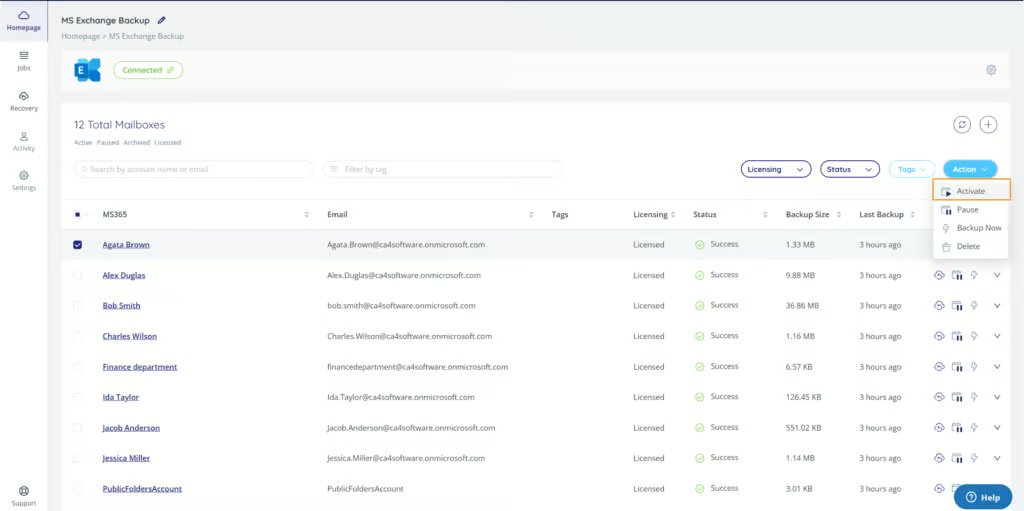
CloudAlly earns full marks for deployment. The setup process takes only a couple of minutes and requires no external documentation or complex configuration.
In our testing, we authenticated using Microsoft credentials, approved permissions, and enabled all test backups in just a few clicks. Once permissions are approved, workloads are discovered automatically and backups start immediately. There’s no manual mapping or per-service setup required.
You must authenticate each backup task with a Microsoft 365 Global Admin separately, but this gives you the opportunity to use a dedicated service account for each backup—a useful option for organizations that want to maintain separation between workloads.
Backups run once per day by default unless you purchase the add-on for three times per day. Backups can also be run on demand. You can check the progress of currently running backups under the Jobs tab, and clicking into a running backup task displays current progress clearly.
For SMBs, you can use a single Global Admin account to cover the entire tenant. For more complex environments, you can add admins to manage dedicated services for each workload. Overall, this is one of the fastest and smoothest deployment experiences we’ve tested.
Important Note — Microsoft API Policy Change (March 2026): Larger tenants can configure multiple service accounts within CloudAlly to distribute API load and effectively sidestep Microsoft Graph API throttling limits. As of Microsoft’s March 1, 2026 API policy change, this approach may now be non-compliant under Microsoft’s updated Terms of Use (section 3.7 enforcement). Organizations using or considering this configuration should review Microsoft’s current Terms of Use and seek guidance from CloudAlly and/or Microsoft before proceeding.
Coverage
Ranked #8 out of 12 M365 Backup Solutions for Coverage
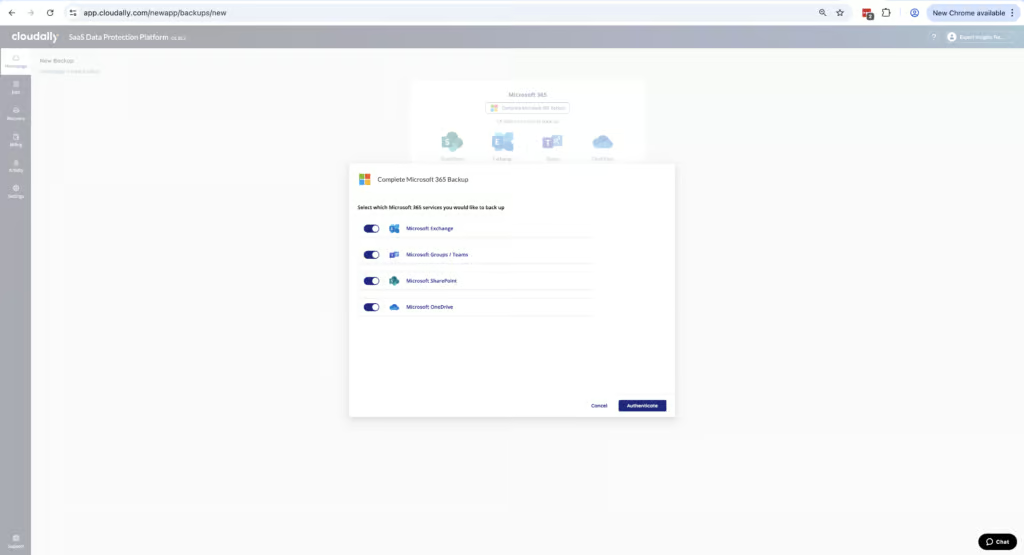
CloudAlly covers essential Microsoft 365 services, but its focus is on core workloads like email, files and shared folders rather than the broader Microsoft ecosystem.
Supported Platforms
 Exchange (Outlook) Exchange (Outlook) |
✓ |
 SharePoint SharePoint |
✓ |
 OneDrive OneDrive |
✓ |
 Teams Teams |
Limited (no 1:1 chats) |
 Azure VMs Azure VMs |
✗ |
 Entra ID Entra ID |
Limited - in beta (users, groups and directory roles) |
 Dynamics Dynamics |
✗ |
 Power Platform Power Platform |
✗ |
CloudAlly covers Exchange Online, SharePoint Online, OneDrive for Business, and Microsoft Teams (channel conversations, group chats, and Teams files). CloudAlly also backs up Public Folders, which many competing tools either ignore or handle poorly—though Public Folders are complex by nature and restores are less intuitive than mailbox or OneDrive recoveries. Public Folder backup depends on Microsoft’s Exchange Web Services (EWS), which Microsoft is planning to sunset in April 2027.
The main coverage gap is Microsoft Teams 1:1 chats, which are not backed up. If your organization relies heavily on private chats for operational or compliance-related communication, this is something to consider.
CloudAlly’s Entra ID backup is currently in beta, covering users, groups and directory roles; CloudAlly told us it will be included in the Microsoft 365 bundle at no extra cost when generally available.
Microsoft now includes a basic Entra ID backup with Entra ID P1 and P2 licenses, but it keeps only seven days of daily backups inside your own tenant. CloudAlly doesn’t cover Azure workloads or the Power Platform. If you’re looking for a single product to protect both SaaS data and underlying Azure infrastructure, CloudAlly isn’t designed for that use case.
Setup was straightforward. Once permissions are approved, workloads are discovered automatically and backups start immediately. We found no hidden exclusions or surprises during our review.
Retention
Ranked #3 out of 12 M365 Backup Solutions for Retention
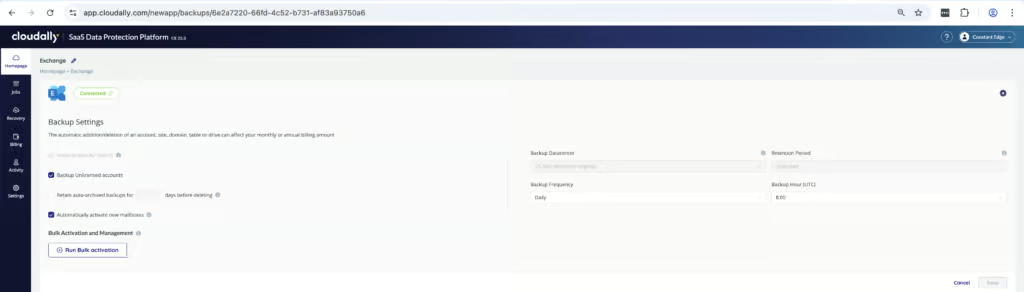
CloudAlly provides strong retention capabilities with unlimited retention by default and sensible handling of user lifecycle events.
If a mailbox or user is deleted or has a license removed, their existing backup data is automatically archived. Archived data can be either retained indefinitely or deleted after a specified period, depending on your policy. Cross-user restore is fully supported, so you can recover a departed employee’s data into another user’s mailbox.
Retention is unlimited by default—data is preserved indefinitely unless you choose to restrict it. This can be customized further by contacting support, and different retention policies can be set for separate backup tasks. We found this to be ideal for managing larger deployments with different policies required for different teams.
Licensing is also well thought out. CloudAlly backs up unlicensed, deleted, and archived users, and only active users consume a license. In our testing, this worked exactly as expected. It helps prevent unnecessary license churn when users leave the organization.
The default backup frequency is once per day. Admins who need more frequent recovery points can upgrade to a maximum of three backups per day, but this is a paid add-on at $6 per user per year. There is no continuous or near-real-time backup option.
Recovery
Ranked #1 out of 12 M365 Backup Solutions for Recovery
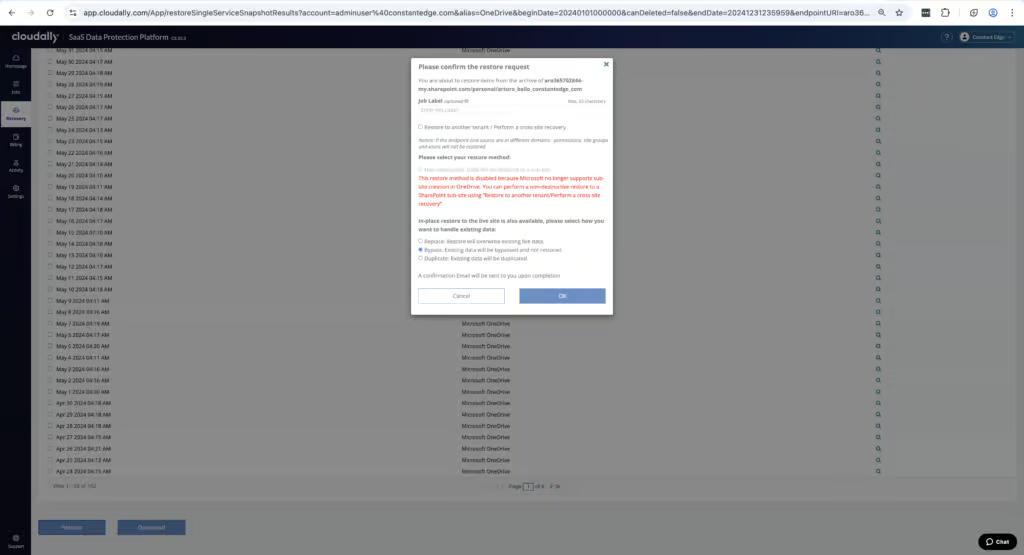
CloudAlly stands out for its fast, intuitive, and dependable recovery process. The platform performs consistently well and makes it easy to recover specific files or entire mailboxes.
In our testing, we found two different interfaces available for locating Exchange backups and one interface for other workloads. You can search a mailbox or site by either date/time snapshot or by item to start a granular restore. End User Recovery can be enabled in settings, allowing users to recover files they’ve accidentally deleted without needing an admin.
CloudAlly supports full and granular restores across Exchange, SharePoint, OneDrive, and Teams. You can restore entire mailboxes or folders, individual items and files, or roll back to a specific point in time. When restoring files or emails, they can be returned to the original location or saved to another user or site—especially useful when an employee leaves and you need to move their mailbox into a folder within another mailbox.
You can check the progress of currently running restore tasks in the Jobs tab, and a notification is sent when the restore is complete. In our testing, we restored a 3.8GB Exchange mailbox in under one hour with no file corruption, missing metadata, or incomplete recovery. CloudAlly’s recovery process outperformed Veeam in our side-by-side testing.
CloudAlly also allows you to download or export backup data. You can download data locally as a ZIP archive or export directly to cloud storage platforms such as Amazon S3 or Dropbox—useful for legal, audit, or long-term archival workflows.
The only limitation is tenant-wide bulk restores, which require contacting CloudAlly support for assistance. End user recovery on CloudAlly for Exchange is arguably the strongest end-user recovery experience we tested.
Resilience
Ranked #4 out of 12 M365 Backup Solutions for Resilience
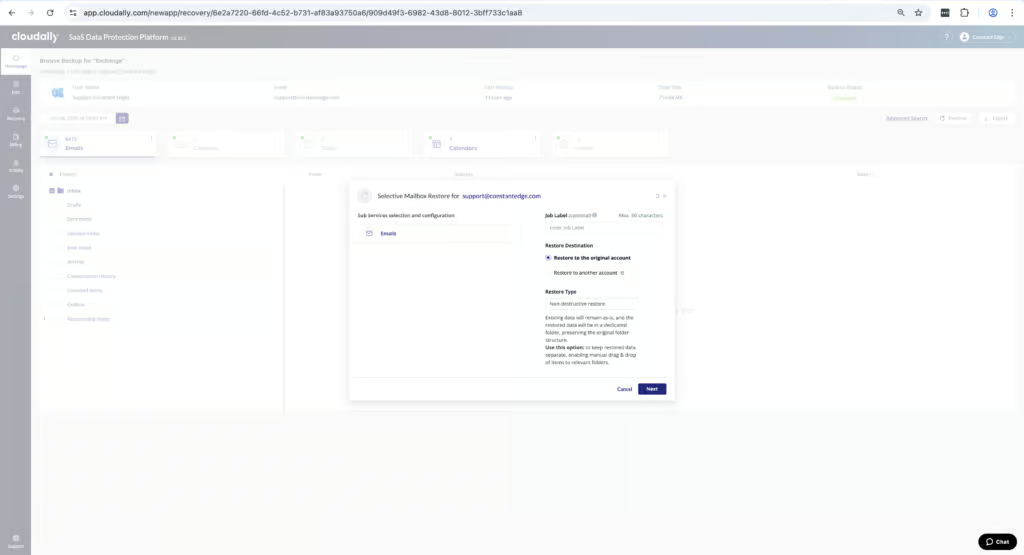
CloudAlly’s resilience capabilities are solid for protecting backups from tampering and enabling recovery, but it does not perform any malware or ransomware scanning.
In our testing, we found no threat detection capabilities to identify points of compromise. There is no malware or ransomware scanning, no alerting if malicious content exists in backups, and no visibility into whether restored data may be infected. CloudAlly backs up data exactly as it exists in Microsoft 365 and restores it in the same state.
That said, backups are immutable by default, preventing them from being altered after creation. Authorized admins can still delete backup tasks, and S3 Object Lock is available if you bring your own Amazon S3 storage. You can choose a date/time snapshot to restore data from, which provides flexibility when rolling back to a known-good state.
A significant resilience advantage is that CloudAlly stores all backup data on Amazon Web Services (AWS), completely separate from the Microsoft ecosystem. This is a meaningful distinction for organizations evaluating backup as part of a broader disaster recovery strategy. Because Microsoft 365 runs on Azure, products that store backups within Azure — such as Veeam — share the same underlying infrastructure as your production environment. In the event of a significant Azure outage, those organizations could lose access to both their M365 services and their backups simultaneously.
CloudAlly’s AWS-based storage eliminates this single point of failure. For organizations that want further control, CloudAlly also supports bring-your-own-storage on Amazon S3, S3-compatible, Azure or Google Cloud storage. With BYOS, the unlimited storage offer doesn’t apply, you still need a CloudAlly subscription to access the data, and there is a charge to export your data if you leave. This gives IT teams full ownership over where backup data resides, which can be important for data sovereignty, compliance, or cost management requirements.
CloudAlly admins are separated from the Microsoft 365 Global Admin role, which reduces blast radius if M365 credentials are compromised. It’s also worth noting that CloudAlly is owned by OpenText, a publicly traded, multi-billion-dollar enterprise software vendor, which provides confidence in long-term platform stability.
Backup Health
Ranked #7 out of 12 M365 Backup Solutions for Backup Health
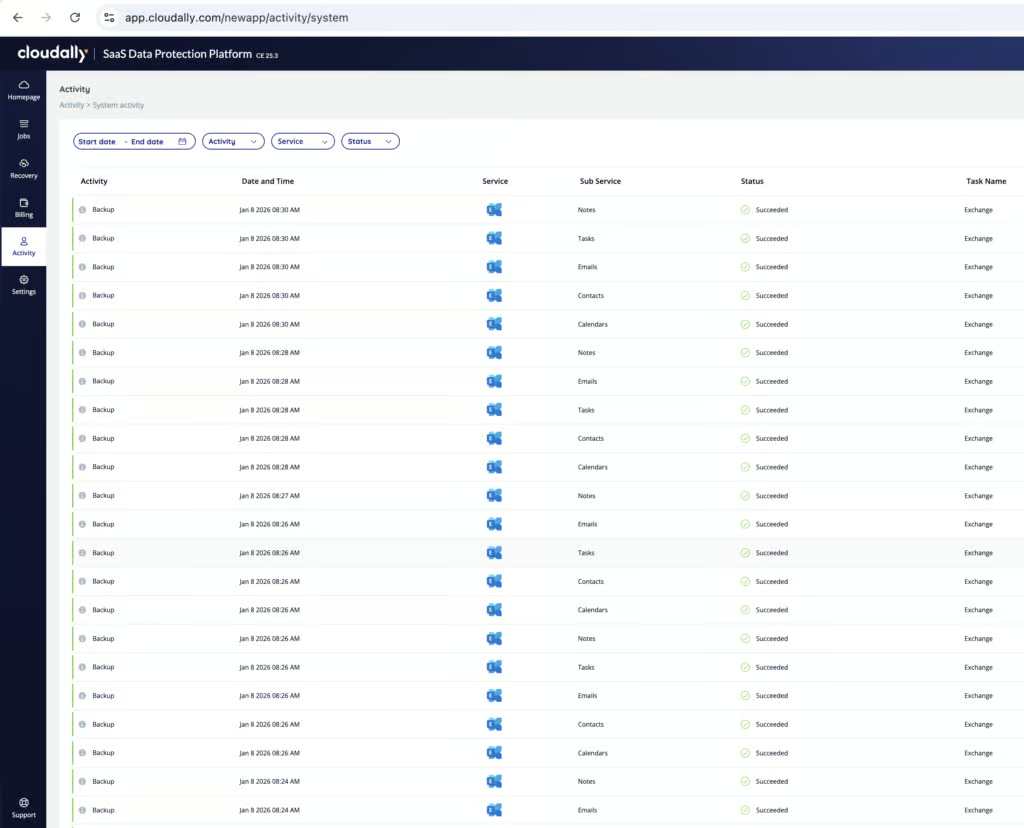
CloudAlly provides the visibility you need to confirm backups are running, though reporting and dashboards are more basic than some competitors.
Admins can receive email notifications if a backup fails. You can choose to receive emailed reports either daily, weekly, or only upon failure. Any backup failures are noted in the activity logs and are searchable.
However, there is no dashboard or graph displaying overall backup health at a glance. You need to check the activity logs or rely on email notifications to stay informed. This is functional but less convenient than platforms with dedicated health dashboards.
Error messages can be on the vague side when failures occur—often showing a simple “FAILED” status without detailed root-cause information. That said, the CloudAlly live chat can be helpful for diagnosing issues when they arise, and failures are rare in practice.
Backup history visibility is strong, particularly for Exchange. You can clearly see which dates have successful backups, making point-in-time recovery straightforward.
Governance and Security
Ranked #5 out of 12 M365 Backup Solutions for Governance and Security
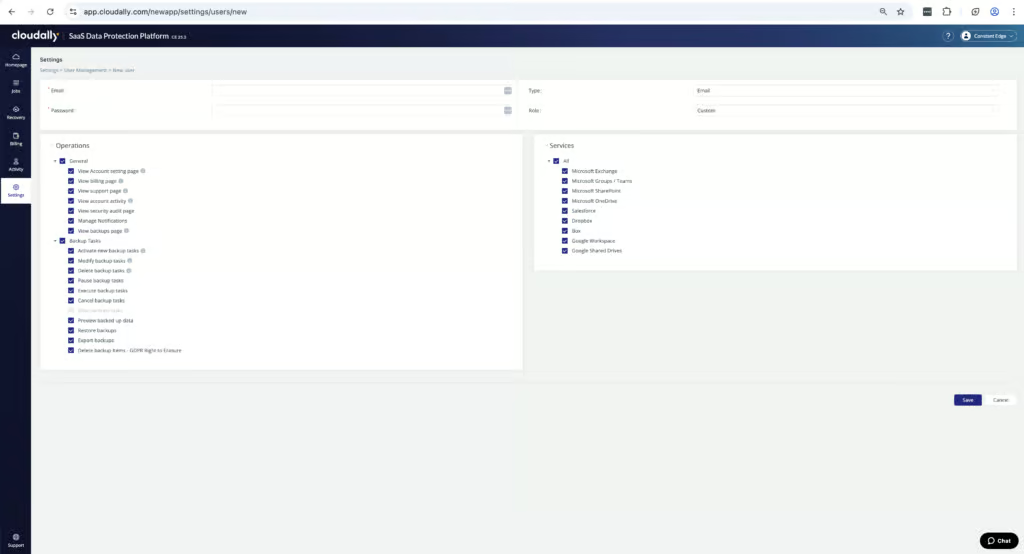
CloudAlly provides solid governance controls and security features suitable for most SMB and mid-market environments, though it lacks some advanced compliance certifications.
Logs are retained indefinitely for system and user activity and can be exported as CSV. You can filter logs by date, activity type, and success/failure status. In our testing, we performed privileged admin actions and located the corresponding audit log entries without difficulty.
Governance Capabilities
| Public API available | ✓ |
| Multi-Tenancy | ✓ |
| Reporting / Alerts | ✓ |
| Automatic mailbox / site / etc onboarding | ✓ |
| Bulk enable / disable backups | ✓ |
| Self-service recovery (for end users) | End-user self-service recovery for Exchange |
CloudAlly supports full role-based admin control. You can set granular permissions for which backup services users can access and which actions they are allowed to take. Admin permissions can also be scoped by service, which is useful for aligning permissions with job function in larger IT teams.
One consideration: any administrator with full access can delete their organization’s CloudAlly account. Once deleted, data is only retained for five to seven days before permanent removal. This creates potential exposure if credentials are compromised or misused.
MFA via authenticator app is available, and SSO via Microsoft, Google or Okta is supported. CloudAlly is ISO 27001 certified, and all backup data is encrypted in transit and at rest using AES-256. The platform is GDPR and HIPAA compliant.
Compliance
| Audit Logs | ✓ |
| Data Center Regions | US, Canada, UK, Ireland, France, Germany, India, Japan, South Africa, AU |
| Data Center Infrastructure | Amazon S3 storage |
| Maximum retention period | Unlimited |
| Role-based access controls | ✓ |
| Data encrypted at rest and in transit | ✓ |
| Supports bring-your-own storage | Yes |
| E-discovery / legal hold | ✗ |
However, CloudAlly doesn’t publish its own SOC 2 report (it relies on AWS’s), and doesn’t support FedRAMP or BYOK encryption. Data residency options include the US, Canada, UK, Ireland, France, Germany, India, Japan, South Africa, and Australia—all built on AWS infrastructure.
For MSPs, offboarding is straightforward. When an account is deleted, it’s automatically excluded from the next renewal invoice, and client data is permanently removed five days after the deletion request.
Compared to other MSP-focused backup solutions, we found CloudAlly extremely easy to manage — with one caveat. If you access the service through the native CloudAlly web portal, the experience is smooth and intuitive. However, if you’re managing accounts through the OpenText Secure Cloud Platform, the process is clunkier with more steps involved.
Commercials
Ranked #1 out of 12 M365 Backup Solutions for Commercials
Pricing
| Free plan available | ✗ |
| Trial available | ✓ |
| Seat-based pricing option | ✓ |
| Storage-based pricing option | ✗ |
| Starting Price (user / month unless otherwise noted) | $30 per licensed mailbox per year (or $3.00/user/month on a rolling monthly plan) |
| Higher Tier Pricing | $36/user/year with the 3x-daily backup add-on (+$6/user/year) |
CloudAlly keeps licensing and support simple, transparent, and easy to budget for. There are no hidden tiers or usage-based surprises.
Pricing follows a straightforward model: $30 per licensed mailbox per year. The billing tab in the portal plainly shows which items you’re being billed for and associated costs. You only pay for active, licensed users or sites, and you are not charged for shared mailboxes.
Storage is unlimited for hosted backups as long as you’re backing up all users. This removes one of the biggest sources of uncertainty in SaaS backup pricing and eliminates the need to monitor storage growth over time.
Support
| Support Locations | US, UK, EU, AU, Middle East, APAC |
| Email support | Yes |
| Phone support | Yes |
| Chat support | Yes |
| Web support portal | Yes |
| Support hours (normal priority) | 24 hours |
| First response SLA (normal priority) | 30 minutes |
Support quality is strong. 24/7 assistance is available via live chat, which is always accessible in the portal. Email, web, and phone support are also offered. In our interactions, support responses were fast and handled by staff who understood real-world Microsoft 365 issues.
CloudAlly is suitable for SMBs and MSPs looking for a reliable, easy-to-use Microsoft 365 backup solution. Ease of use is a key advantage—the platform can be deployed in minutes and requires minimal ongoing administration.
Larger organizations may experience slower backup times due to Microsoft Graph API throttling — rate limits Microsoft enforces per application, tenant, and mailbox to protect service performance. These limits cannot be increased.
Important Note — Microsoft API Policy Change (March 2026): The multiple service account approach for distributing API load may now be non-compliant under Microsoft’s updated Terms of Use section 3.7 enforcement, effective March 1, 2026. Organizations should review Microsoft’s current Terms of Use and seek guidance before implementing this configuration.
The lack of ransomware scanning and advanced compliance certifications means CloudAlly isn’t the right fit for highly regulated environments, but for most SMB and mid-market tenants, it delivers exactly what’s needed.
Editor's Score
Ranked #1 out of 12 M365 Backup Solutions for Editor's Score
CloudAlly is one of the strongest M365 backup options for SMBs and mid-market teams that want reliable, fast backup and recovery without the complexity. The deployment is one of the fastest we tested, the recovery process is excellent, and the pricing is simple and transparent.
The main limitations are the lack of malware scanning, no Teams 1:1 chat backup, and no FedRAMP authorization or SOC 2 report of its own. Backup health monitoring is functional but basic compared to platforms with dedicated dashboards.
For teams that prioritize ease of use, fast recovery, and straightforward pricing, CloudAlly is a strong choice.
Who This Is For: SMBs and MSPs that want fast, reliable M365 backup with minimal complexity. Teams that prioritize ease of use and straightforward recovery over advanced security features. Organizations that want backup data stored independently of Microsoft’s infrastructure, with the option to use their own cloud storage.
Who Should Look Elsewhere: Government, defense, or highly regulated financial environments that require their vendor’s own SOC 2 report, FedRAMP, or BYOK. Organizations that need Teams 1:1 chat backup. Teams that require built-in ransomware scanning or threat detection.
Read the full review
Enter your work email to unlock the full review.
Check your email
We sent a 6-digit code to . Enter it below to continue.