
SpinOne for Microsoft 365 Review

Tested March–April 2026. Updated October 2026.
Bottom Line
SpinOne’s security controls are the strongest we tested, with continuous ransomware scanning of backup data, the ability to block restores of infected files, and a 2-hour recovery SLA on the premium plan. However, SpinOne is a premium product with storage-based pricing and limited bulk restore capabilities, so is best suited for teams looking particularly for the strongest security controls available.
SpinOne offers an M365 backup solution designed for organizations where ransomware risk, insider threats, and the danger of restoring infected data back into production are primary concerns.
Spin.AI sells three products, each in a standard and an Enterprise version: SpinBackup, SpinSPM and the full SpinOne platform. SpinBackup is the entry-level tier, starting at $3.00 user/month. It includes a choice of cloud storage (AWS, GCP, Azure or bring your own storage), but lacks advanced features such as ransomware protection.
SpinBackup Enterprise adds automated Ransomware Protection with a 2-hour incident response SLA, and increases storage from 30GB to 50GB per user.
SpinOne is the full stack platform, which adds other security controls, including browser security and SaaS security posture management, alongside the same Ransomware Protection. SpinOne Enterprise includes unlimited storage.
This review does not cover SpinOne’s wider security capabilities, but focuses just on the backup functionality, looking at the features of SpinBackup and SpinBackup Enterprise.
SpinOne also offers backup support for Google Workspace, Slack, Salesforce, Jira or Confluence alongside Microsoft 365.
How We Tested SpinOne
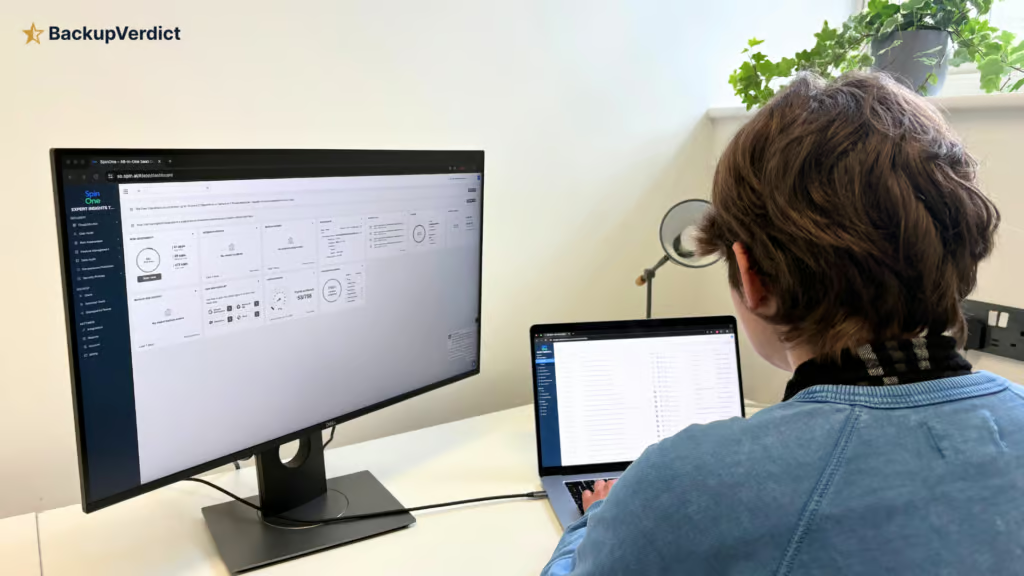
We began by setting up backups from scratch, recording the time and steps required to reach a first successful backup. We verified which M365 workloads were protected by default and tested retention policies, including the employee departure scenario where we attempted to restore data from an archived user.
For recovery testing, we ran full mailbox restores and granular single-item recoveries, testing the search functionality with keywords and attachment filters. We then evaluated ransomware protection capabilities and bulk restore options.
Finally, we tested governance controls by performing privileged admin actions and locating the corresponding audit log entries, verified 2FA enforcement options, and explored the commercial model including storage limits and support responsiveness.
Deployment
Ranked #4 out of 12 M365 Backup Solutions for Deployment
Deployment Options
| SaaS | ✓ |
| On-premises (for Microsoft services like Exchange, Active Directory, etc.) | ✗ |
| Hybrid cloud | ✗ |
Getting up and running with SpinOne was simple and fairly standard, with authentication via a Microsoft 365 Global Admin account. This does the trick for normal user accounts and sites.
In our testing, the OAuth consent flow was clear and workloads were discovered automatically after permissions were granted. Backups run once per day on the standard plan or three times per day on the enterprise plan.
The main friction we encountered was with shared mailboxes. These are not backed up by default and require setting up a dedicated security policy before they can be protected, which adds extra setup overhead compared to other tools.
The UI shows tabs and menu options for all of SpinOne’s services (SSPM, DLP, etc.), even if you are only licensed for backup.
This can make the interface feel slightly cluttered during initial navigation, especially if you’re not interested in those other areas. But if you go for the entire platform, it’s helpful to be able to manage everything in one place.
Coverage
Ranked #8 out of 12 M365 Backup Solutions for Coverage
Supported Platforms
 Exchange (Outlook) Exchange (Outlook) |
✓ |
 SharePoint SharePoint |
✓ |
 OneDrive OneDrive |
✓ |
 Teams Teams |
✓ |
 Azure VMs Azure VMs |
✗ |
 Entra ID Entra ID |
✗ |
 Dynamics Dynamics |
✗ |
 Power Platform Power Platform |
✗ |
SpinOne covers Exchange Online, SharePoint Online, OneDrive for Business, and Microsoft Teams (including 1:1 chats, channel conversations, and associated files). It’s good to see 1:1 Teams chats included, as not every solution includes this feature. Shared mailboxes are not included by default but can be enabled for backup manually by configuring a security policy.
On the other hand, the platform does not support Public Folders, Entra ID, Azure workloads, Dynamics 365, or the Power Platform.
Where SpinOne differs from pure M365 backup tools is its broader SaaS coverage. The same platform can also back up Google Workspace, Slack, Salesforce, Jira and Confluence. So if you’re looking to backup M365 as well as any of these other enterprise apps, SpinOne could be a good option to consider.
Retention
Ranked #9 out of 12 M365 Backup Solutions for Retention
Retention can be set anywhere from six months to indefinitely, which puts SpinOne ahead of vendors with hard limits on retention.
You can set different retention policies by security groups, which is a good feature to have for compliance-focused teams.
However the main pain point we found is that deleted or inactive users are accounted for in a separate Archived Users tab, and each inactive user you want to backup requires an active subscription with add-on archive licenses.
This is a serious cost consideration. Other vendors, like OpenText CloudAlly, for example, automatically back up departed users at no additional licensing cost.
Hornetsecurity allows you to remove users from backups while retaining historical data without extra charges. Afi.ai also does not charge for archived mailboxes.
SpinOne’s approach can make the solution significantly more expensive in the long run, particularly in organizations with high staff turnover, because you have to keep paying for a license even if an employee leaves the organization.
SpinOne retains the latest 100 versions of data in backups, so granular versioning is available but there is a cap. For environments with busy SharePoint libraries or frequent mailbox churn, this is something to bear in mind.
Backup frequency is also tied to licensing tier. Backups run once per day on the standard plan, three times per day for the higher tier plans.
Recovery
Ranked #6 out of 12 M365 Backup Solutions for Recovery
Recovery functionality is solid with strong search capabilities for granular recovery. But it took us a while to get used to the platform.
When we wanted to test recovering data, we found that it wasn’t immediately obvious where to go to perform a restore. It turned out we needed to drill into an individual user or click the name of the backup task before the Restore button becomes visible.
Once you get used to this workflow, the actual process is relatively simple. You can select a timestamp of data to restore (from a calendar view) and then choose a restore destination.
There is a search function so admins can search for file types and keywords, which makes locating specific items straightforward. Search supports multiple filters and works across Exchange, OneDrive, and SharePoint.
This places SpinOne alongside CloudAlly and NinjaOne at the stronger end of search capabilities among the products we tested - ahead of Veeam and Acronis (both limited to metadata search within individual mailboxes, with no email body search) and Hornetsecurity (metadata only within individual mailboxes).
Restoring data is quite rigid however. The only available restore option is non-destructive, meaning that SpinOne always creates a new folder when restoring data.
If you try to restore an email to your Inbox by specifying “Inbox” as the folder, SpinOne will put that email in a new folder called “Inbox (1)”. This prevents accidental overwrites but introduces a slightly unconventional restore structure.
You can download backup data locally as PST or EML files, but direct export to cloud storage like Amazon S3 or Dropbox is not supported.
Resilience
Ranked #4 out of 12 M365 Backup Solutions for Resilience
As we’ve covered, SpinOne stands out for ransomware protection. It continuously scans backups for ransomware and can block access to infected files. If malicious content is detected, you can control how it’s handled - by default, access to infected data is blocked, preventing end users from restoring compromised backups.
Among the products we tested, only Acronis (on its Advanced Security + XDR tier), AvePoint (behavior-based detection), Redstor (scanning 14 attachment types) and Veeam (on its Advanced and Premium plans) offer comparable ransomware protection within backups. CloudAlly, Hornetsecurity, NinjaOne, Spanning, iDrive, and SaaSAssure do not include malware scanning.
Backups are also immutable, which is an important security measure. Once data is backed up, it cannot be altered or deleted, giving you confidence that historical restore points remain intact. SpinOne also keeps backup administration separate from Microsoft 365 Global Admin credentials, reducing blast radius if credentials are compromised.
The main limitation is that there’s no way to mass restore multiple mailboxes at once. Each restore must be launched individually, which would slow recovery in a widespread incident. This a limitation shared with Spanning, iDrive, and Afi.ai. By contrast, Hornetsecurity, AvePoint, and Veeam all support bulk restore of multiple mailboxes simultaneously.
SpinOne offers a choice of cloud storage providers for backup data - AWS, Azure, or Google Cloud Platform - which is unusual flexibility among the products we tested. Organizations concerned about Azure dependency (the same infrastructure that powers Microsoft 365) can direct backups to AWS or GCP, ensuring backup access remains unaffected during a Microsoft outage
Backup Health
Ranked #9 out of 12 M365 Backup Solutions for Backup Health
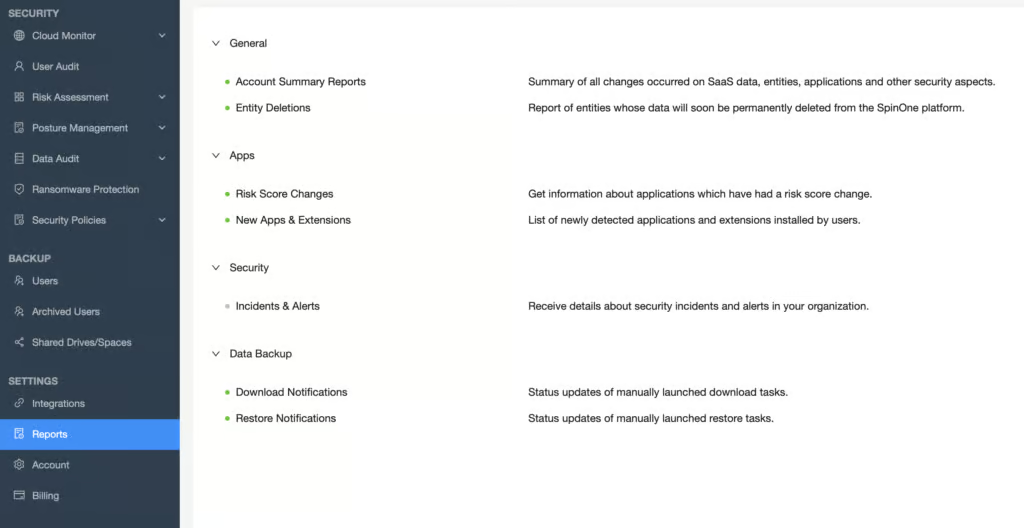
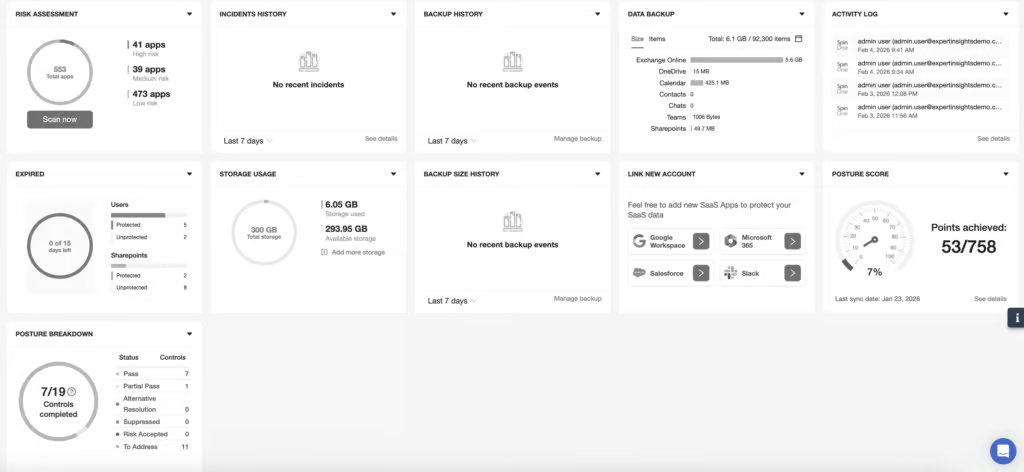
SpinOne’s Backup Health score reflects operational backup monitoring visibility (dashboard metrics, alerting, failure reporting), not its security capabilities. Ransomware scanning and threat detection are strong, but administrators lack clear real-time visibility into whether backups are completing successfully.
Outside of the ransomware scanning, backup health visibility is limited. There are basic dashboards and few options for detailed diagnostics. It's not always easy to find detailed information on why backups succeeded or failed. Admins can receive email notifications if backups run into issues, but the level of detail is limited and there isn’t much documentation available for troubleshooting M365-specific failures.
The dashboard on the home page provides information on backup status, but this page feels bloated with information about SpinOne’s other services. Email reports are basic with few scheduling or customization options.
When issues do occur, SpinOne automatically retries jobs, which reduces the risk of silent failures. However, identifying root cause often requires extra digging or contacting support.
Snapshot history is handled well—you can view timestamped backups using a calendar-style interface and easily see which restore points are available on specific dates.
The Backup Health score reflects the fact that day-to-day backup operations monitoring lacks the depth and visibility offered by platforms like AvePoint or Veeam, even though SpinOne’s security-layer monitoring is excellent.
Governance and Security
Ranked #5 out of 12 M365 Backup Solutions for Governance and Security
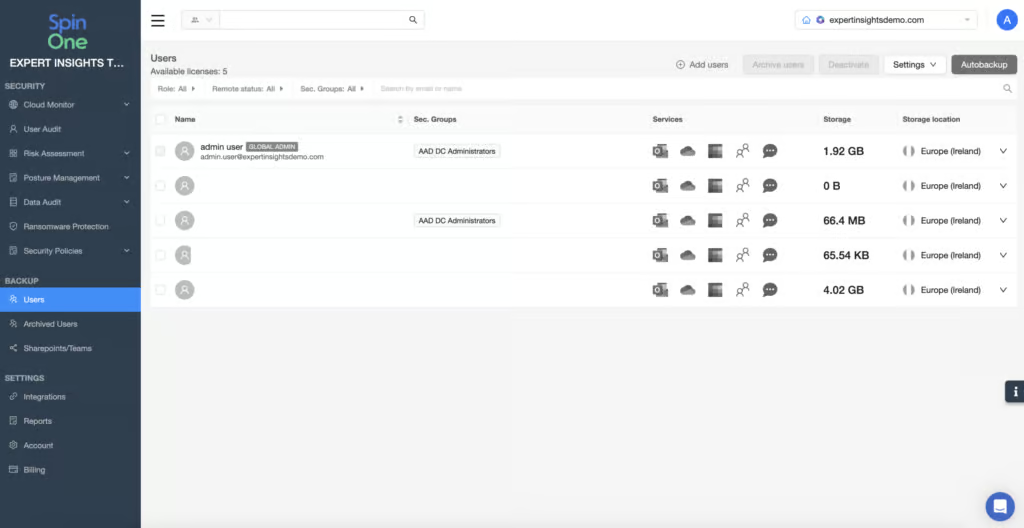
Managing user permissions is a straightforward process. There is a high level of configurability for what users can and cannot access, and all actions taken are logged. In our testing, we were able to define custom permissions based on responsibility and implement separation of duties without difficulty.
Logs are retained for as long as your SpinOne account is active, which is really good to see. Logs are detailed too: the platform tracks activity across its own backup operations as well as Microsoft 365 events, which is useful for investigations and compliance workflows.
Governance Capabilities
| Public API available | ✓ |
| Multi-Tenancy | ✓ |
| Reporting / Alerts | ✓ |
| Automatic mailbox / site / etc onboarding | Limited - can enable automatic onboarding via a security policy. Not turned on by default. |
| Bulk enable / disable backups | ✓ |
| Self-service recovery (for end users) | ✗ |
There’s no end-user self-service restore for Microsoft 365: only administrators can access and restore backed-up data.
Data is encrypted both in transit and at rest. You can enable 2FA for your own account, and you can enforce it for others using a security policy, though this is not the default setting.
SpinOne holds SOC 2 Type II, but is not ISO 27001 certified. It also does not support BYOK encryption, and is not FedRAMP compliant.
Compliance
| Audit Logs | ✓ |
| Data Center Regions | US, AU, Singapore, EU, UK |
| Data Center Infrastructure | AWS, Azure, or GCP (customer choice) |
| Maximum retention period | Unlimited |
| Role-based access controls | ✓ |
| Data encrypted at rest and in transit | ✓ |
| Supports bring-your-own storage | Yes |
| E-discovery / legal hold | eDiscovery with Enterprise plans |
The platform supports GDPR compliance, including the right to erasure. Data residency options allow you to choose where data is stored across multiple regions, and you can store different users’ data in different regions if required by jurisdictional rules.
Commercials
Ranked #10 out of 12 M365 Backup Solutions for Commercials
Pricing
| Free plan available | ✗ |
| Trial available | ✓ |
| Seat-based pricing option | ✓ |
| Storage-based pricing option | Limited - per-user pricing with pooled storage (30GB/50GB per license); additional costs above the limit |
| Starting Price (user / month unless otherwise noted) | SpinBackup costs $36/mailbox/year, with a $5,000 annual minimum |
| Higher Tier Pricing | $9.00 |
The basic backup plan (SpinBackup) is $3 per user per month, with transparent pricing for upgrades visible in the portal. However, this is for the basic service that lacks the higher features such as ransomware protection. It also only includes 30GB storage per user. So on paper it is very cost effective, but the functionality and storage are stripped down.
Storage is pooled per license - 30GB on the standard plan and 50GB on the enterprise plan (SpinOne Enterprise includes unlimited storage). If you exceed those limits, additional costs apply. By comparison, CloudAlly, Hornetsecurity, NinjaOne, and Veeam all offer unlimited storage (Veeam under a pooled 100GB-per-user fair-use policy).
At $3.00/user/month, SpinOne matches NinjaOne on headline price and costs slightly more than CloudAlly ($30 per licensed mailbox per year), but the 30GB storage cap on the standard plan makes the effective cost higher for organizations with growing data volumes.
One important consideration: accounts that don’t have a license in Microsoft 365 still consume a license in SpinOne. This means shared mailboxes are charged for, which can impact budgeting in environments with many shared resources.
The minimum annual commitment of $5,000 (covering approximately 139 users at $3/user/month) means SpinOne is not designed for very small or price-sensitive teams.
Support
| Support Locations | US, Canada, EU, CIS region |
| Email support | Yes |
| Phone support | Yes |
| Chat support | Yes |
| Web support portal | Yes |
| Support hours (normal priority) | 24 hours |
| First response SLA (normal priority) | 24 hours |
Support is available via phone, email, and web. SpinOne also offers a live chat option with real humans. In our testing, we received email follow-up to a live chat question after about 8 hours.
Editor's Score
Ranked #8 out of 12 M365 Backup Solutions for Editor's Score
SpinOne occupies a unique position among the Microsoft 365 backup products we tested. Its continuous ransomware scanning is a genuine differentiator - only Acronis, AvePoint, Redstor and Veeam offer comparable protection, and none of them scan as proactively as SpinOne at the point of restore.
The platform extends beyond M365 to cover Google Workspace, Slack, Salesforce, Jira and Confluence, and offers additional services like SSPM and DLP in one platform - capabilities that no other product in this review set provides.
SpinOne also offers a wider security stack. So it’s a strong choice for companies to consider if they are looking for more broad M365 security controls.
However, these strengths come with trade-offs. Storage caps (30GB or 50GB per user), archive licensing costs for departed users, and the lack of bulk restore capabilities mean there are better options on the market for teams looking for simple, cost-predictable M365 backup. CloudAlly or Hornetsecurity will deliver better value with fewer commercial surprises.
Organizations that want integrated ransomware detection, DLP, and backup in a single platform will find SpinOne offers a combination that no pure-play backup vendor can match. Judge it on what it’s trying to be, not on what it isn’t.
Who should consider SpinOne: Teams where ransomware risk is a primary concern, or who want that want backup, SSPM, and DLP in one platform. Organizations backing up multiple SaaS platforms (M365, Google Workspace, Slack, Salesforce, Jira, Confluence) should also consider SpinOne.
Who Should Look Elsewhere: Teams requiring ISO 27001, BYOK, or FedRAMP compliance. Environments that need bulk restore capabilities for widespread incidents.
Read the full review
Enter your work email to unlock the full review.
Check your email
We sent a 6-digit code to . Enter it below to continue.