
The Short Answer
We've independently tested 11 backup and recovery solutions for Google Workspace. We found AvePoint was the best option for all-round Google Workspace backup, with top scores across coverage, retention, resilience, and governance. Acronis ranked top for coverage with support for 12 workloads. And Druva inSync came in third as the strongest option for enterprises, with 1,000-day retention, advanced ransomware recovery, and multi-platform support.
Are you looking for a backup solution to protect your Google Workspace data? You’ve come to the right place. BackupVerdict has independently tested a dozen of the leading Google Workspace backup solutions. We’ve scored them, compared them and ranked them so you don’t have to do all that work yourself.
It’s important to have a Google Workspace backup solution you trust to keep you in control of your business data in case something goes wrong. But finding the right backup solution can be a confusing process — there are a lot of solutions to choose from, with a lot of similar-sounding claims about coverage, retention, recovery, and more.
That’s why we built BackupVerdict and developed an independent scoring framework to test the leading Google Workspace backup solutions. We hope this list provides you with the insight you need to make the right decision.
As part of our methodology, we looked at coverage, retention policies, time to restore and more. We had a specific and objective system, including measurable metrics, used across every single review.
This has been an intensive process, and we have spent hundreds of hours testing these solutions and producing these independent reviews.
To learn more, you can read about who we are and read our Google Workspace testing methodology.
Summary: Our Top 10 Rankings
Of all the products we tried, these are the best picks
- AvePoint Cloud Backup For Google Workspace Best All-Rounder
- OpenText CloudAlly Backup for Google Workspace Best For SMBs
- NinjaOne SaaS Backup Best For MSPs
- Druva inSync Best For Enterprises
- SpinOne Best For Security Teams
- Acronis Cyber Protect Cloud Best For Coverage
- Afi Backup for Google Workspace Best For Granular Policies
- Spanning Backup For Google Workspace Best For Backup Health Visibility
- Datto SaaS Protection Best For MSP Operations
- IDrive Google Workspace Backup Best Value
Why Trust Us?
BackupVerdict provides independent advice, reviews and comparisons for backup and recovery solutions. We conduct independent, in-depth product testing of cloud backup and recovery, with hundreds of hours of research.
Learn more about who we are and read our Google Workspace testing methodology.
| Solutions Tested | Total Number Of Hours Testing | Combined Years of Experience |
|---|---|---|
| 20+ | 250+ | 35+ |
Google Workspace backup solutions take snapshots of your Google data, including Gmail mailboxes, Google Drive files, Shared Drives, Calendars, and Contacts.
The top reason this is important is that Google has no obligation to protect your Google Workspace data. If you accidentally delete a file or get hit by ransomware, Google is not going to get that data back for you.
This is because Google operates on a shared responsibility model. Google is responsible for uptime and infrastructure. You are responsible for your data.
Google does offer some retention features, like the Trash and Google Vault. But these are not designed for long-term storage or disaster recovery. The Trash automatically purges items after 30 days, and Vault is a compliance tool, not a backup solution.
Similarly, if Google themselves were hit by a cyberattack, or had an outage, it’s your responsibility to make sure you have a backup to keep your business running.
This is commonly required by compliance regulations, which often stipulate you must keep email content, for example, for a fixed amount of time.
The bottom line is: if you depend on Google Workspace for the smooth running of your business, you need a good backup solution in place.
The Best Backup Solutions Compared & Reviewed
| Overall Rating | 8.8/10 |
8.1/10 |
8.0/10 |
7.7/10 |
7.6/10 |
7.5/10 |
7.2/10 |
6.8/10 |
6.7/10 |
6.5/10 |
| Deployment | 6.0 | 10.0 | 9.0 | 6.0 | 10.0 | 6.0 | 9.0 | 8.0 | 8.0 | 9.0 |
| Coverage | 10.0 | 7.0 | 7.0 | 7.0 | 8.0 | 7.0 | 9.0 | 7.0 | 7.0 | 7.0 |
| Retention | 10.0 | 8.0 | 7.0 | 9.0 | 6.0 | 9.0 | 8.0 | 6.0 | 7.0 | 6.0 |
| Recovery | 8.0 | 8.0 | 9.0 | 8.0 | 8.0 | 7.0 | 8.0 | 7.0 | 7.0 | 6.0 |
| Resilience | 10.0 | 7.0 | 7.0 | 8.0 | 7.0 | 7.0 | 6.0 | 6.0 | 6.0 | 6.0 |
| Backup Health | 10.0 | 7.0 | 8.0 | 9.0 | 8.0 | 9.0 | 7.0 | 7.0 | 6.0 | 6.0 |
| Governance and Security | 10.0 | 8.0 | 9.0 | 9.0 | 8.0 | 9.0 | 8.0 | 8.0 | 7.0 | 5.0 |
| Commercials | 7.0 | 10.0 | 8.0 | 5.0 | 6.0 | 7.0 | 5.0 | 5.0 | 6.0 | 8.0 |
| Editor's Score | 7.0 | 9.0 | 8.0 | 7.0 | 8.0 | 7.0 | 5.0 | 7.0 | 7.0 | 7.0 |
| Read Review | AvePoint Cloud Backup For Google Workspace Review | OpenText CloudAlly Backup for Google Workspace Review | NinjaOne SaaS Backup Review | Druva inSync Review | SpinOne Review | Acronis Cyber Protect Cloud Review | Afi Backup for Google Workspace Review | Spanning Backup For Google Workspace Review | Datto SaaS Protection Review | IDrive Google Workspace Backup Review |





1. AvePoint Cloud Backup For Google Workspace: Best All-Rounder


To learn more, read our Google Workspace testing methodology.
Pros
- Broadest workload coverage we tested
- Granular retention with per-container, per-workload, and per-user customization
- Detailed backup health monitoring with exportable reports and real-time alerts
- Strong governance – 3-year retention, granular filtering, exportable logs
- Supports BYOS (bring your own storage) and BYOK (bring your own key)
- Bulk restore capability with different recovery points per workload
- In-house deletion of individual backup records – unique among tested products
Cons
- Complex deployment process
- Granular search interface can be clunky
- Does not back up suspended Google Workspace accounts
- No email body search or preview
AvePoint Pricing
| Free plan available | ✗ |
| Trial available | ✓ |
| Seat-based pricing option | ✓ |
| Storage-based pricing option | Not Public |
| Starting Price (user / month unless otherwise noted) | £2.65/user/month (UK G-Cloud listing; 500-user minimum, 12-month term) |
| Higher Tier Pricing | Not public |
AvePoint Cloud Backup is the most in-depth Google Workspace backup solution we tested. It scored top in our comparison across coverage, retention, resilience, backup health, and governance. It backs up Gmail, Drive, Shared Drives, Contacts, Calendar, Chat, Forms, Classroom, Keep, Meet, Sites, Vault, and Directory.
AvePoint is designed for enterprises, and it can be complex to manage. The deployment process is not straightforward and would require some technical ability or experience. But if you are looking for enterprise-grade control over data protection, storage locations, retention policies, and RBAC, AvePoint is a strong product to consider.
AvePoint covers all of the workloads you would expect, with the option to expand into Google Classroom and Google Directory. Classroom and Directory support extend AvePoint’s relevance to education-sector organizations. AvePoint is one of only two products tested (alongside Redstor) that supports Google Classroom.
Retention policies are the most customizable we tested. The platform uses containers that workloads are placed into, and each container can have its own custom retention period and storage location. For multinational organizations that need to comply with different data residency and retention laws across regions, the container-based model is exceptionally well suited. AvePoint supports BYOS (bring your own storage) and BYOK (bring your own key).
Governance is the strongest of all platforms tested. The System Auditor provides clear visibility into all actions performed within the portal. Audit logs are retained for three years, have granular filters, and can be bulk exported. AvePoint is the only product we tested that allows in-house deletion of individual backup records – typically, this requires contacting vendor support.
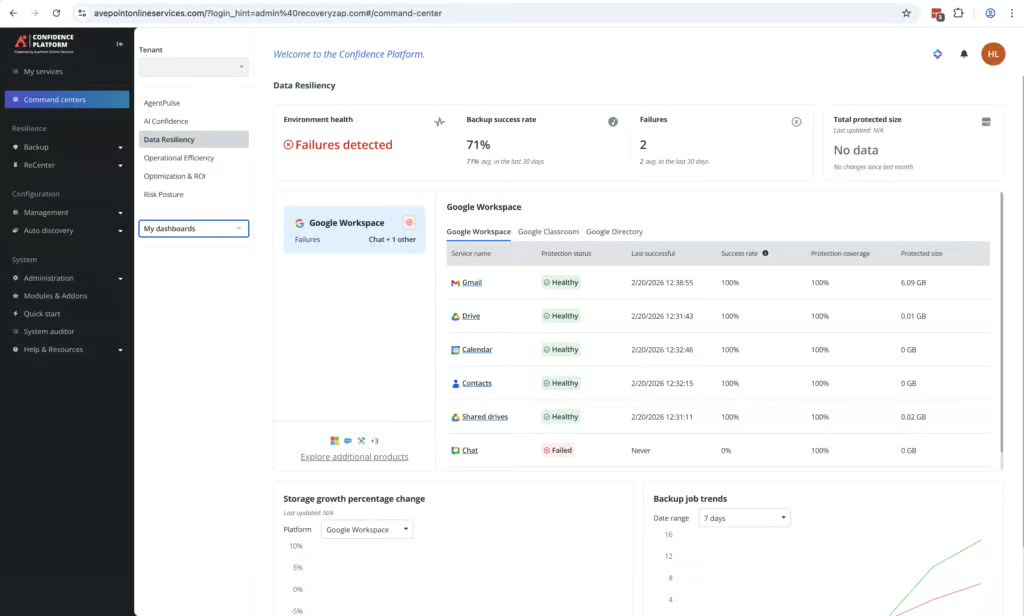
Backup health monitoring is exceptional. When Google Chat failed to back up during testing, this was clearly visible in the dashboard with a large red X. We also received a failed status email notification. Drilling down further revealed how long backups had been failing, and we could generate an exportable report on the failure with a direct link to the relevant knowledge base article.
Backups are always fully immutable. AvePoint monitors for suspicious behaviors rather than traditional signature-based malware scanning. It looks for patterns such as mass file encryption, bulk deletion of files, or suspicious admin activity. Snapshots are color-coded: green indicates safe restore points, yellow flags unusual activity, and red marks potential ransomware-affected backups.
A standout recovery feature is the ability to select different recovery points for different workloads when performing a full account restore. We did not see this capability in any other product tested. The main trade-off is the search interface, which can be clunky, and AvePoint does not allow searching or previewing the body of emails.
2. OpenText CloudAlly Backup for Google Workspace: Best For SMBs
To learn more, read our Google Workspace testing methodology.
Pros
- Deployment completed in under five minutes
- Transparent pricing at $3 per user per month
- 24/7 live chat support with responsive, knowledgeable agents
- Modern, easy-to-use admin console
- Admin role separated from Google Workspace admin role, reducing blast radius
- Unlimited retention by default with customization available via support
- Single-item restores complete in under a minute
Cons
- Large backup and restore jobs are slow
- Backups run once per day unless you purchase the 3x per day add-on
- No support for Google Sites, Forms, or Chats
- No preview option when restoring Gmail items
- Error messages can be vague
- Google Workspace and Shared Drive backups must be set up separately
- No bulk restore without going though support
- Any administrator can delete the entire CloudAlly account
CloudAlly Backup For Google Workspace Pricing
| Free plan available | ✗ |
| Trial available | ✓ |
| Seat-based pricing option | ✓ |
| Storage-based pricing option | ✓ |
| Starting Price (user / month unless otherwise noted) | $3.00/user/month or $30/user/year |
| Higher Tier Pricing | Not public |
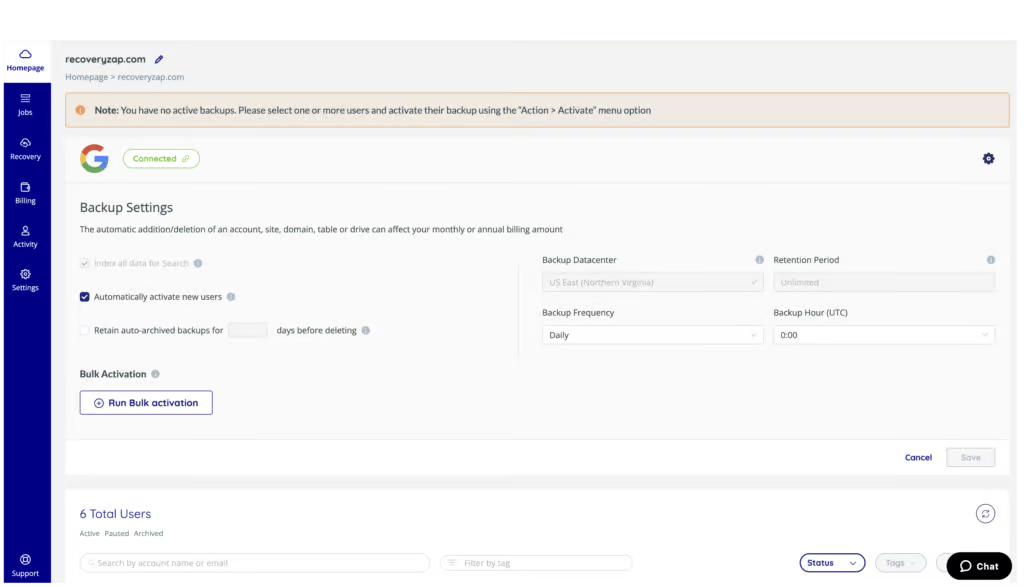
CloudAlly is one of the simplest Google Workspace backup solutions we tested. Deployment took less than five minutes, and the interface is clean and very easy to use. The pricing model is transparent: $3 per user per month with unlimited storage. CloudAlly is best suited for SMBs and MSPs that prioritize simplicity, transparent pricing, and ease of use over restore speed and advanced features.
CloudAlly is owned by OpenText, a publicly traded, multi-billion-dollar enterprise software vendor, which provides confidence in long-term platform stability. If your priorities are reliable backups, transparent pricing, and low management overhead, CloudAlly is one of the strongest options on the market — provided restore speed isn’t your primary concern.
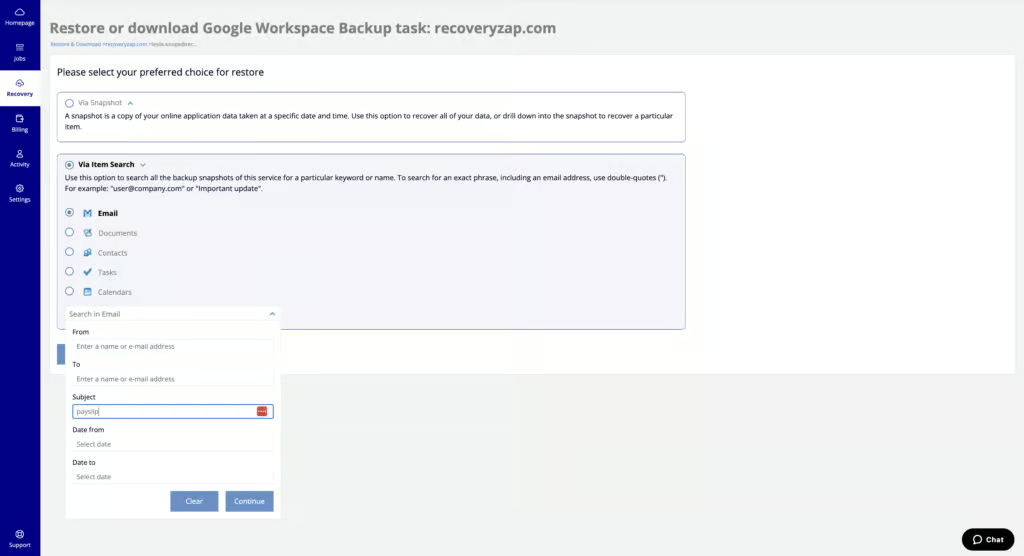
Single-item restores complete in under a minute. Google mailboxes can be restored from time-based snapshots, and data can be restored to the same or a different user account or Shared Drive. End User Recovery can be enabled in settings, allowing users to recover files they have accidentally deleted without needing an admin.
However, full-mailbox restores are slow. We restored a mailbox with 728 MB of emails to another account and it took 16 hours and 35 minutes. This is the slowest restore time we recorded across all 11 products. Any organization that might need to recover a full mailbox in a time-sensitive scenario should factor this into their evaluation.
Backups are immutable by default. CloudAlly stores all backup data on Amazon Web Services, completely separate from Google’s infrastructure. In the event of a significant Google outage, your backups remain accessible. CloudAlly also supports bring-your-own-storage, allowing you to direct backups to your own Amazon S3 bucket.
CloudAlly admins are separated from the Google Workspace admin role, which reduces blast radius if Google Workspace credentials are compromised. If a bulk restore is needed, CloudAlly recommends contacting their support team for assistance.
CloudAlly is ISO 27001 certified, GDPR and HIPAA compliant, and encrypts all data in transit and at rest using AES-256. MFA and SSO are supported. Data residency options include the US, UK, Ireland, multiple European regions, Japan, and Australia. However, CloudAlly does not support SOC 2, FedRAMP, or BYOK encryption.
There are some coverage gaps to be aware of. Google Sites, Forms, and Chats are not supported. Backups run once per day by default unless you purchase the 3x per day add-on. And there is no ransomware scanning capability. The lack of advanced compliance certifications means CloudAlly isn’t the right fit for highly regulated environments, but for most SMB and mid-market tenants, it delivers exactly what’s needed.
3. NinjaOne SaaS Backup: Best For MSPs
To learn more, read our Google Workspace testing methodology.
Pros
- Deployment in under five minutes
- Real-time backup progress indicators
- Strong search: AND/OR conditions and attachment content matching
- Three exportable audit logs (message, user, system)
- Cross-platform restore — Gmail to M365
- Real-time alerts on multiple conditions
- Per-seat pricing with unlimited storage
Cons
- No support for Forms, Sites, or Chats
- Retention limited to four presets (unlimited, 14 months, 4 years, 7 years) without the Archiver add-on
- Suspended users excluded from the initial backup set
- No malware scanning
- No Bring Your Own Key (BYOK) encryption
NinjaOne SaaS Backup Pricing
| Free plan available | ✗ |
| Trial available | ✓ |
| Seat-based pricing option | ✓ |
| Storage-based pricing option | ✗ |
| Starting Price (user / month unless otherwise noted) | $3.00/user/month |
| Higher Tier Pricing | Not public - paid Archiver add-on available |
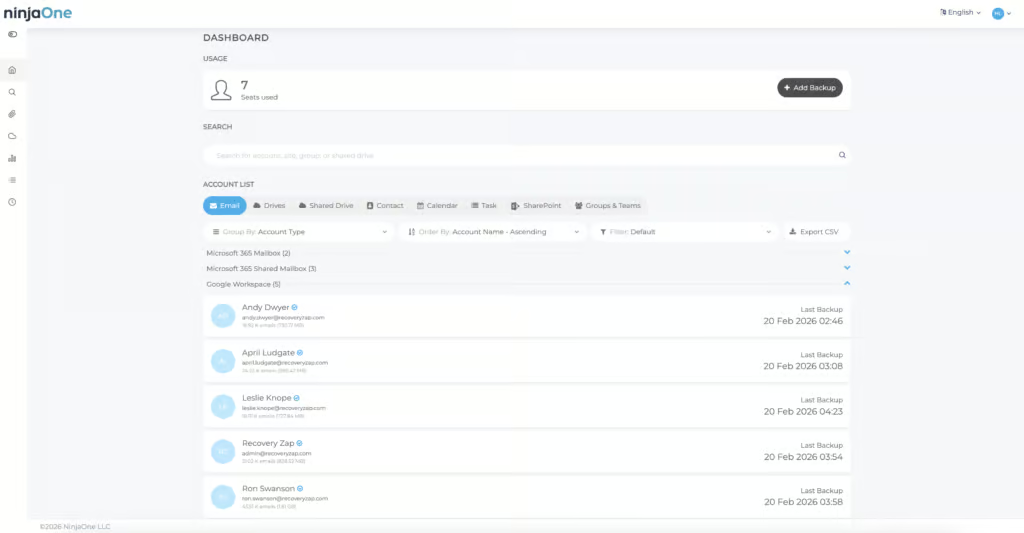
NinjaOne SaaS Backup is a Google Workspace backup product built primarily for MSPs. It's sold as part of the wider NinjaOne IT management platform that covers endpoints, patching, and backup from a single pane of glass. Deployment took under five minutes, recovery was fast and reliable, and the Advanced Search functionality supports granular conditions including AND/OR logic and attachment content search.
For MSPs already standardized on the NinjaOne platform, adding SaaS Backup is a natural extension that consolidates tooling and avoids another vendor relationship. For SMBs that value simplicity, predictable per-seat pricing, and unlimited storage, the product is a credible choice on its own.
NinjaOne offers an Advanced Search tab that supports AND/OR conditions, attachment name and content search, and keyword matching. You can drill down into Drives to locate specific items. This is one of the stronger search implementations we tested across any of the products we reviewed.
Restoring a full mailbox (727 MB) to a new folder took two hours and eleven minutes, completing faster than the platform's own four-hour estimate. Single-item restores took around a minute. End users can view and recover their own historical emails and files. A notable capability is cross-platform restore — you can restore Gmail to M365 accounts in your NinjaOne tenant if needed.
NinjaOne keeps three separate audit logs for message and file activity, user activity, and system activity. All logs are exportable as CSV. The platform is compliant with SOC 2, ISO 27001, and GDPR — one of the most complete governance packages we saw across the backup solutions we tested. NinjaOne’s FedRAMP authorization covers its endpoint management platform, not SaaS Backup.
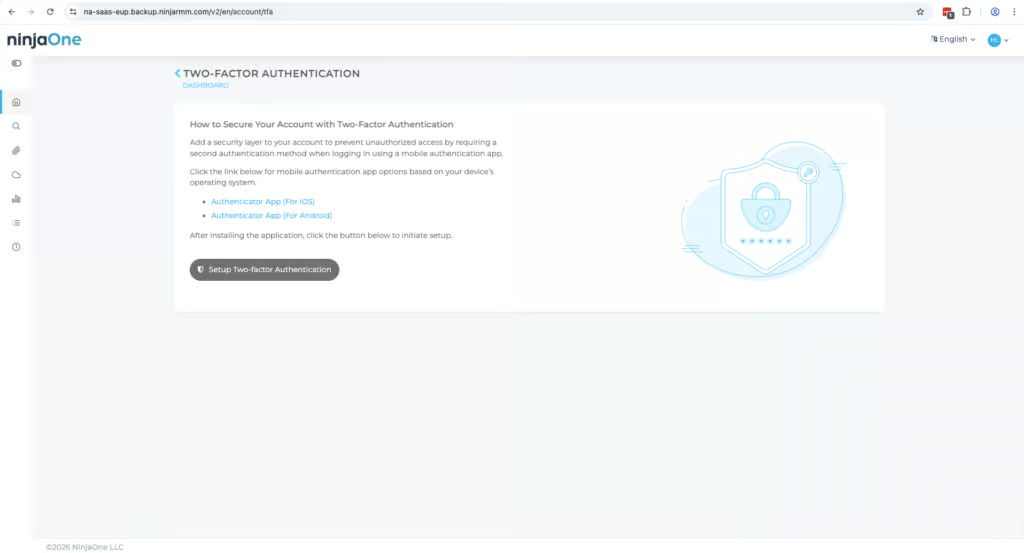
SSO and two-factor authentication can be enforced on login. Admins can adjust user permissions and assign roles below their own level. Cross-user restores are locked behind the highest level of permissions, which adds a layer of protection.
Retention is unlimited by default, but options are limited to four presets: unlimited, 14 months, 4 years, or 7 years. You can only have one retention policy at a time unless you purchase the Archiver add-on. Narrowing scope to individual or departmental accounts is only available on the Archiver plan.
Coverage includes Email, Contacts, Calendar, Tasks, Drive, and Shared Drives. Google Chat, Forms, and Sites are not supported. There is no malware scanning capability, and the platform does not support BYOK encryption. These gaps are unlikely to be major for the majority of MSPs, but may be dealbreakers for organizations with specific compliance or security requirements.
4. Druva inSync: Best For Enterprises
To learn more, read our Google Workspace testing methodology.
Pros
- Highly configurable retention policies
- Advanced ransomware recovery
- Real-time progress tracking for backup and restore jobs
- Strong governance controls
- End-user self-service restore
- Customizable pre-built reports
- Suspended users are automatically preserved and backed up
Cons
- Deployment took approximately 45 minutes with manual configuration required
- Search is limited to each mailbox only, with no tenant-wide search
- No support for Google Chat, Forms, or Sites
- Storage quotas are enforced based on your plan
Druva inSync Pricing
| Free plan available | ✗ |
| Trial available | ✓ |
| Seat-based pricing option | ✓ |
| Storage-based pricing option | Per-user licensing with purchased storage quotas |
| Starting Price (user / month unless otherwise noted) | Not public |
| Higher Tier Pricing | Not public |
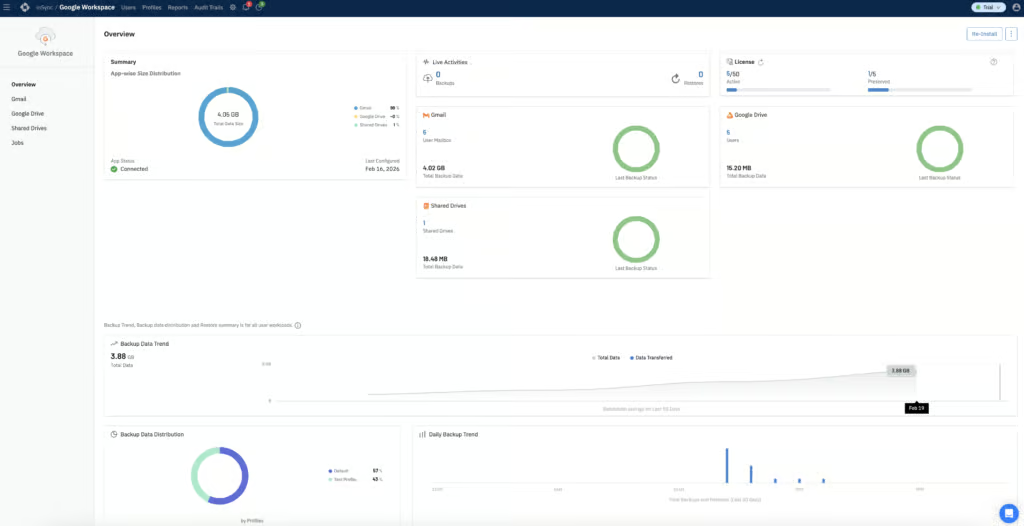
Druva inSync is an enterprise-grade Google Workspace backup platform that scored 9/10 in three of our testing categories. It protects Microsoft 365, endpoints, and servers alongside Google Workspace, rather than being a Google-only product. That heritage shows in both directions: the governance, retention, and resilience features are built for enterprise scale, but the setup and interface are not tailored specifically to Google Workspace administrators.
Druva trades ease of use for depth, and for the buyer it is built for, that trade is well worth making. Few Google Workspace backup tools we tested can match the combination of 1,000-day retention, quarantine-and-clean-snapshot ransomware recovery, and auditor-grade governance.
Retention is one of Druva’s strongest areas. Daily snapshots are configurable up to 1,000 days, weekly up to 100 weeks, and monthly up to 360 months. Gmail and Drive can be assigned different retention periods, and exclusions from backups can be set based on path, folder, or file type. Different retention policies can be enforced for specific users by creating separate Profiles.
Users that are suspended in Google Workspace are automatically marked as Preserved in Druva, archiving their data. As long as you remain within your license limits, preserved users are not charged for. Unlimited retention and legal hold are both available on higher-tier plans.
Druva offers advanced ransomware recovery functionality via its paid Cyber Resiliency add-on. This includes the ability to quarantine infected snapshots and restore data from known clean snapshots. Admins can also use the Data Lock add-on to prevent snapshots from ever being deleted, an action that is irreversible once applied. A managed data detection and response service is also available as an add-on.
Backup data is stored in AWS data centers. Seven distinct admin roles are available with differing levels of access. RBAC, MFA, SSO, and geofencing are all supported. Audit logs are detailed, with separate user and admin audit trails, and can be exported in CSV or HTML format.
We restored 695 MB of Gmail data to another user in two hours and 24 minutes, with data populating in Google Workspace immediately as the job progressed. Single-item restores completed in seconds. End-user self-service restore is supported. Mailbox data can be downloaded in Archive, MBOX, or PST format.
The main limitation is search. Searching can only be done on a per-mailbox basis, not across the entire tenant. Deployment took approximately 45 minutes with manual configuration required at multiple stages. Google Chat, Forms, and Sites are not supported. And storage quotas are enforced based on your plan, with pricing not publicly disclosed.
Druva does not publicly disclose per-user pricing. They offer two plans — Enterprise and Elite — with the Elite package supporting eDiscovery, legal holds, and federated search. Several add-ons including quarantine functionality and SIEM integration can also be purchased. The AI chatbot is a standout self-service tool — it provides relevant answers with short walkthrough videos showing how to fix specific issues, which is a level above most competitors’ documentation.
SpinOne is one of the more expensive options when evaluated as a backup-only product, with limited storage compared to like-for-like competitors.
5. SpinOne: Best For Security Teams

To learn more, read our Google Workspace testing methodology.
Pros
- Deploys in under five minutes
- Real-time alerting for backups, restores, downloads, and deletions
- Malware scanning with automatic restore to a safe backup (paid add-on)
- Customizable security policies for unusual activity detection
- Storage location and retention configurable per organizational unit
- Full mailbox restore possible in under five clicks
- Supports Google Chat and Spaces backup
Cons
- No bulk restore capability for multiple mailboxes
- Granular search - but no per-mailbox search, only cross-tenant
- Unlicensed mailbox data is deleted after just seven days
- Suspended Google Workspace mailboxes are not auto-discovered
- MFA cannot be enforced by the admin – users must enable it themselves
- Relatively expensive pricing for the backup component
SpinOne Pricing
| Free plan available | ✗ |
| Trial available | ✓ |
| Seat-based pricing option | ✓ |
| Storage-based pricing option | Per-user plans with extra-storage add-ons |
| Starting Price (user / month unless otherwise noted) | SpinBackup costs $36/mailbox/year, with a $5,000 annual minimum |
| Higher Tier Pricing | Not public |
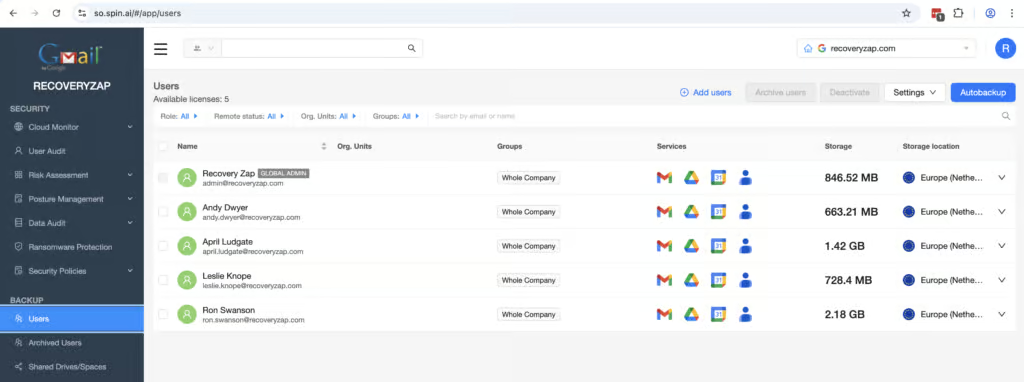
SpinOne is more than a backup product. It combines Google Workspace backup with auditing, security policy enforcement, and malware scanning. The backup component covers all the main workloads: Gmail, Drive, Shared Drives, Calendar, Contacts, and Chats. The product deploys in under five minutes via a standard Google OAuth setup, and the portal is intuitive from the start.
The security capabilities are a genuine differentiator. Customizable policies can detect unusual activity, enforce password changes, and suspend users. Malware scanning can automatically restore to a known-good backup. Where SpinOne stands out is the combination of solid backup with comprehensive real-time alerting, customizable security policies, and proactive threat response — all in one platform.
Deploying SpinOne to a Google Workspace tenant was painless. The process followed the typical Google OAuth and Marketplace application setup, and we were prompted to choose a data storage location and which Google services to back up. The only additional step was enabling backups for users — completed quickly without consulting a guide. A five-minute, zero-friction setup is what a 10/10 looks like.
All main services are backed up, and Shared Drives and Chats can be enabled with a simple toggle. Auto-discovery is not on by default, but policies can be created for this. Storage location and retention can be configured per organizational unit. Metadata preservation is comprehensive. The single point dropped from a perfect coverage score reflects the manual toggles for Shared Drives, Chats, Spam, and Trash rather than any real gap in what can be protected.
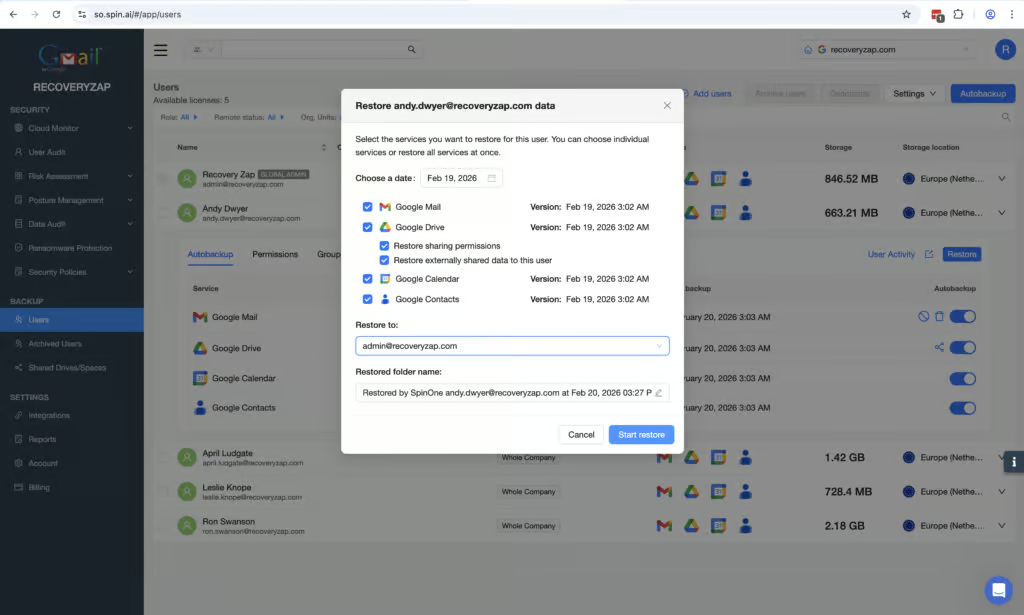
Restoring a complete mailbox is possible in under five clicks. The UI is clearly labeled, and the restore point selection is straightforward. The granular search is functional but feels clunky — you cannot perform a search inside a selected mailbox, only cross-tenant. Results can then be filtered, but the filtering is not intuitive. There is no bulk restore capability, which means recovering multiple mailboxes during a large-scale incident would be a manual, sequential process.
Locating restore points is easy using the calendar view. Customizable policies can detect suspicious activity, enforce password changes, and suspend users. Malware scanning with automatic restore to a known-good backup is a genuine resilience capability. But with no bulk recovery and no additional checks once an account has restore permissions, the overall resilience posture is mixed.
SpinOne has excellent reporting capability. Alerts are sent in real time when restores, downloads, and deletions start and finish. The dashboard displays data well, though the volume of information from the combined auditing and backup functions can make it overwhelming to parse. MFA and IP address restrictions can be enabled, along with custom security policies. Assigning permissions is simple — three clicks to grant a user access. The main limitation is that MFA cannot be enforced by the admin; each user must enable it themselves.
SpinOne offers multiple licensing plans with add-ons for archive licenses and extra storage. At $36 per mailbox per year for 30 GB, SpinOne is justifiable for buyers who use the security and auditing capabilities, but expensive for anyone treating it as a pure backup tool. Support was responsive — live chat answered within a minute, and escalated questions received detailed email responses within 24 hours.
6. Acronis Cyber Protect Cloud: Best For Coverage

To learn more, read our Google Workspace testing methodology.
Pros
- Granular email content search
- Customizable retention policies at user and group level
- Comprehensive role-based access controls
- Detailed reporting and audit logs with export
- Supports multiple storage locations
- Global support infrastructure
Cons
- Complex deployment took 1+ hour
- Slow full mailbox restore speed
- No bulk restore capability
- UI could be easier to navigate
Acronis Cyber Protect Cloud Pricing
| Free plan available | ✗ |
| Trial available | ✓ |
| Seat-based pricing option | ✓ |
| Storage-based pricing option | ✓ |
| Starting Price (user / month unless otherwise noted) | Not public |
| Higher Tier Pricing | Not public |
Acronis Cyber Protect Cloud is one of the best Google Workspace backup solutions we’ve tested, particularly when it comes to retention controls, resilience and governance. Coverage is strong, with support for Gmail, Drive, Shared Drives, Contacts, Calendar, Chat, and Google Forms.
Acronis started out in traditional enterprise backup, with an on-premises solution. The interface takes some time to fully get to grips with. And in general, the solution is better suited to mid-to-large sized organizations and MSPs. If you’re a small team that wants to get up and running quickly, CloudAlly or SpinOne would be a better choice.
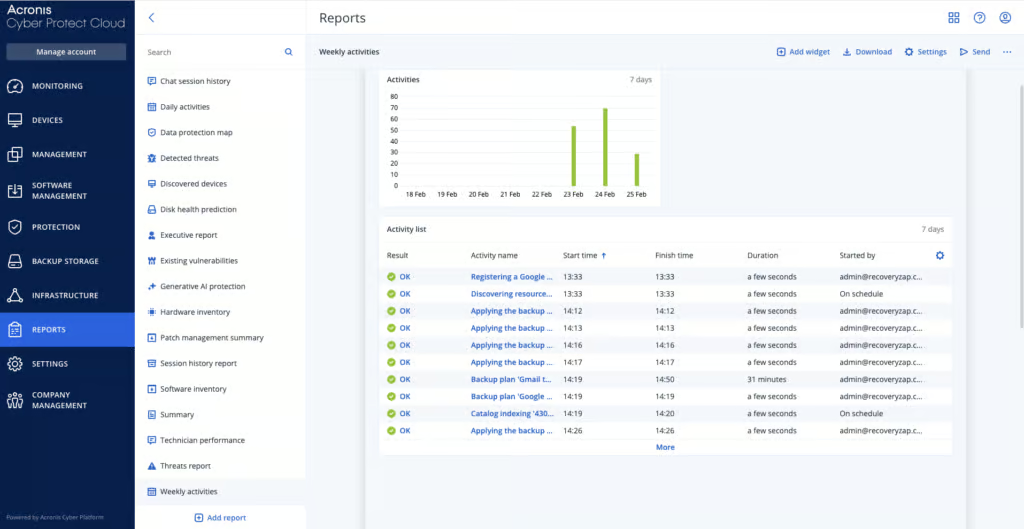
Acronis protects Gmail, Drive, Shared Drives, Contacts, Calendar, Chat, Forms, Keep, Meet recordings, Sites, and Vault. You can configure up to six backups per day, which is the highest frequency we saw across all products tested.
Creating customizable backup plans is one of the most in-depth and straightforward we’ve used. You can store backup data in local folders, network locations, or public cloud storage services. Groups can be created for different user tiers with separate retention and storage settings. We were impressed that Acronis has managed to provide this amount of customization and still keep the admin console relatively simple.
When a mailbox was removed from backups to simulate an off-boarded employee, previous backup data could still be recovered. The mailbox displayed a “Not protected” status and could easily be re-added to a backup plan if needed.
Acronis offers two immutable storage options: Governance and Compliance. Reports can be scheduled hourly, daily, weekly, or monthly and delivered as PDF or Excel files. This level of granularity in report scheduling was not matched by any other solution in the comparison.
Admin alerts go beyond backup failures. You can set up alerts for infrastructure health, like CPU temperature, hardware changes and network usage anomalies. Acronis also offers configurable protection plans for malware protection, though malware scanning does not support RAR, 7z, or ISO file types.
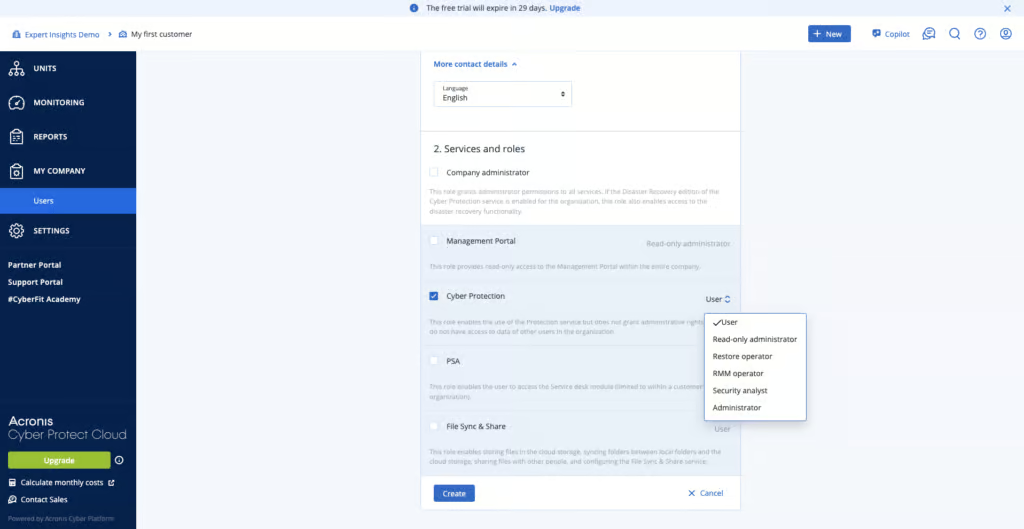
Acronis is SOC 2 and ISO 27001 certified, with clear GDPR documentation. Data is encrypted in transit and at rest, and you can bring your own encryption keys. You need a separate admin account to manage Acronis, rather than just using your Google Workspace credentials – which we think is a good thing. Multi-factor authentication is required by default.
Acronis supports more than 50 global data center locations across North America, South America, Europe, the Middle East, and Asia-Pacific, so there is a lot of flexibility for data residency.
There is no keyword search across the entire tenant – search can only be performed within individual mailboxes. There is no bulk restore capability. And the deployment process took around one hour, which is longer than average.
7. Afi Backup for Google Workspace: Best For Granular Policies

To learn more, read our Google Workspace testing methodology.
Pros
- Easy deployment in approximately five minutes
- Broad coverage including Google Groups and Directory
- Heuristics-based ransomware detection
- Fully customizable retention policies
- Suspended users are not billed
- All Gmail, Drive, Contacts, and Calendar data can be restored together
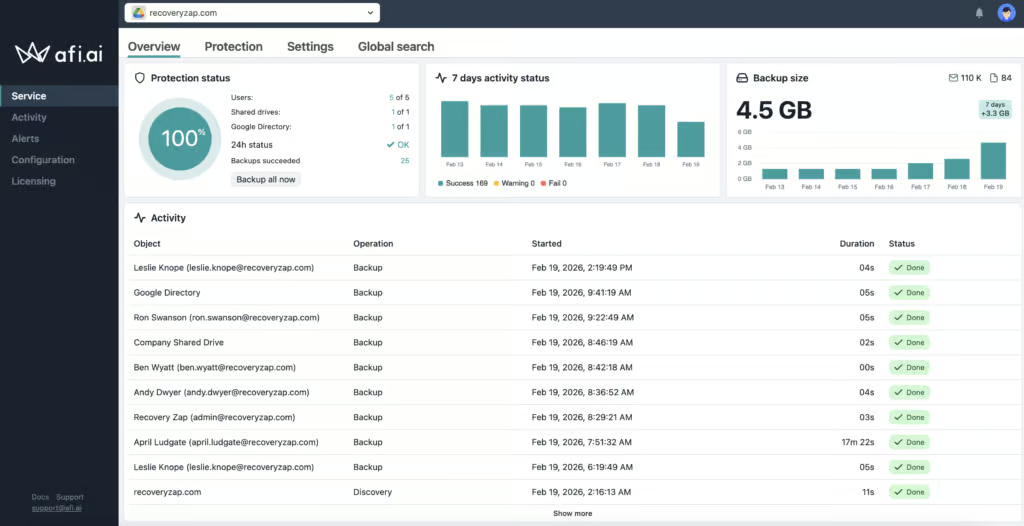
- Clear backup health dashboard
Cons
- Interface is not always intuitive
- No bulk recovery of multiple users
- No Google Forms backup
- No phone support unless annual spend exceeds $60,000 USD
- Reporting could be more granular and customizable
Afi Backup For Google Workspace Pricing
| Free plan available | ✗ |
| Trial available | ✓ |
| Seat-based pricing option | ✓ |
| Storage-based pricing option | Protected-user licensing with pooled storage; custom Shared Drive-heavy plans are quoted |
| Starting Price (user / month unless otherwise noted) | $3.00/user/month ($36/user/year, from 5 users) |
| Higher Tier Pricing | Custom quote - discounts for volume, education, and nonprofits |
Afi Backup for Google Workspace is a technically capable backup solution with easy deployment and broad coverage including Google Groups and Directory — workloads not many competitors protect. The platform offers heuristics-based ransomware detection and provides fully customizable retention policies that can be assigned to different users, sites, and resources, with backups running up to three times per day.
The main trade-offs are around usability. The interface is functional but not always intuitive — it is not immediately obvious where or how to access certain functionality. Support is limited to online channels during business hours, with no clear escalation path for out-of-hours emergencies. Afi is best suited for technically inclined teams that want granular backup policies and ransomware detection.
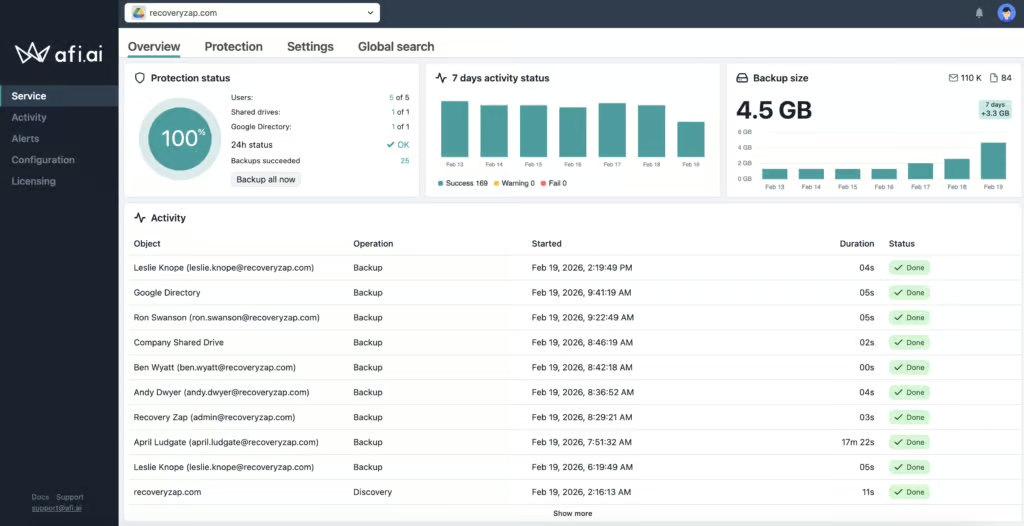
Afi covers Gmail, Drive, Shared Drives, Contacts, and Calendar. Google Groups and Directory information can also be backed up, which is uncommon but welcome. Google Chats can be backed up but must be configured via the Google API, which is a more complicated deployment process. Google Forms are not supported. Deployment took approximately five minutes via a simple three-step process.
Retention is unlimited by default and fully customizable. Different retention policies can be assigned to different resources. If you delete or suspend a Google user, their data is still archived and Afi does not charge for these users. Cross-user restore is also supported — during testing, we suspended a user and successfully restored their data to another account.
Performing a restore is straightforward. Restoring an entire 752 MB Google Workspace account to a new mailbox took 3 hours and 43 minutes. All of a user's Gmail, Drive, Contacts, and Calendar data from a given snapshot can be restored together at once. Search functionality is effective, with filtering by workload, group, or entire domain.
Afi supports heuristics-based ransomware detection and immutable backups with a lockdown mode. However, there is no bulk recovery of multiple users simultaneously, and access is completely dependent on having a Google admin login — if your Google Workspace environment is compromised and admin access is lost, you would also lose access to your backup data.
Audit logs cover admin activity and are kept for 3 years, exportable as CSV. Admins can build Access Groups with different permissions, and Okta or SAML SSO authentication can be enforced. Afi is SOC 2 and ISO 27001 certified, GDPR compliant, and uses AES-256 encryption with BYOK support. Data residency options include the US, UK, EU, Canada, and Australia.
The main commercial limitation is support — available only via online channels during business hours, with phone support reserved for customers spending $60,000 or more per year. Reporting capabilities lack the granularity of products like AvePoint or SpinOne. Afi is a relatively small vendor with around 20 employees, and the ownership structure is unclear.
8. Spanning Backup For Google Workspace: Best For Backup Health Visibility

To learn more, read our Google Workspace testing methodology.
Pros
- Fast deployment in under five minutes
- Clean, modern admin console that is easy to navigate
- Easy license assignment with auto-protect toggle for new accounts
- Dedicated tab for error codes and recommended actions
- End users can perform self-service restores on their own mailboxes
- BYOK and API token access supported
- Dark web monitoring included
Cons
- Backups run once per day with no option to increase frequency
- No support for Google Chats, Forms, or Classroom
- Retention can only be set at the tenant level – no per-user or per-group granularity
- No bulk restore capability
- No real-time alerting – only daily, weekly, or monthly status reports
- Data cannot be restored during the 60-day grace period after license removal
- No malware scanning of backups
Spanning Backup For Google Workspace Pricing
| Free plan available | ✗ |
| Trial available | ✓ |
| Seat-based pricing option | ✓ |
| Storage-based pricing option | Based on average backup storage used per license; 60GB pooled storage per license |
| Starting Price (user / month unless otherwise noted) | Quote-based - $40-$48/user/year in our trial (approx. $3.33-$4.00/user/month) |
| Higher Tier Pricing | Not public |
Spanning Backup for Google Workspace is a SaaS backup product from Kaseya, aimed squarely at small and mid-sized businesses. It backs up Gmail, Drive, Shared Drives, Calendar, and Contacts to AWS-hosted storage on a daily schedule. Deployment took under five minutes, the admin console is clean and modern, and the pricing is competitive at $40–$48 per user per year with 60 GB of pooled storage per license.
Spanning is a good, well-rounded platform for SMBs that want backup running quickly with a fixed daily schedule and tenant-wide retention. It also offers some unique advanced features we haven't seen elsewhere, like dark web monitoring and support for your own encryption keys.
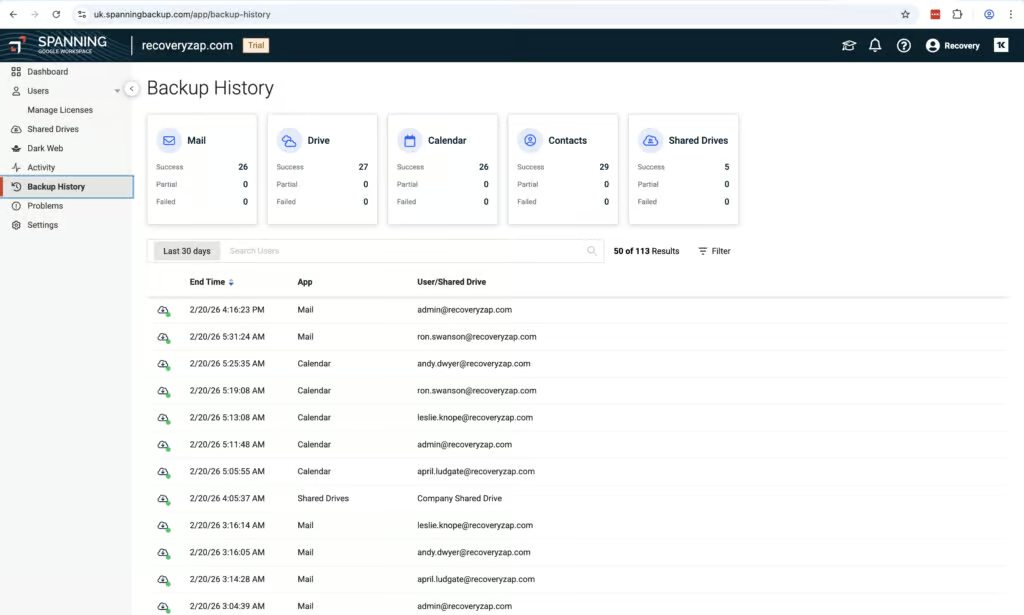
The standout feature is the Problems tab. Each problem has a code attached indicating the error, along with a description and a recommended action. This is genuinely helpful for troubleshooting. The Activity tab is clean and easy to navigate with functional filtering.
However, there is no option for real-time email alerts if a backup failure occurs. Status summary reports can be sent daily, weekly, or monthly, but the content cannot be customized. The product could score higher if real-time alerts could be configured for backup failures.
End users can perform self-service restores on their own mailboxes, which is a genuine USP. Search works well, fetching data quickly with filters for date range, folder, and subject. Recovery speed was good for a full mailbox. The restore function is labeled as "Impersonation" rather than "Restore", which is not intuitive.
The entire user cannot be restored at once — Mailbox, Drive, Calendar, and Contacts must be done individually. There is no bulk restore capability, and you cannot perform more than one restore at a time for mailbox items. Backups are stored on AWS, completely separate from Google's infrastructure.
Spanning is SOC 2 certified and compliant with GDPR, POPIA, and CCPA. Data centers are available in the US, Canada, EU, UK, APAC, and South Africa. The platform supports BYOK encryption and API token access, which is very positive for an SMB-focused product.
The main trade-offs are in flexibility. Retention is indefinite by default but can only be set at the tenant level with no per-user or per-group granularity. Backups run once per day with no option to increase frequency. If a Standard license is removed, data is deleted after 60 days, and critically, data cannot be restored during this window. Google Chats, Forms, and Classroom are not supported.
9. Datto SaaS Protection: Best For MSP Operations

To learn more, read our Google Workspace testing methodology.
Pros
- Simple five-step onboarding process
- Three daily backups with easy snapshot selection
- Fast actual backup and restore speeds
- MSP-focused portal with multi-tenant management for licensing, billing, and support
- Tenant-wide search capability
- Two-factor authentication enforced on account creation
- Activity logs are fully exportable as CSV
Cons
- No real-time alerting – daily report only, set at the partner level
- No Google Chat, Forms, or Classroom backup
- Retention is tenant-wide only with no per-user or per-group customization
- Limited granular search filtering for specific emails
- Cannot preview selected emails
- No bulk restoration of individual mailboxes
- Dashboard is minimal and errors require digging in activity logs to find
Datto SaaS Protection Pricing
| Free plan available | ✗ |
| Trial available | ✓ |
| Seat-based pricing option | ✓ |
| Storage-based pricing option | User licenses include 60GB average storage; excess storage is billed |
| Starting Price (user / month unless otherwise noted) | Not public |
| Higher Tier Pricing | Not public |
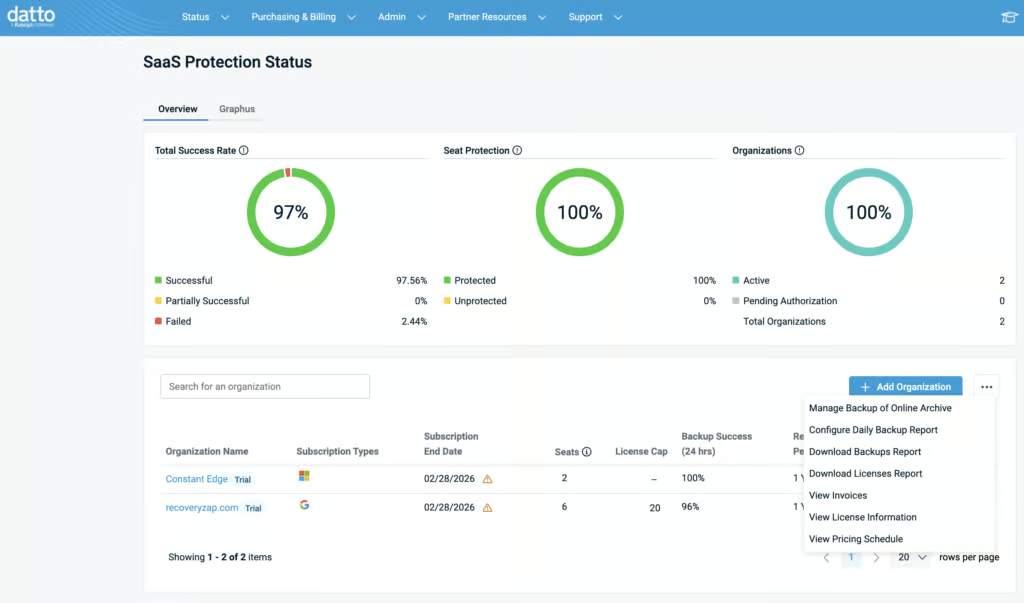
Datto SaaS Protection is a purpose-built MSP backup solution for Google Workspace. The portal is designed around managing multiple client tenants, with licensing, billing, and support ticket management all accessible from a single interface. Backups run three times per day, coverage is solid for the core workloads, and actual backup and restore operations are fast.
Datto needs to be viewed at a higher level as part of Kaseya – it is not just a backup solution but a tool for MSPs to manage their clients’ broader security environment. For teams purchasing directly, the experience is more limited. The dashboard is minimal, errors are not immediately visible without digging into the activity log, and there is no real-time alerting.
The multi-tenant management capabilities for licensing, billing, and support are unique among the products we tested and represent a genuine advantage for MSP operations. MSPs can choose to give access at either the organization or partner level. Onboarding is a simple five-step process, and new users can be auto-discovered and auto-protected.
Coverage includes Gmail, Google Drive, Shared Drives, Calendar and Contacts. There is no coverage for Google Chat, Forms or Classroom. All workloads were automatically discovered and backed up after deployment. If a user leaves and their mailbox is suspended or deleted in Google, the mailbox is converted to an archived mailbox with all original data kept and recoverable.
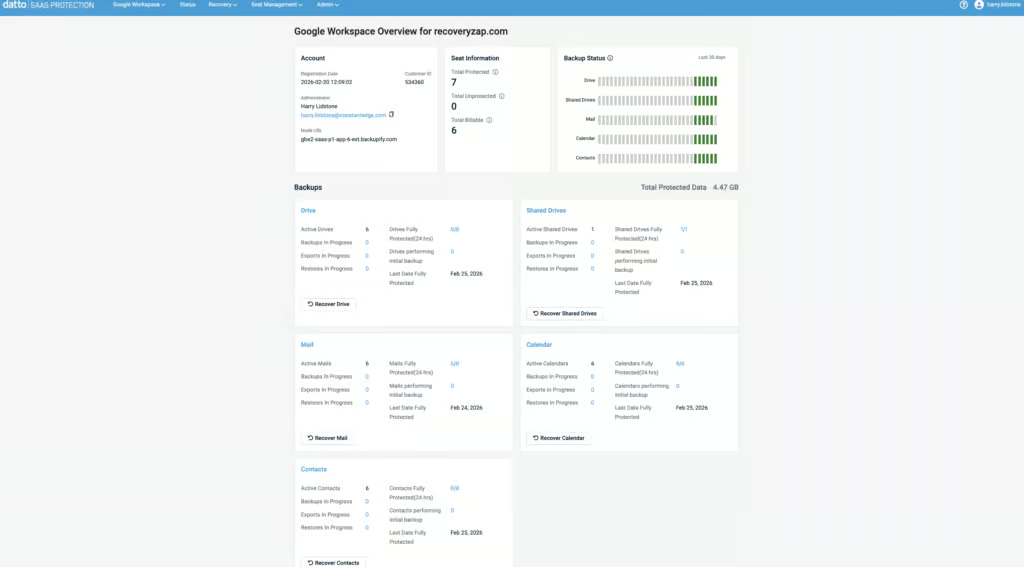
Backup and restore speeds are fast. Three daily backups provide good recovery point granularity. Locating a mailbox to restore is extremely simple – the UI isn’t cluttered, and you can initiate a mailbox restore in just four clicks. Snapshots are easy to select from. There is tenant-wide search capability, though the filtering is limited for pinpointing a specific email, and you cannot preview a selected email.
You can bulk restore mailboxes and individual items. However, we were unable to bulk restore multiple items within a single mailbox, or restore multiple items across multiple mailboxes. Cross-user restore is supported within the same tenant, but there is no cross-tenant restore capability.
Two-factor authentication is enforced on account creation. Reports can be filtered by date, event, status, and user in a granular way, and activity logs are fully exportable as CSV. Summary reports with data displayed in bubble and bar charts can be generated.
The main limitations are around backup health visibility. There is no real-time alerting – the daily report can only be set at the partner level, not to individual customers. During testing, we found an error in a backup item, but the backup health indicator didn’t show any issues. Retention can only be set tenant-wide, with no per-user or per-group customization.
10. IDrive Google Workspace Backup: Best Value

To learn more, read our Google Workspace testing methodology.
Pros
- Extremely easy to deploy
- Affordable flat pricing at $20 per user per year with 10 TB storage per seat
- Covers Gmail, Drive, Shared Drives, Contacts, Calendar, Classroom, and Forms
- Backups run three times per day with on-demand option
- Supports both business and personal Google accounts on the same tenant
- Single-item search is relatively quick
- 25% discount for educational institutions
Cons
- No real-time notification when restore jobs fail
- Basic admin and governance capabilities
- No self-service restore for end users
- No ransomware or malware scanning
- No bulk restore – each workload (Gmail, Drive, etc.) must be restored separately
iDrive Google Workspace Backup Pricing
| Free plan available | ✗ |
| Trial available | ✓ |
| Seat-based pricing option | ✓ |
| Storage-based pricing option | 10 TB per seat included; additional storage $5/TB/month |
| Starting Price (user / month unless otherwise noted) | $20.00/seat/year |
| Higher Tier Pricing | Not applicable |
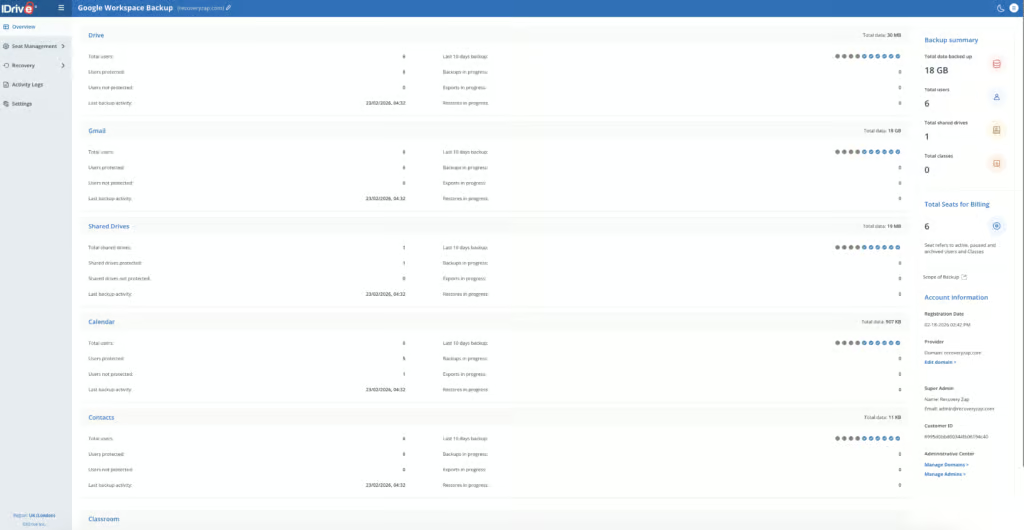
IDrive is a low-cost, lightweight Google Workspace backup platform aimed at the SMB end of the market. Pricing is a flat $20 per user per year with 10 TB of storage per seat included. Deployment took less than five minutes, backups run three times per day, and the platform supports both business and personal Google accounts on the same tenant.
IDrive is an established backup company that has been operating since 1995, historically known for backing up physical devices and servers. It's a trusted brand, which we see as very beneficial when it comes to backup. IDrive is a credible choice for small organizations whose recovery needs rarely extend beyond individual files or emails, and who value affordability and simplicity over operational depth.
IDrive was one of the easiest products to deploy. The entire setup involved choosing a data storage region, installing the Google Marketplace app, and accepting permissions. A non-technical user could comfortably get IDrive up and running. Coverage includes Gmail, Drive, Shared Drives, Calendar, Contacts, and Classroom. Google Chat and Sites are not supported.
Retention is unlimited by default, with no option to customize. Suspended users are highlighted in red within the portal, and anything that has been backed up continues to be billed. Cross-user restore is supported. Educational institutions receive a 25% discount.
Unlike some competitors that automatically discover and protect all users in a Google Workspace tenant, Spanning requires every user to have an assigned license before their data is backed up. If a user does not have a license, their data is not protected. This makes license management an ongoing administrative responsibility, particularly during onboarding and offboarding.
Full Gmail snapshot restores failed repeatedly during our testing — four consecutive attempts on a 600 MB snapshot all failed after 30 to 60 minutes, with error logs citing internal server errors or invalid label names.
Single-item restores did work. The search functionality is relatively quick, with basic search parameters for keyword, seat, and date/time. Gmail, Drive, Contacts, and Calendar must all be restored separately — there is no way to restore all data at once for a particular user. There is no self-service restore access for end users.
Retention is unlimited by default with no option to change. This is a set-and-forget approach designed for SMBs, not enterprises needing differentiated retention policies.
IDrive is SOC 2 and GDPR compliant, with storage regions available in the USA, EU, UK, and Canada. Backup data is stored in IDrive's own independent data centers, completely separate from Google's infrastructure.
Admin and governance capabilities are basic. The only permission options are full access and read only. There are no granular RBAC controls, no real-time alerting, and audit logs cannot be exported. Backup health monitoring is limited — restore failures produced no real-time notifications, and we had to dig into event logs to find details.
iDrive is best suited for businesses, charities, and budget-conscious teams wanting affordable, simple backup with Google Classroom coverage. IDrive is approximately a third cheaper than most competitors and is perfect for very small teams that need reliable backup without enterprise complexity.
Checklist: How To Choose The Right Backup
When looking for a Google Workspace backup solution, here are the nine things we think you should be asking:
- Coverage: Does it cover Gmail, Google Drive, Shared Drives, Calendar, and Contacts? What about Google Sites, Google Chat, or Google Groups?
- Retention: How often are backups captured? How long are they kept? Can you customize policies for different groups?
- Recovery: Can you restore mailboxes, files, and Shared Drives easily? Can you restore to a different user? Is there a keyword search?
- Resilience: Does it scan for ransomware or malware? Are backups immutable? Can you do a bulk restore?
- Backup Health: Can you see if backups are running? Does it alert you if something fails?
- Governance: Are there strong admin controls? Can you export audit logs? How granular are the permissions?
- Security: What certifications does it have? Does it support MFA and SSO? What are the data residency options?
- Usability: Is it easy to use? Can you find and recover files without reading the documentation?
- Commercials: Is pricing clear? Are there any hidden costs? Is the support good?
How We Tested The Best GWS Backup Solutions
To find the best Google Workspace backup solutions, the BackupVerdict team put the leading providers through a standardized, hands-on testing process.
All products were tested in controlled environments using dedicated Google Workspace test tenants with realistic data. Each product was scored using a 100-point technical audit, with final scores converted to a rating out of 10.
Our methodology covers nine weighted categories:
- Deployment (10%): How quickly can you go from signup to first backup?
- Coverage (12%): Does it cover Gmail, Google Drive, Shared Drives, Calendar, Contacts, and other services?
- Retention (12%): How long are backups kept? Can you customize policies? What happens when an employee leaves?
- Recovery (18%): Can you restore data quickly and accurately? How does the search work? Is there bulk restore?
- Resilience (15%): Can it handle large-scale incidents? Is there malware scanning? Are backups immutable?
- Backup Health (12%): Does it alert you when backups fail? Are the dashboards clear?
- Governance & Security (11%): Are there strong audit logs and admin controls? What certifications are in place?
- Commercials (6%): Is pricing transparent? Are there hidden costs? How good is the support?
- Editor’s Score (4%): Our overall editorial judgment on who the product is for and whether we’d recommend it.
Our Scoring Rubric
- 2 (Poor): Works only in ideal conditions. Unreliable or significantly limited.
- 5 (Adequate): Works as documented but needs documentation to use. Functional but not intuitive.
- 8 (Strong): Reliable in realistic scenarios. Handles edge cases well.
- 10 (Excellent): Fast, intuitive, strong guardrails. Exceeds expectations.
Our goal is simple: to help you choose a Google Workspace backup solution that actually works when you need it.
Read more about our methodology here.
FAQs
No. Google does not provide full backup and recovery for your data. They offer some retention features like the Trash and Google Vault, but these are not designed for long-term backup or disaster recovery. Under Google’s shared responsibility model, you are responsible for protecting and recovering your own data.
We think once per day is sufficient for most organizations. Daily backups protect against common risks like accidental deletion or misconfiguration. If you handle sensitive data or make a lot of changes to files and emails, you might benefit from multiple backups per day. Some solutions offer up to 12 backups per day for Gmail.
This depends on your business and compliance requirements. For many organizations, retaining backups for several years or indefinitely is the right approach. We think the best backup solutions let you set different retention policies for different groups or workloads.
Recovery. It’s the whole point of having a backup. When something goes wrong, you need to get your data back quickly and accurately. We’d recommend testing the recovery process before committing to any solution.