
The Short Answer
We've independently tested 12 backup and recovery solutions for M365. We found Veeam was the best option for all round M365 backup. Acronis ranked top for coverage across M365 and on-premises infrastructure. And OpenText CloudAlly was our choice for a fast, affordable and easy-to-manage backup solution.
Looking for a backup and recovery solution to protect your business data, ensure continuity, or meet strict compliance mandates? You’re in the right place, because we publish in-depth reviews of the best backup and recovery solutions.
Having a strong backup keeps you secure against accidental file deletion, ransomware, or service disruptions. They help you stay in control over your business data, even if something goes wrong.
Finding the right backup solution for M365 can be challenging. The market has become crowded, and there are few sources offering objective reviews of backup providers.
That’s why we built BackupVerdict. We have developed a unique, data-driven scoring framework and used it to test leading M365 backup solutions. Our goal is to provide clear, objective insight into how these products actually perform.
During our research, we found that many popular M365 backup services fall short in practice. Some are lacking certain features, like ransomware protection, while others are surprisingly slow or run into errors more than we would have liked.
So, we’ve tested restores, retention, and workload coverage, and reported on which tools are reliable and easy to manage. Our reviews are designed to help you cut through the noise and choose the right M365 backup solution with confidence.
Summary: Our Top 10 Rankings
Of all the products we tried, these are the best picks
- AvePoint Cloud Backup Best For Enterprises
- Veeam Data Cloud for Microsoft 365 Best All-Rounder
- OpenText CloudAlly Backup for Microsoft 365 Best For SMBs
- Acronis Cyber Protect Cloud Best for Coverage
- Hornetsecurity 365 Total Backup Best For Ease of Use
- NinjaOne SaaS Backup Best For MSPs
- Afi Backup for Microsoft 365 Best For Copilot Backup
- Spanning Backup for Microsoft 365 Best For Backup Health Visibility
- SpinOne Best For Security Teams
- CyberSentriq (formerly Redstor) Best For Compliance
Why Trust Us?
BackupVerdict provides independent advice, reviews and comparisons for backup and recovery solutions. We conduct independent, in-depth product testing of cloud backup and recovery, with hundreds of hours of research.
Learn more about who we are and read our M365 testing methodology.
| Solutions Tested | Total Number Of Hours Testing | Combined Years of Experience |
|---|---|---|
| 20+ | 250+ | 35+ |
Microsoft 365 backup and recovery solutions take regular snapshots of your M365 data, like your SharePoint sites, OneDrive files, and Exchange mailboxes, so you can recover the data if you need to.
This is important because the M365 service has no obligation to protect data for you. If you accidentally delete a file, erase a user’s mailbox, or get hit by a ransomware attack, for instance, Microsoft cannot help you recover your lost data.
Similarly, if Microsoft was to go offline, or if it were the target of a cyber-attack, without a third-party backup solution you would have no way of recovering your data.
Having a backup in place provides you with an independent copy of your M365 data. It means you can recover it at any time. It gives you certainty that if something goes wrong, your business is protected.
As well as the above, there some compliance regulations that mandate you keep independent and immutable copies of data, like email messages. Having a third-party backup solution can help you meet these compliance requirements.
If you depend on M365 for email, collaboration, records or storing business data, you need a strong backup and recovery tool.
The Best Backup Solutions Compared & Reviewed
| Overall Rating | 8.5/10 |
8.4/10 |
8.2/10 |
8.1/10 |
8.1/10 |
8.0/10 |
7.1/10 |
6.9/10 |
6.7/10 |
6.6/10 |
| Deployment | 7.0 | 8.0 | 10.0 | 9.0 | 9.0 | 8.0 | 8.0 | 8.0 | 8.0 | 7.0 |
| Coverage | 10.0 | 9.0 | 7.0 | 9.0 | 8.0 | 9.0 | 9.0 | 7.0 | 7.0 | 8.0 |
| Retention | 9.0 | 8.0 | 8.0 | 9.0 | 8.0 | 8.0 | 8.0 | 6.0 | 6.0 | 8.0 |
| Recovery | 7.0 | 8.0 | 9.0 | 7.0 | 8.0 | 8.0 | 8.0 | 7.0 | 7.0 | 6.0 |
| Resilience | 10.0 | 9.0 | 7.0 | 7.0 | 8.0 | 6.0 | 6.0 | 6.0 | 7.0 | 7.0 |
| Backup Health | 9.0 | 8.0 | 7.0 | 9.0 | 8.0 | 9.0 | 7.0 | 9.0 | 6.0 | 5.0 |
| Governance and Security | 10.0 | 9.0 | 8.0 | 9.0 | 8.0 | 9.0 | 8.0 | 7.0 | 8.0 | 6.0 |
| Commercials | 7.0 | 7.0 | 10.0 | 7.0 | 9.0 | 8.0 | 5.0 | 5.0 | 5.0 | 7.0 |
| Editor's Score | 7.0 | 9.0 | 9.0 | 8.0 | 7.0 | 8.0 | 5.0 | 7.0 | 6.0 | 6.0 |
| Read Review | AvePoint Cloud Backup Review | Veeam Data Cloud for Microsoft 365 Review | OpenText CloudAlly Backup for Microsoft 365 Review | Acronis Cyber Protect Cloud Review | Hornetsecurity 365 Total Backup Review | NinjaOne SaaS Backup Review | Afi Backup for Microsoft 365 Review | Spanning Backup for Microsoft 365 Review | SpinOne Review | CyberSentriq (formerly Redstor) Review |










1. AvePoint Cloud Backup: Best For Enterprises


To learn more, read our Microsoft 365 testing methodology.
Pros
- Very broad coverage of M365 services, including Dynamics, PowerBI, Azure and Power Platform (Dynamics and Azure are licensed separately)
- Supports large scale bulk recovery of multiple mailboxes
- Granular system audits with 3-year retention policies
- Full control over data residency with bring-your-own-encryption and bring-your-own-storage
- Automated weekly offboarding detection for employees that leave
- Behavior-based ransomware protection
Cons
- 500 user minimum – not designed for SMBs
- Monthly pricing is higher than some competitors
- Certain features such as container configuration can require additional training to understand
- Cloud Backup Express requires a separate license
AvePoint Pricing
| Free plan available | ✗ |
| Trial available | ✓ |
| Seat-based pricing option | ✓ |
| Storage-based pricing option | ✗ |
| Starting Price (user / month unless otherwise noted) | $4.00 (500-user minimum) |
| Higher Tier Pricing | Not public |
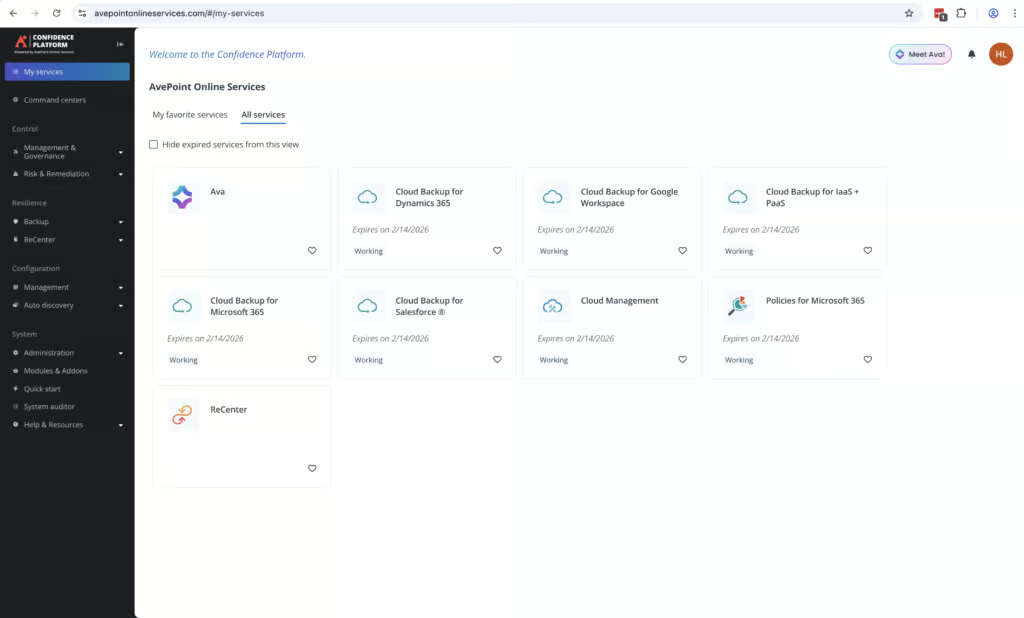
AvePoint offers an M365 backup solution designed for large, regulated enterprises, available for teams of 500 users or more. In our review, we were impressed by the strong customization around policies and controls, bulk recovery features, and the reporting capabilities on offer. It provides serious control over backups and if you need this level of granularity, AvePoint is one of the best solutions we’ve seen.
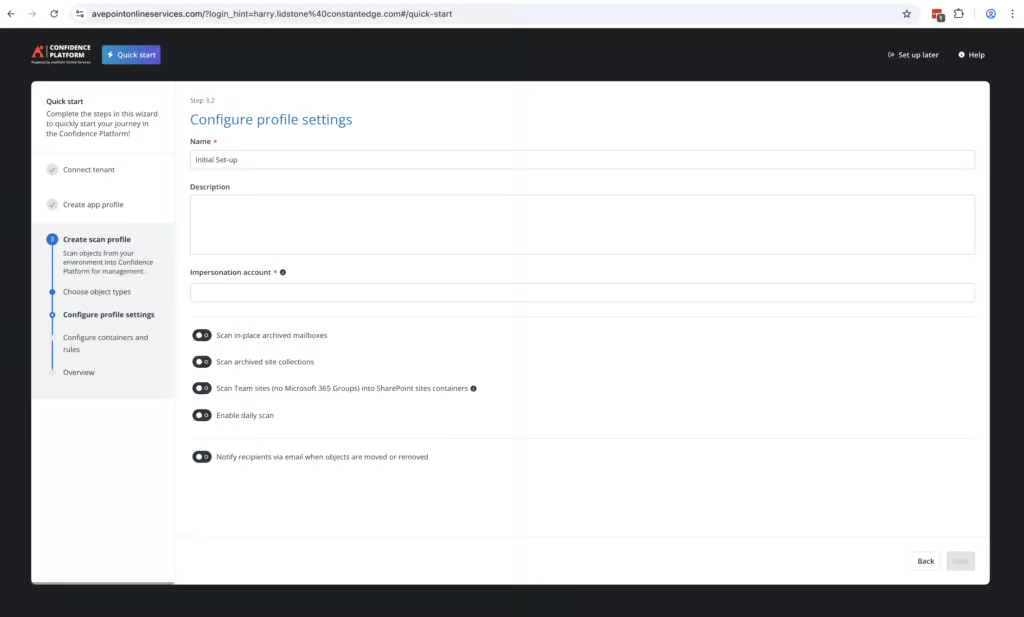
AvePoint is best suited for organizations with dedicated IT teams and tough compliance requirements to meet. It’s not a simple backup and recovery service, but goes much further than basic requirements, with features like data control and auditing. As you’d expect from a more enterprise-focused solution, deployment is a lot more involved than with simpler tools. AvePoint also offers a complimentary 90-minute onboarding session to help new customers get started with the platform.
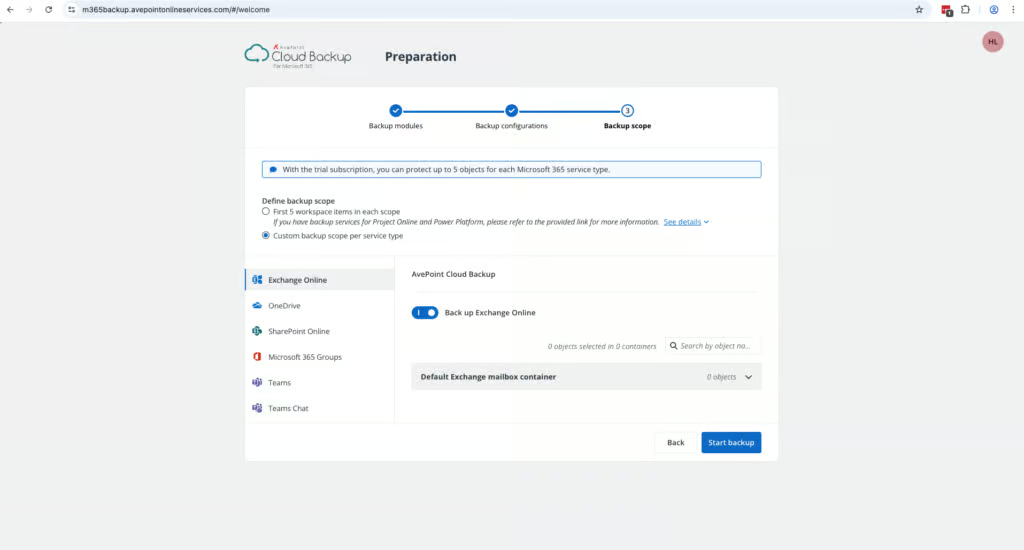
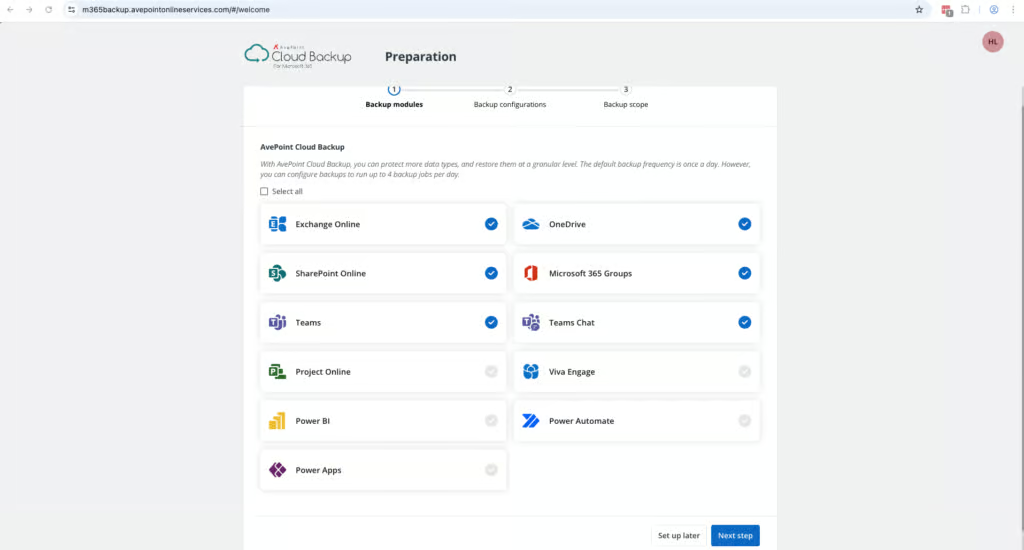
We were very impressed with AvePoint’s coverage. It protects Dynamics, Azure, PowerBI, Azure resources, Entra ID, as well as the core services of Exchange Online, SharePoint, OneDrive and Teams. Within these apps it supports Public Folders, Teams channels, group chats and 1:1 conversations. Entra ID does require additional licensing. Dynamics and Azure backup also require separate licenses. Public Folder backup depends on Microsoft’s Exchange Web Services (EWS), which Microsoft retires in April 2027.
Mailboxes and objects are automatically discovered, and there’s a high level of granularity to choose which of the above services get backed up. If you need coverage across all of your Microsoft workloads, this is a very strong option to consider.
AvePoint provides a System Auditor feature which provides detailed information on all admin actions within the portal and which user performed it. These are kept for three years. They are easy to search and can be exported as required.
AvePoint enables granular role-based access controls, with customizable security policies for different groups. You can set multiple permissions for different users, including read-only access, the ability to restore files, and controls just over certain M365 apps. There are 21 different locations for data residency, and you can also direct backups to your own cloud storage account, giving you full ownership of both the data and where it physically resides.
AvePoint also supports bring your own key encryption, where AvePoint holds your backup data but doesn’t hold the keys needed to decrypt it. This is increasingly important in regulated industries such as financial services, healthcare, and government agencies.
AvePoint offers two different backup options, Cloud Backup (Standard) and Cloud Backup Express. If you need faster large scale recovery of data, AvePoint offers Cloud Backup Express, which integrates directly with Microsoft 365’s native storage, which allows restore speeds of 1–3TB per hour for SharePoint, OneDrive, Exchange, Teams and Microsoft 365 Groups. This does require an extra license, and is designed for large scale recovery, rather than finding a specific item to recover.
AvePoint stands out for its resilience capabilities, with strong bulk recovery, granular restore points and a behavior-based ransomware monitoring system. During recovery, snapshots are color-coded: green indicates safe restore points, yellow flags unusual activity, and red marks potential ransomware-affected backups.
One of the few negatives with AvePoint is the lack of granular search functionality. When looking for an item to restore, you can only search by subject, sender, recipient, or date. Keyword searching of email body content and attachments isn’t included in the base license and requires the paid eDiscovery add-on. Pricing is $4.00 per user per month with a minimum of 500 users.

We were impressed with AvePoint. It’s not the easiest or the fastest backup product to use and deploy. There are complexities when setting up groups and alerts. Policies can take a long time to understand, and deployment took longer than some other solutions.
But if you want serious control over your data, including where it is stored, who can access it, and what happens when you need to recover it, few solutions offer as much control as AvePoint.
For enterprise organizations who need features like bulk mailbox restore, BYOK encryption, policies that can be fine-tuned across locations and teams, and coverage across the M365 eco-system, AvePoint is well worth the investment of time and cost needed to operate the solution.
Put simply, AvePoint offers a depth that very few M365 services we’ve reviewed come close to matching.
Who AvePoint is For: Large enterprises, teams with strict compliance and government requirements, teams with teams split across geographic regions, teams looking for granular data residency controls.
Who should look elsewhere: Teams with less than 500 employees, teams looking for a straightforward, simple backup solution, teams that need keyword search of email content without paying for an add-on.
2. Veeam Data Cloud for Microsoft 365: Best All-Rounder

To learn more, read our Microsoft 365 testing methodology.
Pros
- Broad M365 coverage, with Entra ID on Advanced and Premium plans (Azure and Salesforce sold separately)
- Granular Role Based Access control with custom role creation
- Excellent bulk restore capabilities
- Intuitive interface which is easy to use
- Self-service restore for end users
- Fast search across every restore point of a mailbox
- 24/7 support included with every plan
Cons
- Standard backups run once per day; 10-minute Express backups need the $7 Premium plan
- Admins can’t search email body text
- Top level audit logs of all workloads are not exportable (you can export individual workload logs)
- Relies on Azure cloud storage for backups and recovery, which is the same infrastructure as M365
- Threat detection needs the Advanced or Premium plan
Veeam Pricing
| Free plan available | ✗ |
| Trial available | ✓ |
| Seat-based pricing option | ✓ |
| Storage-based pricing option | ✗ |
| Starting Price (user / month unless otherwise noted) | Foundation $2.63/user/month at 251+ users, billed annually; smaller tiers cost more |
| Higher Tier Pricing | $7.00 |
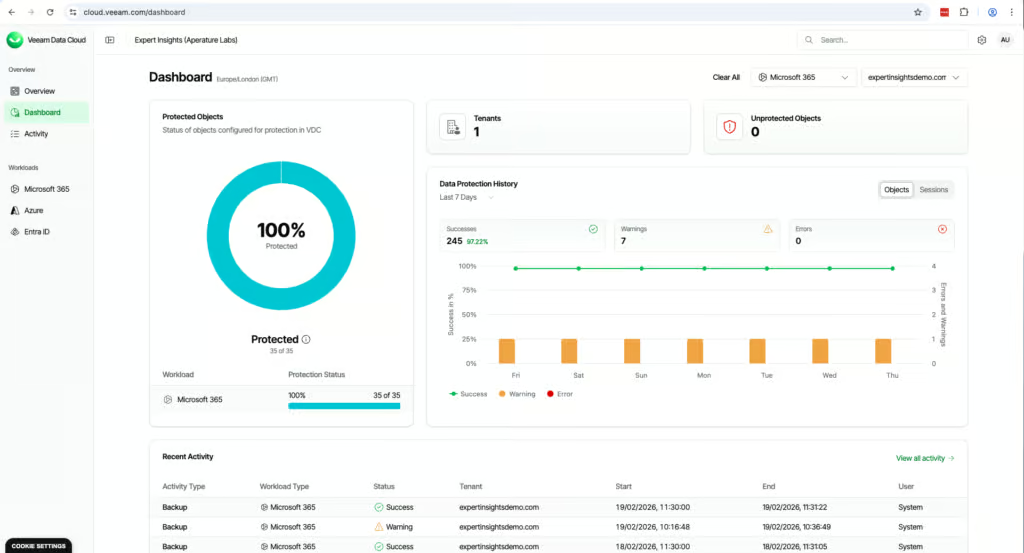
Veeam Data Cloud is a market leader in the M365 backup space, and we were impressed in our review of the service. The cloud dashboard is very clean and modern and the solution is easy-to-use. We think it’s a good mid-way point between SMB focused backup tools like CloudAlly, and more enterprise solutions like AvePoint.
Coverage is strong, with support for the whole M365 suite including Exchange, SharePoint, OneDrive, and Teams, plus Entra ID and Azure. Entra ID is included in the Advanced and Premium plans, and Azure is a separate Veeam Data Cloud product. 1:1 Teams chats are supported, which isn’t always the case with other backup providers.
There is one limitation to be aware of: Veeam stores backup data in Microsoft Azure. This means that if there was a major Azure outage, you could lose access to both your production environment and your backups. By contrast, CloudAlly, Acronis, and Hornetsecurity all store backups independently of Azure.
Veeam told us every customer gets a named contact during onboarding, and every plan includes 24/7 production support.
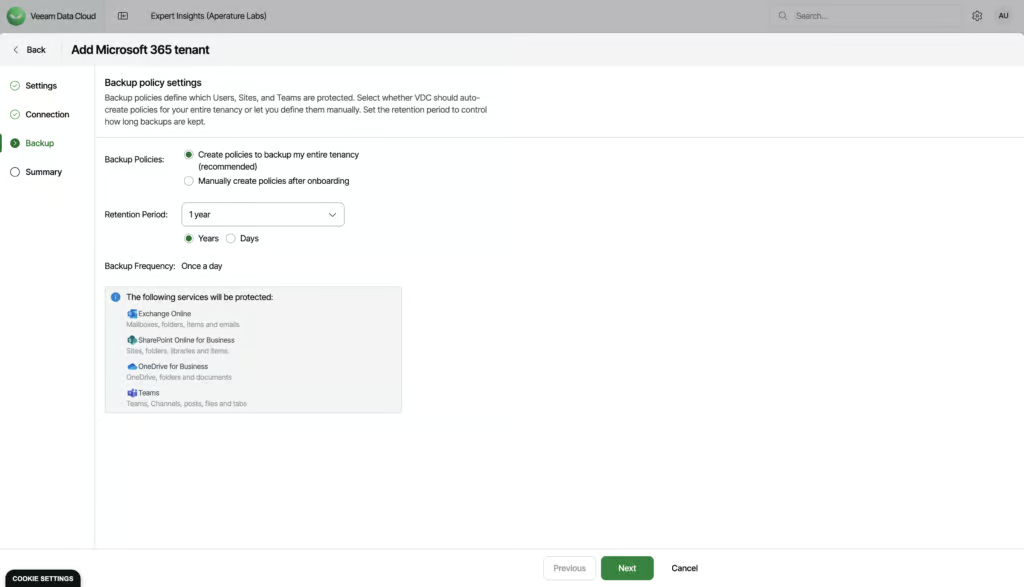
Governance and security is a standout area for Veeam. We think it has the best role-based access controls of any of the solutions we’ve tested. You can create very granular custom roles. For example, you can only allow a user access to view restore points for Outlook. You can also assign one admin for SharePoint, another for Teams, etc., all in two clicks.
Audit logs are detailed and well laid out. You get a top-level overview of the whole tenant, and individual views for each workload which has information on who has completed what tasks.
Data residency options cover Americas, EMEA, and Asia-Pacific, with customers able to select their preferred Azure region.
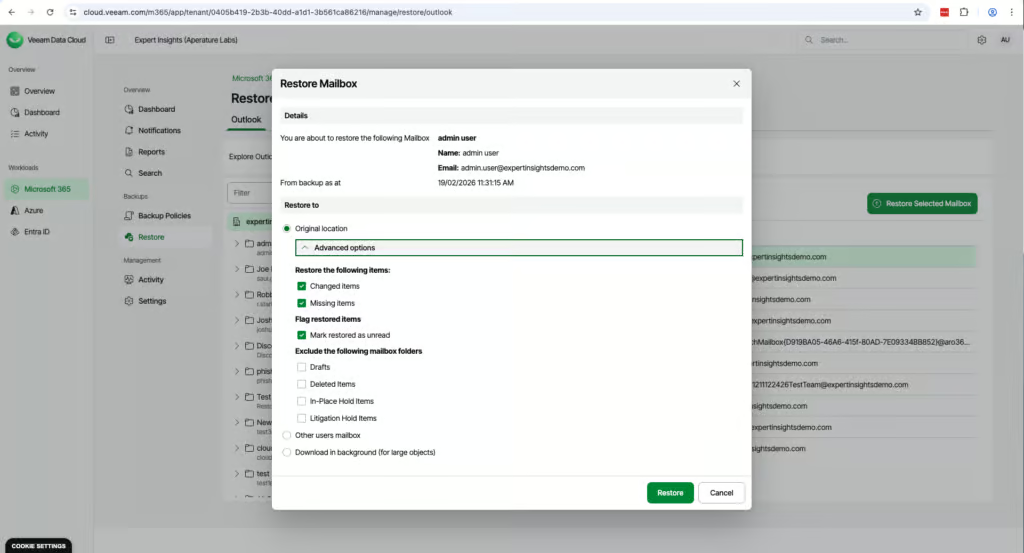
Recovering a mailbox is very simple. The interface is very cleanly designed and has a dedicated ’Restore’ tab, which puts everything you need in one place. The layout mirrors Outlook, so it’s familiar to navigate backed up mailboxes. You can browse backups over time with a calendar view, making it very easy to find a mailbox and choose the right restore point.
Search is limited to metadata however rather than the actual body content of message or attachments. Search has improved significantly since our first test. When we retested in October 2026, a search across every restore point of one mailbox returned 46,060 results almost instantly, although Veeam still can’t search email body text.
We restored a test mailbox to a folder in another mailbox. The restore started at 12:24pm and completed at 12:25pm. Items began populating almost immediately.
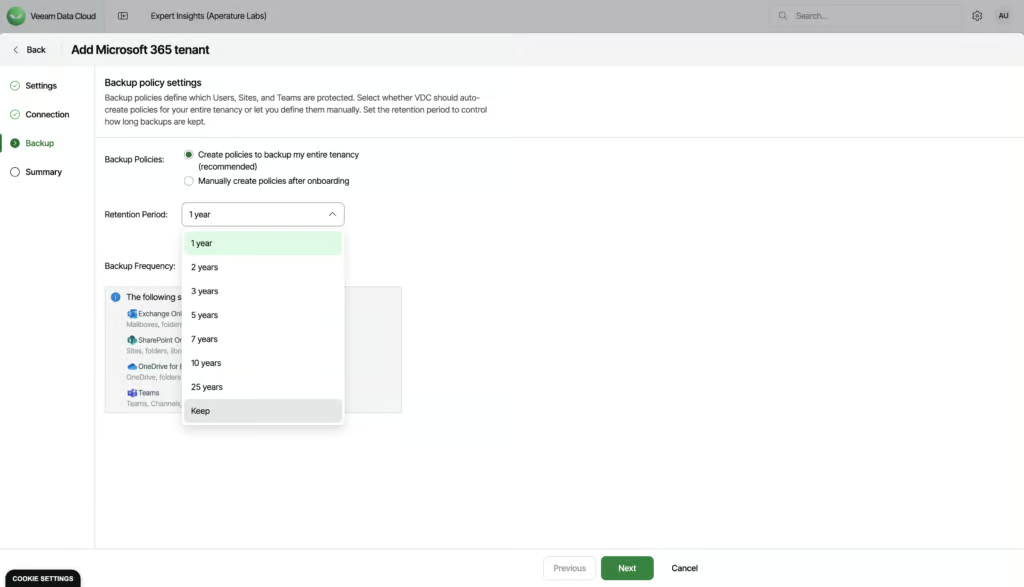
Bulk restoration is available and very easy to execute. In just three clicks you can restore multiple mailboxes back to their original location. There are granular options and policies available for bulk recovery as well: for example you can restore only missing or changed items or exclude drafts. This is a standout feature.
Multi-mailbox restores go back to their original locations. Veeam also supports self-service restore for Outlook and OneDrive, so end users can login and restore their own files if needed.
Veeam has recently announced a new suite of threat protection capabilities for backup, which are generally available as of March 2026. They are included in the Advanced and Premium plans, but not in the entry-level Foundation plan.
Veeam is very competitively priced for an enterprise-level solution. Pricing starts at $2.63 per user per month for M365-only protection on the Foundation plan, rising to $3.33 for Advanced (adding Entra ID and threat detection) and $7 for Premium (adding 10-minute Express backups).

Veeam is an all-rounder which effectively balances granular functionality without sacrificing ease-of-use for admins. We would recommend it for organizations of all sizes as a strong M365 backup tool. Between our first test in March 2026 and our retest in October 2026, the product has clearly matured, with faster search and easier day-to-day use.
There are limitations. Search can’t look inside email body text, though it has become much faster since our first test, and performance can be slower when dealing with large data sets. We’d also like to see more options for bringing your own storage rather than being limited to just Azure.
But the bulk restore capabilities, role-based access controls and the intuitive admin interface are stand out features which explains Veeam’s position as a market leader in this space.
Who it’s for: Teams looking for M365, Entra ID and Azure backup, teams who need granular RBAC controls, teams that need mass mailbox restore capabilities.
Who should look elsewhere: Teams that need multiple backups per day without paying for the Premium plan, teams who want to store data outside of Azure, and teams that need email body search for e-discovery.
3. OpenText CloudAlly Backup for Microsoft 365: Best For SMBs

To learn more, read our Microsoft 365 testing methodology.
Pros
- Extremely fast and easy deployment — backups running in minutes
- Unlimited storage by default
- Fast, intuitive recovery process with strong end-user recovery
- Backup data stored on AWS, independent of Microsoft infrastructure
- Simple, transparent pricing at $30 per licensed mailbox per year
Cons
- No ransomware or malware scanning
- Teams 1:1 chats not backed up
- No FedRAMP or BYOK support, and no SOC 2 report of its own
- Basic backup health dashboards — relies on activity logs and email notifications
- Backup frequency limited to once per day (three times per day is a paid add-on)
CloudAlly Pricing
| Free plan available | ✗ |
| Trial available | ✓ |
| Seat-based pricing option | ✓ |
| Storage-based pricing option | ✗ |
| Starting Price (user / month unless otherwise noted) | $30 per licensed mailbox per year (or $3.00/user/month on a rolling monthly plan) |
| Higher Tier Pricing | $36/user/year with the 3x-daily backup add-on (+$6/user/year) |
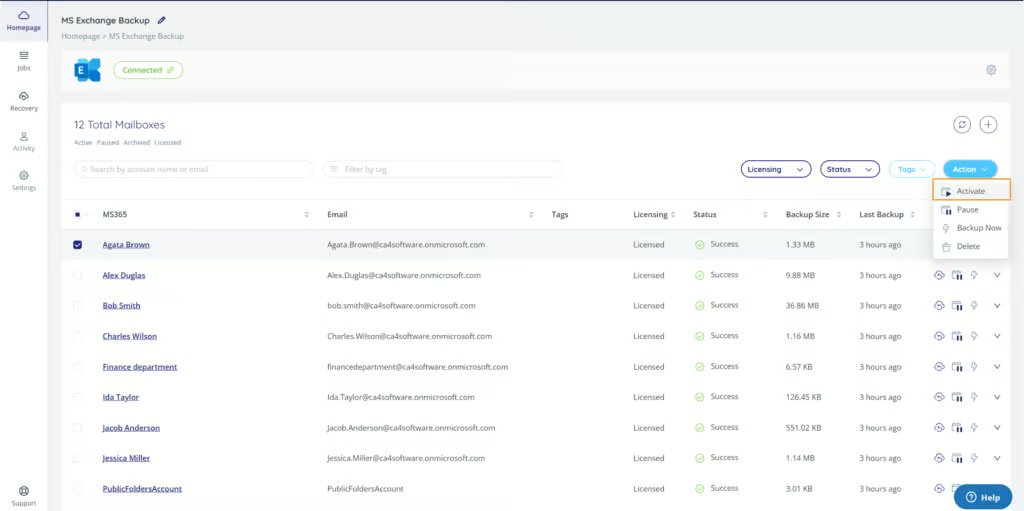
CloudAlly is our top pick for SMBs. It’s easy to get started. You just need to authenticate, set permissions, and then you’re up and running. We had backups going within minutes, with no documentation needed.
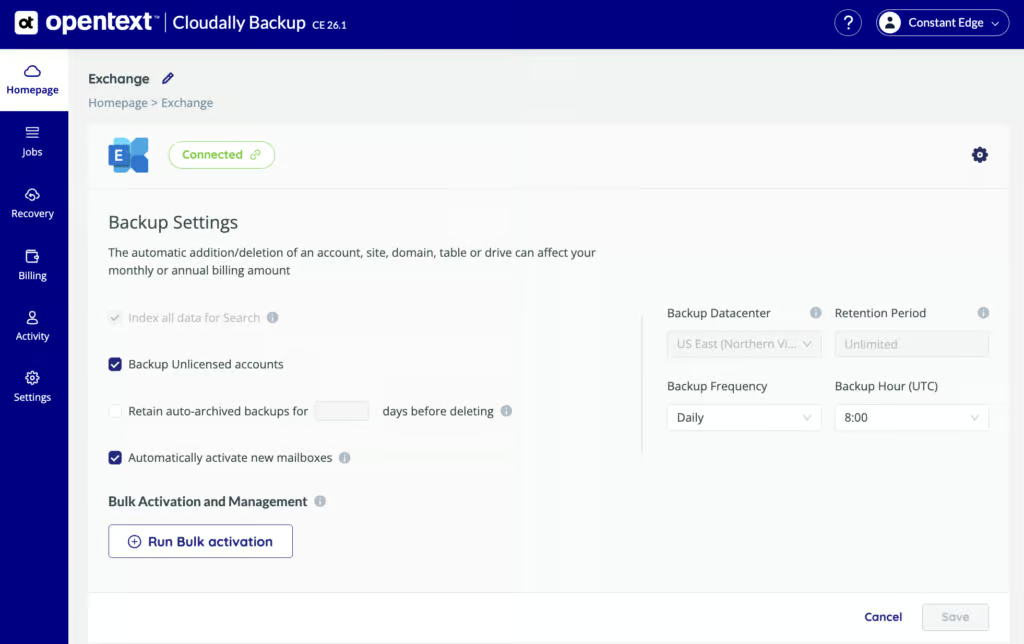
Recovery is where we were really impressed. We restored a 3.8GB Exchange mailbox in under an hour, with no corruption or missing metadata. That’s faster than Veeam in our testing.
You can search for specific emails or files by keyword, which we think is very helpful. End-users can log into CloudAlly and access their own Exchange backups, which means your team doesn’t need to involve an admin for simple restores.
You can also download backups locally or export to Amazon S3 or Dropbox for legal or audit workflows.
One thing we really like is that backups are stored on AWS, not Azure. This means if there is a major Azure outage, your backups are still accessible. You can also bring your own S3 storage if you want full control over where your data sits.
By default, CloudAlly takes one backup per day. You can upgrade to three per day, but this is a paid add-on.
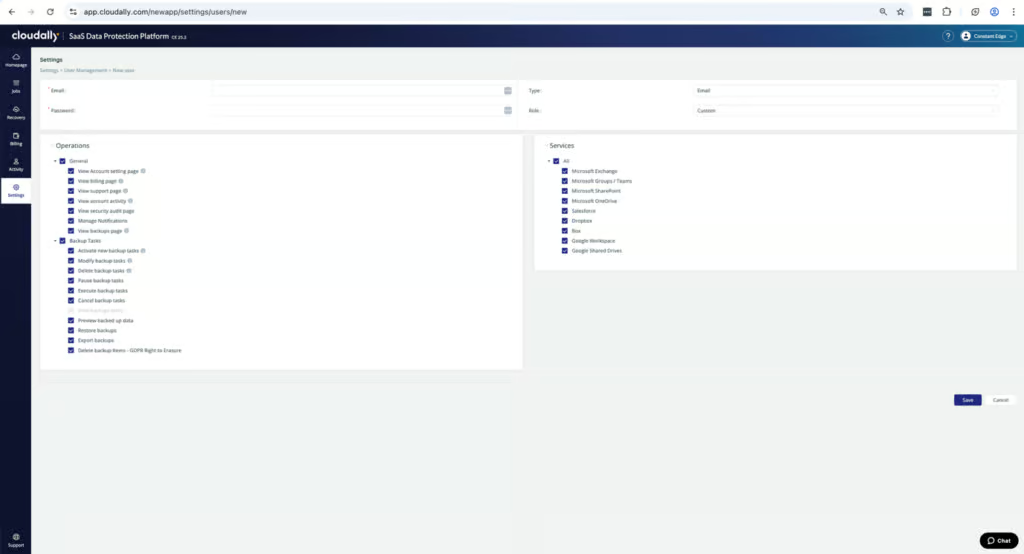
CloudAlly is ISO 27001 certified and encrypts data in transit and at rest. MFA and SSO are supported. Audit logs are retained indefinitely and can be exported as CSV.
Admin permissions can be scoped by role, action, or M365 service. Retention is unlimited by default, and if an employee leaves, their data stays backed up without needing an active license.
There are some gaps though. CloudAlly doesn’t publish its own SOC 2 report, and doesn’t support FedRAMP or BYOK encryption. Teams 1:1 chats are not backed up. And there is no ransomware or malware scanning. CloudAlly’s Entra ID backup is currently in beta, covering users, groups and directory roles. For most organizations we think the coverage is strong, though it would be nice to see these gaps addressed.
CloudAlly is cost effective at $30 per licensed mailbox per year with unlimited storage. We think this is one of the most straightforward pricing models in the market.

CloudAlly is one of the strongest M365 backup options for SMBs and mid-market teams that want reliable, fast backup and recovery without the complexity. The deployment is one of the fastest we tested, the recovery process is excellent, and the pricing is simple and transparent.
The main limitations are the lack of malware scanning, no Teams 1:1 chat backup, and no FedRAMP authorization or SOC 2 report of its own. Backup health monitoring is functional but basic compared to platforms with dedicated dashboards.
For teams that prioritize ease of use, fast recovery, and straightforward pricing, CloudAlly is a strong choice.
Who This Is For: SMBs and MSPs that want fast, reliable M365 backup with minimal complexity. Teams that prioritize ease of use and straightforward recovery over advanced security features. Organizations that want backup data stored independently of Microsoft’s infrastructure, with the option to use their own cloud storage.
Who Should Look Elsewhere: Government, defense, or highly regulated financial environments that require their vendor’s own SOC 2 report, FedRAMP, or BYOK. Organizations that need Teams 1:1 chat backup. Teams that require built-in ransomware scanning or threat detection.
4. Acronis Cyber Protect Cloud: Best for Coverage

To learn more, read our Microsoft 365 testing methodology.
Pros
- Best-in-market retention policies, with up to 6 backups per day (with Advanced Backup)
- Unlimited storage for M365 backups
- Built-in malware scanning of mailbox backups (requires Advanced Security +XDR tier)
- Over 50 global data center locations — the widest data residency range of any vendor we tested
- Covers Microsoft 365 apps, on-prem endpoints, servers, Azure VMs, and more
- Support for Entra ID Backup
Cons
- Interface will take time to learn and can be complicated
- No keyword search across all mailboxes when recovering emails or files – limited to single mailbox
- No bulk restore of multiple mailboxes
- Licensing can get confusing – and the pricing here is higher than some competitors
Acronis Pricing
| Free plan available | ✗ |
| Trial available | ✓ |
| Seat-based pricing option | ✓ |
| Storage-based pricing option | Per-GB consumption pricing for native Microsoft 365 Backup Storage; standard plans per seat |
| Starting Price (user / month unless otherwise noted) | $41.80/user/year, based on 50 users |
| Higher Tier Pricing | $4.00 |
Acronis Cyber Protect Cloud is one of the best Microsoft 365 solutions we’ve tested, particularly when it comes to retention controls, resilience and coverage for M365 services. If your priorities for a backup solution are ransomware protection, granular policies and support for hybrid environments, Acronis is well worth considering.
The interface does take some time to fully get to grips with. And in general, the solution is better suited to mid-to-large sized organizations and MSPs than small businesses.
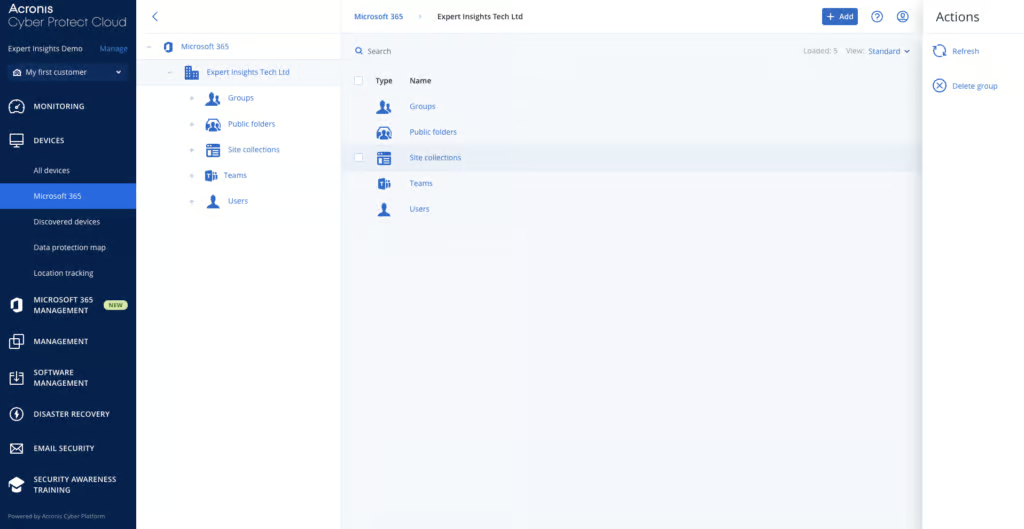
Acronis covers Exchange Online, SharePoint Online, OneDrive and Teams, including 1:1 Teams chats, channel conversations and files. Acronis also covers OneNote and supports mailboxes on litigation hold. This coverage is really strong; most backup vendors don’t support 1:1 Teams chats at the moment. Entra ID backup became generally available in June 2026, at no extra cost. Acronis no longer supports Public Folders.
Where Acronis really stands out though is coverage outside of Microsoft 365. Acronis supports Windows, MacOS, and Linux devices, Azure VMs, and other infrastructure workloads. This means if you’re looking for a backup provider that covers M365 alongside on-prem apps, or if you want to migrate from on-prem architecture to M365, Acronis is a really strong solution to consider.
There aren’t many gaps in coverage, although Acronis does not cover Dynamics, PowerBI, Power Platform, or Copilot.
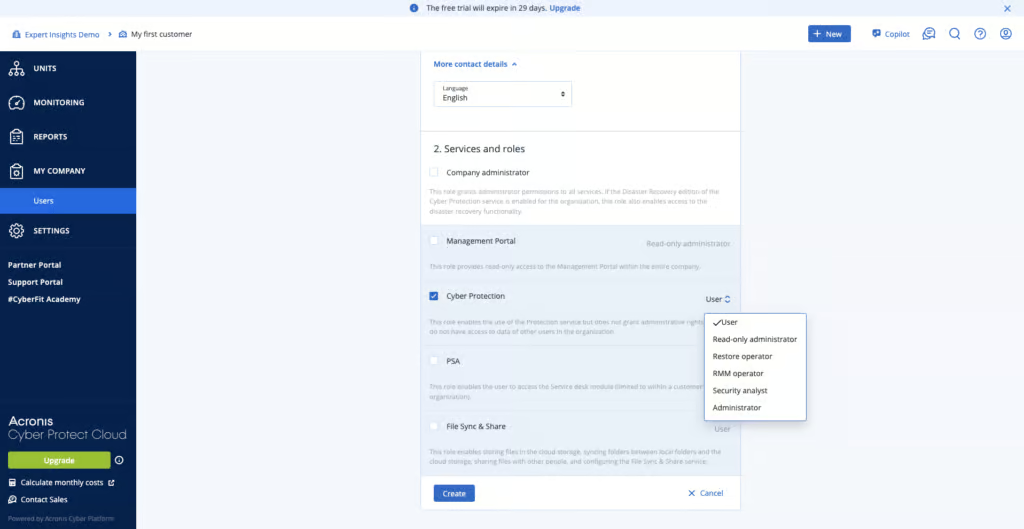
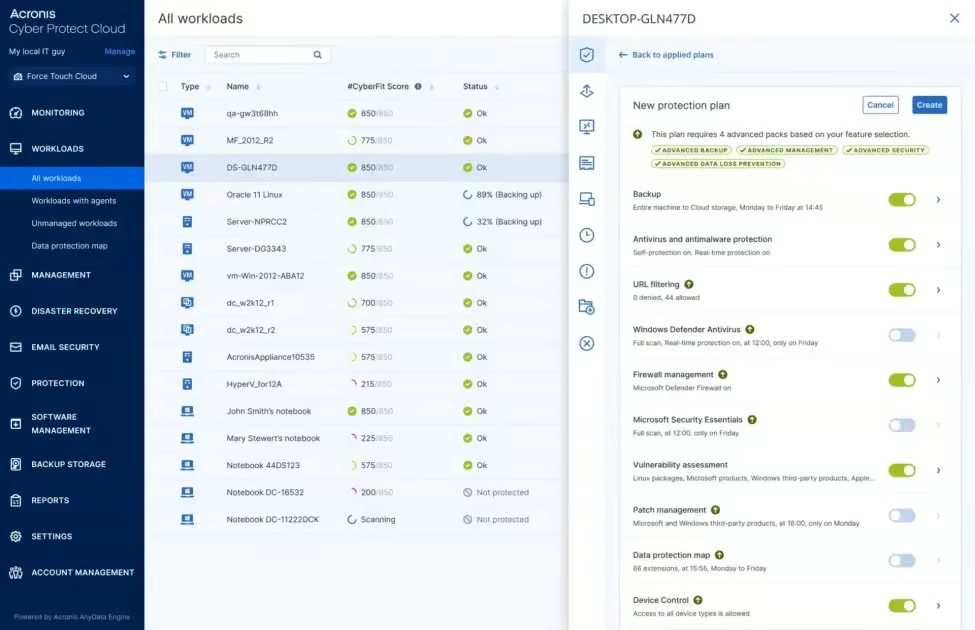
Acronis really stands out when it comes to retention policies. You can choose one, two, four or six backups per 24 hours. You can also set up backups on demand. You can easily configure how long backups are kept, whether daily, weekly, monthly or yearly, which is important for compliance requirements. As part of our testing, we created multiple different backup plans for different user groups and workloads with no issues at all.
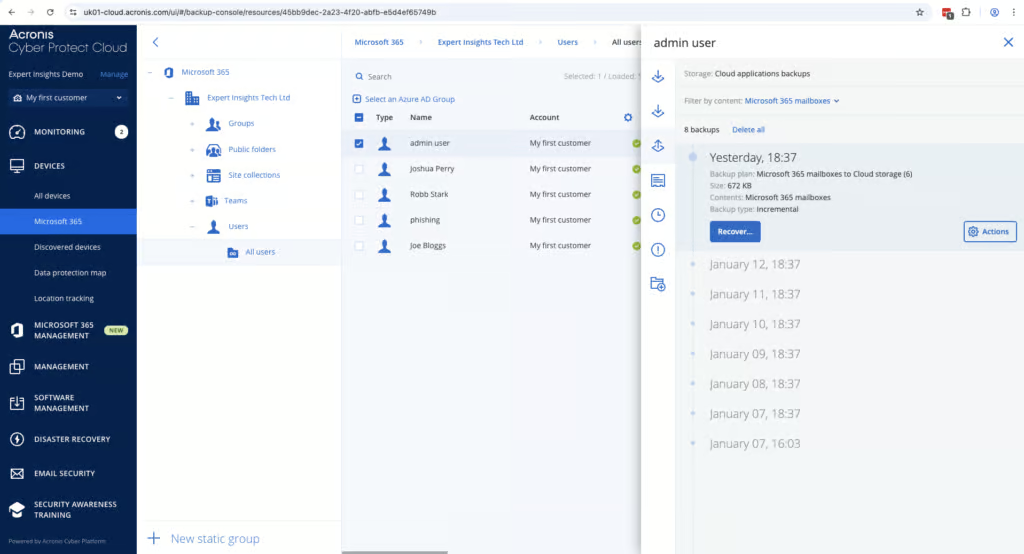
When an employee leaves, it’s easy to restore data from an archived account over to an active user. If a user is removed from M365, their data is still available, which makes a process that can be a headache very simple.
The user interface does take a bit of time to learn, but once you’ve got the hang of things, the granularity of controls exceeds most of the other solutions we have tested on the market.
Acronis includes built-in malware scanning for Microsoft 365 mailbox backups. OneDrive and SharePoint backups aren’t scanned. It also flags if any backups you’re trying to restore contain any suspicious links. This is only available in the “Advanced Security +XDR” tier which does add cost, but in our testing the feature works well.
Acronis offers two immutable storage options: Governance and Compliance. Multi-factor authentication is supported but switched off by default, so we recommend enabling it. You need a separate admin account to manage Acronis, rather than just using your M365 credentials, which we think is a good thing. It means if your M365 account is compromised, your backups are still secure.
There is no keyword search across mailboxes when recovering emails or files, and there is no bulk restore for M365 mailboxes. SharePoint recovery is granular, with file and folder-level restore. These are the main areas where we’d like to see improvement.
Acronis is priced at $41.80/user per year, based on 50 users. This is more expensive than other M365 backup solutions, for example CloudAlly is $30 per licensed mailbox per year. But, Acronis does offer unlimited storage and a very mature platform in return.

We think Acronis Cyber Protect Cloud is a very capable, enterprise-grade backup platform. We scored the solution highly for retention, backup health and security. We would recommend Acronis for MSPs, mid-market organizations and anyone looking for strong security controls, ransomware protection, and coverage for on-prem or hybrid environments, as well as M365.
It’s not the easiest solution on the market to use, and there is a learning curve with the user interface. But Acronis offers a level of control, and security, that few M365 backup solutions can match.
We were particularly impressed with how fast the solution is to deploy, and the capabilities on offer – like its Entra ID backup. The data residency options are also impressive, with the choice of over 50 countries across the world.
Acronis is also a trusted name brand, with a mature, trusted platform, which really cannot be underestimated when you are choosing a backup solution.
Who Acronis is for: MSPs managing multiple customers, mid-to-large sized organizations, teams with hybrid infrastructures, teams with strict compliance requirements, teams prioritizing ransomware resilience.
Who should look elsewhere: Teams that want simple, low-cost M365 backup, teams that don’t want advanced features or data residency options.
5. Hornetsecurity 365 Total Backup: Best For Ease of Use

To learn more, read our Microsoft 365 testing methodology.
Pros
- Intuitive and easy to use app and console
- Supports unlimited data retention
- Offers multiple backups per day by default
- Offers a bulk restore capability which is easy to manage
- Good fit for MSPs with a strong multi-tenant dashboard
- Runs its own data center infrastructure and is not dependent on Microsoft Azure
Cons
- No malware or ransomware scanning within the backup product (slightly mitigated for Plan 3 or 4 customers where email security is included)
- Admin roles are limited to full access and a restricted Service Desk role, with no custom roles
- There are no retention policies for specific groups or users
- There’s no tenant-wide keyword search in the backup module (there is archiving support for Plan 3 or 4 customers)
Hornetsecurity Pricing
| Free plan available | ✗ |
| Trial available | ✓ |
| Seat-based pricing option | ✓ |
| Storage-based pricing option | ✗ |
| Starting Price (user / month unless otherwise noted) | $2.75 |
| Higher Tier Pricing | Not public |
Hornetsecurity is an easy-to-manage, intuitive backup solution. We think it’s a good fit for mid-sized businesses or MSPs who are looking for a user-friendly and effective solution. It’s easy to deploy, easy to manage, and it doesn’t require deep technical knowledge to get up and running. If you’re looking for predictable backups with unlimited retention and a set and forget experience, Hornetsecurity is a good option to consider.
Hornetsecurity 365 Total Backup can be purchased on its own or as part of the 365 Total Protection plans. The product was originally built by Altaro, a dedicated backup company with cloud-to-cloud backup experience that goes back to 2018. Hornetsecurity acquired Altaro in 2020 and Altaro’s expertise was integrated into Hornetsecurity’s broader security platform. Proofpoint completed its acquisition of Hornetsecurity in December 2025. In Europe, 365 Total Backup is still sold under the Hornetsecurity name; in the US you’ll more often see it marketed as Proofpoint 365 Total Backup.
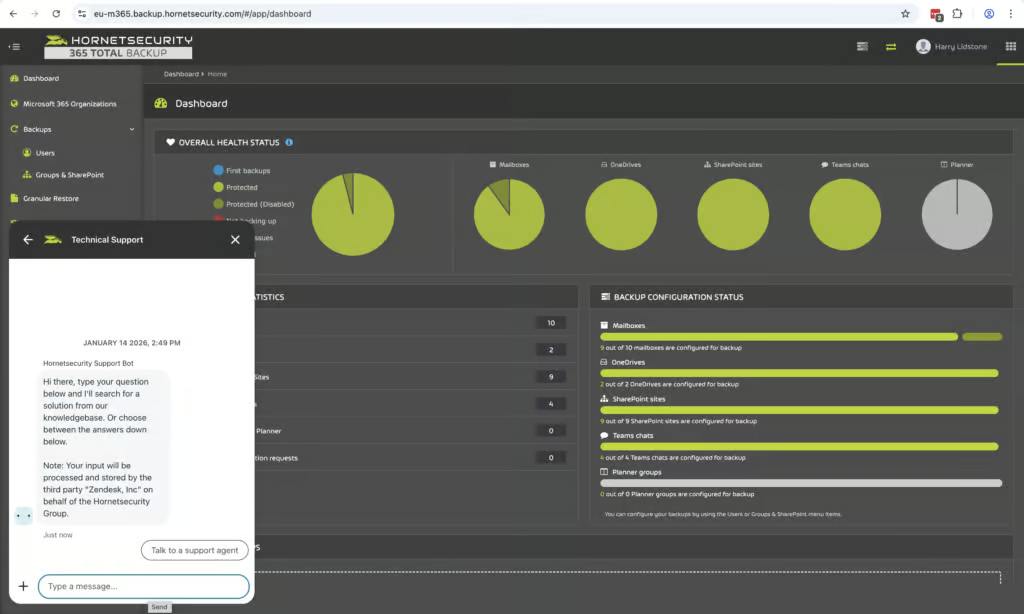
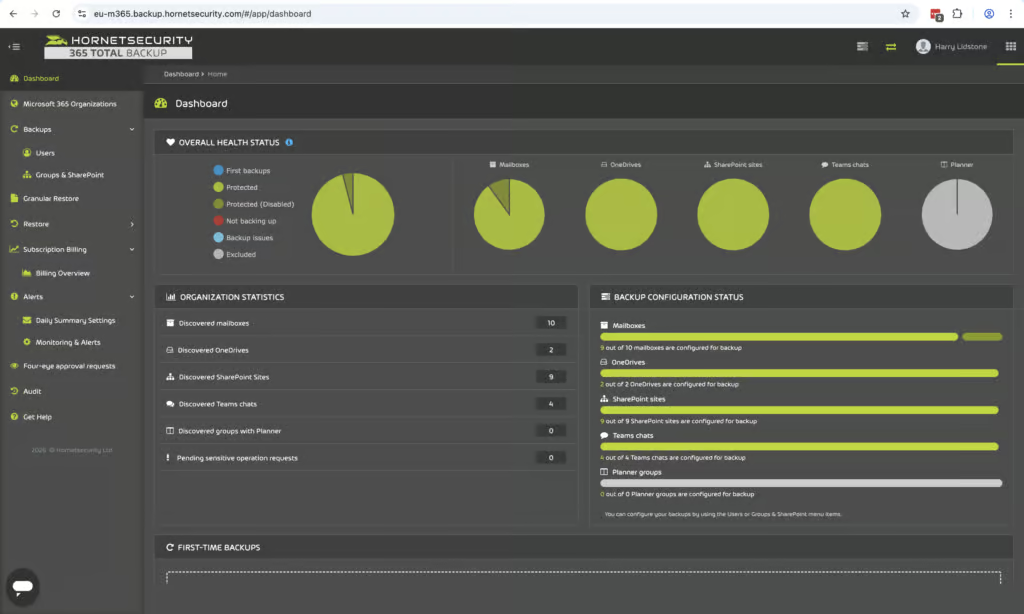
We found Hornetsecurity was very easy to set up. Backups were clearly labeled and it was quite easy to see what was and wasn’t protected once we were up and running. We found that once we were set up on the system the auto discovery was very simple. Hornetsecurity is MSP focused and you can manage multiple tenants on a single account. This makes it very simple for MSPs to onboard and manage multiple clients from the app and console.
Hornetsecurity covers all of the core Microsoft 365 workloads. Exchange, Teams, OneDrive and SharePoint. The platform also supports Planner and OneNote which is nice to have and we don’t typically see this included in Microsoft 365 backup products. For Teams, Hornetsecurity covers 1:1 chats, channel chats and associated files which is again good to see. Hornetsecurity also covers Microsoft Entra ID users and groups. Broader coverage, including devices, Conditional Access policies and service principals, is on the roadmap but not yet released. The main limitations in Hornetsecurity coverage is Dynamics and Public Folders, this is not currently supported.
If you’re on Plan 3 or 4, it also includes email archiving, email security with advanced threat protection and compliance tools. This is really beneficial if you’re looking for a backup solution alongside email security, archiving and so on.
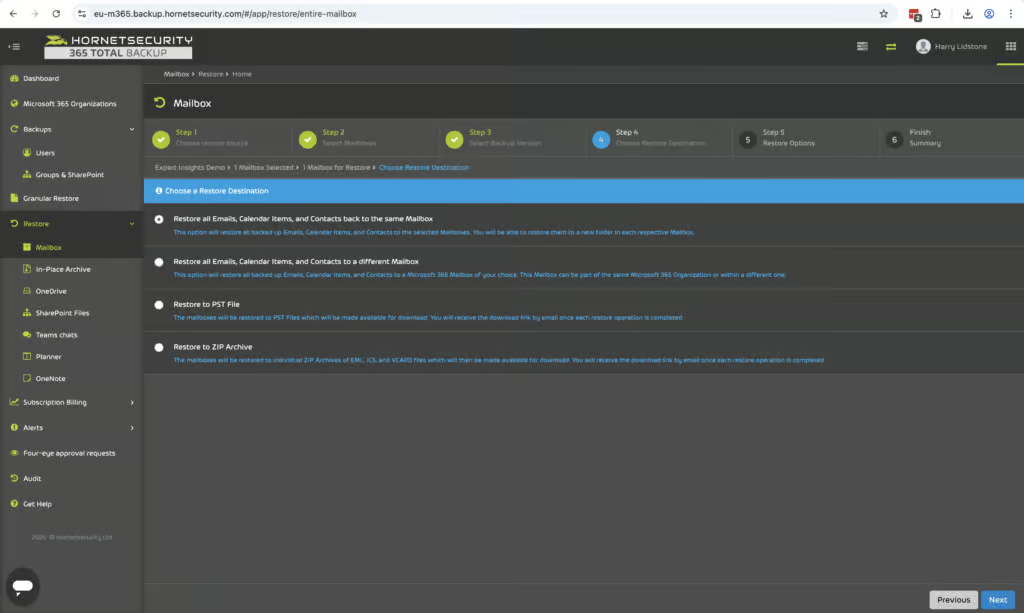
We found recovery to be one of Hornetsecurity’s best areas. There’s a clear and intuitive restore process that works consistently across all of your workloads. You can bulk restore multiple mailboxes at once and you can choose to put them in the same location or you can restore to a PST or ZIP file. It’s very easy to restore specific items. The user interface is really easy to use. You can easily choose between different backups like Exchange, OneDrive and SharePoint and you can restore files to their original location, a different site or as a ZIP file. You can recover multiple files at once and Microsoft Teams data can be restored to a HTML export or recreated as a new Teams chat.
However there is no keyword search which would be good to see added so that you could search for specific items across the entire tenant. At the moment search is limited to metadata rather than email body content or attachments. This is a somewhat common theme and Acronis have the same limitation but CloudAlly does go further and offers full indexing of email body content and attachments. However if you’re on Plan 3 or 4 there is a full cross-tenant search capability which is good to see but this is only available on the higher tier paid plan.
Hornetsecurity stores backups on their own physical data centers which is a really strong feature. You can store data in Europe, the UK, the US (Virginia and Georgia), Canada, France, or Switzerland. All new data is stored on Hornetsecurity owned infrastructure which is a real positive because if Azure goes down you can still access your data.
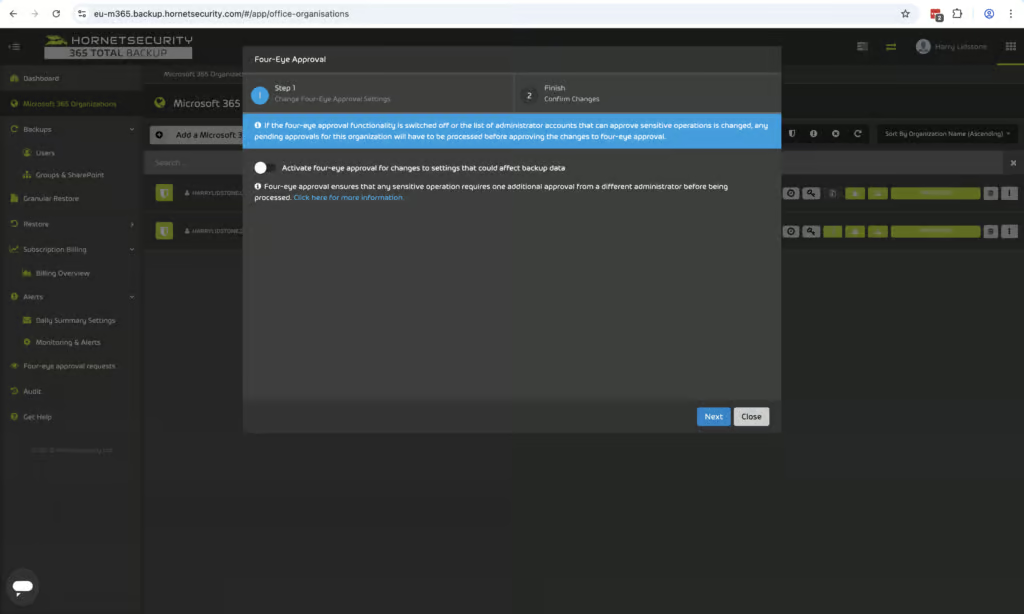
Hornetsecurity provides strong resilience controls. Backups are immutable, they cannot be altered or deleted by any external parties. Essentially you have to have two administrators to approve any destructive actions such as deleting backups. This protects against malicious insider activity and is a really strong feature to see.
365 Total Backup now includes role-based access control through a Service Desk role, which gives restricted access: these users can view information but can’t open, restore or delete backed-up data. There are no custom roles, so there is still more granularity on offer from products like NinjaOne, Veeam and Acronis.
Hornetsecurity’s end-user list price is $2.75 per user per month, with discounts for MSPs and resellers. NinjaOne starts at $3 per user per month, CloudAlly at $30 per licensed mailbox per year, and Acronis at approximately $3.48 per user per month. Storage is completely unlimited which is very good to see.

Hornetsecurity is a strong solution that we found easy to use and it's trusted. It might lack some of the granularity and the in-depth security features that some other products have like custom admin roles and per user retention policies but for the SMB and MSP audience these trade-offs are likely to be not deal-breakers.
Hornetsecurity is one of the simplest and easiest to use among the MSP-focused backup products that we've looked at. It's very simple to use with multiple times per day backup frequency and a very competitive price point. The new Service Desk role improves governance, but we’d still like to see custom roles and per-user retention policies, which would make it a stronger fit for larger organizations.
If you're looking for an email archiving solution or email security solution alongside backup, Hornetsecurity provides a very complete suite. And if you're a small MSP or an SMB that wants a reliable backup service that's very easy to use, Hornetsecurity is one of the strongest options on the market today.
Who Hornetsecurity is for: MSPs managing multiple tenants, SMBs that want a simple and reliable solution, teams that want an easy-to-use solution, or MSPs that are looking for email security alongside archiving and M365 backup.
Who should look elsewhere: Large teams that need custom admin roles, teams that want more security features like bring your own key encryption or FedRAMP compliance, or teams that specifically need backup for Dynamics or Public Folders.
6. NinjaOne SaaS Backup: Best For MSPs

To learn more, read our Microsoft 365 testing methodology.
Pros
- High-frequency backups (Exchange 12x/day, SharePoint 3x/day)
- Strong end-user self-service access to historical data
- Comprehensive search with AND/OR conditions and attachment content search
- SOC 2 Type II and ISO 27001 certified
- Strong governance controls with up to 10 predefined roles
Cons
- Purpose-built for MSPs — less natural fit for standalone organizations
- No built-in ransomware or malware scanning
- Archiver add-on required for granular account-level retention
- No BYOK encryption support
NinjaOne Pricing
| Free plan available | ✗ |
| Trial available | ✓ |
| Seat-based pricing option | ✓ |
| Storage-based pricing option | ✗ |
| Starting Price (user / month unless otherwise noted) | $3.00 |
| Higher Tier Pricing | $4.00 |
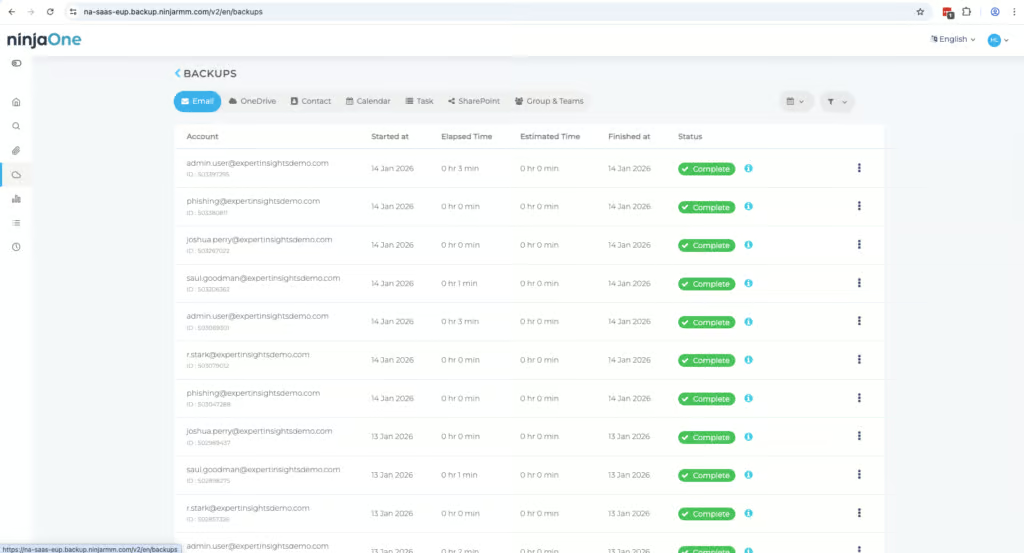
NinjaOne SaaS Backup is a mature, MSP-focused M365 backup and archiving solution. The product is built on technology acquired from Dropsuite, an Australian backup specialist with over a decade of experience in SaaS data protection. If you want high-frequency backups and the ability for users to self-serve historical data without IT involvement, NinjaOne is one of the strongest options available.
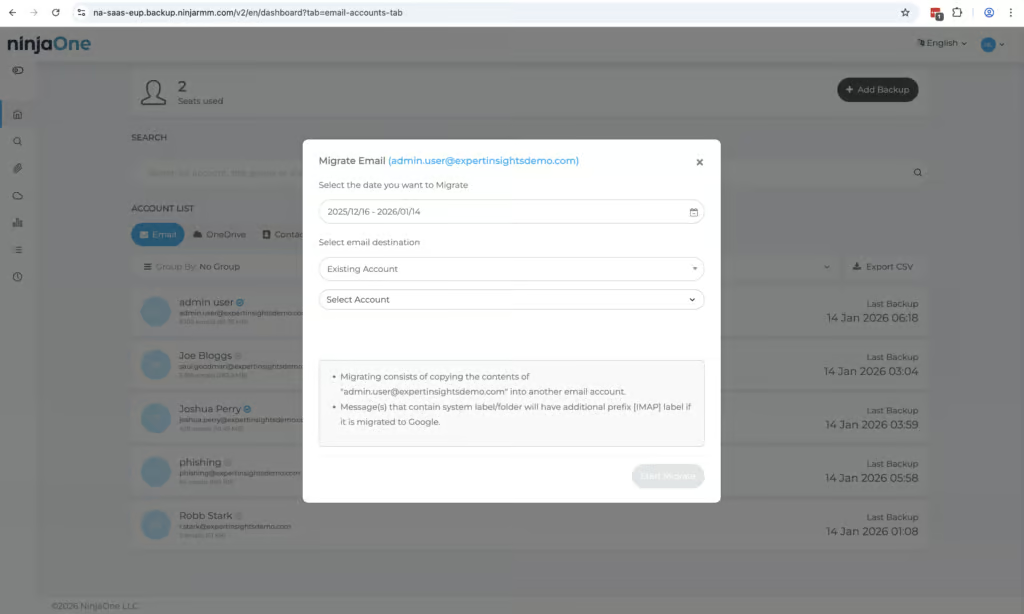
NinjaOne offers the highest backup frequency we tested. Exchange is backed up 12 times per day, compared to Hornetsecurity at four times per day and CloudAlly at once per day by default. SharePoint is backed up three times per day, and other services once daily.
Coverage includes Exchange, SharePoint, OneDrive, Teams (including 1:1 chats, group conversations, and channels), and Public Folders. Public Folder support remains a differentiator compared to many competitors. Public Folder backup depends on Microsoft’s Exchange Web Services (EWS), which Microsoft is set to retire in April 2027. NinjaOne also offers Entra ID backup, including Conditional Access policies, devices and app registrations, which goes further than Hornetsecurity (users and groups) and CloudAlly (users, groups and roles, in beta).
NinjaOne also backs up unlicensed mailboxes and deleted users, clearly distinguishing between billable and non-billable accounts. Versioning is fully supported, so historical restore points remain available when needed.
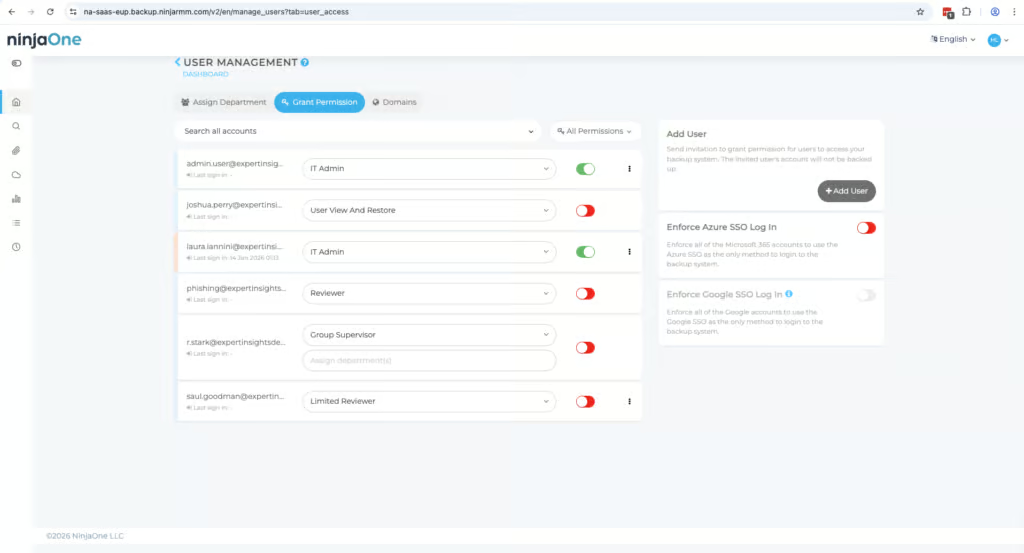
Search functionality is one of NinjaOne’s clearest strengths. The platform supports AND/OR search conditions, attachment name and content search, and keyword filtering. Hornetsecurity allows search only within individual mailboxes with no keyword search. Redstor’s filtering is limited and often requires restoring a broader dataset and manually searching through it. For MSPs handling granular restore requests for compliance, legal, or e-discovery scenarios, NinjaOne’s search capability reduces time spent on individual restore jobs considerably.
In our testing, standard recovery options performed reliably. Point-in-time recovery and non-destructive restores are available. The main limitation is that cross-user recovery is only available to partner-level admins, and there is no true bulk restore capability.
NinjaOne’s role-based access controls are the strongest across the MSP-focused backup products we tested. Depending on your plan, you can assign six or ten predefined roles, which helps with separation between operational, administrative, and audit-level access. Admin logs are exportable, which is important for compliance, audit, and MSP reporting workflows.
NinjaOne is compliant with SOC 2, ISO 27001 and GDPR. NinjaOne’s FedRAMP authorization covers its endpoint management platform, not SaaS Backup.
If a backup fails, NinjaOne keeps retrying and alerts administrators via email. SpinOne is the only other product we tested that retries failed jobs automatically. Dashboards are well designed and easy to navigate, with filtering by workload and date.
NinjaOne does not currently offer ransomware or malware scanning within backups. Among MSP-focused alternatives, Redstor (scanning 14 attachment types) and Acronis (with its Advanced Security + XDR pack) are the exceptions.
Pricing is $3/user/month. The Archiver add-on is recommended if you need long-term retention with end-user access to archived data. There is also a CORE program with special pricing for education and nonprofits.

NinjaOne SaaS Backup sits at the top end of the MSP-focused backup market. It outperforms Hornetsecurity on backup frequency, search, and governance controls, and matches or exceeds CloudAlly in most areas.
Redstor is the strongest alternative for organizations prioritizing compliance, infrastructure-independent storage, and malware scanning, but falls behind NinjaOne on usability, search, and governance depth.
The main considerations to weigh are the lack of malware scanning and the additional cost of the Archiver add-on.
For MSPs already within the NinjaOne ecosystem, we recommend this product strongly; its high-frequency backups, robust search, and comprehensive governance make it one of the strongest options in the MSP backup market.
Who This Is For: MSPs managing multiple client tenants. Organizations that want end-user self-service access to archived data. Environments where high-frequency backups and strong governance are priorities.
Who Should Look Elsewhere: Standalone organizations not using the broader NinjaOne platform or operating as MSPs. Organizations requiring BYOK encryption or built-in ransomware scanning.
7. Afi Backup for Microsoft 365: Best For Copilot Backup

To learn more, read our Microsoft 365 testing methodology.
Pros
- Strong coverage with support for Copilot, Entra ID, and Power platform
- Supports BYOK encryption
- Heuristics-based ransomware detection
- Very fast and simple to deploy
- Granular role-based access controls
- Unlimited default retention with customizable policies
Cons
- No bulk recovery of multiple users
- UI can be unintuitive
- 50GB pooled storage per licensed user — backups stop after 30-days if this is exceeded
- Smaller vendor with only 20 employees listed on LinkedIn
Afi.ai Pricing
| Free plan available | ✗ |
| Trial available | ✓ |
| Seat-based pricing option | ✓ |
| Storage-based pricing option | Per-seat pricing with pooled storage quota; additional storage terms depend on the order |
| Starting Price (user / month unless otherwise noted) | $3.00/user/month |
| Higher Tier Pricing | Custom quote - discounts for volume, education, and nonprofits |
Afi.ai is an advanced backup solution for M365 which provides deep control and strong capabilities. This does mean it can be complex to manage, but for teams that value flexibility and security controls, we think it’s a strong solution to consider.
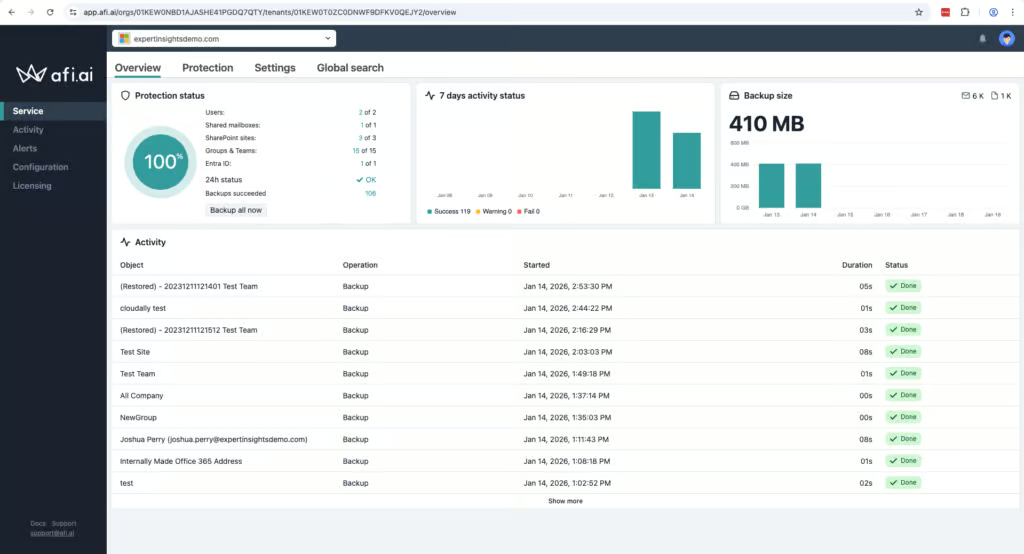
Afi.ai is designed for SMBs, but we found it offers a lot of features that you’d typically find in enterprise backup tools. For example, it offers very broad M365 coverage, including support for Copilot backup. Afi.ai provides granular admin controls, support for ransomware monitoring, and even Bring Your Own Key (BYOK) encryption.
We were impressed with Afi.ai’s coverage of M365 workloads. Afi supports Exchange Online, SharePoint Online, OneDrive for Business, Microsoft Teams, Entra ID, Copilot, and Power Platform services. This range puts Afi.ai comfortably ahead of many other M365 backup tools, particularly those in the SMB-tier.
For Teams in particular, Afi protects 1:1 chats, group conversations, channels, and all files, which is very rare to see. If you need Copilot backup, Afi is well ahead of the curve and is one of the few options currently available. Teams chats and Copilot interactions can be exported as HTML, but not restored back into Microsoft 365.
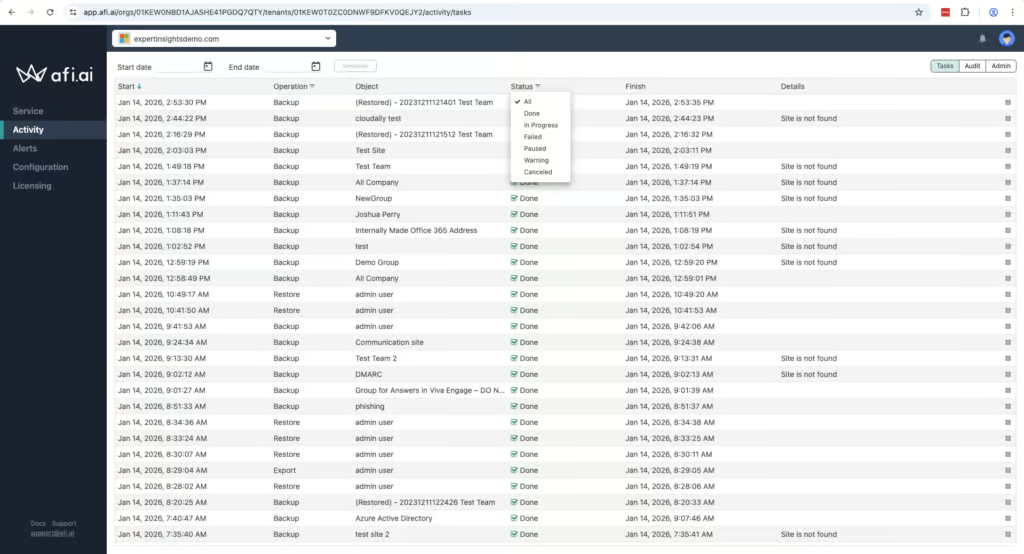
Afi supports BYOK encryption, which is very unusual for an M365 backup tool. Afi.ai also has a very good keyword search capability, which is something we think is very helpful.
Afi is SOC 2 Type II certified (its Google Cloud hosting holds ISO 27001), GDPR compliant, and uses AES-256 encryption for data at rest and in transit. You can build granular role-based access controls for different groups, and these are fully customizable. You can set time restrictions and manage who can view, restore or manage data.
Afi.ai includes heuristics-based ransomware detection. We couldn’t test this directly as part of our review, but it’s a good feature to see included.
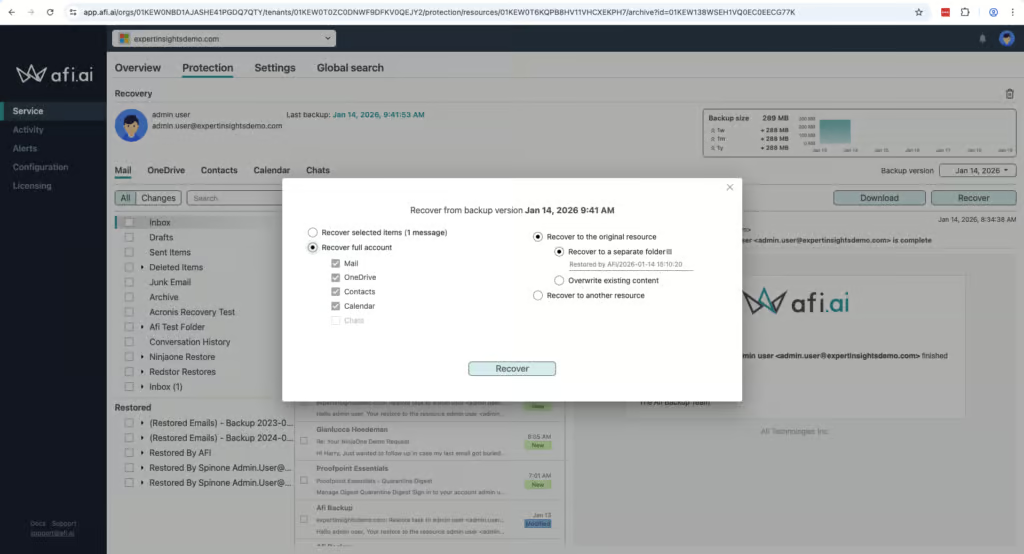
Afi does provide a very strong search component, which we always find very helpful. You can search for specific files or emails by keyword, date, metadata or content filters. This places Afi.ai alongside CloudAlly and NinjaOne at the stronger end of search capabilities among the products we tested, ahead of Veeam and Acronis which only enable search within individual mailboxes.
Afi.ai supports full mailbox and site restores, granular item-level recovery, cross-user restores, point-in-time recovery, and non-destructive restores. You can restore data in place or to an alternate location, preserve folder structures, and download recovered data locally.
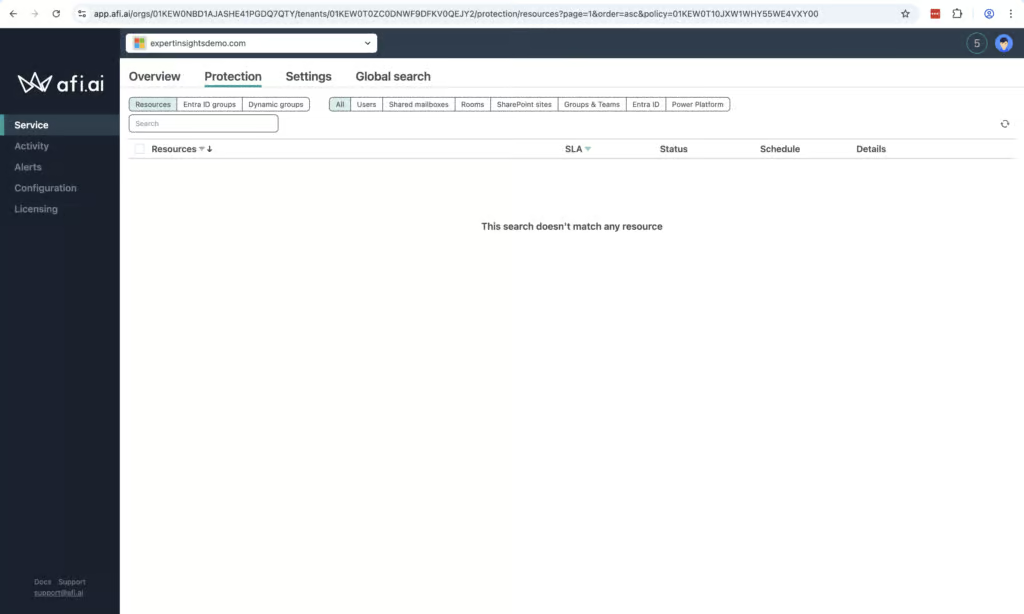
The main challenge we ran into is the lack of bulk recovery. If you are hit by a ransomware attack there is no way to restore dozens or hundreds of mailboxes, instead you’d need to do it one at a time.
Something to be aware of is that Afi is a relatively small vendor, with around 20 employees on LinkedIn. Afi told us that phone support is only available for customers spending $60,000 or more per year. Standard customers are limited to online channels during business hours. Afi’s SAML and Okta single sign-on doesn’t rely on Microsoft 365, so you can still reach your backups if Microsoft’s services are down. Pricing is $3.00 USD per user per month with a 50GB pooled storage limit.

From a technical perspective, Afi is impressive. We are impressed at the coverage on offer for Copilot, Entra ID and Teams that is rarely matched by other vendors.
We did find the user interface could be confusing at times, which makes customization, while very granular, complex. We’d also like to see bulk recovery added to the platform as well, which would be a good feature for larger teams. Support options could also be expanded.
But we have highly rated the platform for governance and security controls, and the recovery processes.
However, the company’s unclear ownership structure, and small team size make it difficult for us to recommend Afi.ai with the same confidence as more established vendors.
Until we have greater clarity on the company’s corporate governance and funding trajectory, we cannot score Afi.ai higher editorially, regardless of the product’s technical merits.
Who Afi is for: Teams looking for highly granular policy controls, teams that need BYOK encryption, or coverage for Copilot or Entra ID, and teams with technically proficient admin teams.
Who should look elsewhere: Teams that need bulk recovery, or a simple backup experience without a lot of upfront configuration.
8. Spanning Backup for Microsoft 365: Best For Backup Health Visibility

To learn more, read our Microsoft 365 testing methodology.
Pros
- Very quick and easy to set up — around 10 minutes from account creation to connected tenant
- Standout backup health monitoring with dedicated problem codes and fix suggestions
- Auto-protect feature automatically assigns licenses to newly discovered users
- End-user self-service restore capabilities
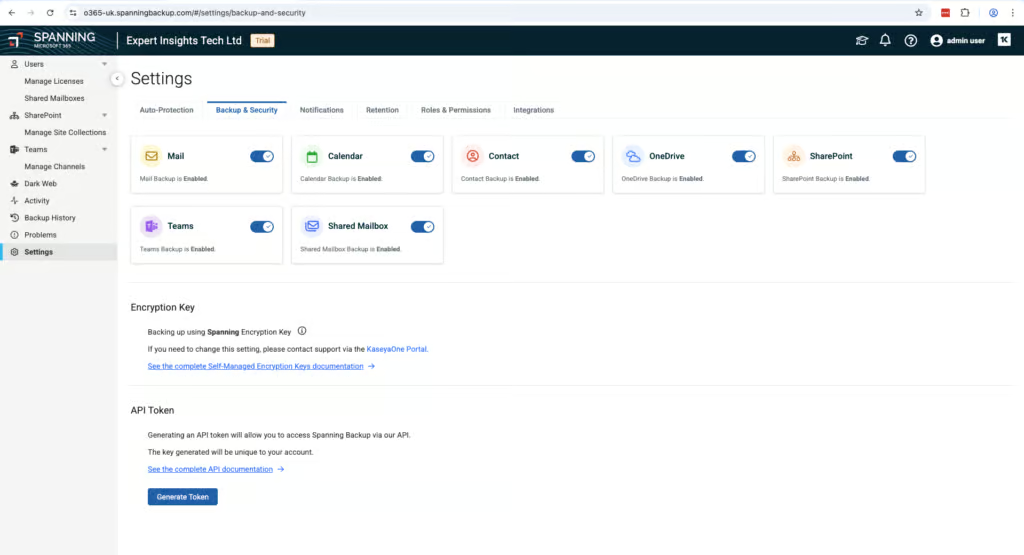
- BYOK encryption supported
- Backup data stored on AWS, independent of Microsoft Azure
Cons
- No bulk restore capability — each mailbox must be restored individually
- No ransomware or malware scanning
- Retention customization requires contacting support — cannot be configured in the UI
- Backup frequency limited to once per day with no option to increase
- Search limited to subject, sender, recipient, and date — no keyword or body text search
Spanning Pricing
| Free plan available | ✗ |
| Trial available | ✓ |
| Seat-based pricing option | ✓ |
| Storage-based pricing option | Per-license pricing with pooled 60 GB per license |
| Starting Price (user / month unless otherwise noted) | $4.00 (via sales) |
| Higher Tier Pricing | Not public |
Spanning is a reliable backup solution aimed at SMBs. It’s quick to set up and we had our account running in about 10 minutes. Now part of Kaseya, it’s clearly aimed at teams that want something simple.
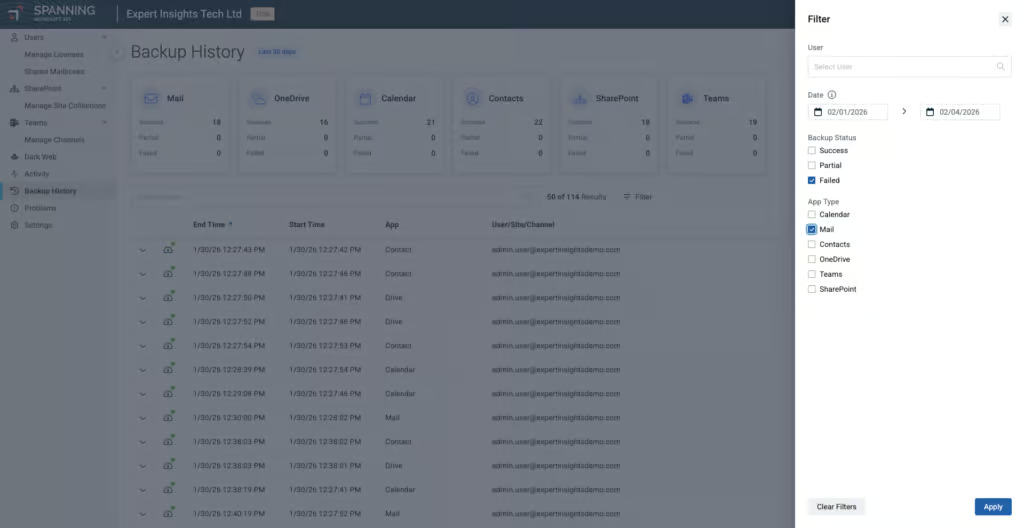
The standout feature is backup health monitoring. Any issues are reported on a dedicated “Problems” page. Every error has its own problem code, and Spanning tells you what each code means, whether you can fix it yourself, and provides a link to the support page. We think this is the strongest backup health implementation we’ve tested.
The daily summary report shows backup success/failure counts and licensing information. There’s also an error-only email option for real-time alerts.
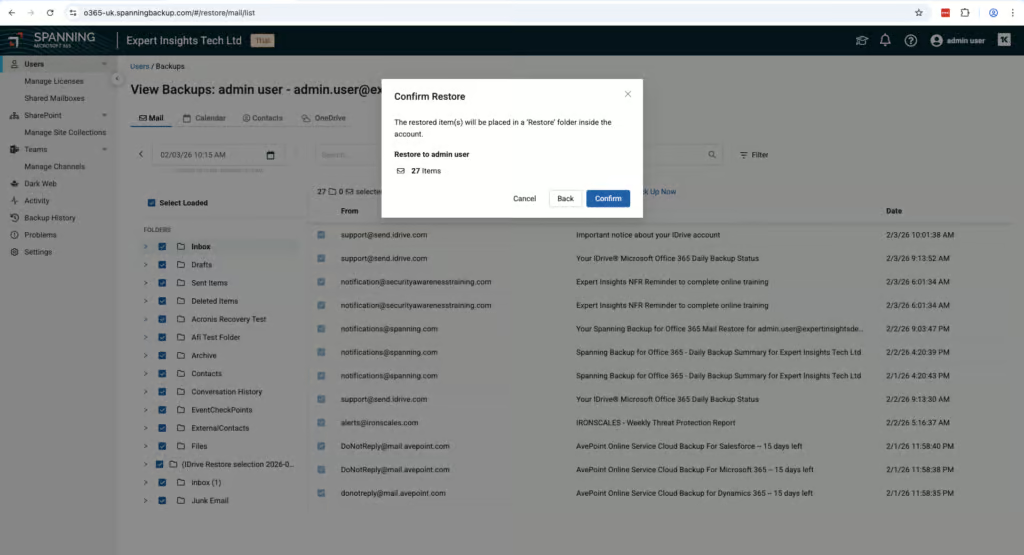
Recovery is functional and reliable. The calendar view makes it very easy to pick a restore point. In our testing, we restored an email to a different mailbox and it appeared in seconds. End-users can start viewing items mid-restore, which is a nice feature.
But there’s no bulk restore, and search is limited to metadata only. If you need to find a specific email by keyword, CloudAlly is a better option.
Backups are stored on AWS, not Azure.
Retention is unlimited by default. But if you want to change your retention policies, you need to contact Kaseya support, which is something to be aware of.
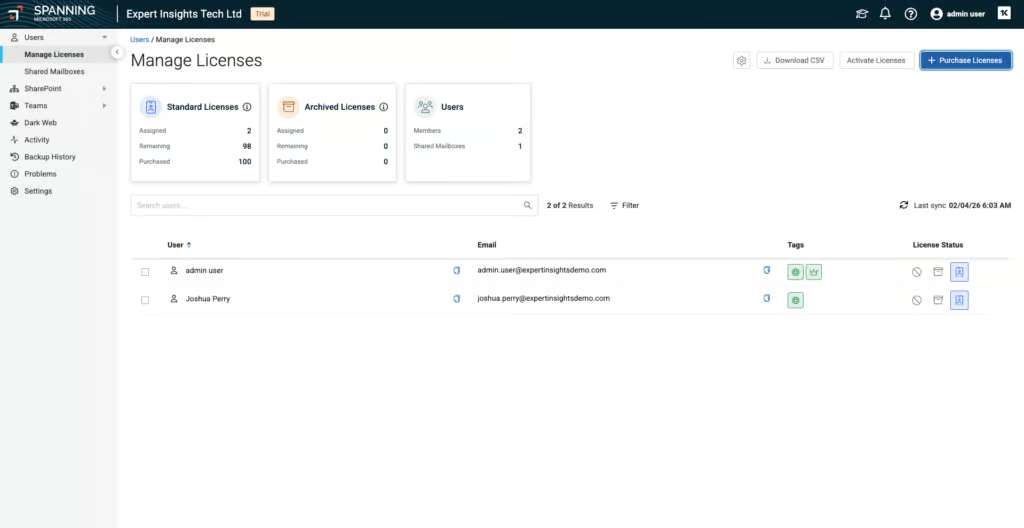
The auto-protect feature is helpful. New users are automatically assigned the right license based on their group. For every standard license, you get a shared mailbox license for free.
Pricing is $4.00/user/month with a 60GB pooled storage limit. This is more expensive than CloudAlly ($30 per licensed mailbox per year, with unlimited storage) or Veeam (from $2.63/user/month). That said, Spanning has a responsive sales team, so discounts may be available.

Spanning is a solid, reliable backup solution aimed at SMBs rather than MSPs or larger organizations. It’s quick and easy to set up — it’s definitely possible for a non-technical person to configure the service. You can trust the product to back up your data and recover it when needed.
However, Spanning lacks customization. If you want custom retention periods for groups, you’d need to contact support. Performance for search and backup/restore jobs is slower than alternatives like CloudAlly and NinjaOne, and there’s no bulk restore capability — though this is a limitation shared with SpinOne and iDrive but not with Hornetsecurity, AvePoint, or Veeam.
At $4.00/user/month with a 60GB storage cap, Spanning is also more expensive than most comparable solutions, which offer unlimited storage at a lower per-seat price. If you want good visibility on what’s being protected and ease of use for managing licenses and backups, Spanning delivers.
Who This Is For: SMBs wanting a reliable, backup solution that’s easy to set up and manage, as well as teams already in the Kaseya ecosystem.
Who Should Look Elsewhere: MSPs and large enterprises needing bulk restore for disaster recovery or granular RBAC beyond admin/end-user.
9. SpinOne: Best For Security Teams

To learn more, read our Microsoft 365 testing methodology.
Pros
- Continuous ransomware scanning of backup data with ability to block infected restores
- 2-hour recovery SLA on premium plan
- Multi-SaaS coverage (M365, Google Workspace, Slack, Salesforce)
- Choice of cloud storage provider (AWS, GCP, Azure, or BYOS)
- Strong governance with detailed audit logging and custom permissions
Cons
- Storage limits (30GB or 50GB per license) vs. unlimited at CloudAlly
- Archived/departed users require paid add-on licenses
- No bulk restore capability — each restore must be launched individually
- Not ISO 27001 certified, no BYOK or FedRAMP compliance
- Minimum $5,000 annual commitment
SpinOne Pricing
| Free plan available | ✗ |
| Trial available | ✓ |
| Seat-based pricing option | ✓ |
| Storage-based pricing option | Limited - per-user pricing with pooled storage (30GB/50GB per license); additional costs above the limit |
| Starting Price (user / month unless otherwise noted) | SpinBackup costs $36/mailbox/year, with a $5,000 annual minimum |
| Higher Tier Pricing | $9.00 |
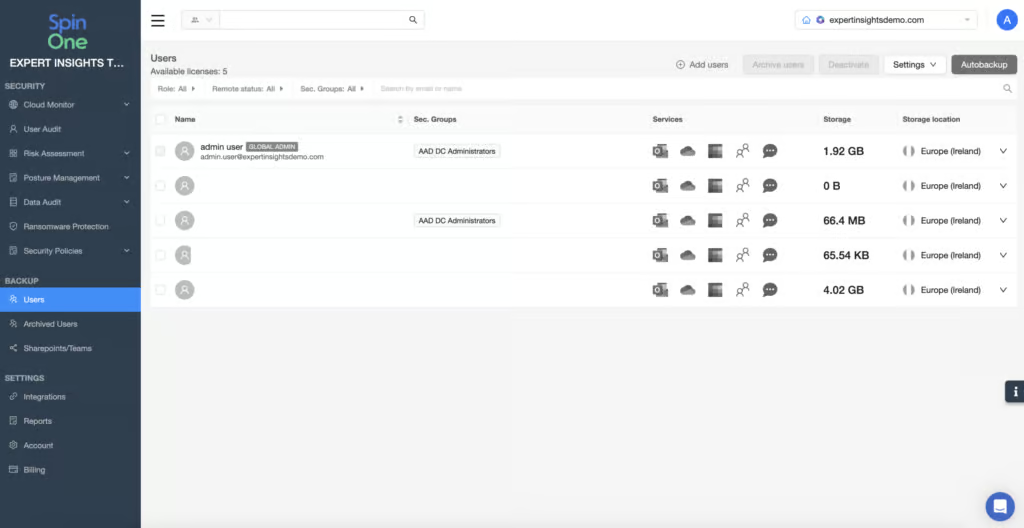
SpinOne’s security controls are the strongest we tested, with continuous ransomware scanning of backup data, the ability to block restores of infected files, and a 2-hour recovery SLA on the premium plan. However, SpinOne is a premium product with storage-based pricing and limited bulk restore capabilities, so is best suited for teams looking particularly for the strongest security controls available.
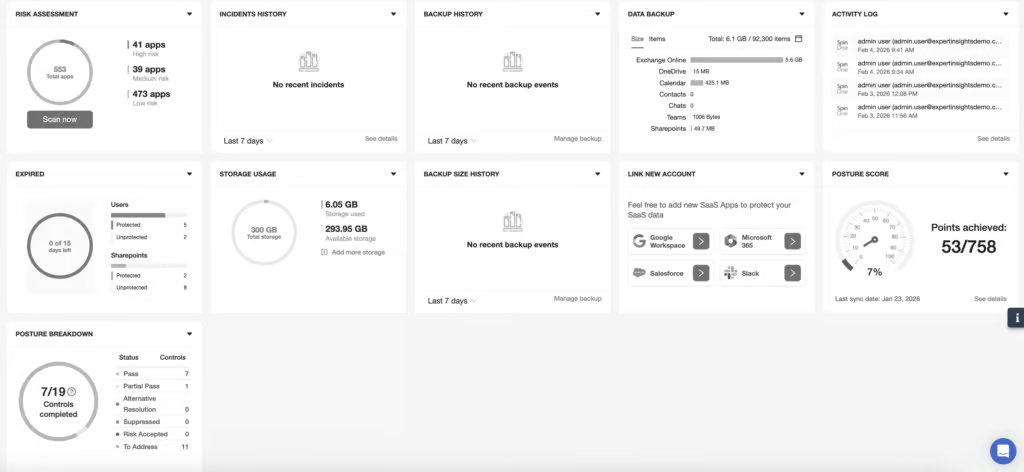
The standout feature is continuous ransomware scanning. SpinOne scans your backups and flags indicators of compromise before you restore anything. If malicious content is detected, access to infected data is blocked by default, preventing end users from restoring compromised backups. To get the ransomware scanning and the 2-hour recovery SLA, you need the higher-tier SpinBackup Enterprise plan. But if preventing infected restores is your priority, we think the additional cost is justified.
SpinOne also keeps backup administration separate from Microsoft 365 Global Admin credentials, which reduces the blast radius if credentials are compromised. Backups are immutable and cannot be altered or deleted once created.
SpinOne covers the core M365 apps and also backs up Google Workspace, Slack, Salesforce, Jira and Confluence. If you’re running multiple cloud platforms, SpinOne could be a good way to consolidate your backup into a single tool. You can choose to store backups in AWS, Azure, or GCP, which gives you flexibility.
Beyond backup, SpinOne also offers SSPM and DLP in one platform — capabilities that no other product in this review provides. So it’s a strong choice for companies looking for broader M365 security controls alongside backup.
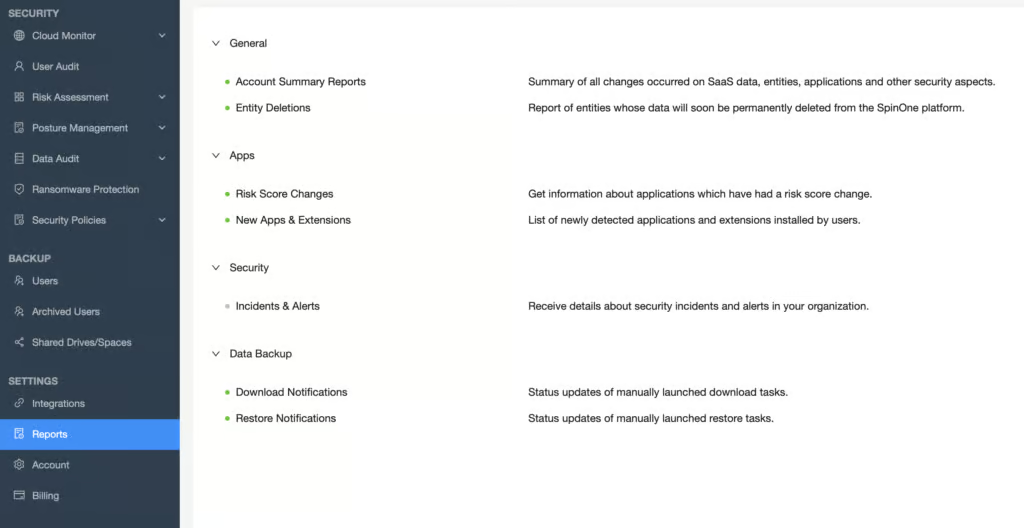
Search is strong, with support for keywords and multiple conditions across Exchange, OneDrive, and SharePoint. This puts SpinOne ahead of Veeam and Acronis for search. Recovery is solid once you get used to the interface, though SpinOne always creates a new folder when restoring data, which can be confusing at first.
The biggest trade-offs are commercial. Storage is capped at 30GB on the standard plan and 50GB on enterprise, with unlimited storage on SpinOne Enterprise. There is a $5,000 minimum annual commitment. Departed users require paid archive licenses to retain their backup data, which can add up in organizations with high staff turnover. There is also no bulk restore capability, which would slow recovery in a widespread incident.

SpinOne occupies a unique position among the Microsoft 365 backup products we tested. Its continuous ransomware scanning is a genuine differentiator - only Acronis, AvePoint, Redstor and Veeam offer comparable protection, and none of them scan as proactively as SpinOne at the point of restore.
The platform extends beyond M365 to cover Google Workspace, Slack, Salesforce, Jira and Confluence, and offers additional services like SSPM and DLP in one platform - capabilities that no other product in this review set provides.
SpinOne also offers a wider security stack. So it’s a strong choice for companies to consider if they are looking for more broad M365 security controls.
However, these strengths come with trade-offs. Storage caps (30GB or 50GB per user), archive licensing costs for departed users, and the lack of bulk restore capabilities mean there are better options on the market for teams looking for simple, cost-predictable M365 backup. CloudAlly or Hornetsecurity will deliver better value with fewer commercial surprises.
Organizations that want integrated ransomware detection, DLP, and backup in a single platform will find SpinOne offers a combination that no pure-play backup vendor can match. Judge it on what it’s trying to be, not on what it isn’t.
Who should consider SpinOne: Teams where ransomware risk is a primary concern, or who want that want backup, SSPM, and DLP in one platform. Organizations backing up multiple SaaS platforms (M365, Google Workspace, Slack, Salesforce, Jira, Confluence) should also consider SpinOne.
Who Should Look Elsewhere: Teams requiring ISO 27001, BYOK, or FedRAMP compliance. Environments that need bulk restore capabilities for widespread incidents.
10. CyberSentriq (formerly Redstor): Best For Compliance

To learn more, read our Microsoft 365 testing methodology.
Pros
- Broad coverage including Entra ID and Azure VM backups from a single platform
- Built-in malware scanning across 14 attachment types
- Redstor-operated storage, separate from Microsoft’s infrastructure
- Immutable backups stored independently of Microsoft Azure
- SOC 2 and ISO 27001 certified
- Supports customer-managed encryption keys (Azure Key Vault or AWS KMS)
Cons
- Interface usability adds friction to daily administration
- Granular search and item-level restore are limited
- Audit logs have minimal detail and cannot be exported
- No end-user self-service restore
- Teams 1:1 chats not backed up
Redstor Pricing
| Free plan available | ✗ |
| Trial available | 30-day trial; 25 Exchange/OneDrive seats per service and 25 SharePoint/Teams sites |
| Seat-based pricing option | ✓ |
| Storage-based pricing option | ✓ |
| Starting Price (user / month unless otherwise noted) | $1.98/active user/month, $1.32/inactive user/month |
| Higher Tier Pricing | Not applicable |
Redstor is best suited for teams that are looking for strong governance and data sovereignty, as well as broad coverage for M365 services. Redstor is now part of CyberSentriq, formed when it merged with email security vendor TitanHQ in June 2025. We’d recommend it for MSPs and mid-sized organizations looking for a high performing backup solution with solid controls and compliance support.
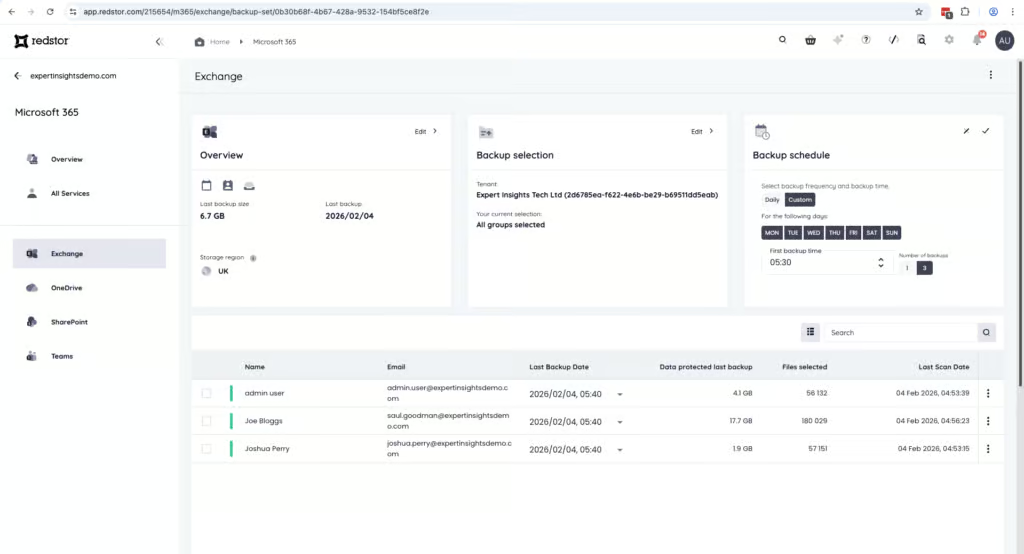
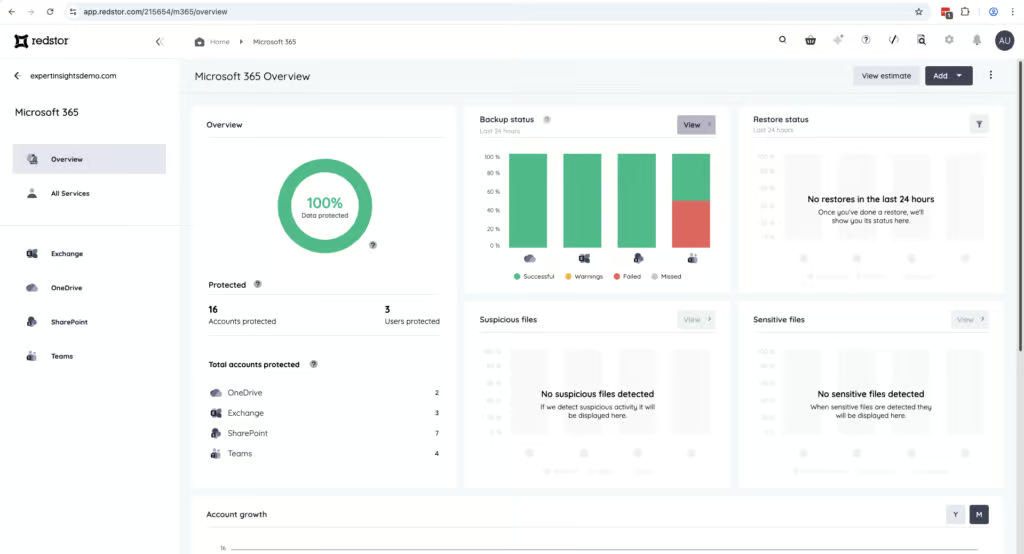
Redstor covers Exchange Online, SharePoint Online, OneDrive for Business, and Microsoft Teams. Outside of the core workloads, Redstor also supports Entra ID, Azure virtual machines, and Azure Blob Storage. This makes it a very good option if you want to manage M365 as well as infrastructure backups from the same platform. You can start with Microsoft 365 and later add Entra ID and Azure workloads without introducing additional products or management consoles.
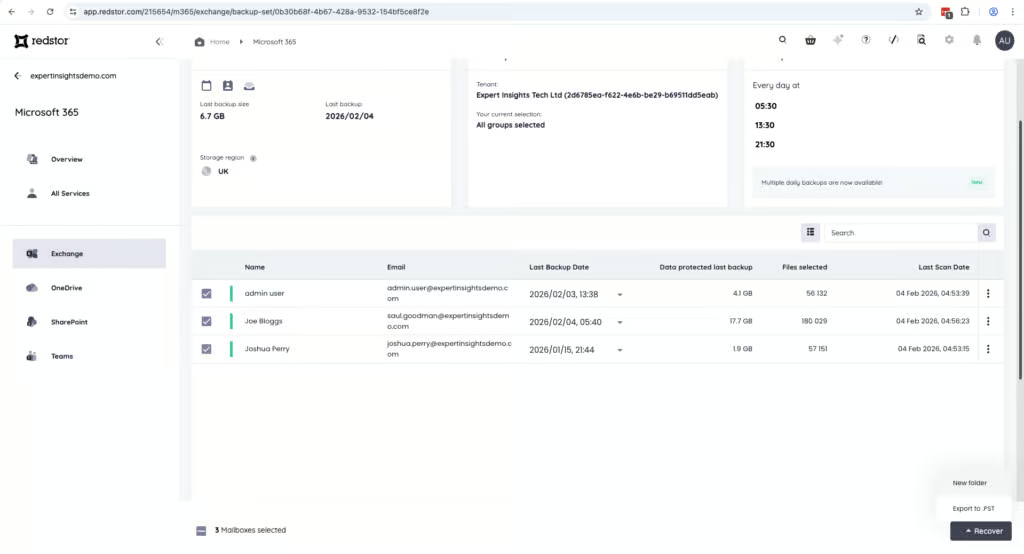
Redstor provides solid resilience with built-in malware scanning, which is still relatively uncommon among M365 backup providers. The platform scans 14 different attachment types and is transparent about what falls outside its scanning scope. Among MSP-focused products, only Redstor and Acronis offer malware scanning, which is a strong differentiator.
Redstor stores Microsoft 365 backup data in its own operated storage, completely separate from Microsoft’s Azure platform. This means that if Microsoft’s servers go down, your backups are still accessible.
Restores require a one-time authentication code which adds protection against unauthorized access. Redstor supports SSO, and you can set up different admins to manage each M365 workload. Redstor is SOC 2 and ISO 27001 certified with clear GDPR adherence. It also supports customer-managed encryption keys through Azure Key Vault or AWS KMS.
The biggest trade-off is usability. The interface is modern, and looks good. But we found finding controls and switching between customer views and backup views to be surprisingly challenging, considering the user interface looks so simple on the surface.

Redstor is a compliance-first platform with strong coverage including Entra ID and Azure VMs, built-in malware scanning across 14 attachment types, and full infrastructure independence from Microsoft. These are meaningful advantages that set it apart from several competitors.
Among MSP-focused products, only Redstor and Acronis offer malware scanning, which is a significant differentiator for security-conscious environments. The coverage breadth, data sovereignty, and compliance certifications are all very strong.
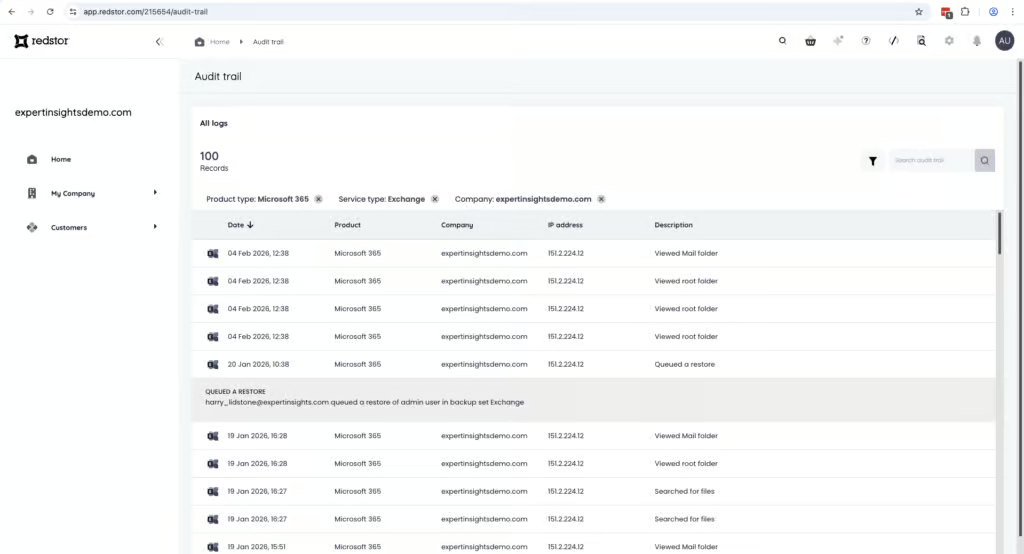
There are areas that need improvement. Audit logs have minimal detail and cannot be exported, which is a serious limitation for teams with formal compliance reporting requirements. The backup health monitoring also lacks the depth and real-time alerting we’ve seen from other products. And the UI, while functional, adds friction to daily administration that more polished alternatives avoid entirely.
But we think Redstor’s strengths outweigh its weaknesses. For MSPs and mid-market organizations who need compliance, data sovereignty, and storage independence, Redstor is a strong option to consider.
Who Redstor is for: MSPs managing multiple tenants in regulated environments, mid-market organizations prioritizing compliance and data sovereignty, teams that need M365, Entra ID, and Azure backup in one platform, organizations that value UK/EU data residency and storage independent of Microsoft.
Who should look elsewhere: Teams that prioritize interface usability, companies requiring exportable audit logs for compliance reporting, users wanting end-user self-service restore capabilities, teams that need strong granular search for e-discovery.
Other Products
| Overall Rating | 6.5/10 |
4.0/10 |
| Deployment | 8.0 | 3.0 |
| Coverage | 7.0 | 5.0 |
| Retention | 6.0 | 4.0 |
| Recovery | 7.0 | 3.0 |
| Resilience | 6.0 | 4.0 |
| Backup Health | 6.0 | 4.0 |
| Governance and Security | 5.0 | 4.0 |
| Commercials | 8.0 | 7.0 |
| Editor's Score | 6.0 | 3.0 |
| Full Review | IDrive Microsoft 365 Backup Review | SaaSAssure Review |


IDrive
IDrive is an established backup company that has been operating since 1995, historically known for backing up physical devices and servers. Their M365 offering is best suited for small businesses already using IDrive, especially those looking to add cloud backup to an existing IDrive setup.
In our testing, IDrive was very simple to set up — under 5 minutes to first backup — and pricing is attractive at $2.00/seat/month with unlimited storage. IDrive also allows both business and personal Microsoft accounts to be backed up on the same tenant, which is unique in this category. Personal accounts can’t restore Outlook data, due to a Microsoft API limitation. Backups run 3 times per day plus on-demand, and backup data is stored independently of Microsoft Azure infrastructure. In September 2026, IDrive added Entra ID backup for $10 per seat per year. Some Exchange features, including archive mailboxes, Public Folders and group mailboxes, depend on Microsoft’s Exchange Web Services (EWS), which Microsoft retires in April 2027.
The restore interface is functional and easy to navigate, taking around 5 clicks to initiate a full restore. Cross-user restores work as expected. However, there are coverage gaps that add up: IDrive cannot back up classic SharePoint sites or OneDrive shared folders, and Teams channel conversations are backed up but can’t be restored. There’s no bulk restore capability — mailboxes must be restored one at a time, and Mail, Contacts, Calendar, and Tasks all have to be restored separately. Admin controls are basic with only “full access” and “read only” roles, and there are no real-time notifications for backup progress or failures.
IDrive is best suited for small businesses already using IDrive for device/server backup, or teams who want to back up business and personal Microsoft accounts together. Organizations that need bulk restore capabilities or real-time monitoring should look elsewhere.
Asigra SaaSAssure

Asigra was a leader in managed backup services for the Windows market. Their M365 cloud backup solution, SaaSAssure, is designed for MSPs looking for a cost-effective backup solution. Unfortunately, our review flagged some significant issues, including a slow user interface and missing functionality, that limit what could be a very effective product at a very competitive price point.
The user interface is very basic, and we found it to be very slow, with a significant amount of buffering and slow loading as you navigate the platform. There are limitations we haven’t experienced in other platforms, for example admins are locked out of the backup environment for a workload while a recovery was in process. We also found errors, for example one restore attempt ran for 8 hours, and then failed due to a data mismatch error.
The solution costs $1.30 per licensed user, which makes SaaSAssure the cheapest solution that we’ve reviewed by quite a significant margin. There are benefits to the solution. It supports bring your own storage, and supports incremental data backup, with up to 999 restore points. There’s also a multi-admin approach to modifying or deleting cloud backups, which is a good security measure to have in place.
Due to these issues, despite the positive pricing and the strong features like bring your own storage support, we cannot currently recommend SaaSAssure as a suitable cloud backup service for M365. If you are an MSP that already uses Asigra for other services, then maybe there’s an argument to use this solution for M365 as well. But most organizations that are looking for a new solution are probably best off looking elsewhere.
Checklist: How To Choose The Right Backup
When looking for a backup and recovery solution for M365, we have picked out a list of nine criteria that we think are essential for a strong solution. Here is a handy checklist you can use when researching, and the questions you should be asking:
- Coverage: Does it cover the key M365 applications, such as Exchange, SharePoint, OneDrive, and Teams? What about Teams 1:1 chats, Public Folders, or Entra ID? Microsoft now includes seven days of Entra ID backup with Entra ID P1 and P2, so check what a third-party tool adds beyond that.
- Retention: How often are backups captured? How long are backups retained, and what policies are available?
- Recovery: This is crucial. Can you easily restore sites, mailboxes, and files? Can you restore to the original user, or a new location? Are there non-destructive restore options?
- Resilience: Does it detect indicators of compromise? Can it spot ransomware? Are backups secure and immutable?
- Backup Health: How transparent is the system? Can it alert you to failed backups? Can you get alerting on backup health?
- Governance: Are there strong admin controls? Can you view audit logs? How granular are admin permissions?
- Security: What certifications does the system have? What security controls are available, e.g. MFA, single sign-on? What are the data residency options?
- Usability: Is the platform easy to use? Is it clear to address support issues? How easy is it to find and recover files?
- Commercials: Is the licensing clearly defined? Are pricing and packages clear? Are there any add-ons available? Is the support high quality?
As reviewers, we’ve spent a lot of time looking into each product and answering each of these questions in order to create what we believe are objective, helpful reviews.
Pricing is obviously also a key consideration, but this is hard to measure objectively. Where available we have considered pricing under the Commercials section, but it’s important to note pricing is often dependent on location and company size.
This checklist is the foundation of our review methodology, which we have applied to all of the backup and recovery solutions for M365 reviewed on this list.
How We Tested & Chose the Best Backup Products
To identify the best Microsoft 365 backup solutions, the BackupVerdict team put the leading providers through a standardized, hands-on testing process designed specifically for the Microsoft 365 ecosystem.
All products were tested in controlled environments using dedicated Microsoft 365 test tenants populated with realistic data. This allowed us to evaluate each solution under consistent conditions and ensure results were fair and directly comparable.
Each backup provider was scored using a 100-point technical audit, with final scores converted to a rating out of 10. Our methodology is divided into nine weighted categories, balancing objective feature verification with real-world usability and recovery performance.
Below is a high-level overview of how we evaluate Microsoft 365 backup tools and why each category matters.
How We Rate Products
A breakdown of our scoring methodology
What we test: Initial tenant onboarding, OAuth consent flow clarity, required admin permissions, time to first successful backup, and backup progress visibility.
Why it matters: A solution that’s difficult to deploy creates risk from the start. We assess how quickly and reliably you can go from signup to first protected backup.
What we test: Support for core M365 workloads including Exchange, SharePoint, OneDrive, and Teams, as well as secondary services such as Public Folders, Entra ID, and shared mailboxes. We verify auto-discovery behavior and identify any undocumented exclusions.
Why it matters: Incomplete coverage leaves critical data unprotected. A backup solution that doesn’t cover your key workloads isn’t fit for purpose.
What we test: Default retention settings, policy granularity, maximum retention limits, and how deleted or unlicensed users are handled. We specifically test the “leaver scenario”—restoring data from departed employees and performing cross-user restores.
Why it matters: Retention policies determine how far back you can recover data and whether backups remain useful for compliance, legal holds, and employee offboarding.
What we test: Full mailbox restores (timed), granular single-item recovery, search functionality, cross-user restores, point-in-time recovery, and data integrity after restore. We measure how long it takes to locate restore data and complete recovery.
Why it matters: Recovery is the single most important function of any backup solution. When something goes wrong, you need to get data back quickly and accurately.
What we test: Ability to recover from large-scale incidents, bulk restore capabilities, restore point selection, malware and ransomware scanning, and operator confidence during recovery scenarios.
Why it matters: These features determine how well a platform performs during ransomware attacks or widespread data loss events. A solution that can’t handle bulk recovery will slow you down when it matters most.
What we test: How backup failures are surfaced in the UI, ease of identifying root cause, alerting mechanisms (real-time vs. scheduled), reporting dashboards, and export capabilities.
Why it matters: You need confidence that backups are running correctly. Silent failures or unclear status indicators create false confidence and operational risk.
What we test: Audit logging (detail, retention, export), role-based access control, separation of duties, MFA enforcement, SSO support, compliance certifications (SOC 2, ISO 27001, FedRAMP), data residency options, and encryption (including BYOK where available).
Why it matters: Backup data is sensitive data. Strong governance and security controls are essential for regulated environments and larger teams with multiple administrators.
What we look for: Per-user pricing model, storage limits and pooling behavior, charges for inactive or deleted users, licensing clarity, and vendor support quality (response time, technical depth).
Why it matters: Hidden costs, confusing licensing, or poor support can undermine an otherwise strong product. We verify that pricing is transparent and support is accessible.
This section covers: Our judgment, the USPs versus competitors, who the product is for and who should look elsewhere, and other trade-offs that don’t score neatly in other categories.
Why it matters: Numbers and features offered don’t tell the whole story. Our verdict captures the real-world experience of using each platform and helps you understand whether it’s right for your specific situation.
Our Scoring Rubric
We score each category on a 0-10 scale using the following criteria:
- 2 (Poor): Works only in ideal conditions; unreliable or significantly limited
- 5 (Adequate): Works as documented but requires documentation to use; functional but not intuitive
- 8 (Strong): Reliable in realistic scenarios; handles edge cases well
- 10 (Excellent): Fast, intuitive, strong guardrails; exceeds expectations
Final Scoring
Each product’s final score reflects its total weighted performance across all nine categories. Every vendor is evaluated using the same methodology, scenarios, and weightings, ensuring consistency across our rankings.
Our goal is simple: to help you choose a Microsoft 365 backup solution that actually works when you need it most.
FAQs
No. Microsoft 365 does not provide full backup and recovery for customer data. While Microsoft offers retention features like recycle bins, version history, and litigation hold, these are not designed for long-term backup or disaster recovery scenarios.
Under Microsoft’s shared responsibility model, Microsoft is responsible for infrastructure uptime, while customers are responsible for protecting and recovering their own data. This is why we recommend organizations deploy a third-party Microsoft 365 backup solution.
We think that for most organizations, once per day is sufficient to protect against common risks such as accidental deletion, misconfiguration, or user error. Daily backups provide a reliable recovery point without adding unnecessary cost or complexity.
Organizations with higher risk profiles—such as those handling sensitive data, operating in regulated environments, or frequently modifying large volumes of data—may benefit from multiple backups per day. Some solutions offer up to 12 backups per day for Exchange, and services built on Microsoft 365 Backup Storage can create recovery points every 10 minutes, which can reduce data loss in the event of ransomware or widespread user error.
Continuous or near-real-time backups are less common and typically more expensive. While they offer more granular recovery points, most businesses do not require this level of frequency. The right backup schedule should balance risk tolerance, operational impact, and cost, rather than aiming for the highest frequency by default.
Microsoft 365 backups should typically be retained for as long as your business, legal, or regulatory requirements demand. For many organizations, this means retaining backups for several years, or indefinitely.
Unlimited or long-term retention is especially important for compliance-driven environments where email, files, or collaboration data may need to be recovered years after creation. Many third-party backup solutions allow you to retain data even after users are deleted or licenses are removed, which is critical for audits and investigations.
That said, not every organization needs indefinite retention. Some teams choose shorter retention periods—such as six months or one year—to reduce data volume or meet internal data-minimization policies.
We think the best backup solutions allow granular retention policies, so different workloads or user groups can follow different retention rules.